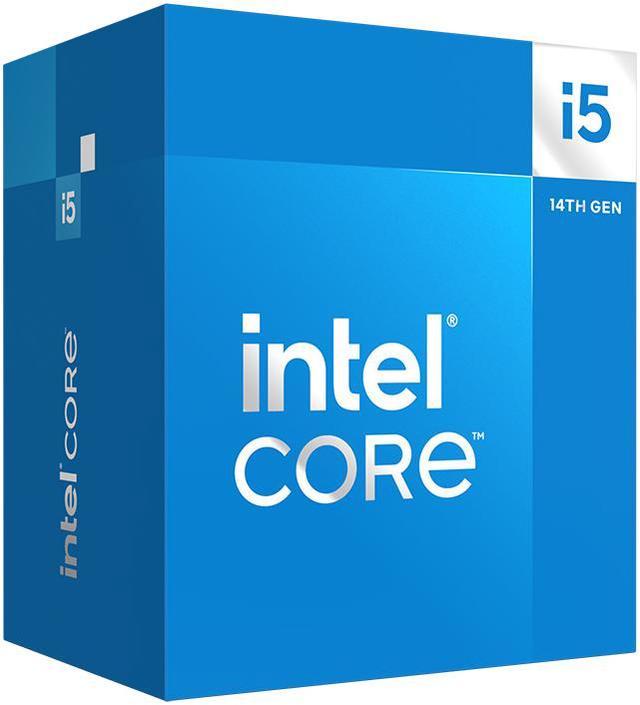
The Intel Core i5-14400 is a 10-core, 16-thread desktop processor with a 4.7 GHz maximum turbo frequency, suited to mainstream desktop builds that need a balance of multitasking and processor speed.
Recommended For
- Builders pairing it with a discrete graphics card for a midrange gaming PC that also handles everyday apps; testing found balanced gaming and application performance, though it is not a top-value choice for gaming alone.
- People assembling a desktop for multitasking and routine productivity, such as office work alongside several open applications, who want a mainstream 10-core CPU rather than a high-end workstation processor.
- Upgraders with a compatible LGA 1700 motherboard and DDR4 memory who want to reuse those parts instead of replacing the platform; check motherboard support and BIOS requirements before installing.
- Desktop builders who need the PC to display an image before buying or installing a graphics card, or want integrated graphics for basic display output and troubleshooting.
Real-World Use Scenarios
- For everyday home or office work—web browsing, video calls, documents, and several apps open at once—the i5-14400 should keep routine tasks responsive; review benchmarks also show it handling a mix of single- and multi-threaded workloads.
- In a gaming desktop paired with a discrete graphics card, the i5-14400 can run modern games as the CPU; gaming results depend on the graphics card, game, and settings, and the processor itself is not a replacement for a gaming GPU.
- For a desktop build without a discrete graphics card, the integrated UHD Graphics 730 can provide display output for office work, browsing, and video playback; it is not suited to demanding modern games.
- When exporting or rendering projects that use multiple CPU threads, such as some Blender or video-encoding workloads, the i5-14400 can process work across its cores; export times still vary with the software, project, and settings.
- For compatible video-editing or media applications, Intel Quick Sync Video can handle supported video-processing tasks, giving users a hardware-acceleration option without requiring a separate graphics card for that function.
Spec Summary
| Attribute | Value |
|---|
| Best For | Desktop PC builds using an LGA 1700 platform, with integrated graphics and support for DDR4 or DDR5 memory |
|---|
| Cores And Threads | 10 cores (6 performance and 4 efficient) with 16 threads and Hyper-Threading support |
|---|
| Clock Speeds | Performance cores run at 2.5 GHz base and up to 4.7 GHz; efficient cores run at 1.8 GHz base and up to 3.5 GHz. Maximum turbo frequency is 4.7 GHz |
|---|
| Cache And Power | 9.5 MB L2 cache and 20 MB L3 cache; 65 W thermal design power and 148 W maximum turbo power. Intel Laminar RM1 cooler included |
|---|
| Socket And Platform | LGA 1700 socket; compatible with Intel H610, H670, B660, Q670, W680, Z690, H770, B760, and Z790 chipsets. A BIOS update may be required on some older chipset motherboards. Supports PCIe 5.0 and 4.0, up to 20 lanes, and 1S configurations |
|---|
| Memory Configuration | Supports DDR4-3200 or DDR5-4800 memory, with two channels, up to 192 GB capacity, and up to 76.8 GB/s bandwidth |
|---|
| Integrated Graphics | Intel UHD Graphics 730 with a maximum dynamic frequency of 1.55 GHz |
|---|
| Instruction Set And Compatibility | 64-bit instruction set; virtualization support; supports Linux, Windows 10 (21H2 and 22H2), and Windows 11 (21H2 and 22H2) |
|---|
| Model Identifiers | Intel Core i5-14400, 14th Gen Raptor Lake; model BX8071514400 |
|---|
Reference Q&A
Q: Should I get the i5-14400 or Ryzen 5 7600 for a new PC?
A: Choose the Ryzen 5 7600 if gaming performance is the priority: testing generally favors it in CPU-limited games. Choose the i5-14400 if you want to reuse compatible LGA 1700 hardware or DDR4 memory, or prefer its 10-core, 16-thread configuration for workloads that benefit from more threads. The Ryzen 5 7600 uses AM5 and DDR5 memory.
Q: Is the i5-14400 worth buying over the i5-13400?
A: The i5-14400 is a small step up, not a major generational upgrade: both have 10 cores (6P+4E), 16 threads, and 20 MB of cache, while the 14400 raises maximum turbo frequency from 4.6 GHz to 4.7 GHz. Pick the 14400 when the price difference is small or you are buying new; the 13400 can make more sense if it costs noticeably less. For an existing 13400 system, the 14400 is generally not a compelling performance-only upgrade.
Q: Should I spend more on the i5-14500 instead of the i5-14400?
A: Choose the i5-14500 for heavier multitasking or sustained multithreaded work: it adds four Efficient-cores, for 14 cores and 20 threads total, and has more cache and a higher maximum turbo frequency. The i5-14400 is the more practical fit for general desktop use and gaming if those extra cores would go unused. Compare the current prices before deciding.
Q: Is the i5-14400 better than the i5-14400F if I have a graphics card?
A: With a dedicated graphics card, the i5-14400F offers essentially the same CPU performance and may be the lower-cost choice. The i5-14400 is the better fit if you need integrated graphics for display output or troubleshooting, or want Intel Quick Sync Video. The 14400F has no integrated graphics, so it requires a discrete graphics card for display output.
Q: Can I use the Core i5-14400 without a separate graphics card?
A: Yes. The Core i5-14400 has integrated Intel UHD Graphics 730, so a compatible motherboard with display outputs can provide video without a separate graphics card. For demanding games or graphics-heavy work, plan on a dedicated GPU.
Q: Is the Core i5-14400 compatible with my motherboard?
A: It uses the LGA 1700 socket and is listed as compatible with Intel H610, H670, B660, Q670, W680, Z690, H770, B760, and Z790 chipsets. Some older motherboards may need a BIOS update; check the specific board’s CPU support list before buying.
Q: Is the Core i5-14400 suitable for gaming and everyday work?
A: Its 10 cores and 16 threads make it suitable for everyday computing, multitasking, and gaming when paired with an appropriate graphics solution. Its integrated UHD Graphics 730 can handle display output and basic graphics needs, but demanding games generally call for a dedicated graphics card.
Q: Does the Core i5-14400 include a CPU cooler?
A: Yes. The listed retail package includes an Intel Laminar RM1 cooler. The processor has a 65W base power rating and a maximum turbo power of 148W, so cooling needs can depend on the workload and system setup.
Q: Can I use either DDR4 or DDR5 memory with this processor?
A: The processor supports DDR4-3200 or DDR5-4800 memory, but the motherboard determines which type you can install. Check the motherboard’s specifications before choosing RAM; DDR4 and DDR5 are not interchangeable in the same memory slot.
Q: Can the i5-14400’s UHD Graphics 730 replace a graphics card for gaming?
A: No, not for demanding modern games. The i5-14400 includes integrated graphics for display output and basic use, but a Reddit discussion about this CPU specifically cautions against treating UHD 730 as a substitute for a gaming graphics card. Choose a discrete GPU if gaming performance matters.
Q: Is the i5-14400 suitable for an office PC without a discrete graphics card?
A: It can support a basic office and general-use PC without a separate graphics card: this model has Intel UHD Graphics 730, and its 10 cores and 16 threads are available for CPU workloads. Community discussion also considers the i5-14400 for office and everyday use; its integrated graphics should not be mistaken for gaming-class performance.
Q: What should I check before choosing the i5-14400 over a cheaper CPU?
A: Compare the total platform cost and the performance difference for your workload rather than deciding by model number alone. The i5-14400 has 10 cores (6P+4E), 16 threads, and supports DDR4 or DDR5, but it requires an LGA 1700 motherboard; check the board’s memory type and whether it needs a BIOS update. A Reddit comparison of the 14400F and 12400F raises the price-versus-performance question, but the 14400F is a different model and lacks the 14400’s integrated graphics.