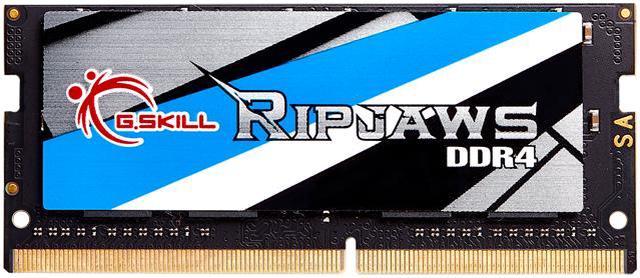
The G.SKILL Ripjaws F4-3200C22S-16GRS is a 16GB DDR4-3200, 260-pin SO-DIMM laptop memory module for upgrading compatible laptops or small-form-factor PCs that support DDR4 SO-DIMM memory.
Recommended For
- Laptop owners with an open DDR4 SO-DIMM slot who are upgrading from 8GB to 16GB for heavier everyday multitasking, such as keeping many browser tabs, office apps, and calls open together.
- Owners of compatible DDR4-3200 laptops who want to add a second 16GB stick for a 32GB dual-channel setup for memory-heavy work or gaming; check the laptop’s supported capacity and existing module before buying.
- Laptop users replacing a faulty or undersized module who need a single 16GB, standard-voltage DDR4 SO-DIMM and have confirmed their system supports DDR4-3200.
- Owners of supported 10th- or 11th-generation Intel laptops seeking a straightforward memory upgrade, provided the laptop uses removable DDR4 SO-DIMM memory and supports the module’s capacity and speed.
Real-World Use Scenarios
- When a compatible laptop is running short on memory, installing this module can increase available RAM and reduce slowdowns caused by juggling several open apps. The actual total depends on the laptop’s existing memory and upgrade limits.
- For school or office work, it can give a compatible laptop more room to keep browser tabs, documents, spreadsheets, and communication apps open together, making it less necessary to close apps while switching tasks.
- When researching online while streaming a video or joining a call, additional memory can help a laptop keep those activities and other everyday apps available at the same time, especially if the original configuration had limited RAM.
- For light photo editing, adding memory to a compatible laptop can provide more headroom for editing alongside a browser or other apps; it does not replace the need for a capable processor or graphics hardware.
- On a laptop using integrated graphics, pairing this module with compatible memory in a dual-channel configuration may improve graphics performance in some games. The result depends on the laptop and memory configuration; this stick alone does not guarantee dual-channel operation.
Spec Summary
| Attribute | Value |
|---|
| Best For | Laptop and small-form-factor PC memory upgrades; listed as optimized for 10th- and 11th-generation Intel Core processors |
|---|
| Capacity | 16 GB |
|---|
| Memory Type And Form Factor | DDR4 SO-DIMM, 260-pin |
|---|
| Speed And Timings | 3200 MT/s (DDR4-3200 / PC4-25600), CL22, timings 22-22-22-52 |
|---|
| Voltage And Profile | 1.20 V; includes JEDEC default profile |
|---|
| Physical Dimensions And Weight | 100 × 30 × 5 mm; 17 g |
|---|
| Model Identifiers | G.SKILL Ripjaws Series; model F4-3200C22S-16GRS |
|---|
Reference Q&A
Q: G.SKILL Ripjaws 16GB DDR4-3200 vs Crucial 16GB DDR4-3200: which should I get?
A: Choose the G.SKILL module if its price, availability, or compatibility listing suits your laptop better; choose the Crucial alternative on the same basis. Both are 16GB DDR4-3200 CL22 SO-DIMMs rated at 1.2V, so the listed specifications do not establish a performance advantage for either. Confirm your laptop supports DDR4 SO-DIMM memory and the intended capacity before buying.
Q: Is this 16GB stick a worthwhile upgrade from 8GB in a laptop?
A: It can be a useful capacity upgrade if 8GB is limiting your multitasking or memory-heavy applications. This is one 16GB module, so check your laptop’s slots and current memory configuration: replacing an 8GB module gives 16GB total, while adding it may provide more capacity if a slot is free. For dual-channel operation, the laptop’s memory support and installed-module arrangement matter; capacity alone does not guarantee it.
Q: Should I buy this 1x16GB stick or a 2x8GB DDR4-3200 kit?
A: Choose this 1x16GB module when you need a single stick—for example, to use an available slot or leave room for a later upgrade—and your laptop supports it. Choose a matched 2x8GB kit when you want 16GB total and your laptop supports both modules; two-module configurations can enable dual-channel operation, which testing found can improve performance versus one 16GB module on some systems. Check your laptop’s slot count and memory limits first.
Q: Should I choose this 16GB module or upgrade to 32GB?
A: Choose 16GB for everyday workloads if that capacity is sufficient for your applications and multitasking. Consider 32GB if your work regularly uses large datasets, demanding creative applications, virtual machines, or many tasks at once. This product is a single 16GB stick, so reaching 32GB would require another compatible module and a laptop that supports the resulting capacity.
Q: Will this 16GB DDR4-3200 SO-DIMM work in my laptop?
A: It will work only if the laptop supports upgradeable DDR4 SO-DIMM memory, accepts a 16GB module, and supports the module’s speed and capacity. Check the exact laptop model’s specifications and available memory slots before buying; some laptops have soldered or non-upgradeable memory.
Q: Can I add this 16GB module to the RAM already in my laptop?
A: Possibly. The laptop needs an available SO-DIMM slot and must support the resulting total memory capacity. Check its specifications first. Matching the existing memory’s type and speed can help avoid configuration issues; this module is DDR4-3200 at 1.20V.
Q: Will this memory run at 3200 MT/s in my laptop?
A: The module is rated for DDR4-3200 (PC4-25600), but its actual operating speed depends on the laptop’s processor and memory support. If the laptop supports a lower speed, the module may run at that supported speed instead.
Q: Is this one 16GB memory stick or a two-module kit?
A: It is one 16GB, 260-pin DDR4 SO-DIMM module, not a two-module kit. Whether it can be installed alongside existing RAM depends on the laptop’s slots and supported memory configuration.
Q: Can I pair this 16GB stick with my laptop’s existing RAM?
A: It may work if the laptop supports 16GB DDR4-3200 SO-DIMM modules, but compatibility depends on the laptop and existing memory. A Reddit discussion reports pairing this module with existing RAM, while also noting that mixed memory can affect operating speed. Check the laptop’s memory limits and existing module specifications before buying.
Q: Will it run at 3200MHz when mixed with another RAM stick?
A: Not necessarily. The module is rated for DDR4-3200, but the laptop or a mismatched module may result in a lower operating speed. One Reddit user reported seeing 2933MHz after pairing it with existing RAM; that outcome is not a guarantee for every laptop.
Q: Does the product listing specify the RAM chip maker or rank?
A: The provided specifications list capacity, speed, timings, and voltage, but not the chip maker or rank. Reddit users have asked about those details for this model, so verify them with the seller if they matter to your purchase.






/20-374-027/c0l.png)
/20-374-027/c0.jpg)
/20-374-027/1.jpg)
/20-374-027/2.jpg)
/20-374-027/3.jpg)
/20-374-027/4.jpg)