
Your Browsing History


Ervis A.
Joined on 08/05/15
0
0
product reviews
- 8
Better than expected
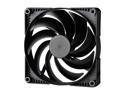
Phanteks SK140 PWM FAN - 140mm Fan, High Airflow Nine-blade Design, Rubber Dampening Washers - Black
Pros: Quiet even at max RPM. The amount of air these monsters bring in keeps 2x 3090's (FE) at a nice 70C max temp under full load (rendering) overnight. They are so good at bringing air in as well as pushing air out the back of the case, that even my M.2's that were scorching hot sitting underneath the 3090's dropped down to max 55c from an alarming 75c under load. In other words, if you have a nice case that is suffering from a lack of intake, slap two-three of these babies at the front, and you will get an insane air intake inside that case. As long as you have decent cable management followed by a decent fan to pull air out, you'll immediately notice an overall case temp drop. SSD' M.2 chipset temps, and especially GPUs and CPU. The fastest way to test this is to heat up your system and then letting it cool down without these fans. Then, do the same once these are installed. My GPUs drop to below 30c in seconds now, even after 10H of working. I'm considering adding another 2-3 of these inside my case in the future.
Cons: Maybe if the rubber came already installed, it would be better. Aside from that, nothing.
Overall Review: Would definitely recommend these to anyone who is looking to have some much-needed air intake improvement, while at the same time keeping noise levels manageable.
12/3/2020See more detail
Worth the money
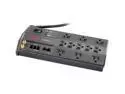
APC P11VNT3 8 feet 11 Outlets 3020 Joules Performance SurgeArrest with Phone (Splitter), Coax and Ethernet Protection, 120V
Pros: Works as advertised. Saves lives and PC(s)
Cons: None.
Overall Review: This little treasure saved my PC and a lot more. For a few days, possibly a week? I was having issues with my PC. I tried everything! New PSU, reinstalled windows, new mobo, etc. Nothing worked! In the end, I decided to do some research on your trusty google... And change the outlet was thrown around a few times. When I noticed that this product came with a wiring check light, I decided to try it. Long story short, once I plugged it, the light was on/red meaning my house wiring was faulty. Personal rant: After telling that to the worthless landlord, he refused to believe it or do anything about it. I called an electrician and he told me I'm lucky the place didn't already go up in flames. Followed it by calling the city, and the owner is now facing some delicious fines for failing to build up to code. The lesson here, don't trust your outlets without checking, and this affordable item is worth the peace of mind it brings. If your system is unexplainably shutting down, do not exclude the outlet/bad wiring as the cause.
5/3/2021See more detail
Just what I needed!
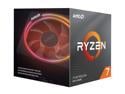
AMD Ryzen 7 3rd Gen - RYZEN 7 3700X Matisse (Zen 2) 8-Core 3.6 GHz (4.4 GHz Max Boost) Socket AM4 65W 100-100000071BOX Desktop Processor
Pros: I was planning on getting the 3900X initially but then I decided to go with this. For what I do (GPU rendering) The core count doesn't matter too much beyond 8. So, I went with 8 and less power/heat. I didn't even need to buy an expensive cooler this time around. Unlike my 1700X which required a Noctua with push-pull to stay under 70. Even with these summer temps my CPU never exceeds 65C and that is while rendering my work. idles at about 28c and boosts all the way to 4.6 on select cores, with PBO on, and when proper cooling is provided. In short, this is a big step up from a 1700X even though they are both 8 cores.
Cons: The fact that AMD was not able to hit 5GHZ this gen is depressing. But, there is always the next-gen to look forward too.
Overall Review: I'd recommend it to anyone who does GPU based rendering/gaming and or even video editing. It has a good single-thread performance and overall speed for all of the above.
10/5/2020See more detail
Excellent for the price I paid but negligence deserves only 4 eggs
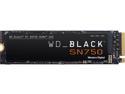
Western Digital WD BLACK SN750 NVMe M.2 2280 1TB PCI-Express 3.0 x4 64-layer 3D NAND Internal Solid State Drive (SSD) WDS100T3X0C
Pros: Fast as you'd expect it, and in my x570 (MEG GodLike) board the already included heatsink lightning slots are perfect for keeping it cool even when transferring 700GB! I checked and it never exceeded 58c in my PC case, so excellent (so far)
Cons: It came without a screw... That is negligence and the mother of all assumptions. Basically, the people at WD decided that we don't need to screw it down, or can find such special screws growing on trees, or maybe we even have one waiting to use! So, they decided not to include one withing the package itself as they SHOULD have. If I had not been lucky enough to have specially designed motherboard slots that house M.2 safely, I'd have been forced to refund this drive or run around town looking for a screw to secure it on a board that does not come with built-in heatsink-and the screw to hold it down.
Overall Review: I have been a WD customer for decades now. I rarely buy anything else, unless the price is just too good to pass up. And I am a little disappointed that they would forget to include such a small, yet extremely important piece of the puzzle. To put it bluntly: No screw, no SSD working for you! Unless you want to hold it down with gum, tape, tie a knot around your board? Yeah, wonderful. Would not buy again if I didn't have a housing for M.2.
9/17/2020See more detail
My best PC case to date - It's so good I'm buying me another.
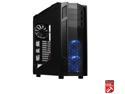
ROSEWILL ATX Full Tower Gaming Computer Case, Supports up to 420mm Long VGA Card, 5 Fans Pre-installed, Fan Speed Control - NIGHTHAWK 117
Pros: Enough space to fit a baby inside (Please do not put actual babies inside it...) Easy to work with, and excellent airflow, 5 gigantic fans preinstalled they just so happen to be very quiet even on standard setting in bios. The airflow, in this case, is so good that my GPU's 2x2080 went from 64 on the bottom GPU and 71C on the top GPU(With my previous medium size case.) Down to 52 bottom GPU and 65 top GPU... All of this was done by simply managing cables, opening top side with the little slider and leaving almost no hot air inside the case with its 5 fans working on "Standard bios speeds" Even cooler with Performance mode if you need it. A ton of ways to manage or hide cables. More drive bays than I will ever need in my entire life. Stylish design, a great looking case both inside and out. And for the price I paid? I'm buying me another one for my Ryzen 9 Build that's how good this case is.
Cons: The only thing I did not like about it was the fact that I had to apply real force, as in strength to align my two GPU's so I could screw them down. The case seems to be a bridge too far when it comes to aligning GPU with screw holes. So hit the gym or ask a friend to help out if you're not fit.
Overall Review: I would highly recommend this to anyone who is tired of cables being in the way, CPU and GPU overheating due to a small case with nearly no airflow.
5/14/2019See more detail
Absolutely fantastic
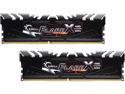
G.SKILL Flare X (for AMD) 16GB (2 x 8GB) 288-Pin PC RAM DDR4 2400 (PC4 19200) Memory (Desktop Memory) Model F4-2400C15D-16GFX
Pros: Went from 2400MHZ to 3200 MHZ with only 1.35v using an AsRock B350 Pro 4 motherboard and AMDCBS to boot. Adjusted with AMD Ryzen Master to cl 18 at 53.3omh
Cons: First pair i received died quickly.
Overall Review: Would recommend if you're looking to OC RAM up to 3200 beyond that i wouldn't recommend trying these sticks. Who knows what happens...
4/7/2018See more detail
seller reviews
- 2
Just what I expected (Excellent)
Love Noctua products for many reasons, but they all link back to NCS.
On-time
Delivery
Product
Accuracy
Customer Service
Satisfactory
5/3/2021See more detail
Great Cooling system
Al though the fan that came with the NH-U12S was a bit noisy and vibrated at 1200RPM+ Noctua sent me another one free of charge. The second fan i purchased (NF-F12)for a Push-Pull setup worked quietly all the way up to 1500+ RPM compared to other brands barely audible.
On-time
Delivery
Product
Accuracy
Customer Service
Satisfactory
6/6/2017See more detail