
Your Browsing History


Brandon M.
Joined on 09/13/09
0
0
product reviews
- 10
Cables could be nicer

EVGA SuperNOVA 850 G+, 80 Plus Gold 850W, Fully Modular, FDB Fan, 10 Year Warranty, Includes Power ON Self Tester, Power Supply 120-GP-0850-X1
Pros: Easy install Full modular Quiet fan
Cons: The cables are ok
Overall Review: Everything seems to be working great. It was nice that they supplied a jumper to turn it on without mobo connection. There are plenty of cables provided, very stiff cables tho, also fat atx cable flat would be better. Also, would have really liked to have gotten at least one sata power cable that only has one end on it, instead of fighting to cable manage 2 more un used plugs. M.2 is here and affordable I think a large amount of people no longer have a stack of HDs that need power.
12/27/2019See more detail
Mounting issues
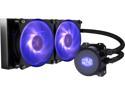
Cooler Master MasterLiquid ML240L RGB Close-Loop CPU Liquid Cooler, 240mm Radiator, Dual Chamber RGB Pump, Dual MF120R RGB Fans, RGB Lighting for AMD Ryzen/Intel LGA1200/1151
Pros: - keeps my 3800x cool - is fairly quiet - tubing seems good quality
Cons: -Mounting bracket for AM4 is total junk -Couldn't get the RGB to work with mystic light, I don't care that much though my case has plenty of other RGB.
Overall Review: So the mounting hardware for the AM4 socket has a bracket that wraps around the water block. The bracket is 2 pieces that is held together by screws. It seemed very simple until I tried to put the screws in. Turns out the screw holes were not threaded and the provided screws were not made of stuff tough enough to thread them. So what ended up happening was that the threads ripped off the screws. Now I'm sure some who read this will think that I just cross threaded the screws and it's my fault. I assure you that is not the case. So to remedy this problem I went to the hardware store and bought screws and nuts and managed to mount the bracket to the water block. I still gave 3 eggs because I feel that there is sufficient cooling for the price I paid. But the road to get there was frustrating.
12/27/2019See more detail
Something this expensive shouldn't have flaws.
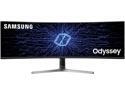
Samsung CRG9 Series LC49RG90SSNXZA 49" Dual Quad HD 5120 x 1440 Resolution 120Hz HDMI, 2x DisplayPort AMD FreeSync 2 Flicker Free HDR1000 QLED Curved Gaming Monitor
Pros: -Beautiful display mine didn't come with any dead pixels -the stand is minimal yet sturdy -the colors are really good for not being an ips panel. - lots of settings to tweak it for your preference
Cons: - the menus won't show if it doesn't detect a signal, that's non sense my 10 year old TN panel can to that. - after walking up from sleep mode the screen comes on and then goes black. -this thing is BRIGHT, when I'm using it for non gaming purpose I set the brightness to 0. - whatever software that's built in for dual input mode is junk, it will quit working and I can't even access the menu.. I know it's the built in software because the menu freezes up or flickers when I try to access it. Turning the monitor off then on fixes it.
Overall Review: I love the screen size and the picture is great. I have an issue if my PC goes to sleep tho, after waking up the screen comes on for a few seconds and goes black again. Power cycling the screen fixes this however in order to power cycle you need to open the menu that won't open if the screen thinks there's no signal. So the only way is to reboot pc or unplug and plug the screen back in. The built in software that runs the menu controls is unreliable at best which is unacceptable for a premium product like this. I'm still giving 4 eggs because of how much I like the picture and I've found work arounds for my issues.
1/28/2020See more detail
Fast
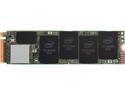
Intel 660p Series M.2 2280 1TB PCIe NVMe 3.0 x4 3D2, QLC Internal Solid State Drive (SSD) SSDPEKNW010T8X1
Pros: - instant boot from shutdown - worked right out of the box - very good price for 1TB m.2
Cons: None
Overall Review: So long as reliability holds up I have nothing bad to say about it. It's a fast 1TB hard drive
12/27/2019See more detail
It's fast
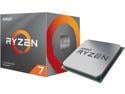
AMD Ryzen 7 3rd Gen - RYZEN 7 3800X Matisse (Zen 2) 8-Core 3.9 GHz (4.5 GHz Max Boost) Socket AM4 105W 100-100000025BOX Desktop Processor
Pros: -Plenty fast for gaming -high clock speeds with liquid AIO
Overall Review: There's really not too much to say about it other than it's fast and reliable. It rivals or equals CPUs that cost more money. Runs good on liquid cooling
12/27/2019See more detail
So far so good
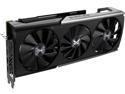
SAPPHIRE NITRO+ Radeon RX 5700 XT 8GB GDDR6 PCI Express 4.0 x16 ATX Graphics Card 100416NT+8GSR
Pros: - powerful card - cooling is sufficient to get Max clocks if you don't mind some noise
Cons: - documentation in the box and on website is non existent - won't maintain top clock speed without a more aggressive fan setting, which would be fine if the trixx software provided that ability, or there was compatibility with MSI afterburner.
Overall Review: This card plays Borderlands 3 on high settings at over 60 fps on my 49" 5120x1440 monitor, if I scale it up from 75% In the game settings. I think this is pretty good performance. I'm taking an egg off because there is NOTHING that explains the 3 way switch on the card and the support website is nothing more than an advertisement. I figured the switch out after some testing but still Sapphire you should provide that info. Also this card is not compatible with MSI afterburner which had been my go to tool for oc for years. The trixx software for this card has no clock or fan settings. The only software for oc or even setting a fan curve is the amd driver that is broken right now. This probably is an amd issue not a Sapphire one but I think it's relevant. I'm sure there are bios that you could flash on to the card to change Max fan speed and stuff but software is more convenient for the average user.
12/27/2019See more detail