
Your Browsing History


Donna R.
Joined on 02/17/06
0
0
product reviews
- 8
About the noise...
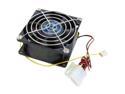
Vantec Tornado 80mm Double Ball Bearing High Air Flow Case Fan - Model TD8038H
Pros: Moves crazy air, I've got it blowing on my x1900xtx which doesn't go over 65C overclocked. There is also a 92mm version of this fan that moves EVEN MORE air, but I didn't have room for it. Also, from what I've seen and read, it is a very high quality fan and should last a long time.
Cons: I got POed after reading people complaining about noise. The name of this fan is the tornado. Decibals are clearly advertised. There are 200+ reviews that state the fan is 'loud.' If noise bothers you, GET A FAN CONTROLLER or, better yet, BUY A DIFFERENT FAN. 95% of fans are designed for low noise. Take your pick.
Overall Review: I bet these are the same people who complain about ride stiffness in sports cars. BTW, noise isn't that bad, I have it running 100% at all times, roommate doesn't even mind. It's got the same pitch as a hairdryer but not nearly the volume.
10/6/2006See more detail
Flawed
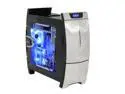
NZXT LEXA-NP Black/ Silver Aluminum Construction
Plastic Front Panel ATX Mid Tower Computer Case
Pros: -Looks good. -Fans are placed well. Side fan will blow on PCI-E video card.
Cons: When I took it out of the box, I saw that the front door hinge was broken (as some others have experienced). It's a cheap little plastic thing, so I could see how that would happen. Can't blame UPS, the case should be made better
Overall Review: Newegg took care of me though - case was out of stock so they gave me a full refund and paid for return shipping(!) If you want to buy this case, you're taking a chance. You'll be really disappointed if you open the box and the front door panel falls off.
6/19/2006See more detail
Response to Lumina's Review
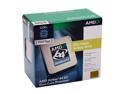
AMD Athlon 64 X2 5200+ - Athlon 64 X2 Windsor Dual-Core 2.6 GHz Socket AM2 89W Processor - ADA5200CSBOX
Pros: Normally I wouldn't respond to someone's review but I can't let this slide. Lumina states "Running kneck and kneck[sic] with intels 4 cores with only 2 really tells you something!" I'm an AMD fan and all but this is complete garbage. You can't compare clockspeed to clockspeed btwn amd and intel and say two procs are the same. The fact is intel's slowest conroe, e6300, can blow 5200+ out of the water with a mild OC. Let's say you OCed the e6300 to 3.0ghz (very doable). You would need to clock the 5200+ to over 3.9ghz to get the SAME performance (impossible)
Cons: I have an opteron 165 @ 2.7, so it's pretty close to this proc, just not as good if you OC. I <3 AMD, just not fanboys
Overall Review: PS: saying you use the stock thermal paste gives you away as a newb
1/31/2007See more detail
Quiet and Stable
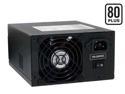
PC Power and Cooling S61EPS 610W Continuous @ 40°C EPS12V SLI Certified CrossFire Ready 80 PLUS Certified Active PFC Power Supply compatible with core i7
Pros: I assume you've already researched the specs and know the pros of 1 12V rail, etc so I'll just get to the good stuff. I checked the 12V rail with a multimeter and it stayed at 12.14V at 0 load and at max load (ATI tool artifact scan + prime95). Not even .01V fluctuation. That's awesome.
Cons: Warranty is only three years, but it's such high quality that I trust it.
Overall Review: Also very quiet - I run Folding at Home (max cpu load) all day and the loudest thing in the case is the videocard (x1900xtx) at its lowest fan setting.
1/26/2007See more detail
To Counting Cards
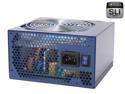
FSP Group FX700-GLN 700W ATX12V V2.2/EPS12V SLI Certified CrossFire Ready Active PFC Power Supply
Pros: Don't listen to the guy who says it needs 28 amps per rail for 7800gtx sli. That number is for the total amps needed assuming a fully loaded system. By no means do the cards themselves need 28 amps. Each card will draw about 11 amps and each one will draw from a seperate rail (18 amp rails). With 7800gtx sli and an average system, you'll be drawing about 350 watts at full load. This psu is more than enough for such a setup.
Cons: Can run 8800 series sli (barely), as long as you don't have a ton of hard drives or something.
Overall Review: People like Counting Cards should lose their posting privileges :p
12/7/2006See more detail
Lights were pretty...
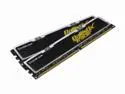
Crucial Ballistix Tracer 2GB (2 x 1GB) DDR 500 (PC 4000) Dual Channel Kit Desktop Memory Model BL2KIT12864L503
Pros: Blue LEDS shine under the heatsinks, creating a blue glow. Green and red activity lights on top.
Cons: Could not get it to run DDR 500. Tried voltage tweaks, loosening timings, putting them in different slots in the MB, best I could do was 245 mhz (DDR 490). Crucial tech told me that over DDR 400 is "overclocked" and there is no guarantee of DDR 500.
Overall Review: I didn't pay for DDR 490. RMA pending.
10/31/2006See more detail