
Your Browsing History


Philip C.
Joined on 06/13/09
0
0
product reviews
- 13
Fast, but tricky
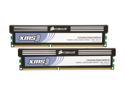
CORSAIR XMS3 4GB (2 x 2GB) DDR3 1600 (PC3 12800) Desktop Memory Model CMX4GX3M2A1600C8
Pros: Very fast stock speed and quick timings. Heat spreaders look very good.
Cons: Supposed to be stable at DDR3-1600 8-8-8-24 with 1.65V. 1.65V was NOT stable on my system (ASUS P7P55D EVO). Prime 95 would report fatal errors within minutes. Raising the voltage to 1.6625V ran stable for 20 minutes before a crash and raising to 1.675V has had no stability problems. I don't mind such a small increase, but I'm dissapointed that it didn't run stable out of the box.
Overall Review: To reach DDR3-1600, my BCLK had to increase from 133 to 160. I don't mind a mild CPU and bus overclock, though. =)
1/10/2010See more detail
Great airflow!
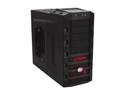
Cooler Master HAF 922 - High Air Flow Mid Tower Computer Case with USB 3.0 and All-Black Interior
Pros: GREAT airflow. I upgraded from a Centurion 5 and I have noticed a tremendous improvement in temperatures. CPU Load went from 74 to 65, GPU Load went from 92 to 81 (main reason why I upgraded, GPU was overheating). System temp went from 56 under full load to 44, 36 idle. Granted, the 4850x2 was blocking ALL airflow in the old case. The toggle switch for the red LED is appreciated although I don't find the LED obnoxious like other products. PLENTY of room. Sapphire 4850x2 fits without any modification with plenty of room to spare (had to cut some metal in Centurion 5 case). Cable management is wonderful! I have almost ZERO clutter in my case (well, the clutter is hidden now!). Tool free drive installation is nice and the inclusion of thumb screws for expansion cards is a great idea. Those clips never work for beefy graphics cards. Noise levels are fine for me. My case is in a cabinet but if it were on top of the desk, the 200mm might be a little loud without a cont
Cons: It's big, but not really a con unless you don't measure ahead of time. You'll spend a lot of time setting up your cable management and getting it just right, but in a way that's a good thing because there's not many cases where you even have that option. I have a Corsair 850TX with quite a few cables (not modular) so my case might be harder than average. The CPU backplate cutout is not positioned correctly for LGA 1156. I already had my Hyper 212 Plus installed, so no biggie.
Overall Review: I didn't purchase through NewEgg simply because I had some gift cards for somewhere else. The price was the same as NewEgg.
7/7/2011See more detail
Great purchase!
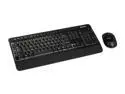
Microsoft Wireless Desktop 3000
Pros: I love the touch and feel of the keys. The perfect bounce and noise for my taste. The extra keys on the keyboard are nice and I actually use them, unlike most keyboard extras. Easily customizable as well. The mouse is very responsive and a positive touch is the scroll wheel doesn't click like the Optical IntelliMouse it's replacing. Very smooth. The grips on the side are very comfortable and has a very nice overall feel. I can tell a significant improvement in the BlueTrack technology. The mouse works perfectly on my reflective-coated desk where my previous optical mouse would jump around. The included software (which is just the regular Microsoft ware) is really helpful and easily configures the devices. Great job on a keyboard/mouse combo. The features, functionality and aesthetics all combine to make me a very happy buyer (do go as fast as you can to change the mouse side button functions away from "forward" and "back" unless you like losing your web pages).
Cons: The keyboard does have the dreaded "F-Lock" button, but it doesn't bother me at all. I've even played around with the nonstandard functions, some. But as a power user, I can't give up the F keys. No cons yet for the mouse.
Overall Review: No problems with range yet, but I don't venture too far away to begin with.
1/2/2011See more detail
Huge card, but fitting for its performance!
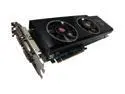
SAPPHIRE Radeon HD 4850 X2 2GB GDDR3 PCI Express 2.0 x16 CrossFireX Support Graphics Card 100270SR
Pros: This is a VERY fast card. I was really blown away when I started benchmarking it and playing games like Crysis and Supreme Commander. I've actually turned VSync ON, which I've never done before. The cooling solution works well and it runs totally quiet at idle (I hear that older models had a different BIOS that ran the fans faster/louder at idle). Windows 7 64-bit drivers have worked well with no problems so far. The price for this card is amazing. I can not find a better card for the money.
Cons: Biggest con is its size. It's about 11.2 inches long, which is .7 inches longer than the standard space allotted for a video card in an ATX mid tower. I had to cut out a portion of my 3.5" cage for this to fit. Thankfully I knew this beforehand so I was prepared with my power tools! The dual fans keep the hot air inside the case, raising the system temperature. However, the hot air doesn't make it to my CPU because the card is so large that it blocks all of the airflow from the bottom of the case, which is another con, sort of. I installed an 80mm exhaust fan right by the card (it fit perfectly on the side panel of my case, which was not specifically designed for a fan, but convenient), and this helped tremendously. The fans at max speed are the loudest I've ever heard, although it's never hit close to that in normal operation.
Overall Review: One important lesson I learned about Crossfire: ENABLE Catalyst A.I. and set it to Standard. Disabling A.I. caused a 30-40% performance hit in all applications and caused enormous graphical glitches in 3DMark Vantage (i.e. Jane Nash "jumping water"). I also recommend disabling adaptive anti-aliasing. This made the shorlines in Supreme Commander very blocky and ugly. System Specs and 3DMark Vantage scores and Windows Experience Index: Cooler Master Centurion 5 Case Asus P7P55D EVO Intel i5-750 OC @ 3.2Ghz CM Hyper 212 Plus CPU Cooler 4GB Corsair XMS DDR3-1600 (8-8-8-24) 2x WD Caviar Black 750GB in Raid 0 Sound Blaster Audigy 2 Platinum Windows 7 Ultimate 64-bit 3DMark Vantage Performance Preset Score: 13305 3DMark Vantage High Preset Score: 8779 I can't run the Extreme Preset due to my monitor resolution topping out at 1920x1080 (1900x1200 is needed). Windows Experience Index: CPU: 7.4 RAM: 7.7 Graphics: 7.3 (both scores) Hard Disk: 5.9 Pretty good!
2/6/2010See more detail
Amazing performance at a great price!
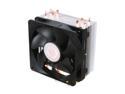
Cooler Master Hyper 212 Plus - CPU Cooler with 4 Direct Contact Heatpipes
Pros: Exceptional cooling performance. Low price. Large heatsink. Includes a small tube of thermal paste. Mounting compatibilty with many platforms. Included fan is very effective with low noise (runs quieter than stock cooler until you get the fan to 100%, which I've yet to encounter without manually pushing it to full speed). Air flow out the back of the case is the way to go!
Cons: Instructions are somewhat difficult and installation can be intimidating and confusing. Very tall heatsink might not fit in some cases.
Overall Review: I installed this in a Cooler Master Centurion 5 case and it fit without a problem. I didn't use the included thermal paste since I alread had some Arctic Silver 5, so I can't comment on the included thermal compound. My cooling results (with Arctic Silver 5 on both coolers): Intel i5-750 @ stock speed of 2.6Ghz under full load (Prime95 maximum heat): Stock cooler: 72 C Hyper 212: 53 C @ 3.2Ghz: Hyper 212: 63 C With a 600Mhz overclock, this ran 9 C cooler than the stock cooler and with much less noise! I'm excited to keep pushing my CPU and see what I can do with this cooler.
2/6/2010See more detail
Great board with excellent features.
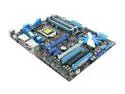
ASUS P7P55D EVO LGA 1156 Intel P55 ATX Intel Motherboard
Pros: Great performance, excellent BIOS options and overclocking potential. Included ASUS utilities are a nice touch. Board layout is nice and everything has fit perfectly. I got mine for $169.99 with free shipping in December '09, so the price was great!
Cons: I'm trying to think of something, but I just can't.
Overall Review: I hear that the P55 platform is about 4% slower in Crossfire than the X58 because of the limited PCI-E lanes. I'm running a single card so it hasn't affected me.
1/18/2010See more detail