
Your Browsing History


Robin G.
Joined on 07/07/02
0
0
product reviews
- 7
Great motherboard paired with Ivy Bridge...
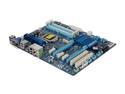
GIGABYTE GA-Z77-D3H LGA 1155 Intel Z77 HDMI USB 3.0 ATX Intel Motherboard
Pros: Great motherboard. Paired with a i5 3450 processor, and 16gb of PC3 12800 memory. CAS latency timings set themselves up. Everything worked great. The 90 degree sata ports make for easy cable management in my case. And uses only a 4pin 12v adapter rather than 8pin like most boards seem to be requiring is a huge plus.
Cons: Ran into a very bizarre issue with the built-in network adapter. Upload speeds to other computers on my network would stay in the 30-50KB/sec range, while downloads would max out my switch (100-120MB/sec range). Put in a cheap intel NIC in the system, and the new network adapter worked great. Just as a test, I swapped back to the built-in network adapter, it was was working great as well. No idea how to explain this one. I used the drivers from the disk as well as checked gigabytes website (same version), reinstalled the deive multiple times, always got the same issue. After I install a new NIC, it started behaving properly. Go figure. I don't discount the motherboard, as it may have simply been a strange driver problem.
5/14/2012See more detail
Great little keyboard

Motorola Bluetooth Keyboard for Android Smartphones and Tablets with Shortcut Keys
Pros: Works very well. Bluetooth paired easily, no drops in bluetooth connection while using the keyboard. Pretty good range. Came with batteries.
Cons: If not using the keyboard for some time, it will go to sleep, but a single keypress will wake it up, (which won't be sent to the paired device) which takes just a second.
3/20/2013See more detail
Great CPU
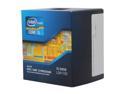
Intel Core i5-3450 - Core i5 3rd Gen Ivy Bridge Quad-Core 3.1GHz (3.5GHz Turbo) LGA 1155 77W Intel HD Graphics 2500 Desktop Processor - BX80637I53450
Pros: Fantastic CPU. Upgraded from C2D E8400. Decided to do a little benchmark test between my new system (this CPU, GIGABYTE GA-Z77-D3H and 16gb GSKILL RAM) and my wife's system (Mac Pro with 2 X 2.2GHZ quad core XEONS with hyperthreading on, 12 gb RAM) using handbrake on the same video file. Hers of course was faster, but not by a lot. She averaged encoding at 257fps, while mine averaged just under 200fps. Handbrake is an extremely CPU intensive program, and while my threads are faster, she has 4 times as many operating threads. I was quite pleased.
Cons: Only issue was running a little hotter than I expected (~40C). Swapped out retail HSF/FAN for aftermarket and temps dropped ~6-8C.
5/14/2012See more detail
Great HTPC board
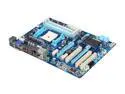
GIGABYTE GA-A75-D3H FM1 AMD A75 (Hudson D3) USB 3.0 HDMI ATX AMD Motherboard
Pros: 4 RAM slots, plents of Sata ports, 4 PCIX slots, built-in video with HDMI, passive cooling on motherboard chipset.
Cons: SATA ports can be a little tricky sometimes, especially in a smaller HTPC case. I have to do some creative things when plugging in sata cables. More my fault for the small case than the MB's fault.
Overall Review: Great HTPC board. Added 4 Hauppauge tuners, 8gb RAM, an A6, and a blue-ray drive. Got Windows 7 Ultimate 64bit installed, and everything setup with no problems (other than getting Hauppauge remote to work with Windows Media Center, but finally got it). Plays everything perfectly. Audio and video over HDMI work like a champ.
4/6/2012See more detail
Excellent
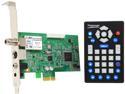
Hauppauge WinTV-HVR-1265 (1196) Hybrid TV Tuner /Video Recorder
Pros: Put two of these into an HTPC and it is working great. Probably going to add a third of fourth. Records NTSC and QAM HD channels perfectly. Haven't noticed any computer problems when recording NTSC(analog) TV yet, but am running on a tri-core A6 2.1 GHz. Remote works great with WMC, also with Netflix integrated into WMC. Had to do a little work to get the remote to work with Hulu Desktop, but a quick google search will give you exactly what you need to add into the IRemote ini file.
Cons: Two issues with this. One is the Previous Channel button on the remote doesn't do Previous Channel. It does some kind of Maximize/Restore window function, which does comes in handy from time to time, but would rather have Previous Channel functionality. Can probably fix this in the IRemote.ini file, just haven't looked. Other issue is that I have had to remap my channels a couple of times since initial setup. The QAM HD channels would display properly, but when recording, would record a different channel. Remapping fixed this.
Overall Review: Will definitely order another, running into issues recording two shows and wanting to watch a third already.
12/29/2011See more detail
Good enough...
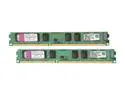
Kingston 4GB (2 x 2GB) DDR3 1066 (PC3 8500) Dual Channel Kit Desktop Memory Model KVR1066D3N7K2/4G
Pros: It's RAM, what do you want. It works...
Cons: None
2/25/2009See more detail