
Your Browsing History


Andy F.
Joined on 09/01/08
0
0
product reviews
- 2
Overall High Quality Case
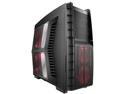
AZZA Hurrican 2000R SAZ-2000R Black (exterior)/Red (interior) SECC Japanese Steel ATX Full Tower Computer Case
Pros: This case is pretty big, it's gonna fit anything you can put in it. There are a total of eight fans which are extremely quiet. The case is made of mostly metal except for the top and front, and even then the plastic is high quality and won't break unless you have your 300 pound friend sit on it. USB 3.0 slot, eSata, 2 USB 2.0 slots in the front. The two front fans are blowing air directly onto your HDD's, which is good obviously. All matte finish so you don't have to worry about your fingerprints on this bad boy. Since I've only had this for two days i'm kind of "guessing" on this but, I was able to install my cpu cooler without removing the motherboard. When you remove the back panel, you can see directly where you CPU is so all you have to do to install a new CPU cooler is to remove the back panel which takes the whole length of 5 seconds. Another thing that's great is how the fans on the side panel aren't taking up any depth inside the case, so huge heatsinks are a non-issue.
Cons: There are these two little rubber "things" on each foot. If you slide this case around on carpet these are going to tear off. You can just stick them back on cause they have some sort of adhesive, but it's still a con.... probably going to just super glue them if any come off again. Also, the hot swappable HDD bays do not work with IDE drives as far as I could see/test. The two intake fans on the side do NOT come with fan filters, just use a thin cloth over it and you'll be fine.
Overall Review: I thought I'd give you guys the specs to the fans in the case just in case you were curious. - Rear Fan (Exhaust) 120 x 25 mm Fan 1000rpm / 20dBA -Top Fan (Exhaust) 2 x 230 x 30 mm Fans 1200rpm /30dBA (Max) -Side Fan (Intake) 2 x 230 x 30 mm LED Fans 900rpm / 24dBA -Right Panel Fan (Exhaust) 120 x 15 mm Fan 1000rpm / 19dBA - Front Fan (Intake) 2 x 120 x 25 mm LED Fans 1000rpm /19dBA Now, there is a fan controller for the top 2 fans which can be run in three modes. Low, high, or off. I'll tell you right now, there is absolutely no difference in noise between low or high, but you can feel the air difference so it's practically useless to put the fan controller on anything but high.
1/9/2011See more detail
GTX 460
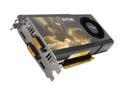
ZOTAC GeForce GTX 460 (Fermi) 1GB GDDR5 PCI Express 2.0 x16 SLI Support Graphics Card ZT-40402-10P
Pros: -Low power consumption -Quiet -Cool -Very affordable -Small -Great tesselation performance. This card is great! It idles at about 38c and maxes out at about 82c (not overclocked). This will fit in just about any computer case out there (slightly shorter than 8.5 inches). Fan never goes above 30 percent usage, and even then it's still just about as noisy as my case fans. Since it's an NVIDIA card, drivers aren't really an issue....so that's a pro.
Cons: Fan appears to not run above 70%, i'm not sure if that's a problem with the card itself or the software i'm using (EVGA Precision). *When I first put this in, it received a 7.2 on the Windows Experience Index. Shorty after, my computer was telling me I had new hardware and the test had to be redone, so I re-ran the assessment. It received a 7.0 instead of a 7.2, i'm not sure how much that matters but that's something to note. Also, I have not messed with the clock speeds at all so I honestly have no idea why the score lowered.*
Overall Review: I've never bought a ZOTAC but this card is great. I'm not sure if other people have been getting faulty cards but the fan usually spins at 850-1000 RPM, which makes it about as audible as your standard case fan. When installing, make sure you completely wipe all traces of any past drivers from your system, or you WILL run into trouble. Lastly, make sure you're not bottlenecking it with a bad CPU and you should have a great experience.
12/8/2010See more detail