
Your Browsing History


Stephen V.
Joined on 09/05/12
0
0
product reviews
- 14
Fast and powerful CPU
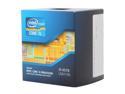
Intel Core i5-3570 - Core i5 3rd Gen Ivy Bridge Quad-Core 3.4GHz (3.8GHz Turbo Boost) LGA 1155 77W Intel HD Graphics 2500 Desktop Processor - BX80637i53570
Pros: If you're not into overclocking, this CPU is practically identical to the K version but ever so slightly cheaper. It's fast and takes everything I throw at it in stride. As the most powerful i5 currently available, this is the best for high end gaming rigs. i7 aren't needed for gaming since HT doesn't improve gaming performance significantly. If you're buying this version instead of the K variant, then I assume you're not overclocking which means that the stock cooler is sufficient enough. So you can save a bit on not having to buy a after market cooler.
Cons: Kinda pricey, but worth it.
12/2/2012See more detail
Would be an excellent mouse if it didn't have a double click flaw.
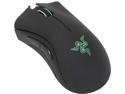
RAZER DeathAdder Chroma USB Gaming Mouse
Pros: Very comfortable and accurate mouse. Works well when it works.
Cons: There's definitely some flaw in the line that causes the mouse to double click when you only click once. Either the button is wearing out or getting dirty or something. Either way, I've gone through 2 RMAs and 3 Deathadders and all started showing the same double click issue after about a month of use. Needless to say I'm personally done with Razer products. If it didn't have this one flaw, I would be a 5 star perfect mouse for me.
Overall Review: If you google "Razer double click issue" you'll see it's widespread AND it's not just limited to Deathadder mice.
4/13/2015See more detail
Should have went with my initial choice and bought this first.
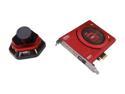
Creative Sound Blaster Zx 116dB PCIe Gaming Sound Card with 600 ohm Headphone Amp and Desktop Audio Control Module
Pros: Sound is crystal clear and amazing. I use these along with my B&W P5 headphones and everything sounds amazing. The card itself looks cool and well shielded and the installation is as about as easy as any other PCIe card. The ACM is hefty and well built. Very smooth volume button and 4 inputs, two 3.5 mm jacks and two 1/4 inch jacks for headphones and microphones respectively. Headphones are connected through the ACM and it sounds amazing.
Cons: Nothing I can see yet.
Overall Review: I initially had forgone a Soundblaster due to everyone saying the driver software was horrible. So I got a Xonar DGX at everyone's suggestion. A decent card in it's own right, but it left me wanting more and I found it also suffered from the less than ideal driver issue as well. Having seen what Xonar had to offer, I decided it was time to see what Soundblaster had to offer and now I wish I had gone with them to begin with. If people consider the driver software bad, then there is no way it's worse than the Xonar software. As soon as I installed it, I could hear a difference in quality over the Xonar as well. The Xonar served it's purpose but the Sound Blaster was what I was looking for all along.
11/12/2013See more detail
Excellent Ram
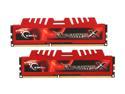
G.SKILL Ripjaws X Series 8GB (2 x 4GB) DDR3 1600 (PC3 12800) Desktop Memory Model F3-12800CL9D-8GBXL
Pros: No problems installing or booting. Everything was detected normally and things are a running smoothly for about 2 weeks now. Look well built and look pretty cool with the red heat dissipaters. Even comes with a cool case sticker.
Cons: None I can think of at the moment.
Overall Review: In order for this RAM to run at the maximum advertised clock speed, I had to go into the bios settings and manually set it to 1600mhz. This is most likely an issue with my motherboard than the RAM since I had to do this same procedure with the other pair of RAM I purchased that had the same specs as these G.SKill. It's just something to consider if you notice your RAM not running at the advertised clock speed.
4/24/2013See more detail
Decent sound with some noticable flaws
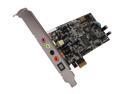
ASUS XONAR DGX 5.1 Channels 24-bit 96KHz PCI Express x1 Interface Gaming Audio Card
Pros: Cheap for the decent sound quality it provides. PCIe
Cons: Front panel jack has horrible volume. I have to pump the headphone amp to max and turn the volume on my computer completely up to get any decent sound. I wrote their tech support about this issue and they pretty much told me to reinstall the drivers, giving me a broken link to the driver download. Tried reinstalling the drivers and it didn't fix the problem. That brings me to the next con, the drivers suck. If you get this card, or any Xonar card, completely skip the Asus drivers and get the UniXonar drivers that a 3rd party made. Much better and stable than Asus' drivers, which are also pain to install btw. Also, at random times I'll get noise coming from the card. Like random static noise. The only way to stop it is to restart my computer. I know it's a problem with the card because I don't get the sound from my integrated sound and it goes away when I disable the card from my device manager. Some kinda interference problem going on with it. All in all, I would not buy this card again, nor would I recommend it.
1/31/2013See more detail
Does it's job well. Bad layout.
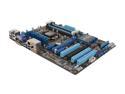
ASUS P8H77-V LGA 1155 Intel H77 HDMI USB 3.0 ATX Intel Motherboard
Pros: Very good at what you need if you're looking for a good H77 mobo and don't plan on overclocking. Nice UEFI and as simple to install as any other ATX mobo. As far as pros, can't really ask for anything more.
Cons: Layout of the expansion slots is horrible. If you're installing a double wide video card in the PCIe 3.0 16x slot, you can say bye bye to one of the 1x slots. That leaves you with only the other 3.0 1x slot and the other 2.0 16x slot. And 3 fairly useless PCI slots. They could have layed it out so that you lose the PCI slot, or even better, put the 3.0 16x slot at the very end so that you use the unused extra slot that most cases have. So in the end, you really have only 2 usable PCIe slots after installing a video card. Not really good unless you need a 56k modem or an old sound card for some reason.
12/31/2012See more detail