
Your Browsing History


Gary P.
Joined on 06/30/15
0
0
product reviews
- 8
something this ugly has got to be good
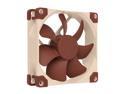
Noctua NF-A9 PWM, Premium Quiet Fan, 4-Pin (92mm, Brown)
Pros: Really quiet. If what you need isn't in the box you have one strange setup. 4-pin PWM. You can use the Y-cable to control 2 fans from each header. Full power or limited top end with included LNA cable. With PWM control can go down to 300 RPM. Updated SSO2 fan bearings. (self-stabilising oil-pressure bearing, 2nd generation)
Cons: Like everyone says, the color.
Overall Review: This ITX build is closed so I went for the quality and ignored the ugly. I have three of these - 2 in push/pull on the NH-U9S CPU cooler and one pulling air in the back of the case. I tried the rubber installation things on the back fan - if you use them install while you have room to mess with them. Not listed as a radiator fan but I would consider using it. With the wide blades and narrow openings it probably has a decent pressure. (Haven't found the numbers yet.) I like the NH-A9 so much that I have ordered 2 of the NF-F12 PWM equivalent to replace the TT Riing fans that I borrowed from another build. ASRock Fatal1ty Z170 Gaming-ITX/ac Intel Core i7-6700K Noctua NH-U9S CPU cooler w/ 2nd NF-A9 for push/pull Corsair SF600 600W SFX G.Skills TridentZ 16 (2x8) DDR4 3200 ASUS R9 Nano GPU Samsung 950 Pro 512MB OS drive Samsung 850 Pro 512MB storage Ncase M1 V5 Win 10 Pro
8/8/2016See more detail
plug-n-play or managed, your choice
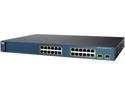
CISCO CATALYST 3560 WS-C3560-24PS-S Switch /w PoE (Grade-A)
Pros: Can be set up as a managed switch, with all the advantages of that like better internet security. Has PoE so I can assign some of the ports for my home security system cameras. Cisco software and support are top notch. You can tweak this thing to your heart's content.
Cons: It is noisy. I don't have a dB meter, but it is above my normal tolerance levels. I'm used to the Netgear unmanaged simple switches so the fans in this Cisco switch caught me off guard. I will be moving this into the closet when I do the permanent setup so that may not be an issue later. For now, unfortunately it negates all the quiet stuff I do when building my computers. This is not something to take away an egg, though, since it was my lack of knowledge, not a deficit in the switch. Update 12/26/2018 I replaced the 3 fans with Noctua NF-A4x20 FLX, 3-Pin Premium Quiet Fan (40mm). $15 https://www.newegg.com/Product/Product.aspx?Item=9SIAADY5SE4763 The fans helped a lot with the noise issue without the Noctua speed limiters but it is better with the limiters installed. The switch is silent when the case is open, like the fans aren't running; closed it has a hum so that noise is the case air flow not the fans. The fans run almost constantly; they quiet every now and then, then speed up a few seconds later. I feel this means it is cooling OK with the limiters or it wouldn't cut the fans back to almost stopped. When you install the fans the U-shaped fan mounts can squeeze the fans and prevent them from starting. Fiddle with the mounts and you can fix that. Splicing the wires is not intuitive, use your meter to check the flow. I bought the switch 5/17/2017. It has run non-stop and has never given me any problems. Today it is listed at $52.77 (refurbished). Cisco no longer supports it so there are no firmware updates. If you need a switch that just does Ethernet (i.e. no WiFi or Bluetooth or whatever they add in now) this is a good solid option.
Overall Review: I needed to get away from the 8-port simple switch now that my needs have changed. With this Cisco switch I have 12 ports filled already and there are 12 more waiting. Six of them will be assigned to the home security cameras so I needed the PoE that this unit offers. I prefer hard-wiring over WiFi and the whole house is wired with Ethernet, including the home theater components that can use WiFi. This required a more robust switch than the simple switches that served in the past. Newer switches all tout their 1000 Mbps speed. This is an old refurbished Cisco switch that fit my budget and the 10/100 Mbps port speeds are OK for my uses. I asked the IT guy at work and he said even with the enterprise system we have there that no one ever used the 1000 Mbps speeds and in actuality didn't get near maxing the 100 Mbps. I asked him about streaming from a NAS and he said I should be fine. I don't really know what to say for recommendations. I am out of my league with this Cisco switch - I am running it as unmanaged plug-n-play for now while I learn how to use it to its full capabilities. I can't hook it to a computer yet to do the setup because none of my computers has a RS-232 port. I picked it up for $79 and at that price it is a steal and I would say go for it - a switch with nowhere near the capabilities will cost you more.
12/26/2018See more detail
Best entry-level AVR
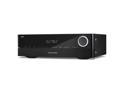
Harman Kardon AVR-1510S 5.1-Channel Network AV Receiver
Pros: Clean front panel instead of the usual busy ones found on many AVR - even the USB and 1/4 headphone jack are behind a cover. Smaller size - 5 1/4" tall when many other brands are 6" or more. Fills my 12 x 9 office with sound without breaking a sweat. It pushes the 5.1 to spouse-screaming levels at -25 dB in the volume scale. Harman Kardon quality and reputation. Harman Kardon concentrates the hardware on musicality instead of trying to be a one-size-fits-all with stuff you don't really use.
Cons: The volume knob has a really bright white light - like, dig-out-a-splinter-from-your-finger bright. (well, almost) Update: there is an option to get rid of the round nightlight glare. It doesn't do 2-channel analog worth a hoot - my 1978 Kenwood blows it away when listening to albums. The power on/off on the remote seems to be worthless.
Overall Review: I wanted an inexpensive 5.1 in the office for playing the Blue Ray/DVD and streaming. The Harman Kardon 1510S is the best AVR in this price range. I did a lot of research before buying this one. I don't know if you are aware but when HK says 75W per channel they mean per channel. Many brands will give you watts based on 2-channel and if you run all five channels the watts drop to compensate. This unit is rated total 410W and will give you the 75W it claims. The AVR that this Harman Kardon replaces died in less than 2 years. It was a brand that I thought I could trust, an $800 (retail) unit with lots of bells and whistles. Unfortunately, I opened the case to replace a blown fuse - then I was honest about it and the warranty was voided. Yeah, with a 3-year warranty I shoulda kept my mouth shut. I decided to go with a brand I have known forever with a good solid reputation and hardware that won't be a doorstop next year. I don't do the Spotify and all that so I can't report on it. I have compared the FM radio on this HK against the Kenwood and the HK seems muddy. I think it has to do with a 2-channel signal from the FM. I noticed that the HK can identify the signal coming in and will adjust automatically. I played around with Blue Ray, DVD, CD, computer audio, and FM radio. When I tried to overwrite it and force something different from the auto-select it would go back to the auto-select. I'll have to play with this some more to see if it can be tricked into doing what I want so I can send to the stereo speakers instead of the surround speakers when I want to. I use my 2560 x 1440 monitor for video. The HK sends a good clean signal regardless of which input I am using. About the Cons - I got this specifically for the 5.1 since the vintage Kenwood handles 2-channel fine. I have read that you can't expect an AVR to do justice to your vinyl. I just mentioned it as a heads-up for people who want one unit to do everything. The power button nuisance is easy to get around. I use the buttons below the on/off, the ones that select a specific input and I set the go-to-sleep function on short duration to shut the unit down. Bottom line: Yes, I would definitely recommend the HK 1510S to anyone who just needs a good solid AVR and isn't interested in a lot of fluff. If you catch this Harmon Kardon 1510S on sale around $150 just grab it. It will be the best $150 you spend this year.
8/15/2018See more detail
All Quiet on the Western Front ............. [thank you Mr. Remarque]
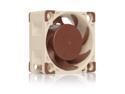
Noctua NF-A4x20 FLX, Premium Quiet Fan, 3-Pin (40x20mm, Brown)
Pros: Quiet, like is that thing running? A box full of setup options. Noctua quality backed by a 6-yr warranty. I have a Cisco Catalyst switch that could drive you crazy with the noise. I tried boxing it into a foam-lined box. The ventilation ports let the noise out. I put 3 of these fans in the switch and couldn't believe the thing was running. I had to visually see the blur of the spinning blades and feel the air flow.
Cons: It was hard to drop the empty boxes in the trash bin. These boxes are so over-the-top that they are marketing genius.
Overall Review: The installation kit has Scotch locks for wiring the fans to proprietary inputs on the motherboard. The instructions were detailed enough to get the job done. A Cisco switch has the wires lined up differently but the included adapter did the trick. I have Noctua fans in my primary computer/gamer - for air flow and double fans on a Noctua CPU cooler (NCase M2 with great air flow), a Win server that never sleeps (generic recycled case with average air flow), my wife's SFF computer (in an InWin case with really bad air flow), an old Win 7 test machine (SFF HP with so-so air flow), and now this Cisco switch. I have never had a problem with Noctua and with all these machines in the office sitting in open shelving it is quiet again. (OK, wife's computer is on her desk in another room. The rest are in the office.)
8/15/2018See more detail
Already saved my machines
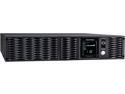
CyberPower PR1000LCDRT2U 1000 VA 900 Watts 8 x 5-15R Battery & Surge Outlets UPS
Pros: Enterprise level protection instead of the usual homeowner UPS = mental security and Pure Sinewave waveform output protects ENERGY STAR 6.0 systems that use Active PFC power supplies - almost everything now-a-days. Full Automatic Voltage Regulation (AVR) technology, which delivers a consistent and clean AC signal.
Cons: It's kind of ugly. Hey, I couldn't leave a blank space.
Overall Review: I don't question the quality of this unit like I do the popular ones most people use at home, the ones whose dependability seems to ebb and flow from year to year. I asked my computer repair guys about which UPS to get and they wouldn't recommend the other brands because of this uncertainty. 'Nuff said. My lab has a server running WS2012 R2, Cisco switch, 2 desktops, 2 monitors, modem/router and a AV receiver. (Yeah, there was a plug left over so the AVR got in the act.) This UPS has already protected everything from several power blips. These power anomalies reboot my wife's computer on a standard surge protector and blink the main home theater components that are protected by a power conditioner/surge protector. The stuff that is plugged in on this Cyberpower never even flinched. And the best part is that I didn't have to hear, "The internet is down!" - the modem never knew there was a problem. I lost a $800 AVR last year that I blame on the power irregularities so this time I'm not taking chances. Bottom line: Going with an enterprise UPS has its drawbacks - looks are plain and simple, there are not a lot of pretty things like Bluetooth and WiFi built in, the readouts are factual and spartan, and the cost factor. When you weigh the cost of what you are protecting in both dollars and time to rebuild, though, I think you will see the value of going this direction. Yes, I definitely recommend this Cyberpower PR1000LCDRT2U UPS or any of the others in their line-up. You can go to sleep at night knowing that even if something happens your most important stuff is OK.
2/4/2018See more detail
Almost as good as an AIO
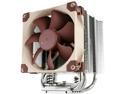
Noctua NH-U9S, Premium CPU Cooler with NF-A9 92mm Fan (Brown)
Pros: Easiest install I have had for a HS/fan unit. Noctua system results in a solid mount and no spring measuring with a caliper was needed. They even give you a screwdriver and high quality thermal paste. Cooler has 5 heatpipes that are staggered as you look at them through the fins, not lined up in a row like some other coolers. I think this should give better cooling since more pipes are in the airflow. The heatsink and the pipes are copper, the fins aluminum. The fan included is a high quality fan. It has the new SSO2 bearings (self-stabilizing oil-pressure bearings). There is a cable (LNA cable - low noise adapter) that limits the max fan speed for quieter running. You can add another fan, attaching it with the included spring and putting it on the same CPU header using the included Y-cable.
Cons: none
Overall Review: I added an extra NH-A9 PWM fan for a push/pull. According to what I have read this will give you about 3C more play room on CPU temps. The unit is asymmetrical. It looks odd at first but it is actually an advantage. The cooler can be mounted in any direction you want. By using the off-center to my benefit I was able to point the outflow out the top of the case and still not cover the South Bridge on my MB. Regular install would cover 1/2 of one of the most visually appealing parts of the MB. I just built this computer this week so I don't have any numbers to report. Under a light-to-moderate load the temps barely move. The specs i have read show this cooler coming close to an AIO in performance. ... update 10/09/2017 I read somewhere that a CPU cooler on the Intel i7 6700K needs to have the heat pipes oriented vertically. My original install had them going horizontally and temps were high. I pulled the cooler, cleaned everything and reinstalled with the fans blowing out the back, heat pipes vertical on the CPU. BTW, the thermal compound from the 1st install was nice and even - the Noctua mounting system did a good job of spreading it. Temperatures are from AIDA64 Extreme stress test; run 10+ minutes each time; in degrees Centigrade. Heat pipes horizontal: average CPU temperature 83.5; max 94 Heat pipes vertical: average CPU temperature 71.6; max 82 ... end update ASRock Fatal1ty Z170 Gaming-ITX/ac Intel Core i7-6700K Noctua NH-U9S CPU cooler Corsair SF600 600W SFX G.Skills TridentZ 16 (2x8) DDR4 3200 ASUS R9 Nano GPU Samsung 950 Pro 512MB OS drive Samsung 850 Pro 512MB storage Ncase M1 V5
10/8/2017See more detail
seller reviews
- 3
It's just a jumper
I have to rebuild my daughter's custom loop and need this PSU jumper to fill in for my misplaced one. I expect it will work OK when I get to the filling stage.
On-time
Delivery
Product
Accuracy
Customer Service
Satisfactory
12/6/2018See more detail
All good with Noctua Cooling Systems
If Newegg hadn't said the fans were coming from a marketplace affiliate I never would have known. Short wait, packed with air bubbles, tracking; easy.
On-time
Delivery
Product
Accuracy
Customer Service
Satisfactory
8/14/2018See more detail
give yourself plenty of lead time
Ordered in mid-December; package arrived end of January. What's the problem on time? It comes from China and they don't get in much of a hurry. Other problems? This was an order of specialty light bulbs. Each was in a small thin cardboard box. These were surrounded by bubble tubes. The whole was in a plastic bag. Needless to say they didn't all survive the shipping from Chine to my house. Would I order from them again? Are you kidding? I didn't do my homework until the package was so late. This is not the first time people have had to wait for a month or more to get something from this seller. Newegg, do yourself a favor and drop this Marketplace vendor. Your reputation is too good to let someone mess it up for your loyal customers.
On-time
Delivery
Product
Accuracy
Customer Service
Satisfactory
1/30/2017See more detail