
Your Browsing History


James R.
Joined on 10/25/04
0
0
product reviews
- 11
Great Card
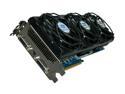
SAPPHIRE Radeon HD 5970 (Hemlock) 4GB GDDR5 PCI Express 2.1 x16 CrossFireX Support Graphics Card 100280-4GSR
Pros: 4GB total memory for a 2GB frame buffer. High default clock settings. Runs incredibly cool. Extremely quiet.
Cons: Card should sell for around $900, but limited supply jacks up the price.
Overall Review: On my 30" LCD at 2560x1600 resolution with high AA, the 2GB frame buffer on this 4GB model drastically improved my gaming. My old 1GB frame buffer 5870 would come to a halt as it would run out of memory. The person that gave this item 1 Egg for having extra memory being just a gimmick doesn't know what he's talking about.
7/13/2010See more detail
DO NOT BUY!
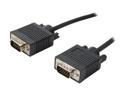
Coboc 25 ft. SVGA 28AWG Male to Male Cable (Black)
Pros: Zero
Cons: This is an incredibly thin cable that I don't even think has any shielding. The image produced on my monitors with two of these cables is beyond atrocious. Incredibly low quality.
3/16/2012See more detail
Best all around gaming monitor as of this writing.

Acer Predator X34 bmiphz Black 34" IPS 4ms (GTG) 60Hz/100Hz, 3440 x 1440 21:9, NVIDIA G-SYNC Ultra-wide Curved Gaming Monitor, ZeroFrame Design, Predator GameView Technology, VESA Mountable, Tilt/Height Adjustable, 2 x 7w Speakers
Pros: Comparison between my late model ASUS PG248Q 27" 144 Hz TN Swift and the new Acer X34 curved 100Hz IPS. 1. Build quality: Monitor case win = ASUS, Stand win (aluminum) = Acer. 2. Both have external power supplies which I like. Allows easy fixing of PSU related problems. Tie. 3. OSD win = ASUS. ASUS's OSD is the best I've seen and allows quick adjustment and use. Acer's feels clunky, designed to be used by some four finger upward contortion of the hand which makes the monitor wobble. The power button is annoying and feel's the same and is right next to the other buttons. At some point, virtually everyone is going to turn their monitor off inadvertently. Not sure why they didn't put the power button to the right of the LED. (At least they fixed the HU's ridiculously bright LED problem). It takes an annoying amount of button presses just to do something like change brightness. There are also other worthless quick access features. Monitor sound volume? Whomever is buying a $1,300 monitor and using the 30 cent built in speakers probably has their priorities wrong. Also; quick access to the overdrive setting. This is silly as you'd never take it off of the "Normal" setting. The positive note is that there are three presets that you can adjust to different brightness levels to reduce the amount of button pressing. I've set one preset to 100% brightness for during the daytime, one for 120 cd/m2 for normal use with bias lighting and one for 50 cd/m2 in the dark. This covers most uses. The blue light, adaptive contrast and dark enhance are all pretty worthless features and remain off. I do like that there is an aim-point option for those games that don't have aiming reticle's. 4. Bezel's win = ASUS. Thinner. 5. Curve win = Acer. 6. Aspect ratio / immersion win = Acer. 7. Speed / motion clarity win = ASUS. With a 100 Hz speed setting, the Acer comes out to a ~10 to 11ms MPRT. The ASUS at 144 Hz comes out to 5.1ms. The ASUS has slightly twice the motion resolution as the Acer. It's up to you to determine if the curved 21:9 aspect ratio is worth giving that extra motion clarity up for. 8. Panel quality control = Tie. Both monitors are pixel perfect and no dirt or abnormalities with the panels. 9. Price win = ASUS. As of this writing, the ASUS is less than half the cost of the Acer. 10. "Wow factor" win = Acer. Obviously a curved 34" is going to look a bit more impressive on your desk than a flat 27". This could be of little concern to many. 11. The LED of the ASUS tells you when you are in G-Sync mode. The Acer's does not, but you can adjust the under monitor LED light strip to do the same. I feel it's a pretty useless feature, but on the dimmest setting some may like it. I would have been mightily impressed if Acer included LED strips all along the back perimeter of the monitor for built-in bias lighting. 12. AR film win = Acer. I feel the Acer has a nice balance of light diffusion to clarity. The ASUS cuts down reflections better, but add's
Cons: Some back light bleed. Funky OSD. 120 Hz would have really made this monitor shine!
Overall Review: A few random thoughts having spent many hours comparing the displays in and outside of games: 1. The TN Swift's motion clarity approaches ULMB territory. It's the best monitor for FPS games. 2. The TN Swift's colors do quite well compared to other displays. 3. The quality of my Acer is higher than I expected. The only flaw I have seen outside of some slight edge bleed (especially bottom left corner) is half-screen LED backlight start-up while recovering from sleep mode. This issue is temporary and quickly resolves itself on boot-up, basically a non-issue. I personally always shut down my PC so it is of no consequence for me. 4. While testing the Free-sync CK version, I was locked into 60 Hz mode with NVIDIA. After having used the G-Sync X34 in flight and space sim's, I have come around to 21:9. The extra width allows me to use more eye scanning and less head scanning with my TrackIR. This turns out to be a larger benefit than I expected. 5. With both monitors FPS capped to one below max refresh and V-Sync on in G-Sync mode, both monitors feel extremely quick and I have no input lag concerns. 6. The ASUS can get quite a bit brighter for bright rooms, but the Acer can get dimmer for dark rooms and dark games. Toss up to which you prefer. 7. With both monitors, I've had no issues worth reporting with regard to negative banding, contrast, clock and phase, gamma, black levels, white saturation or pixel walk. 8. With both monitor dominating their panel type class, I rate them both highly. If you are more of a strict FPS type player, I would recommend the TN Swift. For more general use and immersion, the Acer X34. I honestly don't think there is much market room left for the AUOptronics 27" 144 Hz IPS panel and all the associated monitors that use it. QC issues such as dirt layered in the panel, heavy IPS glow and backlight bleed. The TN Swift would be better for FPS's, and if you want IPS and it's slower pixels; the X34 fills that role better with higher quality control and immersion.
10/18/2015See more detail
Amazing phone
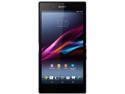
Sony Xperia Z Ultra LTE C6806 Unlocked Cell Phone 6.4" Black
Pros: Incredible screen for data users Fast
Cons: No extra assignable "quick" buttons How much harder would it have been Sony to put in 32GB instead of 16GB memory? They have to stop skimping on that. Yes, you can put in a 64 GB MICRO SD, but I'd love 32GB internal + 64 GB total.
11/22/2013See more detail
Motion Clarity without TN panel!
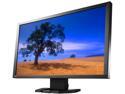
EIZO 23.5" 240Hz VA LCD Gaming Monitor 240 Hz (Height, Swivel, Tilt) Less than 1 ms DVI, HDMI, DisplayPort, USB FG2421-BK
Pros: 1. Amazing brightness adjustability. 2. Overall motion clarity is great. 3. Semi-gloss AR film. 4. Strobing backlight built it, no messing with certain GPU brands, drivers, fixes/work-around’s. It just works! 5. Great bonus features you only find on high end monitors. 6. Blacks and contrast ratios off the chart. 7. Great quality control seen in my three examples. All three have virtually zero back light bleed, haloing, and glow. All three monitors are pixel perfect and are very hard to distinguish between them in image quality. 8. 5-Year warranty. 9. Colors and overall image quality are good and remain good in 240Turbo backlight strobe mode. 10. Simple, attractive housing.
Cons: 1. Pay to play. This is not a budget monitor, and was not designed to be. 2. Just a small hint of input lag. All strobing backlight monitors will have some input lag. 3. On some backgrounds, there is some smearing/ghosting. 4. No VESA mount. 5. Some very faint cross-hatching on light images.
11/13/2013See more detail
Incredible Audio
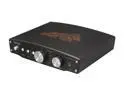
ASUS Xonar Essence One 24-bit 192KHz USB Interface USB DAC and Headphone Amplifier
Pros: For those that want to upgrade from an in-case audio board, this is the DAC to get. High quality, good drivers, awesome sound.
Cons: The only negative I would give it is using some plastic buttons instead of keeping all controls aluminum. Other than that, awesome device.
Overall Review: I love playing my .FLAC files bit perfect with Foobar on this baby! Incredible sound in games too.
8/1/2012See more detail