
Your Browsing History


SCOTT Q.
Joined on 05/11/03
0
0
product reviews
- 6
It's quite nice
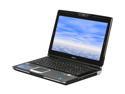
ASUS G Series 15.6" Intel Core 2 Duo P8700 4GB Memory Windows 7 Home Premium 64-bit G51Vx-X3A
Pros: Love the screen - very nice resolution. The CPU and memory - well, they are the cpu and memory. The keyboard - it's got a nice feel and I really like the keyboard backlighting - for the very first time, I was able to do work on a laptop, in the living room, without disturbing everyone with the extra light required when the keyboard can't be seen. The Asus driver disk was a nice touch. I re-installed a clean copy of Win7 (x64) and the drivers were just there - nice!
Cons: Bloatware - not as much as some machines I've seen, but still more than I like .... so I slicked it and re-installed Win7 (which took a phone call to MSFT for the activation - no worries there).
Overall Review: The 24 month warranty is a nice touch ... just hope I won't need to call on it for anything. Would I buy it again - Don't know yet. I'll know better in about 2 or 3 months. I'll update with another review if things change between now and then. Not that it has anything to do with the computer, but NewEgg rocks for shipment. I ordered this on the Sat before Christmas and I received it on the following Wed - with standard 3-day shipping. How cool is that?
12/24/2009See more detail
Didn't see all my memory
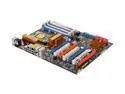
ASRock X58 Deluxe LGA 1366 Intel X58 ATX Intel Motherboard
Pros: Seems to be beautifully designed. It was easy to plug everything (except for the 2 x 12v plugs - tight fit that). The BIOS has a series of OC setting already programmed. I selected the first of these (3.6GHz) and rebooted the computer This raised the CPU temp only a couple of degrees - the fan on my cooler (not the OEM piece of garbage) was still spinning under 2K RPM. After I discovered that not all the memory was being recognized, I dropped a support question email to Asrock. They actaully responded in less than an hour - I was amazed. And, the answer was good - basic diagnostic process (one stick at a time, etc). And if that didn't work - send it back to the dealer. So, I've RMAed it. Will be shipping it out today. Can't wait to see what I get back :)
Cons: Before I realized that the M/B was not seeing all the memory, I installed WinXP-64 and had some driver issues. You HAVE to install SP2 before you install anything else. The printed documentation (the owner's manual) was quite thin. On first inspection, it looks impressive until you realize that the content is translated into 6 or 8 different languages. This content is repeat and augmented in the PDF file(s) on the driver disk, including all of the BIOS documentation. Hmmmm .... I'm setting up the BIOS and I need the documentation. Wait, the only place to find it is in the PDF and I have only one computer.... I ordered a three-channel set of memory (indicated by the Asrock site to be supported) with this board. Installed that memory. Only the memory in the first slot was recognized by the BOIS. I swapped out the memory, one stick at a time to be sure that all the memory was good and found no issues there. Disappointing!
Overall Review: Asrock tech support responded to my tech support question e-mail in under an hour. Way cool.
4/16/2009See more detail
It Just Plain Works
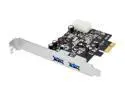
SIIG SuperSpeed USB 3.0 2-Port PCI Express - Value Model JU-E20011-S1
Pros: You can't beat the price and the ease of install. Crack the case, attach the Molex power connector, slip the card into an open slot, power up the system, download the drivers from the manufacturer web-site, install drivers, and .... BAM! It just plain works. I never trust that the drivers on CD supplied with H/W are up to date - I just go to the manufacturer website and look. The SIIG website made it easy to find the correct driver file - just enter the model number of the card (found on the outside of the box as well as on the card), and there it is. Download was quick. Driver install was painless (on both Win7 and Server 2008 R2). As expected, the card works with both my Seagate USB 3.0 drive as well as a number of older USB 2.0 devices I have laying around. Speed with the Seagate drive, doing a HUGE 193GB copy of a large music collection, started at about 97mb/s and dropped off to a sustained 47. I gave this thing 5 stars 'cause I haven't found a single problem with it y
Cons: None that I have discovered to date
Overall Review: You must have a Molex connector (or adapter) in your system - don't think it will work well without the additional power.
5/27/2012See more detail
Nothing comes free
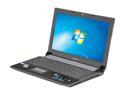
ASUS N53 Series 15.6" Intel Core i5-2410M 4GB Memory DDR3 1066 Windows 7 Home Premium 64-bit N53SN-XV1
Pros: Good process, video, sound. Love the monitor - crisp, clear, and at a very good resolution. Video adapter very nice. Best of all, this thing runs cool and quite.
Cons: Bloat-ware - and this is where the (relatively) budget price is offset. There's so much bloat-ware that it has a significant impact on system startup, system shutdown, and day to day operation. Trying to uninstall all of it is an exercise in futility. Had to resort to a complete system wipe and Win7 reinstall (using other, legal, distribution media and the product key on the bottom of the laptop - MS activated it without issue).
Overall Review: This is the third Asus laptop I've bought in the last three or four years. They started out lightly loaded but seem to have jumped on the bloatware bandwagon.
2/6/2012See more detail
Good price, quick/easy install
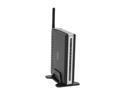
D-Link DPR-1260 Rangebooster G Multifunction Print Server 802.11b / g, RJ45 4 x USB 2.0 Ports
Pros: Everything you need to know to install this product on Win2K or WinXP is in the book and/or in the software loaded on the device. No mention of Vista or Win7 - though setup through Win7 was brain-dead simple. Accessing the device very easy. The booklet says that you need to use a CAT5 connection during initial install - that is, to configure the wireless (that makes sense). What they don't tell you is that once you have it talking wirelessly, you really need to disconnect the CAT5 - the communication between the device and your computer get's really bogged down. Wireless set up was simple and direct. Printer setup was easy ... once I disconnected the CAT5. Device administration is through a browser - pick one. I tried both Firefox 3.0.11 and IE 8 - both worked easily. Once plugged into the USB port, printer recognition was automatic.
Cons: Changing any of the administration and/or device configuration items requires a device reboot. The reboot process flashes a 30 second timer on your browser window. BUT, you don't have to do the reboot process for every change. Make all your changes, then reboot once.
Overall Review: I bought this on the basis of my experience with other D-Link products. I have a 10/100 switch that is something like 5 or 8 years old. It's like Ol' Faithful - never fails and is, in fact, still in service today. I hope this device performs as well.
6/14/2009See more detail
Nice Enclosure
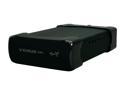
AMS VENUS DS-2316CBK Aluminum 3.5" IDE USB & 1394 Black External Enclosure
Pros: Structural - Very solid. Aluminium case with what looks like ABS plastic end-caps. Internal fan to keep things cool. Mounting HDD – Very easy. Unscrew the two screws on the rear of the case, slide out the HDD mount. The IDE connection lines up with that of the HDD. The power coupling will slide L/R to align with the power port on the HDD. Turn mount over, insert and tighten 4 mounting screws. Re-assemble. Disk activity light does the normal green/yellow/red thing.
Cons: None come to mind
Overall Review: On WinXP and with USB it is not as easy as with, for example, a thumb drive. WinXP does not "automatically" recognize the HDD. I have found I need to access the disk management snap-in to actually mount the HDD. Doing this is easy if you have admin rights on the computer. If you are using a WD drive, be sure to set it to Master - this means, "Remove the jumper!"
1/16/2006See more detail