
Your Browsing History


James B.
Joined on 04/07/04
0
0
product reviews
- 18
Very Good PSU
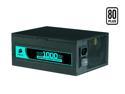
CORSAIR HX Series CMPSU-1000HX 1000 W ATX12V 2.2 / EPS12V 2.91 SLI Ready CrossFire Ready 80 PLUS Certified Modular Active PFC Compatible with Core i7 Power Supply
Pros: Modular. Powerful. Solid construction. Quiet. Doesn't get too hot even under a load. This baby runs like a champ.
Cons: None yet.
Overall Review: Pay attention to the instructions for connecting the PCI-E cables. If done incorrectly (and it's easy to do), the PSU will shut down randomly. Read the instructions completely BEFORE installing. You know how you can tell quality just by the looks? Well, this piece of hardware just looks tough! A little on the pricey side, but I think it's going to be worth it. There are more expensive PSU's out there, but this one is more than enough for most systems. I have it running: Two EVGA GTX 280s Two optical drives One floppy drive Two hard drives Intel C2D E8500 3.16 Four fans And loads of peripherals (Monitor, Printer, etc.) This thing handles it all.
12/11/2008See more detail
Too risky. Look elsewhere.
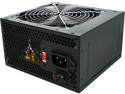
LOGISYS Computer PS550J12BK 550 W ATX Power Supply
Pros: It's Doesn't weigh much? Cheap....WAY cheap
Cons: Problems right out of the box...all but DOA. Failed within 1 minute. Doesn't have very many PCI-E connections (only 1x 6-pin). Have to use molex and adapters for most GPU's Flimsy, cheap material...back of PSU actually bends when connecting the power cord. Not very well made.
Overall Review: I purchased this as a cheap way to rebuild an older system for one of the kids. After connecting everything, it powered up and all was good...for about 1 minute. As soon as I changed the boot sequence to install Windows, the system just shut off. I restarted it and was able to install Windows, but that's as far as I got. The system would just shut off as though it were unplugged from the wall and would refuse to boot up again. It would spin the fans and try to post for about 1-3 seconds before dying again. After several attempts I could manage to get it to boot again. Sometimes the case fans would work, most times, not. Thinking the CMOS battery may have died from just sitting in the closet for several years, I replaced that with no luck. Also, note that when the system did manage to boot, there would be an intermittent "whine" (similar to coil whine) that the system did NOT have before. So, after doing all the usual checks (RAM, GPU, Fans, Connections, ect.) I yanked a working power supply from another unit and PRESTO...it booted right up with no problems...and no horrible whining noise. I will be returning this unit for a refund. DON'T WASTE YOUR TIME WITH THIS PSU! Some people have gotten lucky and received one that worked, but these seem to fail/DOA more than not. Spend a little more and get a unit from a reputable manufacturer (EVGA, Corsair, Rosewill, Antec, Coolermaster, Etc.). You get what you pay for with PSU's so don't make the same mistake I did.
7/29/2016See more detail
Good mouse

Logitech G700 Black 13 Buttons Tilt Wheel USB RF Wireless Laser Gaming Mouse
Pros: Very comfortable fit that is easy to handle and control. The 4 thumb buttons are very nice for assigning game controls. The software (Logitech Gaming Software) is very simple and the UI is much easier than Setpoint. The anit-friction feet work very well and the mouse glides easily across my mouse pad. Rechargable battery included. When the device is in need of charging, the charge cord plugs directly into the front, making it a corded mouse. Charge time seems pretty quick.
Cons: Heavy Very heavy Extremely heavy You wouldn't think that the weight of the mouse should be a big factor, but this one is quite heavy. The most noticable weight problem is that the battery is located at the "heel end" making the device very unbalanced. When gaming, occasionally it is necessary to lift the mouse up and reposition it, and with this one being so heavy on one end, that is a cumbersome task. With time, one could get used to it, but it's going to take a long time. There is no way to counter-balance the device.
Overall Review: I did not purchase this item from Newegg. It is advertised here for $100 (+$1 shipping) as of the time of this writing. I purchased it at a local store (sounds like "Test Cry"), for $70. Why the Egg is so much higher is beyond me...or perhaps the store where I bought it had them mis-priced. Either way, I'm not taking any eggs off the review for price; that has NOTHING to do with the product itself. So far it seems good with the exception noted in the "Cons" section (-1 egg for weight).
2/25/2013See more detail
Follow up review
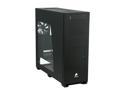
Corsair Obsidian Series 800D CC800DW Black Aluminum / Steel ATX Full Tower Computer Case
Pros: My first review stands, refer to that.
Cons: My first review stands, refer to that.
Overall Review: When I put the system together, the power switch worked, but the power and HDD LEDs did not. I really didn't care about it, but after a few weeks, it did start to bother me. I first thought I had connected them incorrectly to the motherboard, but after triple checking all that, I found it was not the problem. So I decided to check the connection on the front panel. After removing the front bezel, I removed the two small screws that secure the front panel connectors and discovered that the plug to the back of it wasn't completely secured. When I put it securly into place, all the lights worked perfectly. So, just a note for those who may have issues with the front panel lights and audio connectors: Check to make sure the connections are properly inserted, aparently, sometimes they may not be. This is not a design flaw and since everything works as intended, I'm not reducing the rating. Just a heads-up.
3/14/2012See more detail
Nice Unit
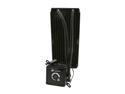
CORSAIR Hydro Series H100 (CWCH100) Extreme Performance Liquid CPU Cooler
Pros: Installation is rather easy (there is a good video guide on Corsair wesite). Compatable with all modern CPU sockets. Closed system that is maintenence free. This unit fits right into Corsair cases with no modification. The included fans move TONS of air (even at low speeds). Mine arrived in perfect condition with absolutely NO bent fins, scratches or dings. Cooling performace is good...actually, very good for the price. See "Other thoughts" for more details.
Cons: The included installation guide is pretty much garbage. It doesn't instruct you on what to do, it only has pictures and parts list. Again, watch the Corsair installation video and you will be fine (Also see "Other thoughts" for some more advice). As others have said, the coolant lines are rather stiff, but I don't see that as much of a "con". LGA2011 USERS: The pump has the Intel brackets pre-installed and all I had to do was thread the risers into the 2011 cooler mounts. The back plate is not needed. When fitting the pump to the risers, the bracket does not want to line up correctly. A little force is needed to get all the mounting points to fit with the pump orientated with the display showing correctly. Turning the pump 90 deg. clockwise allows the bracket to install with zero force, but I didn't want the pump sideways. Fans are pretty loud when they spin up. They are audible even at low RPM, but not bad. Again, they move quite a lot of air, so that is to be expected
Overall Review: I installed this unit into a Corsair Obsidian 800D case. and it fits the case perfectly. I have it cooling an Intel i7 3820 on an Asus Rampage IV Extreme. Acording to CPU-ID, my idle temps are around 33 C and under 100% load at 3.81Ghz they climb to around 58 C. That is with the fan set to quiet mode. I played around with the settings and didn't see much difference in temps with the fans maxed (other than noise). Ramping the fans up only dropped temps by about 2-3 C. I'm guessing that since the CPU is not overclocked and the radiator is so large, the quiet mode is fine for me. Also, I just used the pre-applied thermal compound. Later I intend to clean that off and reinstall the unit with Arctic Silver and I'm sure the temps will drop some. INSTALLATION ADVICE: Neither the video guide or included quide suggest this, but MOUNT THE FANS TO THE RADIATOR FIRST before mounting it to the case. If you don't, mounting the fans can be very difficult. Overall, Corsair WINS!
3/2/2012See more detail
Deactivated
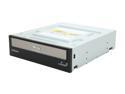
SAMSUNG Black 12X BD-ROM 16X DVD-ROM 48X CD-ROM SATA Internal Blu-ray Combo Model SH-B123L LightScribe Support
Pros: Samsung quality Really slick design with the mirror on the disk tray Seems to work fine Not too expensive
Cons: It's deactivated literally moments after I ordered it. That leaves me to believe I got the last one Newegg is going to stock. Does not come with software for BD playback, but that's what you get with OEM.
3/2/2012See more detail