
Your Browsing History


Shawn E.
Joined on 12/27/10
0
0
product reviews
- 13
Amazing Cooler
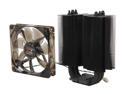
XIGMATEK Dark Knight II SD1283 Night Hawk Edition CPU Cooler with Stealth Aerospace Industry Thermal conductive ceramic coating LGA1150 Haswell Compatible
Pros: Quiet Temps Looks Ceramic
Cons: Directions
Overall Review: Was leary about going with a Air cooler on my build this round, but after reading benchmarks and temp comparisons I decided to give it a try. I was not disappointed! I was so shocked at the temps I decided to take my H100, H80i, Noctua NH-D14 and Hyper 212 EVO off my other builds to test them against it. after 2 hours of Prime95 as well as AIDA64 stress The dark knight beat my other air coolers, even the coveted D14 by 3 degrees. Lost to H80i by 1 degree and fell short of my H100 by 4. I will never buy another closed loop water cooler again. Only 3 degrees warmer then the H100 which is easy 120$, this was only 50$. It also looks great and the white LED fan gives it a cool look. i was after Performance and i got BOTH! Dont look elsewhere, you have one of the best coolers on the market right in front of you. Dont take my word for it test it out yourself. On the flip side to this amazing cooler. At first you think you needed 3 years of rosetta stone to decipher the directions and once you start to figure it out you swear they crapped you out of all the parts. The one I received only has all the parts for "type #3" in the directions. You'll know what im talking about when you get it. Dont panic Type 3 is a good one and it goes together in 2-3 mins.
2/6/2013See more detail
Problems with my Sample (Updated)
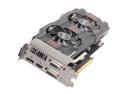
ASUS GTX660 TI-DC2O-2GD5 G-SYNC Support GeForce GTX 660 Ti 2GB 192-Bit GDDR5 PCI Express 3.0 x16 HDCP Ready SLI Support Video Card
Pros: Cooling Looks Quiet
Cons: Stability Quality
Overall Review: This is a updated review of my now 3 1/2 Month old Gtx 660Ti Bought this to compliment my new build. Went with Asus this go round because of the temperature performance in relation to other cards (thought the boost amount was determined by temps, turns out on the 6xx series it goes by TDP. The 7xx series will have the boost temp controlled). None the less it performs as advertised and never goes above 71C in stressing and 50C in intense BF3 gaming runs. I struggled with this build for a whole month with random crashing in games. Turned CPU OC back to stock, re flashed the BIOS on both Mobo and GFX. Reinstalled windows, chipset, audio and all other drivers. PC would not pass 3dMark 11, AIDA 64, OCCT, MSi Kombustor and Heaven benchmarks and would crash within 5-30mins on selected titles. After a month of troubleshooting and tracking down BSOD errors, low and behold it turned out to be the GFX factory OC. Apparently ASUS does not do a good job testing these things as I had to lower the core clock -75mhz Via MSi Afterburner giving me a boost clock of 1031mhz and I had to lower the memory frequency to -450 MHz in MSi Afterburner as well. This would now allow me to actually play the games without crashing, but still crashed when exiting games. Very disappointing that I have to down-clock a factory OC that is supposed to ship stable. Some older games it runs just fine and will run for hours at a +150mhz core OC on top of the factory OC bringing my boost clock in the mid 1200s. Overclocking the memory at all past stock was instant reboot. OCCT showed massive amounts of memory errors during test runs, no errors whatsoever on the core tests. Tried other graphics cards to make sure it wasn’t another issue. All other cards ran fine. Past the 30 day warranty with Newegg by the time I found the source. RMAs are a pain, so I’ll just baby it for now. Even at the lowered factory OC, I still manage a 65FPS average in BF3, 95Fps in Borderlands 2, 126Fps WoW and pretty much all my other games run very well, all in Ultra settings @1920x1080 Card is super quiet in a HAF 932 Advanced case and cannot be heard until 70% or higher manually adjusted Fan speed, though the card even when stressing never goes over 50% and 71C. Was going to get the Gtx 670 but after reading benchmarks and other review sites I couldnt see paying 100$ extra for a card that only achieved 4-7 more FPS across the board. This is by far the best Nvidia based card for the price if only using single monitor setup. 670/680 are for multi monitor IMO. Idk if this helps anyone but my system specs are: Cooler Master HAF 932 Advanced Asus Maximus V Formula Republic of Gamers Intel Core i5 3570k @ 4.6Ghz 1.27v Xigmatek Dark Knight II Cooler 8Gb G.Skill Ripjaws X 2400Mhz Asus GTX 660 TI 240Gb Intel Cherryville 520 Series SSD 1TB 7200 RPM Sata 3 Western Digital HDD
5/2/2013See more detail
Great free bonus

NVIDIA $150 In-Game for Warface, Path of Exile, and Heroes of Newerth
Pros: $50 in game cash for 3 games Free
Cons: None
Overall Review: This is my 2nd one now in 2 weeks (Build PC's for customers), when they don't want the freebies I take them. I play PoE as it is much better then Diablo 3 IMO and its just an overall great F2P game. These allow you to redeem $50 of in game cash shop currency. Not sure about the other 2 games, but PoE's cash shop only has vanity items and effects etc. I saw some reviewers saying its not $150. Yes, it is $150. $50 per ea of the 3 games, not $150 for just one. Someone also stated that it is forced on you. Huh? It is a freebie thrown in. If you don't want it don;t use it. It was free...
5/1/2014See more detail
Better then Naga IMO
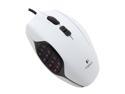
Logitech G600MMO Gaming Mouse - White
Pros: White exterior Tons of customization Comfortable Makes MMO's a walk in park Braided Cable
Cons: G600 logo on back not backlit
Overall Review: Reviewing this mouse after a solid 1.3 years of heavy usage and I am still loving this mouse. Having used the Razer Naga as well, I can say hands down the G600 is the better mouse. Not as aesthetically pleasing, but more comfortable in your hands and spamming the G keys on the side doesn't feel like your knuckles are going to snap and/or get sore. The G keys are angled perfectly and have a raised bump on the G13 key so absolutely no misclicks like with the Naga. When you plop your hand down on the G600 you instantly know where your thumb is on the Gkeys not only then but in the middle of intense raids/PvP matches. The Mouse also slides smooth as glass on the Gigabyte Ghost pad. I had some issues of the Naga "Clipping" during intense raids. In the end, if you do alot of MMO's or macro/hot key happy games or applications, this is a great mouse. Not the best looking, but oh man does it reward you! The LED backlit keys are a nice touch, but my eyes are on the screen not staring at the mouse. I wish they would of atleast added LED backlighting to the G600 logo on back…
4/26/2014See more detail
You get what you pay for
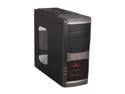
SilverStone SST-RL01B-W-USB 3.0 Black Steel / Plastic ATX Mid Tower Computer Case with Side Panel Window
Pros: Black Painted Interior
Cons: Cheap quality No Exhaust fan included Bad layout No cable management cut outs Horrible SSD mounting system
Overall Review: I bought this case on my other Newegg account for a Customers build. I originally got it to go with the Gray/Red theme including Red LED's that I installed. However, I noticed immediately that I didn't like this case. After building and working with many many other cases, even in this price point, I just didn't like anything about this case really. The expansion slot brackets are even break always and not exchangeable, no where to run cables for a clean look, cheap looking case from the outside, Newegg pictures make it look much better then it does in person. You get what you pay for yea, but there is a horde of other cases in this price point that are MUCH better. My last Silverstone case in this price range for sure.
4/24/2014See more detail
Decent Keyboard
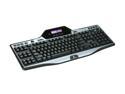
Logitech G510 Keyboard
Pros: Multiple colors Plenty of Macro buttons Volume scroll wheel Multi-functional screen
Cons: LED's too dim for some colors Palm rest tabs break easy Spacebar gets loud after prolonged use
Overall Review: I am reviewing this keyboard after 1.2 years of use. The keyboard has been a great investment thus far. I have no real complaints about it other then little things, like the palm rest locking tabs are cheap and broke at 8 months ( I type with palms rested). The LED lights are far too dim for darker colors and the spacebar gets iffy after awhile. Other then that it is a great keyboard and the G software is amazing.
2/17/2014See more detail