
Your Browsing History


James M.
Joined on 07/03/08
0
0
product reviews
- 18
Great Discs
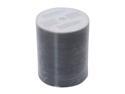
TAIYO YUDEN 4.7GB 8X DVD-R Inkjet Hub Printable 100 Packs Shrink Wrap Disc Model DVD-R47WPP600SK
Pros: These discs are easily the best discs I have ever used. No coasters. Consistently burn with PI\PO quality levels above 95% according to DVDinfo Pro. I don't print on the labels but I like the fact they are white. They don't look cheesy.
Cons: none
Overall Review: A bit more expensive than some other black media but in my opinion worth every penny of the additional coin.
7/21/2009See more detail
DO NOT BUY THIS PIECE OF GARBAGE
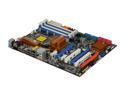
ASRock X58 Extreme LGA 1366 Intel X58 ATX Intel Motherboard
Pros: none.
Cons: I put 4 of these into customer machines. Of those 4, 3 have come back to me all with different issues. I have ended up having to replace them with another model. They have huge memory compatibility issues, along with BIOS problems. AsRock's customer service is infamously poor.
Overall Review: You get what you pay for. I have used tons of ASUS motherboards and they tend to be rock solid. I thought I would give ASUStek's economy line a try. I will end up just throwing these in the trash. I couldn't be more disappointed.
3/13/2010See more detail
Hate When Ignorant Buyers Give Good Products Bad Reviews
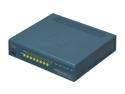
CISCO ASA5505-BUN-K9 Cisco ASA 5505 10-User Bundle
Pros: Cisco.
Cons: Device is starting to show age as it only supports 100 Mb/s. It might not be a problem if you are able to route all you traffic through 1G switches and routers at a level below this unit. If a lot of LAN traffic needs to pass through this device; for instance if you were using this device to separate servers and workstations into two different subnets, flow between the DMZ and the LAN could be bottle necked.
Overall Review: *** Please do not listen to Prem S. review. He does not know what he's talking about. Typical office owner that doesn't want to spend the money for professional IT and wants to DIY. In an office of 30 employees there is really no excuse for this. This will allow than more than 10 users on your LAN. What it won't allow is more than 10 users connected directly to this device. Placing a small router capable of DHCP and NAT address translation avoids the issues Prem S. speaks of. 10,000 simultaneous sessions should be more than enough for almost any small office... 50 employees or less to be really safe.
2/6/2014See more detail
Endless Features, Bargain Price
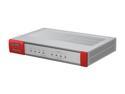
ZyXEL ZyWALL ZWUSG20 Internet Security Firewall with 4 Gigabit LAN / DMZ Ports, 2 IPSec VPN, SSL VPN , and 3G WAN Support
Pros: The only thing that will limit what you are able to do with device is your own knowledge. It has an endless feature set at an extremely reasonable price. Keep your eyes open for sales at 20% off. The web interface is decent although a little confusing until you get used to it. The device uses an object oriented format that makes all kinds of sense but can be a little difficult to wrap your head around initially. The device can also be programmed using a CLI similar to Cisco IOS that can be accessed over telnet and ssh; many of the basic commands are the same as Cisco but when you get into proprietary features it's unique. The control you have over the flow of network traffic is impressive with this device and it easily competes with devices many times its price.
Cons: At $150, none really.
8/25/2012See more detail
Not as advertised
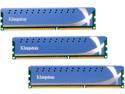
HyperX 12GB (3 x 4GB) DDR3 1600 (PC3 12800) XMP Desktop Memory Model KHX1600C9D3K3/12GX
Pros: Was cheap at the time of purchase.
Cons: Will not run at 1600Mhz with stated 9-9-9-27 timings. In fact, it won't run at 1600Mhz period. Could only get it to run at 1333Mhz, but I was able to tighten the timings to 7-7-7-21. Seems like 1600Mhz shouldn't be a problem, but it just won't do it.
Overall Review: Kingston normally puts out a quality product. Maybe these were just a bad set of DIMMs. If I had ordered them as a 1333Mhz kit I probably would have been happy with them. I am just not a fan of things that don't work as advertised. ASUS Rampage III Extreme Motherboard
3/12/2011See more detail
Packed with features at an economy price
ASRock X58 Extreme LGA 1366 Intel X58 ATX Intel Motherboard
Pros: A lot of features on an inexpensive board. Pretty well thought out; most of the features of the board are easily accessible with a typical layout, and it didn't look like you would lose anything just because you went with say...a long video card, or large CPU cooler. It has a POST code indicator, which fortunately I didn't need but they can be really helpful in troubleshooting when something does go wrong. The boards layout also lends itself to easy cable managment which is nice.
Cons: Board will only accept 2 sticks DDR3 1600 or faster memory. Asrock states 1 DIMM per channel of XMP memory due to Intel CPU spec, it actually took two, and while I would need to look at it again to be positive, while Asrock states this occours for XMP memory above 1600, I was experiencing this even when I manually pulled memory speed back to DDR3 1333, and possibly 1066; it just slips my mind now. Maybe there is a BIOS update for this. Memory used was OCZ DDR3 1600. Because it only took two DIMMs it runs in dual channel with 1600 speed memory. One of the big things when the i7's came out was their triple channel memory controller; and you can't take advantage of that with an XMP memory profile. As it turns out, actual performance differences between dual and triple channel memory are small to nil.
Overall Review: I am just a system builder. I cannot comment on the reliability of the board as this was the first one I've used, and I am not the end user. I only played with it briefly. Didn't seem to overclock quite as well as some of the other higher end boards, but you are also only paying about half of what you would be paying for those other boards. I maxed out right around 190 BCLK on a 920 which is just under 4.0Ghz, but I didn't tweek everything I could have.
2/11/2010See more detail