
Your Browsing History


Lance W.
Joined on 12/02/14
0
0
product reviews
- 12
The difference is insane

Cooler Master Elite Liquid 360 CPU AIO Cooler - 360mm Radiator, 3x ARGB PWM Fans, Dual-Chamber Pump Design, Ultra-Quiet High-Performance Cooling, AMD AM5/AM4 & Intel LGA 1851/1700, Black
Pros: Quiet, cool, rgb
Cons: N/A
Overall Review: I've done my own bench marking and will show my data in this comment. I was hoping for improvement on my CPU temps, but the improvement I got was insanely higher than expected. Do keep in mind I switched from a 280 mm Radiator to a 360 (therefore, you should expect better results) and my previous liquid cooler was seemingly not keeping the temps it had when I previously bought it, though the temps from day 1 till I finally took it out this year wasn't anything significant, but do know this. I'm running: i7 6800k @ 4.0 GHz GTX 1080 FTW 32 GB of OC'd RAM (what causes most of the heat temp and the reason I don't OC my CPU higher) -------------- Previous radiator (H100i V2): -------------- Max temp: 94 C max independent core temp: 100 C (2nd core) -used prime95 & linX for test Idle temp: 39 C to 41 C Heavy gaming temp: 60 C to 67 C -------------- ML360R -------------- Max Temp: 57 C Max independent core temp: 59C -used prime95 & linX for test idle temp: 27 C Heavy gaming Temp: 35 C to 38 C -used a multitude of games (identical test to first) As you can see, I had significantly better results with the ML360R. On top of that, the sound of my previous radiator annoyed the heck out of me as it was obnoxious with how loud it was, where the new radiator is barely audible and I need to do more testing, but I think the sound is of the other fans in my case which I've never heard before due to my super loud old liquid cooler. I don't care for RGB in the slightest, but if you care for such things, the options are unreal, it looks beautiful, and you can RGB everything to your hearts content. This product is great.
9/4/2018See more detail
I bought 5 of these motherboards. 4 out of 5 are bad
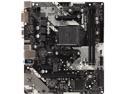
ASRock A320M-HDV R4.0 AM4 AMD Promontory A320 Micro ATX AMD Motherboard
Overall Review: Let me start this out by saying I'm a huge ASRock fan. Throughout 2019 I built various PC's. I build computers all the time for friends and myself. I bought 5 of these boards at the beginning of 2019. I ran Ryzen x2 1600, 2700X x2, and 1200. Every board used different hardware, but by the end of the year, my results were horrible to say the least. First of all, the boards dealing with the 1600 had the worst problems. Critical errors constantly. I couldn't fix this no matter what version the bios was, no matter what hardware I replaced, and I couldn't even debug the solution in my Linux environment either. Different OS's, hardware, nothing would keep these things stable. The 2700X series would blue screen constantly, but a about 6ish months ago, they released a bios update that did fix the 2700X blue screens for one of my boards, but I ended up replacing the other board with a different series and had zero problems. Now I'm only dealing with 4 of these boards instead of 5. I'm running my own small server rig on a 1600 and out of complete and utter frustration of critical errors, I gave up completely and just bout a 3k series cpu, new ram, and mobo, because I don't even care to save a Gen 1 series. The other 1600 that's running has the oddest LAN issue I've ever seen, but the TLDR version of that is the LAN is just unusable. Last was the 1200 series. It would have odd break downs and I ended up returning the mobo and replacing it, which then had me with zero issues later on. So, in the end, only 1 of these boards worked on a 2k series ryzen. I've gone into further detail than I'm even willing to write, but I'm horribly upset with the results of this board within 8 months of use. I've had other friends buy this board and they also had issues, but these were the 5 I had personal experience with. The newer series (specifically the 450 series) has never failed on me! I'm not upset with ASRock. Things happens, bad products are made, so whatever. But please trust me on this. DO NOT BUY THIS BOARD!
1/11/2020See more detail
Better than expected
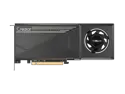
ASRock Creator Radeon AI Pro R9700 R9700 CT 32GB 256-bit GDDR6 PCI Express 5.0 x16 Graphics Card
Pros: Absolutely fantastic card all around. I'm both gaming and doing AI workloads with this GPU. I'm also using 2 of them in parallel on vLLM and it works great.
Cons: As of March 2026, you can for sure get this to work well on vLLM but it's going to take work. You'll need to build vLLM, newest ROCm, and more all by yourself. The ecosystem is not mature yet for these cards when it comes to AI. If you're hoping for plug and play, this ain't it unless you're just doing llama.cpp with Vulkan. But give these cards 3-12 more months and the space will mature drastically by the end of 2026. These cards are sleepers right now in the space. Buy them now knowing they'll be crazy good tier within a year. That's just my opinion on the timeline, but I'm basing that off the ROCm update release cycles I've seen. Or have that power at your finger tips now if you're willing to put up with the rocm upfront friction. But don't expect pre-made docker environments to save you hear, that's not caught up yet either.
Overall Review: Great cards, very young software maturity. Works okay right now for llama.cpp AI tasks, works great with vLLM when you put in the work to build it, great gaming card too, and this card has tons of potential still being unlocked every day as ROCm matures. I love these cards as they are now and I'm excited to see them be even better as development continues.
3/8/2026See more detail
Thank the Lordy!
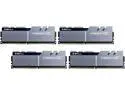
G.SKILL TridentZ Series 64GB (4 x 16GB) 288-Pin PC RAM DDR4 3200 (PC4 25600) Desktop Memory Model F4-3200C16Q-64GTZSK
Pros: I've been sitting on 32GB of RAM for years now that I could never clock properly to spec. It was very frustrating. But I really needed to up my game to 64GB of RAM due to the kind of work I do. The RAM after being put into the proper slots were easy to set the xmp profile properly. Though I had to set mine to 3k instead of 3.2k, but note that's 100% due to weirdness that I don't feel like explaining about my PC. That is not the fault of this RAM, I'm actually incredibly impressed I got it to 3k in the first place on my current setup. Overall, RAM is RAM, but I was impressed that it just worked so simply. I also don't know if it matters, but it's heavy, in a good way imo. You can tell it's not cheap plastic they put on the heat sinks, it feels quality, though I don't have the tools to properly test it. Overall, it's well priced, gets the job done, I may end up buying more in the near future to bump up to 128 GB.
Overall Review: Would very much buy again. Thank you.
3/11/2022See more detail
SO Far So Good
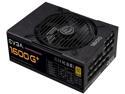
EVGA SuperNOVA 1600 G+, 80+ GOLD 1600W, Fully Modular, 10 Year Warranty, Includes FREE Power On Self Tester, Power Supply - 220-GP-1600-X1
Pros: I've only been using it for 12 hours over night, but so far, it has powered my heavy equipment amazingly. It's also very quiet for how large this is. Most PSU's this size sound like lawn mowers, so lowering the sound levels is nice.
Overall Review: Great, I would recommend, but I'll update this after a few months of use as right now, with how short of a time I've used it, it's not accurate enough imo.
1/7/2021See more detail
Great Case for the price
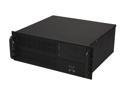
NORCO RPC-430 Black 4U Rackmount Super Short Depth 15.25" Server Case 6 Internal 3.5" Drive Bays
Pros: Is it the best case in the world? Not really, but it's exactly what I was looking for. I mean, if you haven't noticed, getting a rack mount case is extremely expensive! These suckers can cost you a small fortune, but I was building a server that I wanted to be on 24/7, was powerful enough, but also energy efficient (as my current 48 core 256 GB RAM server is simply a power monster and I don't use it to its fullest, so leaving it on constantly can cost me hundreds of dollars in electricity each month). I wanted to build a Plex server, but a computer that would also handle my DHCP server (requires little to no hardware honestly), and did some other tasks for me at the same time (majorly be the main trunkline server for downloads, remoting in so I could connect to everything on my rack remotely, etc). This cheap case was perfect. Very sturdy, very well built and honestly, my only problem with it is that you can't fit a full sized motherboard in there. You'll need a smaller motherboard for the space they gave to this server, but honestly, I knew that buying this case and I didn't have a problem with it personally, but it would have been nice. I was looking for a case that simply worked, was sturdy, cheap, and fit my new energy efficient server that would be running constantly. This does the job and I'm very happy with it.
Cons: Would be nice if I could have fit in a full sized mother board.
6/2/2019See more detail