
Your Browsing History


Christopher G.
Joined on 03/08/07
0
0
product reviews
- 12
EA650 is a top notch PSU
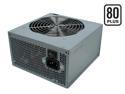
Antec EarthWatts EA650 650W Continuous Power ATX12V Ver.2.2 / EPS12V version 2.91 SLI Certified CrossFire Ready 80 PLUS Certified Active PFC "compatible with Core i7/Core i5" Power Supply
Pros: At 650W, this PSU should have no problem powering a fairly loaded quad core system. Extremely quiet operation, highly efficient as an 80 PLUS certified PSU, plenty of power connectors for SATA and MOLEX. This PSU also has the 8-pin 12V EATX for motherboards and CPUs that make use of this type of power connector (recommended for Intel Quad core CPUs). The Antec EA650 is a great buy - costs half of what most other well-known SLI certified, crossfire ready PSU's sell for online.
Cons: None at all.
Overall Review: 650W is plenty of power, don't get conned by 14 yr olds on the various online forums out there who insist on 800W+ power supplies.
9/30/2008See more detail
Plenty large, great wire management, keeps system cool
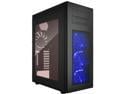
Rosewill RISE GLOW ATX Full Tower Gaming PC Computer Case, Supports: E-ATX, Dual PSU Mount, Vertical GPU Mount & 360mm Liquid Coolers, 4 Dual-Speed Fans
Pros: - Large, plenty of room for components and hard drives, RAID setups, etc. - More than enough fans to keep standard systems running cool - Wire management is the biggest selling point of this case - lots of options for routing wires so that most remain hidden, 2 hidden caddy trays for 2.5" SSD drives - Power/reset buttons as well as USB ports are located at the top of the case for easy access if using as a workstation under a desk - Filters located on top and on the bottom to help keep dust out off the components
Cons: - Fairly large footprint, not the best solution if you're looking for something more compact - Only enough room for 2 optical drives (5.5") on the front of the case - Hard drive caddy could have been designed to support more than two 3.5" hard drives (my previous case, which was much smaller in overall size, had a caddy that supported 4 HDD's)
Overall Review: Overall, this is one of the best deals on a full-size ATX/EATX tower on the market. The spacious interior provides more than enough space for easy installation of motherboard and other components.
12/31/2019See more detail
P5Q Pro - Another solid board from ASUS
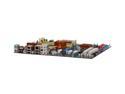
ASUS P5Q Pro LGA 775 Intel P45 ATX Intel Motherboard
Pros: Well-designed board with plenty of PCIe/PCI and memory expansion (up to 8GB). Installed board (this one wasn't for me, took on this build for someone else), dropped in E8500 CPU, threw in 2x2GB (4GB) of OCZ Reaper RAM, some drives, a PSU, then fired it up with no issues. Flashed BIOS to v1613 via EZ-Flash from CD-ROM before installing Vista64 OS, no problems at all. The P5Q Pro has some good overclocking options, not too shabby and basically in-line with the Rampage Formula (a $300 MB) which I use on for my own Xeon quad core system. Runs perfectly fine with 4GB of DDR2 1066Mhz RAM at 2.10V set manually in the BIOS. Passed 24-hour Prime95 stability blend testing with flying colors after all hardware was installed. Great value for a sub $150 motherboard. Highly recommend this one to anyone looking for a reliable and stable that has many of the bells and whistles of boards twice the cost.
Cons: None.
Overall Review: Vista64 installation was dog-slow on this system for some reason, this is really a Vista problem however because it probably loaded trash generic drivers for the DVD drive. Once Vista64 loaded, however, everything ran lightning quick as expected.
12/16/2008See more detail
Solid overall case, but not perfect
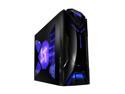
NZXT Guardian 921 CS-NT-GD921-B Black Steel ATX Mid Tower Computer Case
Pros: Built a PC for someone else using this NZXT Guardian case - lots of room inside, tool-less installation for HDD's and Media drives, LED lights on front and side of chassis look very nice. 3 Large 120mm fans for optimal cooling. The ATX screw holes for the motherboard offset posts were clearly labeled which made installation even quicker. Temp sensor display on top panel of case is also a nice feature. Plenty of room in this case for an aftermarket cooling set up. Also has a front hinged magnetic door panel that conceals access to the media drives, which I thought was a nice touch and a useful feature. Tool-less design worked VERY well for HDD and media drive installation. Locks the drives in firmly in place. A good overall, great-looking case and a great buy for the sub $70 range.
Cons: No slide-out tray for motherboard, something I've always liked to see in a case but seems to be a rare offering these days. The 3 120mm fans are fairly weak and don't appear to move as much air through the case as they could. The side panel should be on a swivel -- it would be easy to do damage to the fan wiring if the side panel was pulled off hastily in a careless manner. Tool-less installation for PCIe/PCI cards was the main downfall of this case - the little tabs used for locking the PCI cards do not hold very firmly and the tabs themselves are easy to break. Thermal sensor diodes aren't very accurate, especially for gauging higher CPU temps (above 45C), but they seem to gauge temps accurately under idle conditions.
Overall Review: Be VERY careful with the side door panel once the fan is hooked up. One wrong move could tear up some wiring.
12/16/2008See more detail
Well designed RAM, runs cool, great price
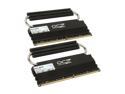
OCZ Reaper HPC 4GB (2 x 2GB) DDR2 1066 (PC2 8500) Dual Channel Kit Desktop Memory Model OCZ2RPR10664GK
Pros: Recently finished building a system that used OCZ Reaper HPC memory, and I was impressed with the quality of the product and its performance. Passed 24-hour Memtest86+ and Prime95 stability testing with 0 errors at 1066Mhz, 2.10V, 5-5-15-15 latency in BIOS. Works exactly as spec'd, no problems whatsoever.
Cons: The heat spreaders may get in the way in a crowded system with too much hardware. But other than that, no cons with this memory.
Overall Review: Time and time again people complain about the RAM not running at 1066Mhz at default BIOS settings. MOST if not all motherboards will not run memory at 1066Mhz by default (in AUTO mode), you need to set the clock speed (1066Mhz) and voltage (2.10V) MANUALLY within your BIOS as per the manufacturer's specs. It's a very simple 3-second task during a reboot.
12/16/2008See more detail
Radeon HD 4650 a solid choice for graphics
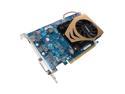
GIGABYTE Radeon HD 4650 1GB GDDR2 PCI Express 2.0 x16 Graphics Card GV-R465-1GI
Pros: Excellent overall performer for the price, with 1GB of GDDR2 memory, the HD 4650 will run games at the highest settings without breaking a sweat. Has both HDMI and DVI outputs for HDTV connectivity. The fan is not noisy as others have stated, I can't hear it at all, but then again I run a Zalman CNPS9700 aftermarket cooler at the highest RPM, which may be drowning out the fan noise. Either way, don't base your decision to buy a solid graphics card on the fan noise, that's ridiculous. Scores a 5.4 for 3D graphics and 5.3 for desktop acceleration within Vista64. Scores may vary depending on how you configure the card.
Cons: None at all.
Overall Review: If you run Vista64, drivers are available from Ati.amd.com - select "Vista32" as your OS and you'll be presented with both the 32 and 64-bit drivers. If you select Vista64 as your OS from the drop-down menu, the 4650 card will not show up.
12/15/2008See more detail