
Your Browsing History
 We‘re shipping as usual! The Canada Post strike only affects certain remote deliveries and PO Boxes. Details
 Holiday Shipping Details & Extended Holiday ReturnsWe‘re shipping as usual! The Canada Post strike only affects certain remote deliveries and PO Boxes. Details Holiday Shipping Details & Extended Holiday Returns

Joined on 05/08/08


Amazing case
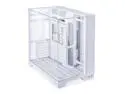
Pros: - Terrific options for cable management and modular locations for SSD/HDD if you go that route. Personally I was going to put a RAID1 array but I elected to use a separate NAS instead. - Great use of thumbscrews to lock the panels in position with magnets to hold them. The metal left-side panel uses studs and magnets. - Mobo tray???? I haven't seen that in years!! Gives you the option of moving the mobo to suit the fans around it. Plus assembling the build is dead nuts easy. - If you elect for the white version, all the components match! It's just sad when some other companies sell a "white" case that has a black mobo subplate, black cables, black fans...Lian Li made the right choice here. - This case has some serious sheet metal design put into it and I'm wondering why I never bought a Lian Li case before, because the engineering behind this is very noticeable. You can disassemble the ENTIRE thing if you wanted to paint it. Makes me think how easy it would be to buy a white case as a primer color then modify it.
Cons: If you're building a max-performance build, this case might not be ideal since it doesn't have a top-facing outtake fan spot. That seems to be the consensus from checking youtube videos. But realistically if you're just building another gaming PC, even an above-average build, you might be able to sacrifice a little bit of thermal performance for the cool looks of this case. One other tiny complaint (more of a warning) it took me a few days to get everything assembled since I was waiting for fans to arrive etc. I found myself removing and reinstalling the thumbscrews a few times, and noticed they are very small, so you gotta be careful to avoid mis-aligning them when tightening because you can cross-thread the holes if not careful. Take an extra second to ensure the screw is straight and aligned with the threaded hole, rather than jamming it in there. I didn't have this problem but I could foresee people encountering it!
Overall Review: This case is amazing looking and REALLY stands-out as a center-piece. My sister visited my house and and didn't believe it was a computer when she saw it. And it was really fun to build inside, with so many options and convenience features. I wasn't as excited about pulling a new PC build together until I picked the case, then I had renewed interest in seeing the final product. If you're looking at other "dual chamber" cases that use fans on top, from Lian Li or another company, this is a good alternative to consider. It offers marginally worse airflow with no top-mounted outtake fans, but the unique appearance is a nice benefit if you aren't chasing the highest-performance build.
Old system
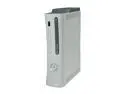
Pros: Better bargain than the cheaper Arcade version. All you really need is a Live subscription and rechargeable controller battery/charger.
Cons: The system I purchased was manufactured in August 2008, it's the old falcon chipset. I'm really disappointed that I bought a brand new system only to receive one a year old. I only purchased it from Newegg since I saw all the other people receiving new systems...uggh
Works good
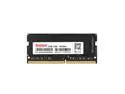
Overall Review: I bought this DDR4 to upgrade a synology NAS from its factory 2-GB up to 6-GB total. It does the job perfect, and is correctly detected in the NAS' configuration, so I can't complain.
Works good after tweaking
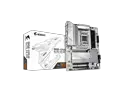
Pros: - Lots of RGB and fan headers. - Gigabyte control center seems to work pretty good for fan control and updating. The fan control is real simplified but easy to manipulate. I've only dabbled with the built-in overclock options but it also seems to work as well. Much better than the ASUS junk software anyway. Also the Gigabyte BIOS is pretty good if you care about that. - Good matching colors for the white version, with some silver metal components rather than painted white. I think it looks good. Also the heatsinks are simple and clean. - M.2 clips make installing drives very easy. No tiny M.2 screw needed. - Big variety of rear I/O for USB, HDMI, displayport. You might not need those but it makes testing the build without GPU easy.
Cons: Strap in, there's some quirks. Some of it is AM5 stuff but not everything. - My first boot was really difficult. I couldn't get past bios with two sticks of ram initially, which took a while for me to diagnose. I was able to get it working by installing one stick in the A2 channel, let it "train" which took about 15 minutes (!!!), then clear CMOS and install the other stick afterward, which took about 5 minutes. The screen is totally non-functional during the training so you have to sit there and wait, which takes a long time if you're swapping components and rebooting. AM5 needs a bit of playing around since it seems that other people have trouble POSTing and can't get it working before updating the BIOS. Personally I didn't have that problem but I could see frustration with different solutions being posted online. - I have an ongoing problem where the system will NOT boot if my powered USB 3.0 hub device is installed in the USB 3.2 port on the back. Fortunately the I/O offers tons of other USB-A ports so there's many other options as long as you don't have like 8+ devices lol. But this was a weird problem because the mobo error would say "VGA" and never get through POST, again due to a USB hub somehow? I really wish it had an error code number LCD to provide more detail. Whatever, I moved it and the system works fine. - The rear I/O has an integrated heatsink which might be the bottleneck on your CPU cooler. I used a Deepcool AIO which has no problems, but I could see a large air cooler getting in the way of the rear heatsink rather than the nearby ram. - Gigabyte control center works for a simple fan interface, but I see everybody complaining about the RGB control. Might have to get a different program for that, if you care. - Price is relatively high for a B650 mobo, but I suppose it's in the same range of the other similar mobo's floating around. There aren't many companies offering AM5 yet, so it's mostly a comparison of similar boards from the same companies. This is a good choice if you need a white color scheme, but note that the black Aorus AX boards have a "V2" available so the white will probably get a similar V2 once they deplete the stock of white boards.
Overall Review: Ultimately I'm happy with the build even though it had some quirks. AM5 seems to be a pain even now two years after release, so be prepared to tinker with it.
Nice linked fan package
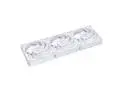
Pros: - Quiet performance especially when correctly-tuned via PWM. They'll be loud at full speed, if the system spools up that hot anyway. - Very clean look when multiple fans are linked together. The fans have a cosmetic metal plate to cover the sides which I actually really like since it throws the look off from a typical fan (the plate is just an inexpensive plate but I think it was a good choice from the manuf rather than using a piece of plastic there). - Anti-vibration mounting pads - White cables for each fan plus a white linkage cable in case you're doing 1+2. The PWM adapters are black but this is fine because they will be hidden.
Cons: None. these are awesome and the price is very reasonable for three fans in one package.
Overall Review: Overall a great addition to a triple-fan radiator. I'm using them as intake.
Good buy (for what it is)
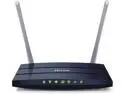
Pros: - Decent range. I'm using it in a wooden building and the range extends through several walls and out of the building itself. I have to drive down the road before the signal is finally dropped. - Good form factor, relatively small size which makes it easy to position out of the way.
Cons: - As many other people have mentioned, the wired connections are drastically limited. I feel this router may be better served running wireless-to-wireless data transfers better than just regular use situations. Transferring between machines may be noticeably better than internet communications. - USB 2.0 (though this isn't a problem if you don't use the USB header)
Overall Review: Be sure to position it high up. It'd be nice if the speeds were higher but I don't notice it myself, in my particular situation at work. So you should understand the details before you buy; this is a good choice for typical use or a small business, but for heavy data transfers you may want a beefier unit.