
Your Browsing History


Benjamin A.
Joined on 03/04/08
0
0
product reviews
- 13
Best processor under $1k
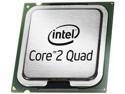
Intel Core 2 Quad Q9550 - Core 2 Quad Yorkfield Quad-Core 2.83 GHz LGA 775 95W Desktop Processor - BX80569Q9550
Pros: I've been fortunate enough to recieve the fabled E0 stepping, and have loved ever second of this proccesor. It blows my Xeon 3510 (E8400) into dust and keeps on going, with more power than Vista can calculate. During test runs I overclocked it to 4 Ghz (470x8.5) @1.35V (within stock voltage), with the stock cooler and paste, and the core temps stayed ~45 C(58 load). After this I reduced the total FSB to 1600 Mhz @1.21V and am enjoying a lovely jaunt of 3.4 Ghz per core with a 10 year expected chip life.
Cons: This is not a con of the chip, but a con of the chipset. To anyone using a nVidia chipset, who has complained of the CPU multiplier being locked at 8, the BIOS utility does not seem to have the functionality to adjust CPU multiplier. When I first booted this new chip it registered as 8.5 multiplier. After toying a little and restarting a few times my multiplier seemed locked at 8, like many of you had complained about. To adjust the multiplier install nTune, then simply enter the dynamic BIOS Access page, move the multiplier from 8 to 9, and upon restarting the system will recognize the 8.5 multiplier.
Overall Review: It may be able to overclock far past the 4 Ghz mark I hit yesterday, but I thought it enough for a break in run. Right now my CPU never hits above 45 C under heavy load.
10/14/2008See more detail
Another DCD switching attempt

UBISOFT Gift - Assassin's Creed Syndicate Game Code
Pros: It's a neat game that comes as a free gift.
Cons: It's on Uplay, from Ubisoft. I haven't yet found a way to mine out a serial key to put the game in my Steam library.
Overall Review: If you just want the game, and don't mind signing up for another content distribution site... go for it!
12/9/2015See more detail
Great little piece for $20
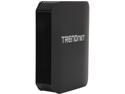
TRENDnet TEW-811DRU AC1200 Dual Band Wireless Router- 4 Gigabit port, Broadcom Chipset, DD-WRT Open Source support
Pros: DD-WRT support, gigabit Ethernet and WAN ports, stable with some tweaks.
Cons: The connection always reads as stable, but the router chokes on heavy traffic. After some research, I pulled this baby apart and redid the CPU thermal paste before loading up DD-WRT. It's been pretty stable since.
Overall Review: The heatsink is a copper sheet, loosely attached to some AlN(a good ceramic heat conductor), and it's pretty poor at stock. Pull it off and put better thermal paste between the layers(CPU-copper-AlN); then it performs like a champ.
6/4/2016See more detail
Great sound, while the materials hold out

Bose IE2 Audio Headphones
Pros: These earbuds have great sound quality, not as good as a pair of regular Bose headphones, but great nonetheless.
Cons: The materials these headphones are made of are very cheap for their price. The gold plated audio connector has such a thin veneer of material that it will wear off from regular use within a year (lessening the sound quality) In addition, the rubber used for the earbud cords began cracking within a year of me getting these; I have since patched it together with electrical tape, and the sound doesn't seem affected.
Overall Review: It's not like I abused these at all, I keep them in a nice case while not in use, and always made sure I kept the cords from being yanked or bent at odd angles. There are other headphones with similar sound for much less money that have better warranty periods.
6/19/2012See more detail
Very Good sinks, Perfect Size
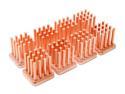
Swiftech MC14 Copper Heatsinks only
Pros: Very good copper material, pre-applied thermal taping, and the size is verily perfect for a VGA ram-chip.
Cons: There are only 8 in a package, and slightly more expensive than comparable heatsinks.
Overall Review: When I read reviews on the poor thermal tape, "even though I followed directions," I think of what it is like to write technical directions. Even though you write down every step required to make your product work, 90% of users will read less than half and then complain when things don't turn out properly. The instructions clearly say to clean the chips with a degreaser (there are several orange oil cleaners on the market that are perfect for this) then firmly press down for 10 seconds. You know those silicon looking pads that are between the ramchips and the heatsink on your video card? They leave an oily film. The key part of these instructions is the degreaser... alcohol is not a degreaser. For a very firm stick, clean the chips with orange oil, then wipe them down alcohol, warm the heatsink with a hairdryer, ensure the surface is lint free, and finally hold the pair firmly mated for 10 seconds or so. If these steps are beyond your computing knowledge, ask a friend to do it.
4/20/2010See more detail
Quick and responsive
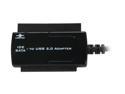
Vantec 2.5" / 3.5" / 5.25" SATA / IDE to USB 2.0 Adapter - Model CB-ISATAU2
Pros: Small, but with cord attatched so it is very hard to lose. Quick transfer, easy hookup, and psu is actually pretty good. Some other products I have used would not recognize drive unless you turned the drive on before plugging the usb cable in, but this product seems pretty good about not caring.
Cons: Nothing, really. $20 is about the standard for a good piece of equipment, there are $15 usb adapters, but they are only about 1/2 the quality.
4/16/2010See more detail