
Your Browsing History


Charles L.
Joined on 09/20/08
0
0
product reviews
- 18
Grat basic board
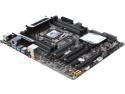
ASUS X99-A LGA 2011-v3 Intel X99 USB 3.0 ATX Intel Motherboard
Pros: Stable and good performing x99 board without a ton of useless gimmicks that just drive up the price.
Cons: A bit slow to boot up, but this seems to be an issue with all the x99-based boards.
Overall Review: A solid motherboard from Asus without a lot of the frills that I didn't need on the other Asus x99 boards such as wifi, plastic bits covering the board, etc. if you are just planning a basic 2-card SLI system, it is hard to beat this for the money. And the realtime multichannel encoding (DTS Connect) is a nice feature for me since I have my computer hooked up to an old AV receiver.
10/4/2014See more detail
Great hardware, awful software
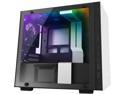
NZXT H200i - Mini-ITX PC Gaming Case - RGB Lighting and Fan Control - CAM-Powered Smart Device - Tempered Glass Panel - Enhanced Cable Management System - Water-Cooling Ready - White/Black
Pros: This is a beautiful case, I really like the matte white finish. It is also a good compromise in terms of small size while also allowing room for an ATX PS, regular graphics card, and a 280mm radiator to fit. The included LED strip and fan controller is a nice touch. It is well constructed and reasonably easy to work in. Overall there is very little to complain about the hardware.
Cons: But then there is the software. The included fan/LED controller requires the CAM software, and this is just a pile of hot garbage. First off, you need to create an account to use the software. Yes, you need to create an online account to run your local hardware. It was stupid when Razer did this, and it is stupid that NZXT does this. Worse, they can't even get this right. I signed up for an account, but can't login because it won't recognize my password. Resetting it does nothing, and I can only log in via Google or FB. You can use "guest mode" but it doesn't save any of your settings. Even if you get all that done, it STILL occasionally forgets your settings, so you have to change all your fan profiles (including the fan names) and LED settings. This gets tiresome very quickly. What's more, editing the fan curves is somewhat limited since you cannot change the entire curve, only the middle section. Still, when it does work, it is fine.
Overall Review: If NZXT happens to read this, here is my advice: You are a hardware company, stick to hardware. Your programmers are completely incompetent and cannot program their way out of a paper bag. You need to scrap the current software and go back to basics. There is ABSOLUTELY no justification for forcing the user to create an online account just to be able to use his/her hardware. Especially since your programmers can't even get basic account setup done properly. Just save the settings to the hard drive, no need to save it to the cloud. Then just get the basics of controlling the fan and LEDs so that they are robust and reliable. Then and only then work on optional bells and whistles. Overall, I really love this case, and I really want to be able to wholeheartedly recommend it. There is a version of this case without the controller, but I feel that the controller does provide a benefit. If only the software was up to the same standard as the hardware, then I would have no problem recommending this product.
8/9/2018See more detail
One of the best mATX cases around
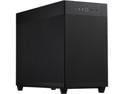
ASUS AP201 Type-C Airflow-focused Micro-ATX,Mini-ITX Computer Case, Support 360/280 Liquid Cooling - Black
Pros: Very good fit and finish Ample room inside for a large GPU and decent-sized CPU HSF, yet still reasonably sized Good Ventilation Easy to install everything inside
Cons: No HDD LED, no reset button Due to the location of the PSU and lack of standardized orientation of the power plug on the back of the PSU, you may have difficulty installing the PSU with the intake fan facing forward (in order to draw cool outside air) Not a lot of locations to install radiators.
Overall Review: Personally, I prefer the understated look instead of the garish RGB lights and glass windows everywhere, so I really like the look of this case. It is not too large, yet has enough room inside to house a powerful gaming system. So far, I'm happy with this case.
7/8/2023See more detail
Good price/performance value
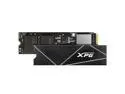
XPG GAMMIX S70 Blade: 2TB M.2 2280 PCIe Gen4x4 NVMe 3D NAND Internal Gaming SSD (AGAMMIXS70B-2T-CS)
Overall Review: It was one of the cheaper performance SSD's for a 2TB drive. No issues so far. No real point in spending more for slightly faster performance.
12/28/2021See more detail
Works as advertised
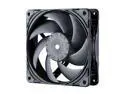
Phanteks T30-120 fan, premium high-performance fan, PWM, Black/Grey
Overall Review: I have a pair cooling my radiators. At 1000rpm, fans are virtually silent while still moving decent amount of air. Even at 1300 the sound isn't obtrusive. I'm impressed.
12/28/2021See more detail
Overall a decent ITX board
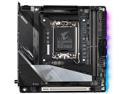
GIGABYTE Z690I AORUS ULTRA DDR4 LGA 1700 Intel Z690 Mini-ITX Motherboard with DDR4, Dual M.2, PCIe 5.0, USB 3.2 Gen2X2 Type-C, WiFi 6, Intel 2.5 GbE LAN
Overall Review: Since this is the only ITX Z690 board that uses DDR4 currently available, I had no choice but to go with this. Luckily, it wasn't the horror show that a lot of other people make it out to be. Yes, you need to update the BIOS right away, but XMP worked fine for me (albeit, I'm re-using my RAM from my previous system and it's only 3200 C16). It recognized my NVMe SSD fine, and I was able to do a fresh install of Win11 with only one hiccup: there is no default LAN driver in Win11. Luckily, I had already downloaded the MB drivers and was able to open a command line window and install the LAN driver during windows installation. The BIOS isn't very extensive. There is an option to disable the LAN port but not the wifi or bluetooth, for example. And the fan curves can be saved in BIOS, which supposedly survives bios updates but don't, so better to save it on a USB stick. Also, there is no way to change the last fan curve point, so it always runs 100% at the end. This may be fine for fans, but for water pumps it's pointless. I wish Gigabyte would allow us full control of the fan curves. The only issue is the WHEA 17 errors, which can be "fixed" by setting pcie to gen3. To be fair, this affects other boards like Asus, too. So it seems like it's a chipset issue, not just a motherboard issue. Hopefully it will get fixed in a future firmware update. Otherwise it's been stable. I've overclocked my 12700kf to 5.2 up to 4 cores, 5.0 all cores, 4.0 e-cores on stock voltage. I'm using a custom watercooler setup, with EK's new LGA1700 waterblock, so fitment wasn't an issue. Also running a 3090 also with EK waterblock. I might play around with memory overclocking, but right now I don't see a pressing need to do so.
12/28/2021See more detail