
Your Browsing History


Victor C.
Joined on 09/10/07
0
0
product reviews
- 28
Pretty good
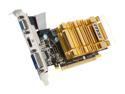
MSI Radeon HD 4550 1GB GDDR3 PCI Express 2.0 x16 CrossFireX Support Low Profile Ready Graphics Card R4550-MD1GH
Pros: Silent of course, and the passive heatsink is good enough to keep my card well below 80C under load. It can do 1080p H264 acceleration without lagging up Flip 3D (see Other thoughts). This card is perfect for users who have low to mid level monitor(s) and do not play games or use CUDA.
Cons: Not fast enough to run the Bubbles screensaver smoothly on dual 1080p monitors, but I only half expected it to. It was close to smooth, so HD4650 would probably be the minimum for Bubbles on those monitors.
Overall Review: Not that I use Flip 3D, but considering you shouldn't be using this card for actual gaming (unless you've already been gaming on integrated video, to which I feel sorry for you), being able to do 1080p H264 decoding and Flip 3D without lag sounds like a suitable real-world worst-case performance benchmark to me. It just means that there is enough headroom with this card for pretty much all non-gaming entertainment uses under a Vista/7 setting. IMO there should be no reason for anyone to get a card so slow that there is lag under certain situations when they're not even gaming.
1/15/2010See more detail
Minuscule performance gain over Wifi G
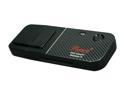
Rosewill RNX-EasyN1 Wireless-N 4.0 Dongle (1T1R) IEEE 802.11b/g/n USB 2.0 Up to 150Mbps Data Rates WPA/WPA2 (AES, 64,128-WEP with shared-key authentication) WPS PIN, PBC (Hardware WPS Button) QoS-WMM
Pros: It works.
Cons: No place (such as the other end of the device) to hold the cap while its in use. No lanyard/strap hole. Drivers did not automatically install using Windows Update in Vista or 7.
Overall Review: Transfer speeds are hardly a step above Wifi G. Wifi G can do about 2.6MB/s while this adapter hovers at just above 3MB/s. I couldn't even stream 1080p mkv content, which needs less than 4MB/s, through this adapter. I even tried putting this adapter a foot away from the AP with no improvement. Considering its performance, 150Mbps Wifi N is virtually 54Mbps Wifi G in disguise. It also shows that the Mbps number is even more exaggerated than it was during the Wifi G era. Oh well, it was a cheap Shell Shocker deal anyway... At least my 300Mbps adapters can stream 1080p mkvs.
9/21/2010See more detail
Supported under FreeBSD and OpenSolaris
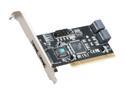
Rosewill RC-209-EX PCI 2.3, 32bit, 33/66Mhz SATA Controller Card
Pros: Supported without needing to install any drivers for FreeBSD and OpenSolaris. FreeBSD supports it the way it is.
Cons: For OpenSolaris, the card has to be flashed with the IDE BIOS for it to work. This requires either a floppy drive or Windows. Inconvenient, but mostly a one-time thing.
Overall Review: The card has 6 physical ports (4 internal + 2 eSATA) but can only do 4 at a time so it has a bunch of jumpers you move as a group to choose between internal or eSATA for either or both of two internal ports. While the bunch of jumpers is a perfectly functional and cost effective way to choose ports, I don't really like the idea. For the idea of choosing between two ports, ONE jumper is enough, but that would require additional hardware elsewhere.
12/11/2010See more detail
Soooo quiet!
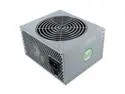
Nexus VALUE 430 430 W Active PFC Power Supply
Pros: This power supply is amazing, it even stays quiet with a full watt load on it. That is more than can be said for pretty much every other power supply in existence. Every other power supply may say "SILENCE" or something as a feature, but once you put some sort of load on it they get to 40dB and up! Even on full load this thing makes less than 20dB. I also promise you that most of those other "quiet" power supplies have a (slightly) higher dB at idle than this one has at full load. The Value 430's fan basically doesn't speed up, no matter what load is put on the PSU. Even with the low fan speed, the exhaust air is ALWAYS cooler than the exhaust from the Corsair 450W it replaced.
Cons: Cables could be longer, I had to get a CPU EPS 12V extension cable to use this power supply in my P182.
Overall Review: Other power supplies may have higher wattage (for the same price) but with the fact that they get too loud starting at about 200W load means that they have a severely limited USABLE wattage.
12/11/2010See more detail
Great DD-WRT router

Rosewill RNX-GX4 Wireless-G Broadband Router / Open Source & DD-WRT Firmware support IEEE 802.3/3u, IEEE 802.11b/g
Pros: Supports DD-WRT! At $20, it was much cheaper than the WRT54GL ever was and both have been equally capable and stable for my uses. Screw-based casing is easy to open up, unlike the WRT54GL's plastic clips.
Cons: As always, the stock firmware is worse than DD-WRT.
Overall Review: I don't think I've ever seen a router box with specs printed on it that include the exact model of Broadcom CPU, amount of RAM, etc... for a ROUTER.
12/11/2010See more detail
Better than my other 7 port hub
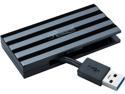
Rosewill 4-Port Slim USB 3.0 Mini Hub, with Built-in 2" Cable, Compatible with Windows & macOS, Portable Pocket Size Travel Accessory - RHB-320B
Pros: This hub will not send power (from the power adapter) back to the computer. This is how all hubs should be! My cheap Vakoss hub lacked that sort of safe circuitry and caused my computer to not even be able to power up while the hub had a power adapter plugged in. I would have to plug in the power adapter AFTER powering up the computer in order for things to work. But that's a thing of the past, this Rosewill hub's proper design solves that problem!
Cons: The primary ports are the 3 at the top, which is a bad position for them. The primary ports are the most suitable for connecting other hubs (and repeaters). Yet the ports on the top are positioned to be used with flash drives, not hubs.
Overall Review: For those that don't know what I'm talking about... think about how a 7 port hub is made. It's just a secondary 4 port hub chip connected to a primary 4 port hub chip. Given that USB can only be repeated/hubbed five times out, its important to know which ports are from the primary chip. Those are the ports you would want to connect any further hubs or repeaters to for the maximum number of devices. Albeit, virtually no one needs that many devices for this layout problem to matter, so its still 5 eggs, but it is a layout problem nonetheless. BTW, the hub's stand is made out of metal instead of plastic and has a good amount of weight to it.
9/21/2010See more detail