
Your Browsing History


John L.
Joined on 12/10/04
0
0
product reviews
- 15
They're fans -- and they work -- quite well
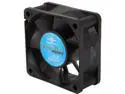
Vantec Thermoflow 60mm Double Ball BearingTemperature Controlled Case Fan - Model TF6025
Pros: These are great fans to use for additional heat exhaust. Only spin up as much as needed based on air temperature flowing through them reducing noise factor when full airflow isn't needed. Just remember that the temperature sensor is in the fan body . . . and therefore it should be used as an exhaust fan pushing hot air out of a case. Given their 60mm size, they're still quieter, even at full speed, than other fans in the same size and bearing class. If you need quieter fans with the same airflow rating, get larger fans that can turn at lower RPM to do that (RPM is the biggest factor in noise).
Cons: My only wish is that they could be powered by the motherboard instead of only the fan spinning sensor wire connecting to the motherboard. I will ultimately remove the bulky four-pin drive power connector and put the power connection in the same motherboard connector as the third sensor wire. Would have gotten five eggs if not for that.
Overall Review: Added a pair of these to the back of an old case with new motherboard, processor, graphics card and RAM that generate substantially more heat than the case was designed for (ATX desktop box that dates back to Win95 Socket 7 ATX motherboards). Knew it would need better airflow before rebuilding it. Gave a great, heavy-duty steel case a new lease on life!
10/20/2008See more detail
Great Price - Great Card - Solid Performance
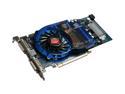
SAPPHIRE Radeon HD 3870 512MB GDDR4 PCI Express 2.0 x16 CrossFireX Support Graphics Card 100225L
Pros: Review title almost says it all . . . plus solid performance above and beyond what I had expected. Great price to performance ratio.
Cons: Zero!
Overall Review: Ensure there's enough airflow through the case in the proper direction to ventilate heat out of the case . . . the enemy of processors, RAM . . . and . . . graphics cards. Fan on graphics card doesn't seem unduly loud to me (my system has three case fans in addition to the processor and graphics . . . but they're not that loud either). I plan to add a second one of these in tandem with the first one (Crossfire) later this year.
10/20/2008See more detail
Great AM2+ Motherboard at Great Price
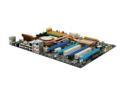
MSI K9A2 Platinum AM2+/AM2 AMD 790FX ATX AMD Motherboard
Pros: Great price . . . well made (see Cons for one nit) . . . installed nicely . . . and works extremely well . . . the 64-bit drivers for WinXP /x64 drivers are stable with no problems. I'm exceptionally happy so far (about two weeks of running). Nice that it has lots of on-board peripherals including IDE and floppy drive support (yes, I still use a micro-floppy occasionally). Lots of custom voltage and timing settings in the BIOS . . . really came in handy for using low-latency RAM that is rated for and needs to run at slightly higher voltage to attain its full performance.
Cons: Had to bend a heat pipe downward slightly to fit the graphics card into the first PCIe slot. Not much and it was easy to do gently without risking damage. However, it could be designed so that it doesn't need to be. This has been mentioned by others . . . so I knew it would be likely I'd have to do the same when I bought it. That's the sole reason for four eggs, not five. Minimum power supply rating in the manual, in my humble opinion, is a bit low. Should be higher (see Other thoughts).
Overall Review: Bought this board for an Athlon 64 x2 6400+ with Windsor core . . . rated at 125 Watts. Powered up just fine and has sustained operation with it . . . no BIOS issues. Will eventually put a second graphics card and run crossfire later this year . . . and put a high end Phenom on it . . . in a year or so. Be certain to use the additional power connector on the motherboard for graphics stability . . . definitely helps. Be certain the power supply can provide enough power (wattage) for the entire system (including all the peripherals)! Proper power supply selection . . . getting a good one that solidly delivers stable power . . . is half the battle with motherboards and graphics cards in particular. A little overkill in this regard doesn't hurt (and the power supply will run cooler). After I built the system I benchmarked it and got better results than were anticipated!
10/20/2008See more detail
It's RAM -- It Works -- As Advertised!
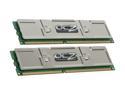
OCZ Platinum 2GB (2 x 1GB) DDR 400 (PC 3200) Dual Channel Kit Desktop Memory Model OCZ4002048ELDCPE-K
Pros: It's RAM and it works . . . quite well . . . at its timing specs . . . with solid heatsinks . . . and installed easily in my system. No glitches, no problems . . . just a standard notice in WinXP on first boot that the RAM has changed. Great price with the rebate!
Cons: None at all (see Other Thoughts)
Overall Review: Pay attention to the timing specs and voltage. If you want it to perform, set RAM voltage in BIOS to the voltage specified for this RAM. I've found that to be the case with all low-latency high-speed RAM (OCZ and RAM from other mfrs.). Before buying any low-latency RAM for a store-bought system (e.g. Dell, HP, Gateway, etc.) . . . ensure you can change the RAM voltage in BIOS first. This is something all non-OEM motherboards I've encountered in the past 5 years or so do allow . . . but some OEMs (especially Dell and HP/Compaq) dumb down the BIOS and severely limit what an end-user can change. One among many reasons I've been building my own custom systems. One other tip -- if replacing other low-latency RAM reset BIOS settings for voltage and timing to Auto before replacing the RAM -- and then go back in and set voltage and timing for the new RAM after installing it -- prevents BSOD on first boot if the new RAM needs different settings (especially voltage).
10/20/2008See more detail
Great Value - Must Set BIOS To Use
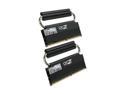
OCZ Reaper HPC Edition 4GB (2 x 2GB) DDR2 800 (PC2 6400) Dual Channel Kit Desktop Memory Model OCZ2RPR800C44GK
Pros: Great Price Great Speed (see Other Thoughts) Sturdy Heatsink Installed Easily
Cons: None for me . . . Ensure your application (motherboard, case and other peripheral components) allow room for the elevated heatsink above the RAM. Also ensure you can set RAM voltage and timing in your BIOS so you can use all the performance you're paying for. This sometimes isn't explained well (or clearly). See other thoughts below.
Overall Review: I've been using high-speed low latency RAM for about five years. In nearly all cases it required adjusting the BIOS to the higher than "normal" (standard) voltage the RAM is rated for by the mfr. (go above mfr. rating at your own risk). That's the reason for the heatsinks. The RAM ICs have been selected to withstand it if the heat is dissipated. In some cases it required manually setting timing as well. Once done . . . observing the RAM's specs . . . you get all its high performance . . . with this RAM I did both. I don't OC beyond mfr. spec . . . high speed, long life (never had a RAM failure) and high reliability (no BSOD or lock-ups) . . . not just this brand . . . but others as well.
10/17/2008See more detail
It's RAM -- It Works -- As Advertised
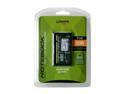
Kingston ValueRAM 1GB 200-Pin DDR SO-DIMM DDR 333 (PC 2700) Laptop Memory Model KVR333SO/1GR
Pros: Hey . . . it's RAM. It fits . . . and it works . . . what more is there?
Cons: NONE
Overall Review: Plugged this in to an older laptop to upgrade it from 512MB (2 X 256MB) to 1.25 GB RAM (1 X 256MB + 1 X 1GB). With this machine the imbalance RAM size didn't matter as it's not a dual-channel architecture. I may eventually replace the remaining 256MB stick with another 1GB stick, to bring it up to 2GB, but it's not a high priority. Glad I could find some PC2700 (333 MHz) RAM! In spite of the RAM speed . . . it's an Athlon 64 Skt 754 machine and still runs at a pretty respectable speed . . . faster than any 32-bit laptop I've seen . . . and now its WinXP "breathes" better with a GB of RAM . . . noticeably less swap file use.
9/15/2008See more detail