
Your Browsing History


Bryan K.
Joined on 01/10/06
0
0
product reviews
- 11
Fast Processor!!
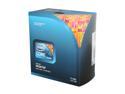
Intel Core i7-940 - Core i7 Bloomfield Quad-Core 2.93 GHz LGA 1366 130W Desktop Processor - BX80601940
Pros: Fast, takes everything I throw at it. I am not overclocking it, it's fast enough.
Cons: Absolutely none.
Overall Review: I tried using the stock thermal paste that came with it. It was idle at 45C. Removed it and used arctic silver and not I'm idle at 36C. The problem was the stock paste did not spread out evenly. My System: Intel Core i7 940 (Stock Cooler) ASUS P6T Deluxe MoBo 6 GB OCZ Gold 1600 DDR6 EVGA GTX 280 SCC Edition Western Digital Velociraptor 300 GB Apevia X-Jupiters Case OCZ 700GXSSLI Power Supply
2/19/2009See more detail
Caught fire today
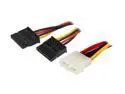
Nippon Labs SATA Adpater Molex 4-Pin PC power cable to 2 x SATA Converter Cables for SATA I and SATA II Hard Drive Model POW-SATA-2
Pros: None
Cons: Found out the hard way that MOLEX to SATA adapters are prone to catching fire. Mine just did today. I would never suggest to buy an adapter if you can avoid it. Don't take my word for it, do a search for them catching fire. Definitely not worth the risk.
8/24/2016See more detail
Doesn't work with jumbo frames & poor support
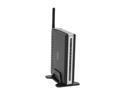
D-Link DPR-1260 Rangebooster G Multifunction Print Server 802.11b / g, RJ45 4 x USB 2.0 Ports
Pros: Can print or scan with any computer on your network as long as you are not using jumbo frames.
Cons: *The DPR-1260 does not work with jumbo frames. If you have a network storage device, this becomes an issue. I have a D-Link DNS323 network storage device that I use jumbo frames for faster transfers but with that enabled I cannot get to the DPR-1260 to scan or print. Called tech support and they did not have a clue. * Emailed tech support five days ago with no response. * Tech support must be in another country as it was very hard to understand who I was speaking with.
Overall Review: A company should be able to support their products and keep customers happy with good customer service. Every company can offer the same products these days, it's how they treat customers that should set them apart.
7/17/2009See more detail
Wow - It's HUGE!
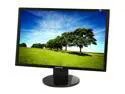
SAMSUNG 24" LCD Monitor 5 ms D-Sub, DVI 2443BWX
Pros: It's a Samsung!!! On my 3rd LCD from them; all still in great working condition. Have a 930bf and a 940bf. Those are 19" monitors and I must say the jump from those to this one was incredible. Now for some good points. Low profile bezel; a must for me, I don't like the wider ones. No stuck or dead pixels No problems with ghosting - gamer... Everything is very clear, no problems with light bleeding at the edges. I am sitting back a good 2.5 feet from it though. If you are sitting too close, you will have some trouble with the viewing angles. It's huge, no need to be any closer to it!! If you are on the fence, buy this monitor, you will not be disappointed.
Cons: I'm going to keep it at 5 eggs because I knew all of these before I purchased it. They are minimal complaints but still worth a mention. - Glossy bezel; not sure why they went with glossy... Kind of like when all TV and stereo manufacturers went with silver a few years ago... Just doesn't make sense. - No height adjustment; honestly this isn't a big deal at all. - No actual buttons for the settings; it uses heat from your fingers to act as a button. I think this was a poor move for two reasons, it makes it harders to adjust the settings and your fingers leave finger prints on the glossy bezel.
Overall Review: I am very happy with my purchase. I spent about 8 weeks back and forth shopping for a monitor; it was between this and the T240HD. I don't plan on watching tv with this monitor. I was really worried about getting dead/bad pixels with the strict return policy. But, as always, NewEgg rocks. I was able to get it the day after I ordered it and that was with the 3 day select! My System: Intel Core i7 940 (Stock Cooler) ASUS P6T Deluxe MoBo 6 GB OCZ Gold 1600 DDR6 EVGA GTX 280 SCC Edition Western Digital Velociraptor 300 GB Apevia X-Jupiters Case OCZ 700GXSSLI Power Supply
2/20/2009See more detail
Fast & Stable
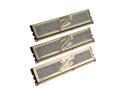
OCZ Gold 6GB (3 x 2GB) DDR3 1600 (PC3 12800) Low Voltage Desktop Memory Model OCZ3G1600LV6GK
Pros: I haven't had one problem with it. Put the max settings in BIOS (1600) & (8-8-8-24) and it's been running stable ever since.
Cons: None.
Overall Review: Make sure you BIOS has the settings you want, don't rely on it to pick them out for you. My System: Intel Core i7 940 (Stock Cooler) ASUS P6T Deluxe MoBo 6 GB OCZ Gold 1600 DDR6 EVGA GTX 280 SCC Edition Western Digital Velociraptor 300 GB Apevia X-Jupiters Case OCZ 700GXSSLI Power Supply
2/19/2009See more detail
Great Fan
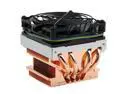
COOLER MASTER KHC-L91-U2 92mm Rifle CPU Cooler
Pros: Good fan, quiet and keeps my AMD 64 4000+ below 47C playing BF2 at maxed video settings.
Cons: It's big, but it does the job. That is the only reason it's not a 5, but it's definitely worth it.
Overall Review: Use the mounting brackets that came with it, including the bottom piece that replaces the one on your mobo. NewEgg did a great job with shipping and it came as described. I recommend NewEgg for all your PC needs.
3/10/2006See more detail