
Your Browsing History


Wesley C.
Joined on 09/02/07
0
0
product reviews
- 47
Good fans!
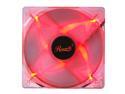
Rosewill Computer Case Fan, 120mm, LP4 Adapter, 3 /4 Pin Connector, Red Frame, 4 Red LED Lights, Sleeve Bearing, Silent - RFA-120-RL
Pros: Got these fans for 4.40 a piece. They move alot of air. Lots of cooling! Rosewill products have generally been great for me.
Cons: "silent" if you have them on a fan controller at 50% or less speed, otherwise, no mistaken they are there. Can't remove any eggs, the sound doesn't bother me. If you want quiet "fans", become a pro golfer. You are guaranteed not to hear your fans!
9/20/2016See more detail
Works!!
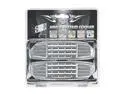
Titan TTC-HDC4 HDD & System Cooler
Pros: Works as a system cooler. Haven't tried it as a HD cooler. Comes with all the hardware you will need. And for the price its a good buy.
Cons: Manufacturer needs to re-tool this product. Cools better without fan grills. About ten degrees fahrenhiet better. Exposes the fans and looks even worse without the grills. For a few extra dollars you can re-tool it yourself. see next comment!
Overall Review: A little double sided tape, two 60mm fan grills and some black paint and you can make this product HOT!!!! Improves air flow and improves looks, and keeps little fingers out of the way of fan operation! (if you have that problem). I tried uploading a picture, hope it worked! Newegg rocks!
9/12/2010See more detail
Upgrade!!!
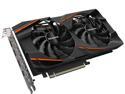
GIGABYTE Radeon RX 580 GAMING 8G (rev. 2.0) Graphics Card, PCIe 3.0, 8GB 256-Bit GDDR5, GV-RX580GAMING-8GD REV2.0 Video Card
Pros: Uses less power than my old R9 380 and runs cooler. 8 GB of Vram. Got it on Black November deal. Thanks Newegg!
Cons: No back plate like my old card. They do alot for the looks inside the case. It can't go to work for me.
Overall Review: Very pleased. I had an issue with drivers on install but it was on me. Went with the amd optional drivers instead of the recommended ones during install. Ran into some issues with the metrics overlay crashing my games. Recommended driver install fixed that problem. Also, had to switch to hdmi output verses the dvi on my old card. This caused windows to set my monitor which is a HDtv to 30hz which had me getting 30 fps during game play. Had to go into the advanced display settings and manually set the refresh rate to 60hz to fix. Only had for a day or so, but so far I am very pleased. Gigabyte makes great cards. This is my third one.
11/25/2020See more detail
Blazing fast m.2 ssd
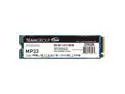
Team Group MP33 M.2 2280 256GB PCIe 3.0 x4 with NVMe 1.3 3D NAND Internal Solid State Drive (SSD) TM8FP6256G0C101
Pros: It's so tiny. Install was easy. It's super fast. Getting over 1300 mb/s read speeds. 5 year warranty just like samsung and WD.
Cons: Team group doesn't have it's own migration software for cloning your old hdd or ssd. Smart tool software is meh, but does give drive benchmarks.
Overall Review: Overall I am please. Took me a while to acquire a decent cloning program to meet my needs since team group doesn't supply one on their website. Either way. It's fast and stays pretty cool even though it's mounted behind my graphics card. My old Samsung 850 evo was getting 525 mb/s read speed, so it's almost 3 times faster. Other reviewers make note the mounting screw is not supplied. The motherboard manufacturer usually supplies you one in the box. For real geeks who build our own rigs, this is not a problem.
11/25/2020See more detail
Really good mouse so far!

AULA SI-9008 Black 7 Buttons USB Wired Optical Gaming Mouse
Pros: Feels high quality. Not hard plastic. Rubbery with good grip. Nice weight to it. Buttons feel good and consistent. Plenty of buttons that are programmeable. Adjustable poleing levels and dpi. Adjustable RGB colors and modes. Comes with software. Better quality mouse than I currently have that I spent more money on.
Cons: I can't say I have any. Time will tell about it's longevity. Will review again if I have any problems.
Overall Review: Bought this to replace a mouse I got 5 years ago. Been having mouse wheel problems over the last year. I use my mouse heavily. Mouse wheel function finally quit so I ordered this Aula Dagger. Very happy to have a working mouse wheel again.
2/19/2020See more detail
Does the job!
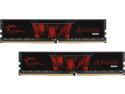
G.SKILL Aegis 16GB (2 x 8GB) 288-Pin PC RAM DDR4 3000 (PC4 24000) Desktop Memory Model F4-3000C16D-16GISB
Pros: It works. And if it does that, that's all it needs to do. Gskill makes good ram. I have these set at 2666mhz because my 1st Gen Ryzen processor restricts memory to that speed. All in all, very happy.
Cons: None.
Overall Review: Ordered last week and got today. Was a bit giddy about the upgrade from 8 to 16 gigs and probably installed them too quickly. Ended up with error beeps from motherboard and no post. Uh ooh! So I took my time. Installed one stick at a time and tested. Motherboard posted with one stick installed. Set desired speed in bios and restarted. Loaded windows. No errors. Shutdown and installed the second stick. Motherboard posted and showed all 16 gigs in bios. Loaded windows. No errors. Pretty sure in the initial rush I just didn't have one of the sticks seated properly. Loaded a game and played for 30 minutes to stress test. Smooth as butter. So very good experience. Gskill memory is top notch stuff. Thanks Newegg!
2/18/2020See more detail