
Your Browsing History


Justin P.
Joined on 08/23/11
0
0
product reviews
- 10
Works great, comes with all you'll need for a while
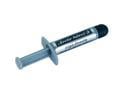
Arctic Silver 5 High-Density Polysynthetic Silver Thermal Compound AS5-3.5G
Pros: -Great quality thermal compound. No insane temp reductions(I'm calling shenanigans to the people claiming 10-15c temp drops, it's thermal paste not liquid nitrogen). -VERY easy to apply. The amount of pressure it requires to get the compound to come out is very little, but not little enough to accidently squirt a whole bunch out. I get very accurate amounts of thermal paste coming out every time. -Comes with a lot. Judging by the picture i was honestly expecting it to be bigger but it's about the same size as all other thermal past tubes(like the ones that cooler master heatsinks come with). You only need to apply about the size of a pea/BB pellet. DO NOT, i repeat DO NOT follow the guide on their website. They say to use OUTRAGEOUS amounts just so you'll waste your thermal paste and need to buy more soone. Don't spread it out either, when you put the heatsink down it spreads it for you. I've applied it to about 10-12 CPUs now and i'm not even at half yet. If this is for personal use you'll never need to buy another one. -Feels awesome knowing you have a completely custom computer, right down to the thermal paste. -Not much more you can ask for, it's thermal paste, it does its job and it does it well.
Cons: -Conductive. Not for n00bs, do your research on conductive thermal compound before ordering -Curing. In case you didn't know, thermal paste needs a while to "cure" before it preforms 100%. I believe this one said it takes around 300 hours to cure completely. It also says to regularly shut your computer off and let it cool to help it cure as well. That means it's better not to leave your computer on overnight finishing those downloads too often, at least for the first 300 hours. Just give your computer a break every now and then and it'll be fine. -Price. Honestly they only charge this much because they know people will buy it, but you can get thermal paste wayyy cheaper plenty of other ways. I mean all heatsinks either come with it pre-applied or come with a free tube of the stuff. This is quality thermal paste you're paying for, but not really $8-12 worth if it's for personal use. If you do plenty of client builds however, you'll definitely get your moneys worth.
Overall Review: Quick recap. It's amazing quality thermal paste, comes with enough to last you easily 30+ builds if you use the right amount(ive done 10 so far and im not even close to half way). It's annoying having to pay $8 for thermal paste you'll probably only use once or twice if it's for personal use but if you do regular client builds then this is a great purchase.
9/5/2013See more detail
good board, but no bifurcation is insane
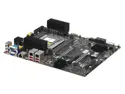
Supermicro MBD-H13SRA-TF-O Threadripper PRO motherboard, Single socket sTR5, LGA-4844.
Pros: IPMI dual 10g NICs otherwise well built board
Cons: no bifurcation on a $700 workstation board
Overall Review: i really liked this board. it seems well built, IPMI works flawlessly, bios updates are seamless, dual 10g NICs for redundancy. perfect for a server, except... no bifurcation support. wth. i didn't even look when ordering because it's standard on every consumer board released in i don't know how long. my fault of course, but imagine the pain when my $7000 rig can't do such a basic task that my $1000 gaming desktop has been able to do for 5 years. so i can't create a raid ZFS setup with nvme drives. and considering nvme drives are now cheaper than 2.5" sata SSD's, bifurcating nvme is the clear choice from a cost and of course performance perspective. supermicro support is pretty terrible too. you have to jump through a million hoops to create a ticket with them. they really don't want people contacting them. and sure enough, they confirmed no bifurcation support on this board and no plans to add it. $700 btw. considering this is a threadripper board, where PCIE lanes are one of the main selling points, bifurcating those lanes seems like a no brainer feature. i was looking at other supermicro boards on intel for another server i'm building (SUPERMICRO MBD-X13SAE-F-O) , and that board doesn't support bifurcation either. for a company so famous in the server space, you'd think they'd have the basics down, but they clearly don't care. i can't recommend supermicro in the consumer/workstation space. if you don't care for bifurcation and never plan to use it, this boards great. but if you're throwing an expensive new threadripper into this thing, why wouldn't you want that feature? *shrug*
7/24/2025See more detail
amazing price/capacity
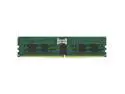
Kingston KSM56R46BD4PMI-96HMI 96GB DDR5 SDRAM Memory Module - For Motherboard - 96 GB - DDR5-5600/PC5-44800 DDR5 SDRAM - 5600 MHz Dual-rank Memory - CL46 - 1.10 V -ECC-Registered - 288-pin - DIMM
Pros: cheap fast low latency ecc registered on my supermicro QVL
Overall Review: excellent ram. not sure why there's zero people reviewing these. they are literally the best price/capacity ecc registered ddr5 you can get, and it being at 5600mhz is awesome. most anywhere near this price range are 4800mhz and considering i'm running an amd server, it really helps performance. i have these in a Supermicro MBD-H13SRA-TF-O board with an amd 7980x. boots immediately into 5600mhz without doing any bios changes. infact, i have these mixed with two 64gb kingston modules as well and they're working fine together. i made sure the speeds/latency and even manufacturer (micron) matched and as i expected saw no performance issues. great memory. worth every penny.
5/30/2024See more detail
Great price, a little noisy
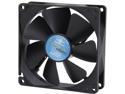
Vantec Thermoflow 92mm Double Ball BearingTemperature Controlled Case Fan - Model TF9225L
Pros: -Affordable -Good length of wire -Great cooling for 6 bucks.
Cons: -Power connector says it's a "3/4 pin". Just so you know that simply means it's a 3-pin but can be plugged into a 4-pin connector. It's just an annoying way for the company to get sales by tricking noobies. ALL 3-pins work with 4-pin headers. Don't be fooled. -A bit noisy. Nothing outrageous but i was just expecting it to be quieter. For the size of the fan it's definitely not worth docking an egg but you will hear it running.
Overall Review: I used this fan with my Cooler Master Hyper TX3 92mm heatsink for a dual-fan setup. I'm using this to cool an AMD FX-6300 @ 3.8 ghz and my idle temps are 20c, 32c while gaming and under 100% cpu load(P95, sony vegas etc) the highest it reaches is 43c. Very happy with my setup.
10/14/2013See more detail
Hyper TX3 Review
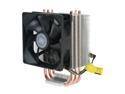
Cooler Master Hyper TX3 - CPU Cooler with 3 Direct Contact Heatpipes
Pros: Before I start I feel obligated to let you know that I'm reviewing this with a dual-fan setup(stock CM fan in pull, vantec thermoflow 92mm in push) and keep in mind this review is for the 92mm CM Hyper TX3 since apparently they group all the CM hyper heatsink reviews together. Anways, lets begin the review. -VERY cool compared to stock heatsink. I have an AMD FX-6300 @ 3.8ghz that went from 32c to 22c idle. Now that's not insanely impressive in itself but the load temps are what really impressed me. I overclocked to various speeds on the stock heatsink and put the CPU under load to test it out, in addition to that i tested at the same speeds under the same conditions with the Hyper TX3 installed. Check "Other thoughts" to see the results. -Inexpensive. Got mine for roughly 13 bucks after tax with free shipping thanks to a coupon code. Only $19 to order this with an additional high quality 92mm fan for a dual fan setup. -Comes with plenty of mounting brackets for a bunch of sockets and everything you need to mount an additional fan, even the anti-vibration pads. -Perfect size. Fit in my Rosewill Challenger without any sort of problem and no RAM clearance issues either(i have Kingston Hyperx, the one with the big heat spreaders). There is still a good 2-3 inches of height clearance left before it hits the wall of my case. Very comfortable headroom. -No need to install a back mounting plate to your motherboard so very simple installation for the most part.
Cons: -Pain to install for AM3+ socket. Instructions were virtually useless, had to find a video on the installation and let me tell you there are VERY few. The ones that do exist have horrible camera angles. If you already know how to install AM3 socket coolers i'm sure this will come naturally to you, but the only AM3 socket i've installed was the stock heatsink which just slides right in. For this cooler you need to assemble the mounting bracket and place it down correctly the first time so as not to smear your thermal paste. -Noticeably noiser than the stock heatsink. I'm not docking an egg as once i removed the second 92mm fan the noise issue was virtually non-existent. Keep that in mind if you plan on running dual fans. -Funky fan mounting. Not a major problem and nothing to lose an egg over but the mounting for the fans is pretty tight. This can also be a pro as it ensures the fans will never come off in use but the fit is so snug that it began bending the fins on the heatsink while i attached them. They were easily bent back into place once the fans were on so again, not worth docking an egg. -Mounting latch for the AM3 socket snapped as i went to tighten it on my first attempt at installing it. The very small bolt holding the lever together just snapped. I contacted newegg for an RMA the very same wednesday night, shipped it the following morning, got approved for the replacement the day after that and had my new heatsink by Monday night. VERY excellent customer service on Neweggs part. This one installed perfectly. Judging by the reviews i haven't seen one person have this issue so im guessing it was a fluke, so i won't dock an egg.
Overall Review: Overclocking tests. Keep in mind I didn't use the CM thermal paste, i used Arctic Silver 5. I'm sure the CM thermal paste would have performed very close, with a variation of at most 2-3c 3.8ghz very light cpu load(web browsing) stock HS 32c 3.8ghz very light cpu load(web browsing) Hyper TX3 21c 3.8ghz moderate cpu load(playing WoW max settings 1080p) stock HS 41c 3.8ghz moderate cpu load(playing WoW max settings 1080p) Hyper TX3 24c 3.9ghz full cpu load stock HS = 64c max 3.9ghz full cpu load Hyper TX3 = 42c max 4.0ghz full cpu load stock HS = 69c max 4.0ghz full cpu load Hyper TX3 = 44c max 4.1ghz full cpu load stock HS = 70c max 4.1ghz full cpu load Hyper TX3 = 44c max 4.2ghz full cpu load stock HS = 71c max 4.2ghz full cpu load Hyper TX3 = 45c max 4.3ghz full cpu load stock HS = 71c max 4.3ghz full cpu load Hyper TX3 = 45c max 4.4ghz full cpu load stock HS = computer froze up and crashed, couldn't get it to stabilize until i installed the new HS. 4.4ghz full cpu load Hyper TX3 = 45c max, seemed stable enough. So as you can see the temperatures are ridiculously far apart.
9/18/2013See more detail
Does its job
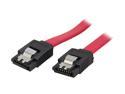
BYTECC SATA-118C 1.5 ft. Serial ATA-150/300 Cable w/ Locking Latch
Pros: -Perfect length -Sweet color -Works well -Locking mechanism works but is also very easy to pull off when you need it to -Durable
Cons: -Not a 90 degree cable, but i knew that when i made my purchase.
Overall Review: Great cable for very cheap. Looks nice and does its job. What more can you ask for?
9/5/2013See more detail