
Your Browsing History


Ian L.
Joined on 11/11/10
0
0
product reviews
- 13
Big cooler
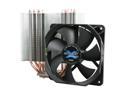
ZALMAN CNPS10X Performa 120mm Long life CPU Cooler
Pros: So much cooling power Comes with a fan
Cons: Huge - see below
Overall Review: This cooler is big. Because of the way my motherboard is set up (Gigabyte GA-Z68X-UD3H-B3), and the size of my RAM's heat fins, the fan that attaches to the cooler blocks two RAM ports. I only use two at the moment, so I just use the two furthest away, but I'll have to come up with a solution to fix this problem if I decide to expand. I believe that some"low-profile" RAM sticks are able to fit underneath the fan, but I cannot personally attest to that. That being said, this thing cools like a boss - I've got CPU temps idling at 27c and getting not past 41c on 60% load - and that's in a case whose design typically raises heat by a few degrees (Fractal r3 - silencing material raises heat unless you have good airflow). I would buy it again as long as I was prepared for it's size.
3/6/2012See more detail
Yes Please
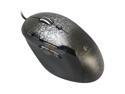
Logitech G500 10 Buttons Dual-mode Scroll Wheel USB Wired Laser Gaming Mouse
Pros: - Super comfortable grip (super. comfortable.) - Adjustable DPI (and easy to adjust too!) - Two scroll wheel modes (I actually use this all the time, and it's flawless) - Mouse buttons galore (programmable with Logitechs software) - Adjustable weight (I just set mine and forget it, but it's nice to have the option to lower the weight for quicker movements or raise it for more deliberate ones) - Laser is awesome (haven't even used a mouse pad since I got it; tracks on nearly everything) - I really really love the color scheme. The black speckles are awesome. Kinda sad that they are moving to a different pattern on the new "S" series. - Logitech has the best customer service (see other)
Cons: First one did some funky stuff after 3 months, but Logitech immediately remedied the problem. Fantastic stuff.
Overall Review: This is by far the best mouse I've ever used. And when I had problems with the first one, Logitech sent me a new one with no troubles. After over a year of service, the second one started producing a high pitched noise that really grates my ears - and again, Logitech is sending me a new mouse to rectify the problem. They take their warranty very seriously, and that means a great deal to me as a customer. The new mouse they sent me is a G500s (this model is apparently discontinued), so I'll see how that one holds up versus its predecessor and review that one as well. This mouse is 100% worth it. Hopefully the new generation will be just as awesome.
12/4/2013See more detail
Beautiful Controller
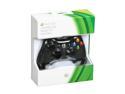
Xbox 360 Wired Controller Black/Glossy Black
Pros: - Awesome grip - Recognized immediately on Windows 7 - Can be plugged into Xbox 360s as well - Still working well after over a year of use
Cons: None to speak of!
Overall Review: Beautiful designed and executed controller. Very nice feel, smooth buttons and triggers, and has lasted me a long time. I'll probably grab a few more when they go on sale.
12/4/2013See more detail
Fantastic
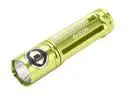
Icon Light RG104A Rogue 1 Green Alluminum Flashlight 50 Lumen
Pros: - Small - Nice design - Vibrant color - Two light levels
Cons: - Always switches between two light levels upon clicking the button, but that's not really a con just a thing to remember
Overall Review: Very nice flashlight. Small but powerful. Got it in a Shell Shocker, and it has been way worth the money.
12/4/2013See more detail
Nice.
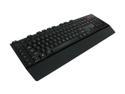
Microsoft SIDEWINDER X4 Keyboard - Retail
Pros: * Key feel is awesome - the keystroke has the perfect length and amount of resistance for the way that I type * Feels solid - good build quality, doesn't feel like it will break any time soon * Special function keys work perfectly and are easy to program with the "record" key * Cable is long enough for my purposes * I personally think this keyboard looks awesome - aesthetics is a big portion of what I buy, and this keyboard delivers. One thing I like is that the logos - Microsoft and the Sidewinder "S" logo - are either small or inconspicuous, something that I love * Backlights have 4 settings (High, Med., Low, Off) controlled by a key on the board itself * Two little bumps on the W key - didn't know this at first but I have used it a lot so far
Cons: * Keys are a teeny bit glossy - after long gaming sessions you can tell where my fingers were resting. A quick once-over with a dry cloth gets rid of it perfectly * Definitely a different key layout than my previous keyboard - took me a few days to adjust, but once I did it was easy to get my typing speed back to normal. I was used to the escape key and etc. being the furthest keys to the top left - but with the macro keys and other additive keys, it is no longer this way. Like I said, just took some readjusting and was not worth docking an egg
Overall Review: I am using this on a build that dual boots Windows and Mac - as you would expect, it works absolutely perfectly on the Windows portion of the machine. On the Mac, though, the Macro keys do not work (cannot record, etc.), though the brightness keys still work. Not really the board's fault, as I assumed this going in, so I'm not going to dock an egg. I was just disappointed because it came with software to install (for Mac) which gave my keyboard and mouse Windows sensitivity curves and scrolling, but did not allow the macro keys. Just a heads up.
4/2/2012See more detail
Works well, quiet
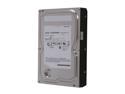
SAMSUNG Spinpoint F3 HD502HJ/ST500DM005 500GB 7200 RPM 16MB Cache SATA 3.0Gb/s 3.5" Internal Hard Drive Bare Drive
Pros: Quiet while running - barely hear it accessing even when I take the side off of my padded (for silence) case Pretty fast - a bit faster than my external drive, but not extraordinarily so Solidly built and doesn't feel as shaky as some other drives I've used
Cons: Makes a bit of noise when reading to start up - not enough to dock an egg, though, because it's inherent in HDDs; I've just been using an SSD for a while now and got spoiled :P As I said above, though, it's near silent when it gets running, though, so it's quiet enough for me.
Overall Review: The build that this drive went into is based on silence - so this drive being fast AND silent was a must for me. It delivered. Simple plug-and-play into my build, computer recognized it, I partitioned it to specifications and started to use it. I boot Windows off of this disk, and it's pretty quick comparative to other HDDs I've worked with in the past few weeks. All in all a good purchase. Bottom line: Quick, quiet, quality.
3/12/2012See more detail