
Your Browsing History


Tae S.
Joined on 01/30/08
0
0
product reviews
- 22
Lite-on iHOS104 Blu-ray ROM Drive
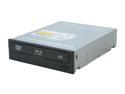
LITE-ON Black 4X BD-ROM 8X DVD-ROM 32X CD-ROM SATA Internal 4X Blu-ray Reader Model iHOS104-06
Pros: Inexpensive SATA Blu-ray drive. Handles Blu-ray, DVD and CDs. Other thoughts: Ran out of room, so I'll start Other thoughts here... If you plan to use this for playing Blu-ray movies, I can tell you it does work, but there are some things to consider. You can play Blu-ray movies without a "Blu-ray media player." What the Blu-ray media player provides is the menu system for navigating the content easier. HDCP - High Definition Content Protection Need it both on video card and monitor in the form of HDMI (HDCP is implied) or HDCP over DVI (only found on newer models of video cards and monitors, so you should look for this). Cheap alternative is to use analog PC video (VGA) connection, which gets you around from having to buy new equipment. An easy thing to do if you have one of the newer video cards with 2 DVI or DVI and analog video out with a monitor with DVI and analog in ports. Hook up both DVI and analog cables and set monitors for dual display mode. Contin
Cons: It's been reported that firmware W06 (latest firmware and only firmware I'm aware of) has a bug where CSS does not descramble content, which maybe causing the following problem... The free PowerDVD 8.0 BD (Blu-ray Disc) Edition that came with the drive didn't work with Blu-ray discs. I get error 80040154 after selecting Blu-ray region but region is never set and indicates 0 changes left, even though the region has never been set before, much less changed. I googled the problem and found the media player (PowerDVD in this case) is suppose to handle region changes. PowerDVD doesn't have any problems setting DVD region and play DVDs. No good for Blu-ray, though. I haven't tried PowerDVD 9.0, but someone reported getting the same error 80040154 on it and PowerDVD 8.0 BD edition in Cyberlinks forum. Error message in Device Manager: Windows did not start a related device driver. To learn more, click the Driver tab and then click Driver Details. But it still works fine.
Overall Review: ... Move the Blu-ray player to analog screen to watch movies to get around not having HDCP on the video card and/or monitor. Use the analog/digital switch button to toggle between the two. PowerDVD didn't work for me, but WinDVD Pro 2010 plays Blu-ray. It's a little buggy and crashes on occasions and the mouse pointer doesn't correspond to menu items. You'll have to use keyboard arrow keys to navigate menu sometimes. Mouse movement causes Blu-ray menus to pop up even though the cursor is not directly over the WinDVD window. You can play Blu-ray movies without a Blu-ray player software. You need Blu-ray ripper to copy the contents and remove the content protection or use something like AnyDVD HD which removes content protection on the fly so you can directly read the files off the disc. You need a H.264 codec (ex: google Vista Codec Pack or K-Lite x64 for 64-bit Windows.) You can use Window Media Player 11 to watch Blu-ray movies after they've been decrypted. Out of room.
9/14/2009See more detail
Defective
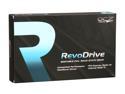
OCZ RevoDrive PCI-E x4 120GB PCI Express MLC Internal Solid State Drive (SSD) OCZSSDPX-1RVD0120
Pros: Cost to Speed ratio.
Cons: This one had to be replaced. The 2nd unit also failed after a few months.
Overall Review: NTFS and SSD aren't a good combination. NTFS is a journalling file system and constantly writes (a journal) to the drive (to help recover from system reset/restart or crash recovery).
7/6/2012See more detail
Acer Makes Pretty Good LED/LCD Monitors
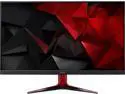
Acer Nitro Gaming VG271P 27" Black IPS LED HDR400 FreeSync Monitor 1920x1080 Widescreen 16:9 1ms VRB Response Time 144Hz Refresh rate 400 cd/m2 1000:1 HDMIx2, DisplayPort, Speaker
Pros: Good quality Not too expensive
Cons: Lighting (backlight/black) quality various noticeably from monitor to monitor (same model). but not as much as some other monitors I tried/tested.
Overall Review: I already had an Acer GN276HL. I couldn't find anymore (out of stock/production) to order and opted to order 2 VG271P for a 3 monitor setup. I am considering a 3rd, although not likely.
5/23/2019See more detail
WARNING. Closest to Black it can get is Dark Grey. It looks exactly like Back lit Projection TV from the 90s.
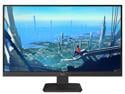
Dell D2719HGF 27" Full HD 1920 x 1080 144Hz DisplayPort HDMI Built-in Speakers AMD FreeSync Anti-Glare LED-Backlit LCD Gaming Monitor
Pros: Low price.
Cons: It looks exactly like backlit projection TV from the 90s.
Overall Review: I bought 3 thinking of using them for gaming and now thinking of sending them back. Don't be surprised if you decide to send them back. I am looking at it next to an Acer GN276HL (LED backlit) and no comparison.
3/7/2019See more detail
SSD Dailed
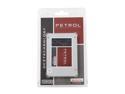
OCZ Petrol 2.5" 128GB SATA III MLC Internal Solid State Drive (SSD) PTL1-25SAT3-128G
Pros: Cost.
Cons: High failure rate.
Overall Review: TRIM control turns out to be simply a mechanism to block out sections which the drive can no longer write to.
7/6/2012See more detail
Dead after a few days
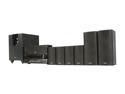
ONKYO HT-S5300 Home Theater in a Box
Pros: Good quality sound.
Cons: The amps failed after a few days of operations. The top of the unit is unusually hot almost like a CPU without much of a heatsink.
Overall Review: I don't recommend this unit.
6/1/2010See more detail
seller reviews
- 1