
Your Browsing History


Dustin H.
Joined on 12/26/10
0
0
product reviews
- 7
Excellent for Sandy Bridge
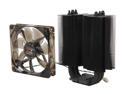
XIGMATEK Dark Knight II SD1283 Night Hawk Edition CPU Cooler with Stealth Aerospace Industry Thermal conductive ceramic coating LGA1150 Haswell Compatible
Pros: -Mounts perfectly on my Asus P6P67 Pro with Intel 2600k. Use the 1336 mounting holes and bracket. -Looks great. The dark shine with the white LEDs really looks awesome. -My 2600k idles at around 27C and loads at 50C. Fan ramps up to keep it cool but remains quiet! At 4.43 Ghz the load temp goes up to 63 C after hours of 8-threaded Prime95. -Anti-vibration fan mounts. I like quiet! -Got it for a measly $16.50 after MIR and promo code!
Cons: -Doesn't support fans on both sides (if that's your thing). -Doesn't have the cooling power of larger coolers. -Included fan isn't silent (but it's pretty close). -Included documentation didn't specify how to mount on 1156 (just follow the 1336 instructions).
Overall Review: Honestly, it's exactly what I needed. Unless you're an extreme overclocker looking to go above 4.5Ghz this is all you need. It looks great, it's quiet, and it keeps my 2600k cool whether I overclock it or not. And all of this for only $16.50. Absolutely incredible considering I paid $50 for a Zalman cooler years ago.
1/25/2011See more detail
Slow
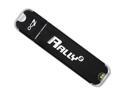
OCZ RALLY2 8GB USB 2.0 Flash Drive OCZUSBR2DC-8GB
Pros: -Got it for free with a Radeon 6950. -8GB is plenty of storage. -Read speeds of around 20MB/s.
Cons: Absolutely terrible write speed. Averages around 2MB/s, sometimes going as high as 5MB/s and other times dropping to 1MB/s. Compared to the Sandisk 8GB which writes at 19MB/s and Kingston 2GB that writes at 28MB/s, the performance is pathetic.
Overall Review: It does what it says it does and is small. Just don't expect it to write quickly.
1/25/2011See more detail
It works
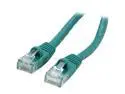
Coboc CY-CAT6-02-GN 2ft. 24AWG Snagless Cat 6 Green Color 550MHz UTP Ethernet Stranded Copper Patch cord /Molded Network lan Cable
Pros: Used to connect a switch to a patch panel. The boot is a little bigger than other patch cables I have (not a good/bad thing, just is what it is). They all work just fine. This color was cheaper than the others.
Cons: N/A
10/7/2018See more detail
Good speeds, solid feeling case, and a 2 year warranty,
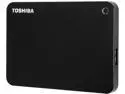
TOSHIBA 500GB Canvio Connect II Portable Hard Drive USB 3.0 Model HDTC805XK3A1 Black
Pros: Probably the most important factor in me picking this drive over others was the 2 year warranty. Most 2.5" external drives only have a 1 year warranty (except for a few expensive Western Digital drives which come with a 3 year warranty). I've had the drive for a couple of weeks now and it's working perfectly, but if I ever do have any issues I won't hesitate to send it in. The enclosure feels solid and durable. It is glossy plastic black which will show dust and finger prints, but whatever. The USB 3.0 micro cable plugs in plenty tight. I hate loose ports, so it was nice to see this. I have no doubts about the durability of the enclosure. It does have rubber feet to prevent it from rattling while on a hard surface (it does vibrate just a little, but so does every hard drive ever). The little circle in the corner lights up when the drive is being accessed. The drive powers down after about 10 minutes of inactivity, but will spin up again once it's needed. Never had any issues with this. Benchmarks using CrystalDiskMark: USB 3.0 I get 116.4 MB's read and 114.3 MB/s write. USB 2.0 gives 34.5 MB/s read and 30.04 MB/s write. To completely fill my 2TB drive it would take about 19 hours using USB 2.0 or 5 hours using USB 3.0. For large file transfers you're definitely going to want to use USB 3.0. No complaints about the speed. If you want to use this with a Wii U you'll need a USB y-cable (about $7). The Wii U's USB ports don't provide enough power to run it off just one, but with that cable it works fine. I decided not to use this drive for my Wii U, but I can confirm that it does work once you get the cable.
Cons: Only complaint is the USB 3.0 cable, which is only about 18 inches long. I'd prefer a 3 foot cable, but it isn't too hard to go buy one for a few bucks if I really want it.
Overall Review: Included software is loaded on the drive. Mac Driver, NTI Backup Now EZ 4, and PogoPlug PC for Windows and Mac (how to use your 10GB of cloud storage). I have no need for any of these, but others may.
4/25/2015See more detail
Power hungry and warm running, but powerful
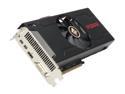
PowerColor PCS+ Radeon HD 7870 MYST. Edition (Tahiti LE) 2GB GDDR5 PCI Express 3.0 x16 CrossFireX Support Graphics Card AX7870 2GBD5-2DHPPV3E
Pros: This is a fairly capable card. Definitely capable of handling most games at 1920x1080. However, my main use for it is mining Litecoins. It manages to get around 425 KH/s, which isn't too bad at all. Also, if you undervolt the card it will sip power (mine uses less than 100 watts). I'm pretty sure this makes it one of the most efficient (hash/power) cards out there.
Cons: At the stock clocks, this card runs pretty warm. The fan isn't the quietest in the world (it's louder than my Sapphire 7950) and it even manages to consume more power (at stock clocks) than my 7950.
Overall Review: If you get this card and care about temps and power consumption, you MUST undervolt it. The stock voltage is 1.187v, and I've lowered mine down to 0.925v. No drop in performance, but the card now peaks at only 69C under full load, and this lower temperature means the fan spins a lot slower (and is a lot quieter). I can't imagine using this card at stock settings, especially if you plan on Bitcoin or Litecoin mining. For Litecoin mining I run my card at 855 core/1500 memory/0.925v (lowering the clock to 855 seems crazy, but it gets you a much better hashrate). I got mine for $204 with a coupon code. The price now seems to be $240 after MIR. At $204 this card was a steal. This card will bring you very close to the performance of a 7950. If you have an extra $60 I highly recommend the upgrade, but if you don't this card is a great choice, as long as you're okay with it using a little more power and running warmer.
4/14/2013See more detail
Good stuff
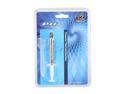
XIGMATEK PTI-G3606 thermal grease
Pros: Used on an Intel 2600k with a Xigmatek Dark Knight. Idles around 27 C and loads at around 49 C. It comes with enough for around 5 CPU installs and the included spreader is incredibly helpful.
Cons: None
Overall Review: My heatsink was direct heatpipe contacting, so I put some on that and spread it around to fill in any tiny grooves. Then I put a pea-sized glob in the middle of my processor and clamped it down. That's it!
1/25/2011See more detail