
Your Browsing History


stan h.
Joined on 09/24/03
0
0
product reviews
- 13
Fantastic little inexpensive CPU
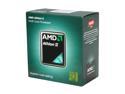
AMD Athlon II X2 250 - Athlon II X2 Regor Dual-Core 3.0 GHz Socket AM3 65W Desktop Processor - ADX250OCGMBOX
Pros: 3GHz dual core AMD socket AM3 chip for less than sixty bucks. I almost went with a Phenom II but all the comparison benchmarks showed no more than 5% performance gain for most apps and games. The Athlon II X2 250 dissipates 15 watts less heat at full load as well. This single chip has more aggregate performance than a 2-way Opteron server of just a few years ago. Far more than adequate for surf/email and occasional gaming.
Cons: Absolutely none.
Overall Review: Initially I thought the included HSF was going to be an issue due to: 1. No heatpipes 2. Not a skived copper heatsink 3. No copper heat spreader embedded in the aluminum as with the Athlon XP Barton heatsinks 4. Quiet fan with only moderate airflow My initial impression was incorrect. This chip runs pretty cool at idle and under load with the stock HSF.
8/27/2011See more detail
Died after 4 months
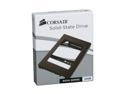
Corsair Nova 2.5" 32GB SATA II Internal Solid State Drive (SSD) CSSD-V32GB2-BRKT
Pros: Very high random read/write IOPS and streaming read, as you'd expect from even an inexpensive SSD. Streaming write is about half that of reads, but still better than a 7.2k mech drive. WinXP boots in about 4 seconds. Miserly power consumption. Totally silent operation.
Cons: Died at 4 months. Took 3 weeks total to get an RMA replacement drive from Corsair, which has "REFURBISHED" printed on the drive label in large black print. I was without my PC for those 3 weeks as I have no spare drive. I'll be ordering a cheap mech drive to keep as a spare under the assumption that this refurb drive probably won't last long either. I sincerely hope the Corsair 3 year warranty actually lasts 3 years, and that they'll continue to replace each successive dead SSD until that 3 years is up. If it turns out the warranty is void after the first replacement I will never buy another Corsair product. I hope this drive lasts more than 3 years so I don't have to find out.
Overall Review: For some reason my original very positive review has been removed. Just as well I guess. I wrote that review after only a week of use and gave the product 5 eggs. Due to the failure after 4 months, and reading that many others have had their Nova32 die in about a year or less, I'm dropping that to 2 eggs. It really doesn't matter as Corsair has discontinued this Nova32 and Newegg has exhausted their stock.
9/26/2011See more detail
Lack of coverage

LG Black Optimus F6 T-Mobile No Contract 4G Smart Phone
Pros: Will never know.
Cons: Was all set to buy this phone until I looked at the map. T-Mobile's coverae map shows a no service zone of 5+ miles radius around the rural Missouri town in which I live. They show excellent signal in the town 8 miles away by the interstate but that does me no good. So I could possibly make/receive calls and do data over my WiFi, but as soon as I hop in the car I'd have no service. And the map shows no service along long stretches of roads I travel. This review demonstrates that the carrier is still more important than the phone.
Overall Review: I was previously looking at a really great Motorola Boost Mobile phone that is no longer available. Boost's coverage in this area is even worse than T-Mobile's. Sprint's coverage here is also terrible, even though their HQ is only 150 miles from my house. So it looks like I'll have to bend over for the local regional cell provider for a smart phone, or go with AT&T or Verizon who both have universal peering arrangements and have 4G coverage here. Thankfully everyone now offers no contract phones.
11/30/2014See more detail
Nice little board
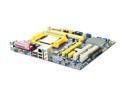
Foxconn M61PMP-K AM3 NVIDIA MCP61P Micro ATX AMD Motherboard
Pros: Low cost. DDR3 support. Clean board layout. Good compatibility. Good quality board level components (caps, coils, VRMs, etc). Runs a Regor 250 just fine at stock speed and voltage (I don't plan to OC this system as dual 3GHz cores each w/1MB L2 is plenty of horsepower). Excellent AMIBIOS implementation. Correctly automatically disables onboard video when PCIe video board is installed. Will correctly boot an SSD connected via a Silicon Image PCI SATA controller, even though the BIOS doesn't explicitly offer such a boot option. This feature saved my bacon, read below. I'm really impressed so far with the quality and features of this board given the price point. I highly recommend it as a repair/replacement or new build motherboard.
Cons: Neither the BIOS nor the FoxOne software correctly report the temperature of the Regor cores. Initially I assumed this was a mobo problem. Contacting Foxconn support yielded no definitive answer. They simply suggested flashing the BIOS with no assurance that doing so would solve the issue. My research into this issue shows that AMD, in its infinite wisdom, changed the output voltage of the thermal diode embedded in each core of the Regor, Callisto, and later chips. I have still found no definitive information as to what offset to use in order to get a true temp reading. The CoreTemp documentation says the offset should be set somewhere between 10-20 degrees Celsius. Currently I'm running with a 15C offset which seems pretty close based on a number of factors I won't go into here as 10000 characters isn't enough. I hope to find definitive info on this at some point.
Overall Review: In 2003 I built a new system from all Newegg components. Ran flawlessly, powered on for 8 years straight. Recently the Biostar nForce2 mobo bit the dust. It housed an Athlon XP Barton and eVGA Geforce FX5900 reference design. To repair it I ordered this Foxconn, a Regor 250 CPU, 2 Crucial Ballistix DDR3 1GB sticks, a PCIe x16 PNY Geforce GT240 w/1GB DDR3, and a new PSU. The machine had been running WinXP with all updates, the old nVidia nForce platform drivers, fairly recent nVidia GPU drivers, and an add in Silicon Image 3512 PCI card with a Corsair V32 SSD attached, from which the system was booting. I gutted the chassis of everything but the optical drive and the SSD. I installed the Foxconn, dropped in the GPU and SATA cards. I powered up, the Foxconn booted the SSD, and all I had to do was install all the new drivers. The fact the board correctly booted the SSD prevented me from having to do a total WinXP reinstall. Again, this is a great little motherboard.
8/27/2011See more detail
Nice inexpensive card
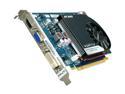
PNY Verto GeForce GT 240 1GB DDR3 PCI Express 2.0 x16 Graphics Card VCGGT2401D3XPB
Pros: Good manufacturing quality and components, nice board. Great performance/features for the money. 96 stream processors and 1GB RAM. Price. :) The GT215 core doesn't seem to need copious memory bandwidth, so the GDDR3 doesn't appear to be much of a handicap vs the GDDR5 version of this same card. Tis a short card, fits just about any case.
Cons: Stock cooler is a little loud for my taste. Before my old AGP mobo died, prompting this PCIe GPU purchase, I had recently installed a Scythe 4-channel fan controller to quiet the system down and it worked wonders on two case fans, the CPU and GPU fans. As my only AGP mobo is dead, I stole the Arctic Cooling Accelero S2 off my GeForce FX5900, fabricated a mounting adapter plate as the S2 is not compatible with the GT240's 62mm hole spacing, and bolted it onto this GT240 along with my 92x15mm Delta fan controlled by the Scythe. Better cooling and nearly silent.
Overall Review: I paid $239 in 2003 for the FX5900 I purchased from Newegg along with the rest of the components for the AthlonXP PC I built that fall. This GT240 was 1/6th the cost of that FX5900 and simply runs circles around it. I'm not into shooters as I was then so this card is more than adequate. With the Accelero S2 and Delta fan core temp doesn't exceed 47C w/ a mild overclock while running the heavy hitter Unigine Heaven demo in OpenGL with default settings, plus 2x FSAA, windowed at 1280x720. Benchmark FPS is 21. This with o'clocked Core 600, MEM 800, Shader 1500. And it's rock solid after running Heaven for over an hour. For ~$40 this card is low on price, but not performance. The fact that PNY is the only company nVidia allows to build its Quadro professional workstation cards tells you something about the quality of manufacturing of PNY products. This is just a great little card. I can't believe it's as cheap as it is. What a steal.
8/27/2011See more detail
Nice stix
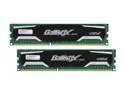
Crucial Ballistix Sport 2GB (2 x 1GB) DDR3 1333 Desktop Memory Model BL2KIT12864BA1339
Pros: Crucial quality. Streamlined svelte heat spreaders facilitate easier installation and promote better airflow than the bulky heat spreaders used on some modules, such as the Geil DDR400 modules in my previous system. Those heat spreaders were so large that no air could pass between adjacent modules, nearly defeating the usefulness of the spreaders. These spreaders are much better.
Cons: None so far. They work great at stock speeds. I've not attempted to overclock them. With 20GB/s+ bandwidth I don't see any need to OC.
Overall Review: The Foxconn nVidia 6150 based mobo automatically configured these to run at DDR1066, claiming this was the speed provided by SPD, which is obviously not the case. I manually set them for 1333 and they've been running great for almost a month.
8/27/2011See more detail