
Your Browsing History


Matthew J.
Joined on 04/24/06
0
0
product reviews
- 11
Too Stronk
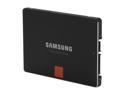
SAMSUNG 840 Pro Series 2.5" 256GB SATA III MLC Internal Solid State Drive (SSD) MZ-7PD256BW
Pros: TLDR: Stupidly fast. - Boot times are incredible: My rig takes just about as long to POST as it does to boot into Windows - around 8.2 seconds after POST** (See other thoughts). To clarify; I'm not talking about 8.2 seconds until you see the desktop background. I'm talking 8.2 seconds and the computer is almost in an idle state and ready to use with my normal startup applications running and ready to go (Skype, Steam, Origin etc). - Benchmarks: I'm currently getting benchmarks that are better than advertised. Sitting at 555 reads/525 writes (110k 4k random reads, 94k 4k random writes). - Noticeable difference in loading times: I won't sit here and try to fool you into thinking that all apps have DRAMATICALLY reduced loading times, but there definitely is a noticeable difference with a lot of apps- especially while gaming. - Dat Windows Experience Index: A fairly useless metric, but still awesome to have gone from a 5.7 "Primary hard disk" rating to a 7.9.
Cons: A funny/ironic "con": My rig boots so fast that I can't get connected to my router fast enough via a wireless NIC and Steam/Origin times out saying I have no active internet connection. So my only con is that it's too fast...
Overall Review: I run an Asrock z77 Extreme6 mobo that has two different SATA controllers. When the SSD is plugged into the proprietary Asrock SATA 3 ports using their controllers, my boot times are easily under 9 seconds after POST. However, the SSD benchmarks at around 1/2 of advertised speeds (~370 reads/320 writes and 50k random 4k read/writes). If they are plugged into the Intel proprietary ports with their associated controllers, the boot time sits around 20 seconds (Hangs for about 12-14 secs when you first see the "Starting Windows" logo) - but I get better than advertised benchmarks across the board (See above). This may or may not be remedied by modifying a few settings in the BIOS which I haven't gotten around to doing yet and I will update this review accordingly. This, of course, in no way affects the overall rating of the SSD itself.
5/30/2013See more detail
It works
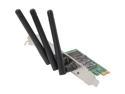
Rosewill RNWD-N9003PCE - Dual Band Wireless N900 Adapter - IEEE 802.11a/11b/11g/11n, Up to 450 Mbps (5.0 GHz) + 450 Mbps (2.4 GHz) Data Rates, PCI E Interface, 3 External Detachable Antenna
Pros: Plugged it in, installed the drivers and it works. No hassles.
Cons: None. Does what it's supposed to do.
Overall Review: I've heard there are a lot of problems with Windows 8 and this adapter, but it's smooth sailing for me on Windows 7.
1/13/2014See more detail
Excellent Mouse

Perixx MX-2000 IIR Programmable Gaming Laser Mouse - 8 Programmable Button - Avago 5600DPI ADNS-9500 Laser Sensor
Pros: This mouse is fantastic for the price point. Accuracy is on point and as expected. All buttons do what they're suppose to. The weights are a nice addition, even though I don't use any of them. The mouse fits well in the hand for someone with decently long fingers. It hits pretty much all the right notes at the right price.
Cons: None that bring it down from a 5 egg rating. The software is a bit sluggish and clunky, but it works. It doesn't have that many buttons and some of the extra ones that this mouse does have are in slightly awkward positions. That being said, I don't really mind it since I don't need 40 different programmable buttons.
Overall Review: All in all, for the price point, it's really hard to beat. If you're looking for some of the features of the higher end mice that make you coffee, fold your clothes, and control your microwave, then you're going to have the shell out the extra 50$-100$ and go for something else.
1/13/2014See more detail
Great price and great case
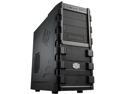
Cooler Master HAF 912 - Mid Tower Computer Case with High Airflow, Supporting up to Six 120mm Fans and USB 3.0
Pros: Tons of room. Installing parts is a breeze. Great airflow. I'm currently only using only 3 120mm fans (2 that came with and an extra I had laying around) and it pulls/pushes the air brilliantly. CPU temps (i5 3570k) only reach about 65C under heavy load. It looks slick without being gaudy. I don't need all those flashy LEDs or crazy buttons and knobs that make you coffee and beat the kids.
Cons: Only comes with 2 120mm fans. Wish it came with more (Especially a 200mm), but for the price it's hard to beat. Managing cables that pass through the back in between the case and the mobo can be a bit tight. Neither of these cons was worth taking an egg off for - I'm mostly just nit-picking.
Overall Review: The airflow from front to back might be a bit obscured if you're running a set up with 3+ HDDs in the 3.5" bays. For me it's not really a con since I currently run only 1 HDD (Soon to be an additional SSD). I'd definitely recommend this case if you're looking for a nice, neat and clean solution for your new computer. In fact, unless you're going for an all out flashy build, I'd go as far as saying this is about as good as you can get for the price.
9/6/2012See more detail
Works well

KOSS Blue Mirage 3.5mm Connector Canal Stereo Earphone (Blue)
Pros: Comfortable fit even with prolonged use. Comes with 3 sizes of ear cushions, so you can adjust them to your liking. Great sound quality. Good bass. Overall durable build. I expected the volume control to break (like most do) but it has held up. If the price stays low, I'll probably buy another pair if/when these give out.
Cons: 2 of the included ear cushions have torn apart under normal wear and tear. Because of this, the earbuds fall out easily unless I'm not moving.
Overall Review: The color scheme (blue and white) looks nice.
9/4/2012See more detail
Works
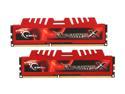
G.SKILL Ripjaws X Series 8GB (2 x 4GB) DDR3 1600 (PC3 12800) Desktop Memory Model F3-12800CL9D-8GBXL
Pros: Easy install. The heat spreaders don't interfere with installation. They work... is there anything else you need to know?
Cons: None so far.
Overall Review: The sticker that came with them was a nice touch. Swag!
9/4/2012See more detail