
Your Browsing History


Alfonso R.
Joined on 03/27/05
0
0
100%
100%


product reviews
- 96
Smart case but requires planning
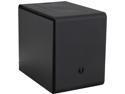
BitFenix Phenom M BFC-PHM-300-KKXKK-RP Midnight Black Steel / Plastic Micro ATX Mini Tower Computer Case
Pros: Case makes maximum use of volume, very few other cases out there that can match it in terms of lower volume. Very smart looking.
Cons: This case is fantastic if you know what you are getting into. Micro-ATX in this footprint has drawbacks but they can be overcome. If you don't know what you're doing you'll have headaches. Major things to look out for: 1. If you decide to attach a 240mm AIO liquid cooler to the roof beware that it will nullify your ability to use a 2nd video card for SLI/Crossfire. The 240mm with the 120mm fan will result in 50mm of thickness, at least, that will encroach into that area. 1 GPU is fine, 2 will not work in that fashion. Using a 240mm or even a 120mm AIO liquid cooler in push/pull is no a go up top. 2. Airflow; optimum set up is very limited. Recommend intake of 2 120mm at the bottom, rear intake of 140mm (AIO Corsair H90 just fits), use the top two 120mm fans as outtake, place those in pull if using an H100i at the top so fans on top and H100i just below them. This will keep your pressure positive and is the most optimum set up. 3. The front doesn't have a door so you can't use an optical 5.25" drive. The micro-ATX and mini-ITX Colossus will be out soon, it has a door and will allow you to install 1 optical bay.....assuming you don't install an H100i type cooler at the top.
Overall Review: This case is fantastic if you know what you are getting into. Definitely made in mind with an H75/H80i/H90 on the rear intaking air. Attach the radiator touching the back of the
12/11/2013See more detail
Cooler Design Fail
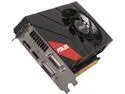
ASUS GeForce GTX 670 2GB GDDR5 PCI Express 3.0 SLI Support Graphics Card GTX670-DCMOC-2GD5
Pros: It's a GTX 670 in shorter length.
Cons: Complete design FAIL. Cooler frame protrude a quarter of an inch past the PCI bracket. Not a problem for regular cases but ITX cases will need to be double-checked. Considering I can get an R7970 for the same price they should lower GTX 670 pricing to roughly 10% less.
Overall Review: Great idea, bad delivery. From ASUS too, so disappoint. :(
5/18/2013See more detail
Great Value Proposition 1 TB NVMe
Corsair MP600 GS M.2 2280 1TB PCI-Express 4.0 x4 3D TLC Internal Solid State Drive Up to 4800 MB/sec (SSD) CSSD-F1000GBMP600GS
Pros: More than acceptable performance per price. I mean, getting these types of scores using 3DMark Storage Benchmark for 1 TB of data that is selling for $69.99 is very impressive in my humble opinion. As a comparison, SK hynix Platinum P41 1TB PCIe NVMe which is considered high end sells for double the price but you get double the performance in Bandwidth & Access Time. But, for those that are budget constrained this Corsair MP600 GS is an option and remember that double the performance doesn't always equate to actual realized gains. You can also pick up the 2TB version for about $140.00. Fast storage has never been this cheap.
Cons: None, for the money it's great and the difference between it and higher end drives that have twice the bandwidth and half the access time are negligible. Get these while they are priced as cheap as they are.
Overall Review: Would definitely recommend this to anyone needing a 1 TB M.2 NVMe SSD for a good price. It's Corsair so you'll get better than average support if needed. Can't forget to mention, after installing this drive it won't show up in Windows Explorer right away. Pull up Disk Management to create a Volume on it and it will then show up in the Windows Explorer window. Am now using it to store my Steam games.
3/8/2023See more detail
Very pleased
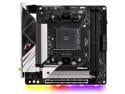
ASRock B550 Phantom Gaming-ITX/ax AM4 AMD B550 Mini ITX AMD Motherboard
Pros: ITX is already very high priced and the worst in terms of price-to-performance as it is but when compared to other AM4 ITX boards this one checks off all the boxes. Good value when ITX is your only option for a small build. Perfect match in the Thermaltake Tower 100. Best ITX case I've built in and I've built quite a few.
Cons: The board ships with BIOS/Legacy mode enabled. You will have to disable or lower priority in order to boot the Windows installation off the USB Flash Drive. Warning that came up in the BIOS......"You MUST go to your UEFI settings and lower or disable the priority of CSM/Legacy mode." In this day and age the board should ship with this feature disabled out of the box.
Overall Review: Highly recommend. Took some getting used to the BIOS, my first ASRock board, I normally go with MSI. The ASRock BIOS isn't bad at all.
1/17/2023See more detail
Solid as always
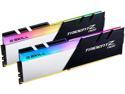
G.SKILL Trident Z Neo (For AMD Ryzen) Series 16GB (2 x 8GB) 288-Pin RGB DDR4 SDRAM DDR4 3600 (PC4 28800) Desktop Memory Model F4-3600C18D-16GTZN
Pros: Best thing I can say is that this worked well on both my B550 and X570 with the Ryzen 7 5800X. Just remember to update your BIOS on your motherboard to the latest otherwise you may have trouble getting XMP to work.
Cons: None.
Overall Review: Would definitely recommend. GSkill is all I ever use. Their memory configurator on their site is tops. Use it and you won't have any compatability issues.
12/23/2020See more detail
Easy set up and easy install
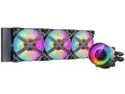
DeepCool CASTLE 360EX RGB AIO Liquid CPU Cooler, Anti-Leak Technology, Three MF120GT A-RGB PWM Fans, Wire Controller and 5V-D-G 3-Pin Motherboard Connector, TR4/AM4 Supported LGA 1700 Compatible
Pros: Has everything I was looking for in an AIO cooler. Looks very slick on an AM4 installation with a minimal hardware design for mounting. Pump unit only has two cables coming out of it. One for the pump header and one for the ARGB header on the motherboard. Includes a fan switch and ARGB switch. I like the RGB fans on this one because it's only the X frame that lights up and not the whole fan. Also, these fans look good on the exhaust side as you can see in the picture. The lighting is easily controlled via the MSI Mystic Lighting application. The 5600X is loving it because I can push the OC pretty well and still keep the temps relatively low.
Cons: Not a con but a warning so you don't freak out! After screwing down the pump on to the CPU which was very easy to do a very small amount of fluid was trickling out of the bottom tube where it joins the pump. Usually this is due to too much pressure. Once I turned the system on the pressure relief (anti-leak) system kicked in and the leak stopped.
Overall Review: Would recommend.
11/12/2020See more detail
seller reviews
- 2
Great cooler
Delivered on schedule. Easy cooler to install. My 2nd one.
On-time
Delivery
Product
Accuracy
Customer Service
Satisfactory
12/23/2020See more detail
Good prices good delivery
Would buy from them again. Good experience on purchase of LG 77" OLED C9 model and LG SL9YG soundbar.
On-time
Delivery
Product
Accuracy
Customer Service
Satisfactory
5/15/2020See more detail