
Your Browsing History


Ashton M.
Joined on 03/27/08
0
0
product reviews
- 13
Still holding up strong
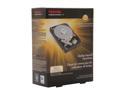
TOSHIBA PH3300U-1I72 3TB 7200 RPM 64MB Cache SATA 6.0Gb/s 3.5" Internal Hard Drive Retail Kit
Pros: Properly packed (compared to bare) High transfer rates Reliable Did I mention reliable? Very low DOA rate
Cons: None thus far
Overall Review: I normally do not write reviews but with several of another companies model drive dying on me all the sudden, I felt compelled to review the drive that i use in the other half of my array. Currently have probably 12+ of these drives (bare and retail) in my network for several years now, no complaints. I use them either for straight Windows or are in a ZFS array for storage. My suggestion is DO NOT go with the bare drives. Price might seem better but I've had more DOA's due to ordering OEM drives than retail. This is in part due to the lack of sufficient shipping materials to maintain the drives integrity. All in all, a great drive!
5/7/2015See more detail
Worked fine, until the end of newegg warranty
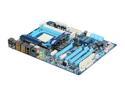
GIGABYTE GA-890FXA-UD5 AM3 AMD 890FX USB 3.0 ATX AMD Motherboard
Pros: Features and lots of them Stability, while it lasted Seemed to handle the 1090T with no problems, unlike another board maker that has issues with boards that catch fire.
Cons: 10 days outside of the Newegg warranty the board totally dies, refuses to accept any signal from the power/reset buttons on both the case AND the bench buttons on the board itself. Contacted newegg hoping they would be willing to swap it out being only 10 days outside of their warranty, nope, they basically told me to go away, even with the thousands I've purchased from them in the past 2 years. Contacted Gigabyte and filed for an RMA, still waiting on that stupid #, in the meantime, I have no computer and no clue if the motherboard took my other parts down with it.
Overall Review: Gigabyte will allow advance replacement on a PROVISIONAL basis. But, to be honest, it seems like it is still too slow. 2 days (I am on day 2 now, still waiting) JUST to get the RMA # 2 days for them to CHARGE your card for the MSRP of the board Processing time to get the board mailed (whatever that means) Shipping time (AND THEY WONT LET YOU PAY FOR OVERNIGHT RETURN SHIPPING, ON YOUR OWN DIME!) Seriously, I needed this workstation (and it is a workstation) back up ASAP. Newegg let me down, Gigabyte let me down. All future purchases will more than likely go somewhere else and to a different manufacturer. Realize if you want to run a business off of Newegg and Gigabyte, you better make sure the item dies exactly within 30 days for newegg and you have all the time in the world to RMA to Gigabyte if it doesn't.
4/21/2011See more detail
Dropping Off Like Flies
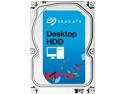
Seagate Desktop HDD ST3000DM001 3TB 64MB Cache SATA 6.0Gb/s 3.5" Internal Hard Drive Bare Drive
Pros: High rate of transfer both on reads and writes Fairly inexpensive
Cons: High DOA rate Minimal Warranty Lasts just over 1.5 years
Overall Review: As a network administrator I tend to purchase quite a fair amount of technology, both for corporate use and personal. My home network comprises several dozen of these specific model drives over the years and they have been fairly good until recent when several all went dead at once nearing the 2 year mark that I use for backups. Further adding insult to injury is that several more that are used on my main computers are now reporting severe sector errors, meaning I will most likely lose several more in the coming days. Data loss is looking closer and closer to a reality. Spend the extra money and use a different brand. Seagate used to be high quality, but it is starting to feel like they are designed to last just long enough to get through the warranty period. After my experience ends with these in the coming weeks, I will be replacing every last Seagate drive in my network, regardless of condition. The possibility of further data loss down the line is too much to risk.
5/6/2015See more detail
Used with Norco 4224
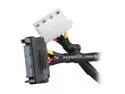
1ST PC CORP. CB-SATA-4P8 8 in. SATA 15-pin to Molex 4-pin Female Cable Adapter Male to Female
Pros: Inexpensive Adds options for power supplies with little molex connectors and many SATA connectors
Cons: Wiring feels a little brittle near the SATA connector, I would advise against pulling or tugging on the wires themselves as they feel like they might break off or pull out any second.
Overall Review: I purchased several of these to use in my Norco 4224, also purchased from here on Newegg to resolve backplane issues. These cables did wonders to help with those flimsy Y power adapters that I had. I highly suggest these over any y power molex splitter.
8/20/2013See more detail
Norco 4224 Review
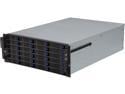
NORCO RPC-4224 4U Rackmount Server Case with 24 Hot-Swappable SATA/SAS Drive Bays
Pros: Inexpensive large drive capacity Fairly decent airflow Roomy for motherboard and PSU bay
Cons: Top cover is not easily removable in a datacenter environment. I would've like to see either a handle, or at least larger screws than the flimsy tiny ones they use. Makes removing the cover a pain, especially if you lose these screws. Powering of the backplanes is EXTREMELY finicky. Make SURE to avoid Y power splitters at all costs, use a high wattage and amperage PSU with a single 12V rail. Power/Reset button placement is not in a good place. Consider unplugging them if you expect to need to pull it out of the rack by the handles while it is running. Weight is definitely not the best, but what can you expect from such a large beast. Remove all the drive caddy's before attempting to mount this on rails, definitely do not attempt to mount on rails if the drives are in place, even with two people. Airflow is average to start with, I suggest using electrical tape or such to mask the many holes on the sides and rear of the case, as well as between the fan-wall and the backplane bay. I noticed a several degree drop in drive temperatures after doing this. The reason being is that there is very little room in the drive bays for airflow, you'll need a decent negative pressure effect going on to pull any large amount of air through the front.
Overall Review: I currently utilize this case for a lab SAN running OpenIndiana/Napp+It. So far it has 10 7200 RPM 3TB drives, 4 2TB drives and a few other various drives. As mentioned in the cons, the power supply is critical on this. I have an extremely large Corsair 900+W PSU on mine and had backplane issues where drives would randomly vanish. I removed the Y splitter cables and bought SATA to Molex connectors, it solved all my problems. If you are like me and started with much less than the 24 drives this accommodates, I suggest moving a spare hard drive through each slot and verifying that it shows up and works. One of my main concerns was not knowing about a defective back plane until much later down the road. Save yourself the hassle and check as soon as possible. Also, there is a fairly large thread over on the storage sub-forum of Hard-Forum for Norco case owners. I would highly advise anyone that owns or is looking to own one, review it. In the end, this is a very good case for the price, assuming you don't get one with bad backplanes like others have received.
8/20/2013See more detail
Great memory
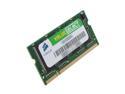
CORSAIR 512MB 200-Pin DDR SO-DIMM DDR 266 (PC 2100) Laptop Memory Model VS512SDS266
Pros: Plug and play, threw it into my ancient HP laptop with dead memory and worked perfect. No errors in Memtest86 and working great till this day.
Cons: Laptop memory still little more expensive than desktop memory.
Overall Review: Great replacement RAM!
4/2/2009See more detail