
Your Browsing History


Michael H.
Joined on 04/27/05
0
0
product reviews
- 2
Very well thought out case
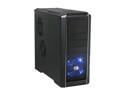
Cooler Master RC-690-KKN1-GP Black SECC/ ABS ATX Mid Tower Computer Case
Pros: Oh wow, where to begin... Very roomy inside, and lots of places to put fans (even the stock fans that come with it cover the essential airflow points). The 120mm fans that come with it are quiet. All of the fan locations are drilled out to handle various fan sizes. The hard drive rack is nice. The cable ties are useful for a few of the wires in your case, but for the ones that are in the way, you can just unscrew them. The power supply mounted on the bottom may seem like a bad idea... Until you realize there's a fan hole right under it. If you get a two-fan power supply, it will drag cold air out from the bottom of the case, and straight out the back. Virtually eliminating the power supply from the list of heat sources in the case! Very nice! The construction of the case is very sturdy, and has a very nice finish. I barely cut myself removing the top cover. 1 cut during the whole build is pretty good I'd say. eSATA connector on top accomodates motherboards without it.
Cons: I'm nitpicking at this point really. The power LED connector for this case's front panel was a 2pin, and I needed a 3pin. Not a terribly hard modification to make if you run into this problem. No PC speaker? I'm not sure if this can even be considered a con though, since most motherboards have other means of reporting errors these days. The top and front covers are a little hard to remove. Take them off once, get the work done, and don't put them back on until the end of the build and hopefully this will become a non-issue. The top connection header wires are a bit long. It's probably bad to complain that any wire is 'too long,' since longer wires will accomodate all situations, but these things can reach about a foot outside the case from the header. Yikes.
Overall Review: I think a few people said it didn't come with any screws. It's funny, because I caught myself thinking the same thing. On the 5 1/4" drive bays they placed all the screws into the metal of the case. There are more than enough there to handle the mounting of your components. The case itself comes with 12 brass motherboard standoffs if you needed to know that as well. Also, the 3 1/2" bay adapter for the floppy drive is great, just be sure to install it in the right orientation. Some users reported it sticking out an inch too far, and it's likely they put it on the adapter backwards. Looking at it again, it probably will stick out a bit if it is on the wrong way. Just examine the diagrams carefully and/or trial and error it otherwise.
12/17/2007See more detail
A good fit for smaller cases
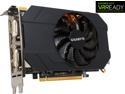
GIGABYTE GeForce GTX 970 4GB Mini ITX OC EDITION, GV-N970IXOC-4GD
Pros: - Fast, runs everything I toss at it at full settings without fail/slowdown. - Quiet, haven't even noticed it running (except for initial system power on fan test, heh). - Small, my case only has allowance for 10.5" which is really tight for most GTX 970 solutions. This card should fit in just about any case. - Solid, it feels really solid when you're installing it. Not flimsy or anything. The copper heatpipes look really good! - Only 1 8pin (6+2) power cable, makes the cable management easy-peasy. - Price, it's a little more than what I'd like to pay for a video card upgrade... I usually shoot for $200-$300, but this thing performs incredibly well for the price. I feel like the extra $30 over my target will likely be paid back later by a little extra time in my machine.
Cons: I haven't been able to get the card over 65C/149F and the fan has been quiet so far. However, on startup, the fans go full blast (normal for most cards) for a moment or two while the system POSTs, and it is fairly loud. If your case is not properly ventilated or runs in a warm space, I could see this being a concern. When I was initially setting the card up I had a lot of WEIRD problems with the way all of its ports are blocked/mapped together. It's not incredibly intuitive, which I will go into more detail below. The solution works in the end though, it's just not straight forward.
Overall Review: Ok so FLEX. Take note of the port mappings on the box/manual and try to match one of those if you're running 2, 3 or the max of 4 monitors. I run 3 displays myself. When I initially installed the card, I was getting complaints from my motherboard's BIOS through beeps codes. The system still started up and operated just fine in Windows, but those beeps were unsettling. The code was for a display error. At the time, I had connected one monitor to the DP closest to the HDMI, the HDMI, and the DVI-D port. After a lot of experimenting with the ports, with the DVI-D occupied, it did not send any signal to the DP ports above it, as expected really. To resolve the code, I had to move my DVI cable from the DVI-D port to the DVI-I port. After I did that, the motherboard beep code went away and all of my displays function in Windows. At POST, my DVI-I is the only monitor that displays motherboard information which is still a little weird, but I'll take it. The reason this is strange to me is because my initial configuration was in line with FLEX configuration 1. And the way I moved it was in line with both configuration 1 and 2... If you have more than 1 DisplayPort connection, I could see having to play some port bingo in the back before you had a configuration you were 100% okay with. I was replacing a 6850 which has served me well for nearly 4 years. But it has been having some problems keeping up with recent game releases. So I've been watching the video card market for the past 3 or 4 months for a new winner that I hope to run for just as long if not longer and this was my pick! The GTX 970 is a real beast for the price. The ol' 6850 will find a new home in my backup machine!
12/5/2014See more detail