
Your Browsing History


Dustin L.
Joined on 09/18/05
0
0

product reviews
- 12

ASUS P5K3 DELUXE/WIFI-AP LGA 775 Intel P35 ATX Intel Motherboard
Pros: This motherboard is absolutely awesome. At first I didn't want to revert from a dual proc to a single, but with the processors that this board can support, its actually an upgrade from the dual xeons that I was running before. The fsb and ddr3 of this motherboard is just awesome and the option for up to 10 SATA drives is great. With the built in wireless (an antenna comes with the motherboard), connecting to a network is easier now than it was ever for my setup. It also looks awesome when a large copper heatsink is put on the processor.
Cons: ZERO
Overall Review: This board is capable of so much, I could spend another $3k on parts and still not max out this board's potential. Running Intel Duo LGA775 E6850 3.0GHz 1333 fsb, EVGA NVIDIA 8800 GTX 768MB PCI-16, 2gig Corsiar pc10600 (1333mhz) ddr3, 2 Seagate 320gig SATA HDD, Silverstone OP650 650W
10/10/2007See more detail
The Illusion of choice

Microsoft Windows 10 Pro 64-bit, DVD - OEM
Pros: -It's Windows and has the most support in the Industry -Most issues are resolved fairly quickly with updates -You can change colors for your windows -Boots fast
Cons: -It's Windows 10 and is the corporate creep of 'one of us' -Most updates induce issues that need more updates to fix (yo dawg, I heard you like updates) -Metro look is just awful, at least you can get rid of the tiles, hide most the 'required' social media and news bloat and there are typically a fair few articles online to help disable other 'needed' Windows operations -Writes to your storage to boot fast, thereby putting additional wear on SSDs to save a few seconds -RAM HUNGRY (uses 6 gigs at idle with nothing open and as many programs closed as possible while only giving information for 750mb of RAM being used in task manager) -Had to make an Xbox live account... I still don't know why
Overall Review: Having had Windows 7 until 2021, I literally couldn't install it on the new computer due to being blocked out from doing so. My experiences with Windows 10 have included waking up to my computer having reset in the middle of the night and losing all the work that was compiling while I was sleeping. Waking up at 4am after the computer reset and went back into the OS to start up a playlist I had paused on Youtube at 11pm. Updating to find things are now more broken (as if the actual users were the beta testers!). And searching for hours on how to take out a lot of the 'essential' things to Windows with Regedit and other programs. Perhaps with Windows 11, a lot of this will be fixed, but I'm anticipating I'll go to Linux after this if things keep up as they are. Microsoft has seemingly long ago forgot that people are and crave individuality and not the 'one of us' mentality being shoved down our throats.
7/15/2021See more detail
Anything electronic can be broken
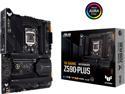
ASUS TUF GAMING Z590-PLUS LGA 1200 Intel Z590 ATX Intel Motherboard
Pros: Attractive design that isn't over the top, like most everything else Incredible value (especially if you don't need the wifi of the wifi version) Minimal RGB Plenty of places to tuck and hide wires Optional PCIe 4.0 (But requires 11th gen) ASUS Customer service once again keeps me brand loyal
Cons: **!!** IF you are going to use an Arctic Liquid Freezer II, the pump assembly MUST BE MODIFIED to fit onto this board if you are going to use the 4 pin designed for AIO **!!** Board came with defective (after 3 boots) PCI-e controller, resetting CMOS helped but then failed again Some modifications required for Arctic Liquid Freezer II AIO pump usage Read up on what RAM configurations can run at rated speed, as 4400cl16 was not achievable even at 1.5v
Overall Review: The motherboard was shipped to me working and after a short time, my GPU wasn't being detected and I had to rely on the integrated graphics of my 10850k. Eventually figuring out it was the PCI-e controller, resetting the CMOS helped for a boot or two before the failure came again and stayed. Sent motherboard to Newegg and was denied due to 'bent pins' on the CPU socket. 2 weeks after sending it out, I got it back, looked at it and saw there was a pin broken on the socket. Put it back together and tested with it still booting and exhibiting the same issue. I contacted ASUS and the normal lines of troubleshooting were gone through before I was told to send it. Not knowing how the pin broke, and reading ASUS's information online, I was expecting to have to pay a fee to have the boards socket replaced, but after seeing the part on the way, it was received about 7:30 pm a few days later and a replacement was on the way the following day. This is the 2nd time in 16 years I've ever had an issue with an ASUS board (that wasn't caused by a powersupply deciding to ground out internally) and the 2nd time I was floored with ASUS's response and care for the customer. From a BIOS chip sent to my address to replace my bad one in 2006 to the replacement for a bad CPU socket, ASUS really does have fantastic customer service, even to the point of contacting me 'too much' through the process to make sure I was kept up to date on how things were going. Less the PCI-e controller being bad, the replacement board is the same as the previous with G.Skill 4400 cl16 sticks not being able to achieve their full speed, but that's on me for not reading from G.Skill on what they can do with the board. 4000cl15 is achievable though!
7/15/2021See more detail
A new Platinum standard
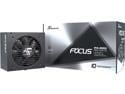
Seasonic FOCUS PX-850, 850W 80+ Platinum, Full-Modular, ATX Form Factor, Low Noise, Premium Japanese Capacitor, 10 Year Warranty, Nvidia RTX 30/40 Super, AMD GPU Compatible, Ref# SSR-850PX
Pros: Great packaging Easy test instructions before installing Fully modular Quiet operation Optional ways to mount based on system configuration Plenty of straps and ties to help in wire management 10 year warranty!
Cons: None
Overall Review: Moving from a 2010 based 1200w (remember the days of SLI Fermi? That's why) PSU, I was pleased with the build quality and ease of installation. The 1200w I used before was likewise fully modular, but I THINK 80+ certification was just becoming a thing back then, so that was all it had. The platinum certification on this allows for silent operation, or in my case (Lian Li Lancool Mesh II) a completely isolated cooling system for the PSU with air draw from below and then right out. Doing this will make the fan run more often, but won't vent heat into the case. Pick your poison of a little more noise (likely more when under load but it would probably barely add to anything) and wear on the fan or heat venting into the case under light loads and warm case air being used to cool the PSU.
7/15/2021See more detail
Advertised for a reason
Thermal Grizzly Conductonaut CPU GPU Cooling Ultra High Performance Liquid Metal Compound Cooler Fan Thermal Grease/Paste -1 Gram TG-C-001-R
Pros: Easy to place on die with the included tools Easier to work with than Synthetic Oil based fluids Great packaging for protection and storage after 10850k w/ Arctic Liquid Freezer II staying at or near ambient on light workloads and has yet to cross 60C under 70% workloads with 30-35C ambient (Yeah, A/C would be nice to have)
Cons: Take caution when applying and making sure it doesn't get to places not intended, the metal can be difficult to spread evenly and correctly as it doesn't bond with many things and will stay in small droplets of metal
Overall Review: There are certain things in life you should NOT go cheap on. Tires for cars, frame for a house and inserts for your shoes. Likewise, thermal compound is another. Although there are failsafes built into computers to keep them from frying, the time, frustration and additional potential cost from having to go with a reapplication of a different compound is never worth the small bit for paste. Do yourself a favor and do it right from the get go.
7/15/2021See more detail
Revenant
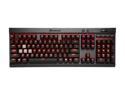
Corsair Gaming K70 LUX Mechanical Keyboard Backlit Red LED Cherry MX Red (CH-9101020-NA)
Overall Review: Pretty much everything one could hope for with a mechanical keyboard in terms of functionality and use. Coming from a membrane keyboard, I was struck at first by the sound of the switches, but have grown used to it, though it's not something that one will not hear. Flawless function, even when I spilled a soda on it! I can say the internals are about what you'd expect with most all others designs and other manufacturers I've seen.
9/21/2019See more detail