
Your Browsing History


Christopher S.
Joined on 09/01/04
1
0
product reviews
- 28
Good Printer
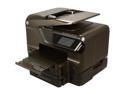
HP Officejet Pro 8600 Premium Up to 20 ppm Black Print Speed 4800 x 1200 dpi Color Print Quality Ethernet (RJ-45) / RJ-11 / USB / Wi-Fi Thermal Inkjet e-All-in-One Color Printer
Pros: Attractive. Easy to use. Large and angle-adjustable touchscreen. Fast printing and scanning. Quiet. Wireless/Wired and ePrint connections. Apps. Scan to PC, email, memory card, network folder. When turned fully off and then back on, it becomes operational faster than any other printer I have seen; usually ready in seconds rather than in minutes. The upgraded Premium version comes with a second paper tray + 3 color ink cartridges (in addition to the 3 color + 1 black cartridge). One other thing: when cancelling a print or scan job, the printer responds and recovers quickly. The 8500 I had would always lock up and almost never get around to stopping the print/scan job.
Cons: Scan to network folder has a flaw in it that is bothersome for me. I use my printer to scan to network folders probably more than actual printing, so the flaw in the 8600 is a pain for me. When scanning documents to a network folder, the 8500 I upgraded from would ask whether there was another page to scan. The user was given three options: 1) scan another document and add it to the same file (used for creating multipage PDFs), 2) scan as a new file (for single page documents), and 3) No (done with scanning). The 8600 only gives the option to either scan another page or to exit. When scanning another page, it will put ALL of your scans into ONE PDF whether that's your intent or not. You would then have to extract all of those pages manually. In order to create SINGLE page scans, you have to select 'No', and then restart the scan to network folder process all over again! If you have the volume of documents like I do, this becomes unacceptable.
Overall Review: I upgraded to the 8600 from the 8500 when I saw the sale price + recycling of my old printer credit while in an office supple store. After finding out about this issue with scanning to network folders, I considered going back to get my old printer, but I have decidedd that I will stick with this one. I contacted HP about this issue and they have elevated the issue to their Advanced Support Group, but I feel that the only way to correct the printers behavior is to reprogram it (firmware update I suppose). Also, when I installed the printer software, I skipped the CD and went straight to the HP website for the latest package. Sadly, this printer does not come with any photo manipultion tools as previous printers have. It comes with the drivers and IRIS only. Otherwise, this is a solid printer and one worthy of consideration.
1/4/2012See more detail
Needs Improvement
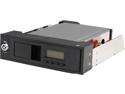
StarTech HSB110SATBK 5.25in Trayless Hot Swap Mobile Rack for 3.5in SATA HDD with LCD & Fan
Pros: It works.
Cons: Lots. See Other Thoughts.
Overall Review: Where to start? First, the locking mechanism is very flimsy and I swear that every time I operate it I think I'm going to break it. Next, it will not recognize a drive until you lock the door with the key. While it is nice to be able to enable/disable a drive just by using the key (as opposed to having to open the door or remove the drive), your drive will not be recognized until the door is key-locked. Lose a key and you're material-exiting-from-your-backside out of luck. Finally, this thing is LOUD! I have an i7 4770, a Corsair H100i, an 6970 with an Artic Accelero Xtreme III VGA Cooler, a Blu-ray drive, an SSD, and two HDDs in two of these hot-swap bays. While I do not have a decibel meter with me, I can tell you that my system would be otherwise silent without either of these things turned-on. The sound the internal fan makes is also annoying as heck. The front panel is worthless...I cannot read any of the info unless I am directly in front of it. But what's worse is that you cannot change anything (like fan speed), except for the threshold the alarm will sound at. I am already looking for a replacement product, Mind you, these things work, but not suitable for a quieter environment.
5/1/2014See more detail
So far, so good
AGPtek® 320GB Internal HDD Hard Drive Disk Kit for XBOX 360 Xbox360 Slim
Pros: Inexpensive Large capacity
Cons: 1Gen Xbox compatibility?
Overall Review: I don't have any 1Gen Xbox games, so I cannot talk about any issues with compatibility. However, there are sites out there that will tell you on how to resolve such issues. I got these for two of my 3Gen Xbox360 consoles, since the installed 4GB of storage was no longer sufficient to even install updates to the consoles. They installed easily enough and have worked as advertised. However, soon after getting these, I banned the kids from them; they are really the only ones who use these consoles, so I cannot speak about issues concerning the RRoD some are seeing. These drives had names written in Chinese script and I'm not too sure about the integrity of how these were made (do they contain spyware? were the techniques used to make these legal? etc.). I would like to see MS not charge an arm and a leg for pitiful storage capacity upgrades through their channels, and I would also like to know why only 32GB of anything connected to the USB port is visible? I would support MS if they could address these two points. Otherwise, these are good and work as-advertised.
2/27/2015See more detail
AWESOME!
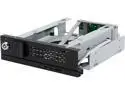
ICY DOCK Tray-Less 3.5" SATA Hard Drive Mobile Rack with 80mm Cooling Fan - TurboSwap MB171SP-B
Pros: +Separate on/off switch +Fan controller +80mm fan (with an option to install a 120mm fan- AWESOME) +Tray-less drive mechanism
Cons: It took three days to get here!
Overall Review: I had to replace another ICY DOCK mobile rack that I've had for years because it couldn't support drives larger than 2TB. I originally purchased a pair of StarTech HSB110SATBK's, and a word of advice about those- stay clear of them: they are noisy as heck and the front panel LCD screen lacks any useful utility. The fan for them is actually louder than my whole system! The rack won't work unless you lock it- dumb. Anyhow, I saw a review of these on another website and immediately ordered a pair. One was DOA and is in the process of being RMA'd, but the other works just fine. Since I use these in a system that's on top of my desk and like 2' from my right ear, I REALLY needed something quiet, and boy I tell you- THESE THINGS ARE QUIET! Even with the fan speed at max, I can't even hear it operate! I think installing a larger 80mm fan (as opposed to the usual 20mm/25mm type), is a great idea as you get max cooling without the noise! However, when I put these two racks in my case, one atop the other, I noticed that there wasn't much of a gap between them, so it'll be interesting to see if the top drive gets significantly warmer than the bottom drive, which has an empty slot beneath it. So far, the bottom drive is much cooler in the ICY DOCK rack compared to the StarTech. The entire drive door/ejection system seems pretty solid. My other ICY DOCK rack never had any issues and I don't expect these to either. Otherwise, this product is the cat's meow, and I am considering buying 2 or 3 more for my other PCs.
10/15/2014See more detail
Update to Other Reviews of Mine
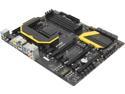
MSI Z87 MPOWER LGA 1150 Intel Z87 HDMI USB 3.0 ATX Extreme OC Flagship High Performance Triple CFX/ SLI Platform Intel Motherboard
Pros: See Other Thoughts
Cons: See Other Thoughts
Overall Review: First, I really wish that Newegg would allow the editing of reviews so that users can update them at a later point instead of having to write multiple ones. That being said, I was able to resolve one issue I mentioned in an earlier post: I mentioned that numerous websites wouldn't work properly and I discovered the culprit- IE11 in Windows 8.1 and 8.1 Update 1. After swapping-out nearly every single piece of hardware, reinstalling the OS and not running any A/V, I finally installed a 3rd party browser and that seemed to do the trick. I also don't know how this happened, but my GPU (6770HD), got fried or is somehow otherwise damaged. So now I am running this MB with the integrated audio and IGU and it seems really empty in the case. :( That's OK because this machine is going to become my FlightSim rig once the Surface Pro 3 ships. MSI sent an email via Newegg to me about the BT module. Very helpful (not). It was an article from Windows 7 for Dummies! (And I am using Windows 8.1U1, BTW) Still no documentation from MSI about how to use the BT module. I mean, it seems the PC and the devices connect, but then nothing happens, nothing can be done. Wonderful. Finally, I really want to diss on the LU5 software. When scanning, it will say that certain drivers or apps aren't installed (when they clearly are), or that the installed version is higher than the online version (nig say whaaat?)! I also am not sure on why the Creative drivers won't recognize the onboard Creative device?
5/22/2014See more detail
Amended Review
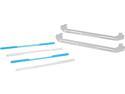
CORSAIR CMDLBUK02B Light Bar Upgrade Kit for Dominator Platinum
Pros: See Other Thoughts
Cons: See Other Thoughts
Overall Review: Well as it turns out, I did install this product wrong, but only because the documentation was incorrect. As others have pointed out, you need to retain the clear plastic strip that comes with the memory and install these (with the tabs out, another error in the documentation). Once you do this, it works. A note about these- the inserts don't really fit tight in the slots. Once you've installed the sticks back into your system, you can adjust their position with your finger. It would be nice if the "Dominator" text would also light. Sorta reminds me of the warp core in Star Trek.
1/30/2014See more detail