
Your Browsing History


John S.
Joined on 04/03/05
0
0
product reviews
- 9
great motherboard
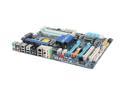
GIGABYTE GA-EX58-UD3R LGA 1366 Intel X58 ATX Intel Motherboard
Pros: This is all you need in an X58 motherboard as long as you don't want to do SLI. No frills, no nonsense, and all the functionality you could want. Didn't have any problems with compatibility or functionality with this motherboard. Started right up the first time. No bugs, which is more than I can say for some of these other more expensive X58 motherboards that are currently available. Gigabyte seems to have the X58 well figured out. Seems to be really stable. Everything benchmarks with expected results. Very detailed and plentiful overclocking options. Enough slots for future expansion. Plenty of ports. Good online support. No fan on the northbridge. Being able to use my old Audigy 2 sound card saved me some money. It has 2 BIOS' which is great for ensuring the board's longevity.
Cons: The main cons and the reasons this is so inexpensive is because it only has 4 RAM slots and it only supports ATI Crossfire, no Nvidia SLI. Since I have an ATI video card I don't see this as a problem and hopefully I'll be able to upgrade before 6GB of RAM becomes insufficient. Also, no eSATA. I see this type of connection becoming very popular in the future so it would be nice if this motherboard had one or two. I guess I can always get an eSATA bracket. One last thing: it didn't detect my RAM's settings correctly; I had to set them manually.
Overall Review: I don't know if this problem was caused by the motherboard or what, but at first there was this quiet but high pitched whine coming intermittently from the computer. It would only happen when I went from idle to working, like opening a web page for example. I thought it might have something to do with my power supply, but regardless of that I decided to upgrade the BIOS on this board to the F3 version and the whine stopped. Take that as you will. Things in my computer: 1. Intel i7 920 @ 2.66Ghz 2. This motherboard 3. 6GB (3x2GB) G.Skill model #F3-10666CL9T-6GBNQ 4. WD Velociraptor 300GB 5. SAPPHIRE 100259-1GL Radeon HD 4870 (1GB of RAM) 6. Antec NeoPower 650 Watt PSU Bottom line: If you're only going to be using one video card or if you prefer ATI and you don't mind the fewer RAM slots, this motherboard is a perfect choice for a X58 platform. Huge value in this board when others of similar quality cost a lot more money.
1/17/2009See more detail
Great size, great design, great case.
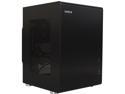
Lian Li PC-Q33B Black Aluminum Mini-ITX Tower Chassis
Pros: I have owned this case for about six months now. I'm really happy to see this case come to Newegg. This case has some major draws. First and foremost, the hinged design is fantastic. It's the best innovation I've seen in an ITX case. The whole front of the case flips down to allow total access to all the internal mounting surfaces. I've had ATX mid tower cases that were more difficult to work in than this case. This is the main reason I bought this case. The internal organization of the components is great. The case is kind of zonal in terms of heat, allowing you to keep your hard drives a bit cooler than they might otherwise be. Also, the way hard drives mount directly to the back of the front panel is a nice space saving feature. The case allows for a good number of full sized ATX components. It will support a full sized ATX power supply. It also supports very tall CPU coolers, which is great if you're into that kind of thing. I personally don't have a tall CPU cooler installed, but it's good to know I can have that if I want it. The case supports ITX-length graphics cards, so your choices are a little limited as far as that goes, but there are several very decent gaming cards you can put in this case. I personally have a GTX 760 installed and it plays all the games I want with ease. The aesthetics of this case are awesome. I think it's really beautiful, elegant even. The brushed aluminium is really nice. The design is minimalist and kind of industrial, which I really like. The thumb screws have little rubber grommets on them which help to prevent you from marking up the aluminum as you screw in the screws. These features give the case a very high level of apparent fit and finish. Lian Li clearly spent a lot of time designing this case, getting these little details right. One other nice thing about the design are the dimensions. Many ITX cases are very short and deep. This case, in contrast, is taller than it is deep and has a nearly square footprint. I like this design choice a lot. As is the case with many aluminum cases, this case is very light even with all the components installed. It's much lighter than steel cases I've owned in the past. The power button is cool because it has two build in LEDs, one for power and one for HDD activity. This goes along with the minimalist design. The way the side panels pop on and off of the side of the case is very convenient. It's a big improvement over the myriad screws you would need to remove from previous Lian Li cases in order to take off the side panels.
Cons: This case isn't all fantastic. There are a few things I've noticed about it that are not so greatl. None of these are deal breakers and I'm mostly just nitpicking. Still, I would like to mention a few things. First, this case has only a single fan in the pack for ventilation. With a good fan at a high RPM you could probably have some decent cooling in this case, but I would look elsewhere if you're in need of high levels of heat dissipation. Second, this case has no dust filters at all. I feel like this is something all cases should have. As long as you're diligent about cleaning the dust out of the interior this isn't a big deal, but I thought I would mention this. Third, given the way that hard drives can mount directly to the back of the front panel, you have to use SATA cables that plug straight into your drive. You can't use angled plugs with this case. Also, since drives mount totally flush with the mounting surface, you'll need pretty slim SATA connectors. I myself had to wedge a couple of fairly fat SATA connectors into my SSD, which is less than ideal. Forth, the blue power LED in the power button was WAY WAY too bright when I first got my case. In order to not have this thing illuminate my entire bedroom at night, I had to open it up and use some special shaded stickers I bought to reduce the brightness of the blue LED. I'm kind of picky about this kind of thing, as I often cover all my electronics' LED lights with electrical tape. Maybe you wouldn't mind about the brightness of the blue LED as much as I did. On a related note, the power button doesn't sit totally flush with the outside surface of the case. It's a little recessed, at least on my case. If you push in the power button at too much of an angle, it can actually get kind of stuck behind the front aluminum panel. It's easy to pop back into the correct position, though. The next thing deals with the way the side panels attach to the sides of the case. The way the side panels attach is they have little aluminum pegs on them, which pop into little plastic retainer clips in the case. I'm concerned about the longevity/durability of these little clips. When I got my case, one of the little clips was already broken. Thankfully, Lian Li included a spare plastic clip, which was easy to replace the broken one with. I haven't had any more issues for the six months I've had this case, but I'm still going to try to refrain from removing/replacing the side panels excessively. Finally, this thing is a finger print magnet. The brushed aluminum soaks up finger oils like nothing I've ever seen before.
Overall Review: In looking at my list of pros and cons, you might think that I'm not really happy with this case. But I really am! I like it a lot. To me, the materials, size, and the innovative, intelligent design far outweigh ALL of the cons I listed. Overall, this is by far the best case I've ever owned. With the increasing amount of gaming-grade hardware available for ITX sized cases, I hope to never have to get another ATX case again. If you're considering an ITX case, I believe this is one of the best choices on the market right now. Lian Li have done a good job of minimizing the sacrifices you need to make to switch to the smaller ITX form factor.
11/2/2014See more detail
Great for the price
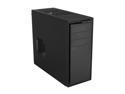
NZXT Source 210 S210-001 Black “Aluminum Brush / Plastic” ATX Mid Tower Computer Case
Pros: Excellent build quality and sturdiness for the price. This case really impressed me. I was expecting some flimsy thing but instead I got a perfectly good, solid case with parts that fit very well together. The paint job is really good. The front panel and buttons on the panel all look and feel really good. The interior is intelligently laid out. No sharp edges. Lots of room for expansion. Easy to work in this case. Lots of room for fans.
Cons: No fan filters. The case magnifies the sound of components inside which vibrate, i.e. hard drives. I mounted two hard drives in this case and the hard drive access sounds were clearly audible. I installed the same two drives in a different, more expensive case and they were dead quiet. Don't get this case if you're looking for something that deadens sound. This case won't do that. Another small con is that the texture/color of the plastic bezel doesn't exactly match the texture/color of the paint of the case. Just a small nitpick.
Overall Review: For the price this case is fantastic. It's not a premium offering, it's very spartan, no-nonsense, no-frills, just straight forward and to the point. But for the price, that's okay. This case fulfills its purpose very well for the asking price. If you're looking for a cheap, basic case but also want something that isn't going to let you down, this is a great choice.
7/16/2014See more detail
Good drive!
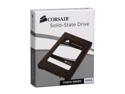
Corsair Force Series 2.5" 60GB SATA II MLC Internal Solid State Drive (SSD) CSSD-F60GB2-BRKT
Pros: This drive is very fast. HD Tune puts it at about 170MB/s average read/write for benchmarking and about 260/250MB/s read/write for the file benchmark. Random access times are pretty much instant of course. Installation was simple and painless, no problems with stability like other people seem to be having. No crashing and it wakes from sleep with no trouble. Lightning quick Windows startup and shut down.
Cons: None. A little pricey but it's to be expected for a solid state drive. You get what you pay for. Also you have to be moderately mindful of your space usage, can't go crazy. I have the bare minimum software installed (Windows 7, MS Office, Adobe Photoshop, one game) and I only have 19GB free. I recommend a separate drive for storage.
Overall Review: Running Windows 7 Pro 64 bit, Intel i7 920, Gigabyte EX58-UD3R with latest BIOS revision. Running Intel storage matrix drivers, you should definitely get these if you have this drive and you plug it into an Intel SATA port! I read that there might be stability issues without the Intel drivers. Also make sure your BIOS is set to AHCI or RAID mode, not IDE. Final thought, my BIOS reports the drive not responding to SMART commands but it doesn't seem to be having any problems otherwise so I think it might just be an incompatibility between the Sandforce 1200 and my BIOS.
9/13/2010See more detail
Best keyboard I've ever owned
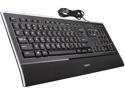
Logitech K740 Illuminated USB Keyboard
Pros: This keyboard is probably the best keyboard I've owned. I can't decide what part of it I like the best. It looks extremely nice - really a good addition to a modern desktop. Elegant, I guess, is the word. The back lighting of the keys is superb. The color is good, sort of a warm white hue. The lighting is very even. The best part about the keyboard is the way it types. I've never had a keyboard that was more of a pleasure to type on. The tactile feel of the keys as you use the keyboard is excellent. The keys press down softly yet decisively, and spring back eagerly. The laptop-style flatness of the keys is great, coupled with the amount of travel the keys have - a little more than a laptop's travel but less than a regular desktop keyboard. I like how the setpoint software allows you to choose the default action of the F keys, i.e. whether holding the FN button down causes them to type F1-F12 or to use the shortcuts such as play/pause, calculator, eject, etc.
Cons: At first, this keyboard was more difficult to touch-type on. As I used it more and more, I got used to it. The legs on the back of the keyboard don't raise up the keyboard quite as much as I would like, and they seem kind of flimsy. We'll see. Also, for that matter, the whole keyboard seems kind of flimsy, but let me be clear: it does seem well-built. It's not of poor quality at all. It's just that because it's very thin, it kind of flexes. As others have said the F numbers aren't lit up, only the media functions. The raised bumps on the F and J keys aren't quite as prominent as I'd like them to be. It takes me a little while to find the home row without looking sometimes. Honestly these are just small nitpicks. Overall the keyboard is great and its pro's far outweigh its cons.
Overall Review: After using this keyboard extensively in the dark and in poor lighting conditions, you sort of start taking the lighting for granted. I learned this when I went to use another keyboard in the dark and I found myself put off by the fact that I couldn't easily see the keys. I had to look down, let my eyes adjust, then type what I needed to type. So beware; this keyboard will spoil you.
9/16/2009See more detail
Works great as long as you know what you're doing
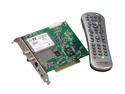
Hauppauge WinTV-HVR-1600 ATSC/ClearQAM/NTSC TV Tuner PCI w/Remote
Pros: The HVR-1600 works great after some fiddling around. It will receive analog channels in pretty good quality and it receives clear QAM channels in perfect quality, though signal strength is a little on the low side. I haven't tried it for ATSC as I have no need, but I'm sure it will perform similarly in that regard. The included remote is an awesome bonus. It has good button placement and build quality and it works with a wide variety of software. Good drivers and great online support with lots of documentation is available. Also, there is a large-ish community of people tuning TV with this card on the Internet.
Cons: The HVR-1600 has several flaws, but they aren't really due to limitations of the card itself. The card performs as advertised. Rather, the card's problems stem from the realities of digital TV reception and the limitations created by the software. The software that is included with this card is good for only the most rudimentary functions. The interface is unnecessarily complicated, and extremely unintuitive. Additionally, as I said before, analog reception is fine, and digital is perfect, but only on the channels that it can actually receive. Basically, you're at the mercy of your local OTA reception and/or what your cable provider allows to be broadcast unencrypted, aka as clear QAM. In my town, this is about 5 channels; Fox, NBC, ABC, CBS, and PBS. This is obviously not an ideal situation but it's the reality of tuning TV with this tuner card.
Overall Review: I docked an egg solely because the included software isn't very good. Other than that, the card is great. The thing is you're not going to be able to get all your 300+ digital channels through this thing. That's a limitation your cable provider is enforcing, not this tuner card. Also, I would recommend using some kind of 3rd party PVR software to really get this card to perform to the best of its ability. I've been using GB-PVR for over a year now and after a little set up it's been working with little or no problems for months. There is a fantastic online community for this software, as well. Another solution you could try is MythTV, though I'm not sure there are drivers for the digital tuner for linux yet. I've also tried recording from the card directly from a VCR and it worked perfectly. I did have to experiment quite a bit with software before I got it to work for that purpose, though. Final thought: this card is great if you're willing to experiment with setting it up.
9/7/2009See more detail