
Your Browsing History


Anthony P.
Joined on 11/22/06
0
0
product reviews
- 24
Bogus
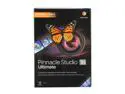
Pinnacle Studio 16 Ultimate
Pros: The product works great. It is Avid Studio V2 renamed to PS16 because Pinnacle is now owned by Corel, not Avid. Those familiar with Avid Studio will find the transition real easy. There are new features that might make it worth the upgrade. I like them and they are too numerous to mention here. Oh, and if you have any plugins what worked with Avid Studio, they will work just fine in PS16.
Cons: Stay away from the basic version. Plus or Ultimate versions are the only ones worth considering.
Overall Review: To the "nameless" poster that was crying about how bad the software is probably doesn't know how to use it. Crying about how it's not like Studio, blah blah blah. Clueless. Totally clueless. This program is NOT and update of Studio15, but an update of Avid Studio. The legacy Studio line is gone now. Pinnacle is owned by Corel, who has their own VideoStudioPro software that competed with Studio. People should do their research before jumping on something they know nothing about. PS16 is a great program with a pretty extensive feature set. It is not for the once in a while family video maker. But if you want to do more, this is a program that will allow you to grow.
12/22/2012See more detail
Make sure you get latest revision mb
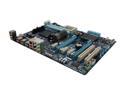
GIGABYTE GA-970A-D3 AM3+ AMD 970 + SB950 USB 3.0 ATX AMD Motherboard
Pros: The board is simple and clean. For those that aren't going to go crazy overclocking and want a good inexpensive stable motherboard, this one works great.
Cons: I bought this board before the FX chips came out from Newegg. I was moving to Poland from NY so wanted to build me a "future" compatible computer. I built the system on the Phenom II X6 1090T and ATI HD5870, 16gigs of Corsair Vengeance DDR3 1600 ram. I had to manually change the RAM speed in BIOS, otherwise, it booted up with RAM set to 1333. No big deal. The shocker came when my Rev 1.0 motherboard would not work with AMD's latest FX8350 CPU. Come to find out that Rev 1.0 will not even work with the FX8150, which is the first released Bulldozer. This in spite of the box sporting the AMD FX sticker. I updated the BIOS to the latest version F11, and still there is no support for my CPU. It will show up in POST correctly, but you will get BSOD soon after fully booted up. Very very disappointed. I've been a Gigabyte user for ages. I had to buy another board (yes, it was Gigabyte GA970a-UD3) in order to have to use the FX8350. That was not a part of my plans. Gigabyte's reply was (and it was in Polish even though I wrote in English. Using Google to translate Polish reply) "FX8350 processor support if this is technically possible we will try to add in a newer BIOS version." Thanks. Just what I did not want to read. And still no FX8150 support.
4/4/2013See more detail
Amend the Above Review
MAGIX Movie Edit Pro 2015 Premium - Download
Pros: A great editor.
Cons: None.
Overall Review: I based the above review on purchasing the program for $45. It's a steal at that price. At it's list price there is plenty of good competition. Each bringing their own specialty to the game. You have Motion Tracking and Subtitling with Video Studio Pro. With Pinnacle Studio 18 Ultimate, you have a host of "pro" features that extend past the consumer editor into the prosumer realm. There is also PowerDirector 13 Ultimate that brings in Multicam (MEP has it too) and a couple of other features. As posted above, I mainly use PS18U. The feature set is outstanding, and it works for me. I own all the editors mentioned here, and still return to PS18U for editing.
2/1/2015See more detail
Mouse Failed

Logitech G500 10 Buttons Dual-mode Scroll Wheel USB Wired Laser Gaming Mouse
Pros: The price was right on sale, and the features it offered were excellent. Weighting was great. I like a heavier mouse. I like the programmable dpi settings and all those extra mouse buttons that can be used for heavy combat settings. I use one had for a lot of functions without looking at the keyboard.
Cons: The material it is made out of just does not feel "right" or comfortable after long term use. It feels like plastic with a grainy texture. The major "con" and it is a show stopper is that the left mouse button would "click", but do nothing. If you wanted to "lasso" and drag icons, files or folders, you couldn't. At first I thought it the USB port. Nope. Another mouse works perfect there. Then I went to Logitech's website and I am not the only with this problem. There are many people with the same problem. Logitech was a respected name. I had the MX518 for years, and abused it too. It finally gave up. So, why not get another "better" mouse from Logitech? Mistake on my part. While ranting, the G35 headset earpiece and headband covering are flaking all over the place. Headset is still good. But there are no replaceable earcups of headbands. I think I am staying away from their products and will look elsewhere.
Overall Review: I live in Poland and Logitech products command a VERY high price. Too bad the quality doesn't match.
12/11/2012See more detail
Avid Studio Success
Avid Studio
Pros: A wealth of features and the ability to create stunning videos. Unlimited tracks. Red Giant plug ins. Hundreds of transitions, effects, and Montage themes. Background rendering while you continue to edit. Everything a video editing junkie would need! Upload directly to Youtube from within the software. Pinnacle's online forum is where are the help is. Avid employees and seasoned moderators are always there to help and offer advice. See if you can get any NLE software at THIS price with all these features.
Cons: Lack of secondary color correction. Version 1 software that works as advertised but you have to make sure that your computer, especially if editing AVCHD, MOV high def files, meets the recommended specs or better, not the minimum specs. It's really not the software that is the problem but the HD files. Software not for the casual editor. The learning curve is a little steep, but well worth the time!
Overall Review: Replying to the poster that said the product does not work, I differ with him. I have produced many HD videos with the program, but you have to know what you are doing. Want proof? Go to youtube and you will see many uploads and tutorials. I use Canon DSLR mov files, Canon AVCHD and GoPro Hero2 camcorders and import these files in directly with NO problems. I have used it for over a year. Are there issues? Yes. All software has them. NLE software of this level require a system that is set up for it. This product is geared for the prosumer/event editor. It requires you actually reading the manual and looking at the tutorials that are supplied with it. The learning curve is a little steep. BTW, my computer specs are AMD1090T oc'ed 3.8Ghz, 16gigs DDR3 1600 ram, ATI HD5870 w/2gigs GDDR5 ram, Bluray burner, Win7 Pro 64bit.
6/22/2012See more detail
Great Ram
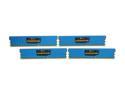
CORSAIR Vengeance LP 16GB (4 x 4GB) DDR3 1600 (PC3 12800) Desktop Memory Model CML16GX3M4A1600C9B
Pros: Easy to install, low profile so as to not interfere with CPU coolers, looks nice in my Gigabyte mobo.
Cons: None
Overall Review: Booted right up without an issue, but my Gigabyte mobo did not recognize the correct speed, which was easily adjusted in the BIOS settings. I do not fault the ram, but the BIOS settings, even though they were set to Auto. At the discounted NewEgg price, well worth it, even though I have not used anything that has come close to using 16 gigs!!
10/8/2011See more detail