
Your Browsing History


Brian S.
Joined on 01/24/08
0
0
product reviews
- 1
Great case if you can obey their logic.
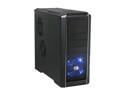
Cooler Master RC-690-KKN1-GP Black SECC/ ABS ATX Mid Tower Computer Case
Pros: This case is actually a great case, but if you don't work with it the way the designers planned, you'll get frustrated. You've GOT to do things their way, or you'll be fighting the case the entire time you're putting it together. I'd built a number of systems on Enermax, Lian Li, and even other Cooler Masters and the design is well thought out, though it has numerous nuances. I'm going to step out of Newegg's review framework here for a moment and point out what you need to know. The entire front and top is grille, while the sides, back, and bottom are metal. The entire front bezel comes off, as well as the top. To get the front off you have to pull REALLY, REALLY hard. I was afraid of warping it or breaking it, but it did give in eventually. Keep this front grille off for CD Drive insertion and if you're replacing the front intake fan. The gently inset grille on the bottom half is supposed to be like that. The top grille is much better designed. Just pop the clips inside
Cons: The fans CAN be inserted after the motherboard is in place, and this is one of the nicer features of the case. The top fans go on the inside of the case, but screw into place from the outside of the case, so you can use a full size screwdriver (which was nice, since I had one of those fans that had plastic-biting screws). The front and bottom fans have a removable mount (with filter) that you unscrew from the bottom, remove, mount the fan to outside of the case, replace into the case, and then rescrew from the bottom. It's a nice touch, particularly since the hard drive bays would otherwise prevent you from screwing the front fan into place (from the inside). Also nice on the bottom fan, as the large fan size (120's or 140's) makes them tuck under the motherboard, so the removable mounts are a plus. 1 fan on front (though the grille in front of the 5.25" bays is also an intake) 2 on bottom (1 from powersupply) 2 on back (1 from powersupply) 2 on top 2 on left 1 on right
Overall Review: Get yourself a modular power supply, particularly if you plan on using the bottom fan (which is nice, particularly if you have a larger videocard that comes with it's own fan, as this will pull air into that area of the case). The cables have a tendency to bulge into the fan blades. Other facts: Reversed powersupply (it's on the bottom), so a fairly long stretch for some 4/8- pin motherboard connectors. Removable 3.5" trays that do actually hold a HD in. TONS of screws. You should have more than enough, they're all along the 5.25" bays, every single screwhole on both sides! Weird cable ties are in the case that will nudge right up on a standard ATX motherboard. I'd suggest ripping them out. Has little feet and stands off a solid floor, for intake into the pcu. Comes with three fans. For some reason, the hard trays force the hard drive to go in backwards, so try to use an "L" SATA power connector or else they'll nudge up against the right side of the case.
1/8/2009See more detail