
Your Browsing History


Jason P.
Joined on 05/28/05
0
0
product reviews
- 26
So far so good
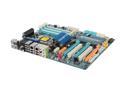
GIGABYTE GA-EX58-UD5 LGA 1366 Intel X58 ATX Intel Motherboard
Pros: Wish I could give this ~4.8 eggs, some minor issues, but overall great board. Easy setup, nice layout, rock solid so far. Appreciate easy access to the power button (an extra one right next to the RAM for when you're digging around in your case) and clear CMOS on the back (they made it difficult to accidentally hit this). The LED with error code is always nice when troubleshooting builds. Like the fact that I could update the BIOS without a floppy by hitting END during POST. It'll read any FAT filesystems (USB drive and/or my FAT32 grub partition) and let you browse for the BIOS bin file. Shipped with F2 BIOS I flashed to F3. HW RAID features are nice, worked flawlessly in RAID0, Acronis TI saw the RAID array without any issues. The BIOS actually recognizes the array as just another HD, so I am guessing that it will work pretty seamlessly with all backup software. See con, didn't work so well when not in RAID.
Cons: More of a con for the i7 920. The CPU runs pretty hot and even throttles itself at stock speeds when at a constant 100% load due to temp/TDP thresholds. I used the default thermal pad that came with the cooler (probably a poor choice). We'll see if this clears up when I install a better cooler. I know I can turn off these limits in the BIOS, but these features are meant to protect the hardware and I feel better letting them do their job. Some of the Utility software that came with the board I cannot get to work on Vista x64. I had issues when using the white SATA connections when I just wanted to hookup drives and not use the RAID features. I had 3 160G old SATA drives all hooked into the white ports, and only 2 were be visible. This might be by design, I'm not sure. It seems that only 1 drive can be visible per pair of white SATA ports...not a problem when using RAID features on these ports, could be if you just want 10 independant SATA ports.
Overall Review: I was getting an error code initially (0x69) that resolved to "Turn on L2 Cache". It wasn't obvious to me at first, but I figured out it was my fault due to not reading the manual. If you're running TRI-channel with 3 sticks of RAM, USE THE WHITE SLOTS! If you don't you'll likely get the 0x69 error and it will not post.
11/21/2008See more detail
Battery DOA
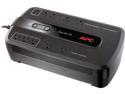
APC BE750G Back-UPS 750 VA 10-outlet Uninterruptible Power Supply (UPS) (Replaced by BE850M2)
Pros: First one I ordered has been working great for over a year.
Cons: Second one appeared to work correctly until I tested a power failure. Battery is shot from the time of purchase.
Overall Review: I have 2 of these units, both purchased from Newegg. The first unit has been working great for my purposes, which is to prevent an unclean shutdown of an opensolaris zfs fileserver. My 1st UPS will power this system for well over 15 minutes... I've never pushed the limits. Built a 2nd, identical fileserver and bought a 2nd UPS. The recently purchased UPS will only power the system for 6 seconds. Obviously the battery was completely shot before it was even shipped to me. Chances are these have been sitting on the shelf for too long as lead-acid batteries degrade over time when a charge is not maintained.
7/29/2010See more detail
Expected better
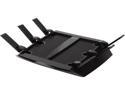
NETGEAR Nighthawk X6 AC3200 Tri-Band WiFi Router, Gigabit Ethernet, Compatible with Amazon Echo/Alexa (R8000)
Pros: Great WiFi range / speed
Cons: Occasional 5Ghz conenctivity issues Weak / essentially non-existent QoS options Slow firmware updates / lags behind features of less expensive models.
Overall Review: Haven't dug into the cause yet, but all WiFi devices connected on the 5Ghz band sometimes lose connectivity. It looks like they are still connected to the wireless, but have no internet connectivity. I've been ignoring the issue / turning wifi on/off (this affects multiple devices, so it's not the device itself) to workaround the issue. Next time I'll dig in and see if I can find out what exactly is causing this behavior. I expected more for the price. Especially on the firmware updates / feature front.
12/16/2014See more detail
Found my replacement

Logitech MX310 6 Buttons 1 x Wheel USB or PS/2 Wired Optical Mouse
Pros: Perfect fit
Cons: Can no longer purchase
Overall Review: Found a nice replacement for those that like the shape and feel of this discontinued mouse and thought I'd share. If you miss your MX310, I recommend giving a Sensei RAW a try.
7/19/2013See more detail
Useless for my purposes
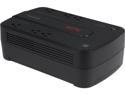
APC BE350G Back-UPS 350 VA 6-outlet Uninterruptible Power Supply (UPS)
Pros: Newegg's customer service is top-notch and I was able to promptly return this item and get something more suited for my NAS.
Cons: Warning!! There is no interface to the PC. I have never seen a UPS without this feature. Automatic shutdown is not an option. The only useful purpose I can come up with for this UPS would be for powering network equipment during an outage, or cleaning up dirty power from the wall.
5/4/2011See more detail
Broken DNS implemenation
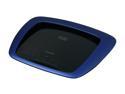
LINKSYS E3000 Wireless Router simultaneous Dual Band Gigabit 802.11a/b/g/n 2.4GHz / 5GHz up to 300Mbps with USB Built-in UPnP AV Media Server
Pros: Good wireless signal.
Cons: DNS is busted, terrible tech support. I made the mistake of resorting to tech support in troubleshooting the fact that this router won't resolve computer names on my local network, I got this gem from the tech support agent "I am afraid to inform you that we do not support File & Print Sharing with Linksys routers" Wow, really? I'm not even talking about file and printer sharing.. I just want a functional DNS server. File and printer sharing does work fine BTW, just don't expect a proper DNS implementation. I can manually assign IP's and use a hosts file... then again it's 2011, should I really have to?
Overall Review: For the price, I can't imagine doing worse than this router. I will NEVER buy a Cisco / Linksys router again. Overpriced, worthless trash.
4/29/2011See more detail