
Your Browsing History
Lowest price in 30 days


LOWEST PRICE
In Docking Station
Shop Department
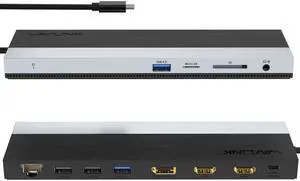
Wavlink USB-C Docking Station Triple Display Max 4K@60Hz with DisplayPort, 2xHDMI, PD, 85W Charging for PC, 2xUSB 3.0, 2x2.0, Gigabit Ethernet, SD/TF Slot, Audio Jack For Windows&Mac etc
- Part Number: 1x USB-C to Host with integrated cable 50cm length 2 x HDMI 2.0 1 x DisplayPort 1.4 1x USB-C supports PD 100W IN 2x USB-A 5Gbps 2x USB-A 480Mbps 1x Gigabit Ethernet 1x SD/Micro SD 3.0 1x Combo Audio 1x LED light Indicator
- Compatibility: Suitable for your thunderbolt 3/4 laptops or devices with full-featured type-c port(support charging and video output). Works with MacBook Pro/Air 2021/2020/2019/2018/2017/2016, iMac/ iMac Pro, Google Chromebook Pixel, Huawei MateBook Pro, Dell, Surface Book 2, HP, Lenovo, etc.
- Ports Spec: PD3.0 supports up to 85W Pass Through Charging, 2 x USB3.0 A port speed up to 5Gbps, 2 x USB2.0 A port speed up to 480Mbps, 2 x HDMI (2.0), 1 x DisplayPort (1.4), Integrated TRRS 4-pole phone jack, SD/Micro SD V3.0 Card Reader slot, 1x RJ45 10/100/1000Mbps Ethernet, 1x LED Power Indicator
- Parts: 1 Year...
- Model #: WL-UMD08
- Item #: 9SIC7HJM0A8391
- Return Policy: View Return Policy
$64.99
Free Shipping
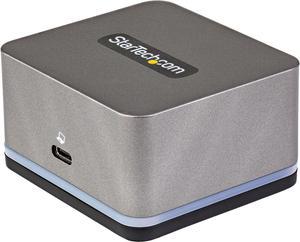
USB C Mini Dock for iPad Pro, Android Tablets & Smartphones, USB-C Tablet/Phone Docking Station w/ 4K 30Hz HDMI, 27W Power Delivery Charging, 3-Port USB Hub, Gigabit Ethernet - iPad/Tablet USB-C Dock
- Compatibility: Windows 10 macOS Big Sur (11.0) macOS Catalina (10.15) macOS Mojave (10.14) macOS High Sierra (10.13) Ubuntu 18.04, 20.04 iPadOS Android 9.0
- Ports Spec: 1 - External Ports: Barrel Power Connector (Size M, OD:5.50, ID: 2.10) 2 - External Ports: USB Type-A (4 pin) USB 2.0 1 - Host Connectors: USB Type-C (24 pin) USB 3.0 (5Gbps) 1 - External Ports: USB 3.1 USB Type-A (9 pin, Gen 1, 5 Gbps) HDMI RJ-45
- Dimension: 1.40" x 2.60" x 2.40"
- Weight: 0.31 lb.
- Model #: DK30CHPH
- Item #: N82E16834977811
- Return Policy: Standard Return Policy
$101.99
Free Shipping
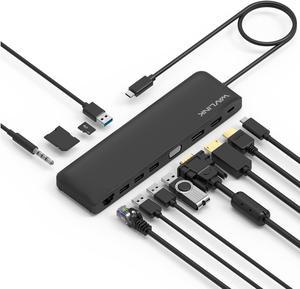
Wavlink USB C Triple Display 4K 12 in 1 MST USB C Docking Station, Type C Systems (DP & HDMI &VGA, USB 3.0&2.0 Ports, SD TF Card Reader, Gigabit Ethernet, Audio For for MacBook Pro & Windows
- Compatibility: This slim compact dock is compatible with USB-C Computers that have USB3.1 full function with data transfer, USB-C Power Delivery & Video Alternate Mode. Support Windows 7 / 8 / 10; Max OSX 10; Linux or the latest version. We provide 12 months warranty for this product.
- Ports Spec: One USB-C port supports PD 3.0 upstream power charging to PC computer with up to 100W Both DisplayPort v1.2a and HDMI v1.4b support 4K/30Hz single display One VGA port supports up to 2K (2048x1152) @60Hz single display Dual displays up to 2048x1152 @60Hz; Triple displays up to 1920x1080 @60Hz Two USB 3.0 ports and two USB 2.0 ports provide data transfer rates up to 5Gbps & 480Mbps separately One RJ45 Gigabit Ethernet port enables stable wired connection One built-in SD/TF card reader supports SD v2.0, SDHC up to 32GB, and SDXC up to 2TB One audio combo jack for stereo a...
- Model #: WS-UMD04-A
- Item #: 9SIACU9FE90633
- Return Policy: View Return Policy
$54.99
$69.99
Free Shipping