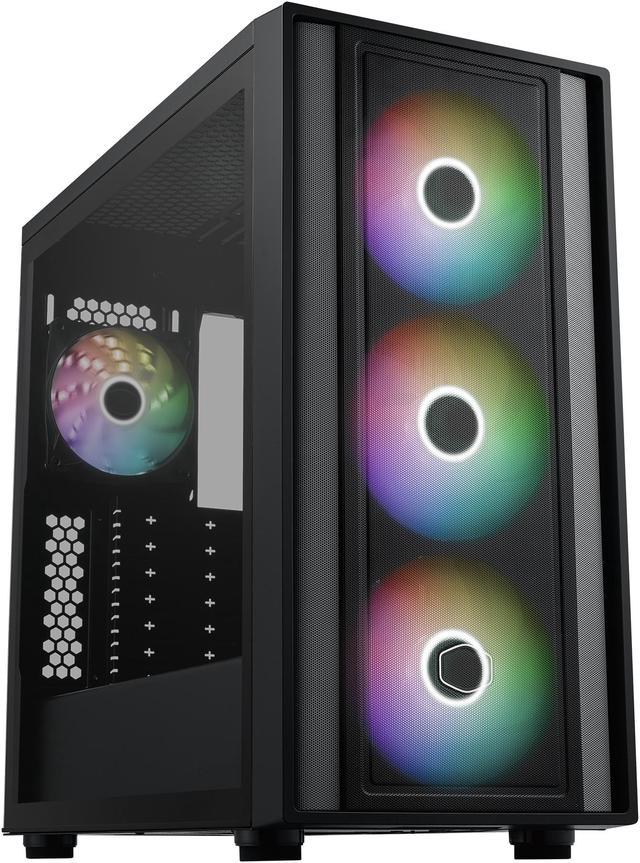
The Cooler Master MasterBox 600 is an ATX mid-tower PC case built for airflow-focused gaming and performance builds, especially for users who want support for back-connected motherboards, large GPUs up to 410mm, and up to a 420mm front radiator.
Recommended For
- Builders planning a clean back-connector setup with ASUS BTF, MSI Project Zero, or similar boards. Cooler Master positions the case around back-connected motherboard support, and reviews highlight the extra rear cable space as a practical fit for hidden-cable builds rather than a cosmetic extra.
- Airflow-focused gaming builders who want strong cooling out of the box without immediately buying extra fans. Official specs and reviews consistently point to the mesh front and four included ARGB fans as the main real-world advantage for high-airflow ATX gaming builds.
- Upgraders fitting long GPUs or large front radiators in a mainstream mid-tower. The case is repeatedly positioned as a roomy ATX option for modern gaming parts, including very long graphics cards and front 420 mm radiator support, which suits users building around oversized current-gen components.
- First-time or value-oriented PC builders who want an ATX case with fans, USB-C, tempered glass, and current motherboard compatibility in one purchase. Review coverage frames the MasterBox 600 as a value case because it bundles features that often require stepping up in price.
Real-World Use Scenarios
- Building a clean-looking gaming PC with an ASUS BTF, MSI Project Zero, or Gigabyte back-connect motherboard: the rear-connector layout and extra cable space make it easier to hide wiring, so the finished build usually looks tidier through the glass side panel and takes less effort to cable-manage than a standard front-connector setup.
- Putting together a high-airflow gaming or creator system with a large GPU and multiple fans: the mesh front and four included fans match the common use case of keeping modern components fed with fresh air, so users can expect a straightforward airflow-focused build without immediately needing to buy extra case fans.
- Using a long graphics card without moving to a larger full tower: builders fitting current high-end GPUs generally have enough room here, so the case suits mainstream ATX gaming builds that need GPU clearance but still want a normal mid-tower footprint.
- Planning a liquid-cooled build with a 360mm top radiator or 420mm front radiator: reviewers consistently position this case for bigger cooling setups, so it fits users trying to run hotter CPUs with more radiator headroom than many mid-towers offer.
- Doing a first-time or value-conscious ATX build and wanting the case to feel complete out of the box: community discussion and reviews often point to the included ARGB fans and roomy interior as reducing the number of immediate add-ons, so the build process is typically simpler and cheaper than starting with a bare chassis.
Spec Summary
| Attribute | Value |
|---|
| Best For | Builders seeking an ATX mid-tower with support for long graphics cards (up to 410mm), large front AIO radiators (up to 420mm), ARGB cooling, and USB Type-C front connectivity for modern gaming or workstation builds |
|---|
| Model Identifiers | Cooler Master MasterBox 600 — MB600-KGNN-S00 |
|---|
| Chassis & Materials | ATX mid-tower chassis with steel and plastic exterior and a tempered glass left side panel |
|---|
| Motherboard Compatibility | Supports ITX, Micro-ATX and ATX; accepts E-ATX up to 12” x 10.9” (30.5 x 27.7 cm) and supports back-connector motherboard variants (E-ATX may affect cable management) |
|---|
| Cooling & Fans | Ships with 3×140mm ARGB front fans and 1×120mm ARGB rear fan; supports air and water cooling with fan-mounting options on top (up to 3×120/3×140), front (3×120 or 2×140) and rear (1×120) |
|---|
| Radiator Support & Component Clearance | Front radiator support up to 420mm (front: 120/140/240/280/360/420mm), rear 120mm; max GPU length 360mm (410mm without front radiator), max CPU cooler height 170mm, max PSU length 170mm (210mm without HDD cage) |
|---|
| Storage & Drive Bays | Supports 2×3.5" drives and 2×2.5" drives installed (expandable to up to 6×2.5" bays) |
|---|
| Expansion & Slots | 7 expansion slots for add-in cards |
|---|
| Front I/O & Connectivity | Front I/O includes USB 3.2 Gen2x2 Type-C plus USB 3.2 Gen1 Type-A and a USB 3.2 Gen1 Type-C port, plus a 3.5mm audio jack |
|---|
| Filters & Airflow | Large FineMesh front intakes with dust filters on top and bottom to help keep airflow unobstructed and clean |
|---|
| Dimensions & Weight | External dimensions 465 × 230 × 465 mm; net weight 7.9 kg; package weight ~9.435 kg (package dimensions available) |
|---|
| Package Contents | Includes MasterBox 600, tool kit and manual; sold as a single package quantity |
|---|
| Design Highlights | Equipped with 140mm SickleFlow ARGB fans and FineMesh large mesh intakes; includes Type-C front connectivity and support for back-connector motherboard layouts |
|---|
Reference Q&A
Q: Should I buy the Cooler Master MasterBox 600 or the NZXT H7 Flow for a high-airflow ATX build?
A: Choose the MasterBox 600 if you want a modern airflow case with back-connect motherboard support and strong stock cooling value. It supports hidden-connector boards from ASUS, MSI, and Gigabyte, includes four ARGB fans, and allows up to a 420 mm front radiator and 410 mm GPU clearance. Choose the NZXT H7 Flow if you want a larger chassis with more internal working room and broader fan placement options, but it does not support back-connect motherboards. For builders specifically planning a BTF or Project Zero style layout, the MasterBox 600 is the more direct fit.
Q: Is the MasterBox 600 a better choice than the Corsair 4000D Airflow for large GPUs and newer motherboard layouts?
A: Yes, the MasterBox 600 is the better choice when GPU length, front radiator size, and back-connect compatibility matter. The MasterBox 600 supports up to a 410 mm GPU without a front radiator and up to a 420 mm front radiator, while the Corsair 4000D Airflow is limited to a 360 mm GPU and up to a 360 mm front radiator, with up to 280 mm on top. The 4000D Airflow remains a practical pick for a conventional ATX build, but the MasterBox 600 fits larger current-generation components with fewer layout compromises.
Q: Should I get the MasterBox 600 instead of a more style-focused case like the Fractal Design North?
A: Choose the MasterBox 600 if cooling headroom and hardware clearance are the priority. It supports a 420 mm front radiator and up to a 410 mm GPU, which gives it more room for long graphics cards and larger liquid-cooling setups. Choose the Fractal North if you want a more furniture-style design and are comfortable with tighter front-radiator and GPU trade-offs; Fractal lists up to 355 mm GPU clearance, or 300 mm when using a 360 mm front radiator. The MasterBox 600 is the easier fit for performance-first builds.
Q: Is the MasterBox 600 worth choosing over a cheaper airflow case like the Montech AIR 903 MAX?
A: Choose the MasterBox 600 if you specifically want back-connect motherboard support and a more current layout for hidden-cable builds. Choose the Montech AIR 903 MAX if you want a lower-cost airflow case and do not need back-connect compatibility. Both target strong cooling and large-component support, but the MasterBox 600 is positioned more around cleaner cable presentation and compatibility with newer reverse-connector ecosystems, while the AIR 903 MAX is more of a value-first conventional ATX case.
Q: Is the MasterBox 600 a better upgrade than an older mainstream airflow case like the NZXT H7 Flow (2022)?
A: The MasterBox 600 is the stronger upgrade path if your next build uses a back-connect motherboard or if you want a newer internal layout with more cable-hiding flexibility. The older H7 Flow (2022) still offers strong airflow and roomy ATX support, but it was designed before back-connect compatibility became a common buying factor and lists lower front GPU clearance at 400 mm. If your build is conventional and you already own the H7 Flow, the benefit is mostly layout modernization rather than a fundamental airflow change.
Q: Will this case fit a large GPU and a front-mounted AIO at the same time?
A: Usually yes, but radiator placement changes GPU clearance. The MasterBox 600 supports up to a 410 mm GPU without a front radiator, and up to a 420 mm front radiator. If you plan to use a very long graphics card plus a thick front AIO, check the exact card and radiator dimensions before buying. This is a common decision point on retail Q&A pages for mid-tower cases.
Q: Is the MasterBox 600 a good choice for a high-airflow gaming or workstation build?
A: Yes, it is a strong fit for high-airflow builds. Its front mesh design, multiple large included fans, and support for up to a 420 mm front radiator make it better suited to hot gaming or creator systems than closed-front cases. The trade-off is size: it is roomier and less compact than smaller ATX cases aimed at minimalist builds.
Q: Who is this case most suitable for?
A: This case is best for builders who want modern airflow, space for large parts, and cleaner cable routing, especially if they are using a back-connect motherboard from ASUS, MSI, or Gigabyte. It is less ideal for very small-space setups or buyers who want a compact case first and maximum expansion second.
Q: Does it come with enough fans, or should I expect to add more?
A: For most builds, the included fan setup is already solid. The product listing shows multiple preinstalled large fans, which is better than many cases that ship with few or no fans. You may still want to add or replace fans if you are building around very high-end parts, a specific noise target, or a custom cooling layout.
Q: Is this better than a typical mainstream ATX mid-tower case?
A: It is better if your priority is compatibility and upgrade headroom. Compared with a typical mainstream mid-tower, the MasterBox 600 offers unusually strong support for long GPUs, large radiators, and back-connect motherboards. The trade-offs are that it takes more space and may be more than some buyers need for a basic air-cooled build.
Q: Who is the MasterBox 600 best suited for?
A: The MasterBox 600 is best for builders who want strong airflow, support for large modern parts, and cleaner-looking cable routing, especially if they plan to use a back-connect motherboard. It makes more sense for mainstream ATX gaming or workstation builds than for very compact builds or users who want a minimal, plain case.
Q: Is the MasterBox 600 a good choice for high-airflow gaming builds?
A: Yes, if airflow is a priority. The case is built around a mesh front panel and includes multiple preinstalled fans, which makes it a practical choice for air-cooled gaming systems or builds using power-hungry GPUs. The main caveat is size planning: front radiators reduce GPU clearance, so very long graphics cards need extra attention.
Q: Is the MasterBox 600 worth buying over similarly priced cases?
A: It is worth considering if you value included fans, large component support, and back-connect motherboard compatibility in one case. The trade-off is that it is more of a function-first mid-tower than a compact or especially premium-feeling option, so buyers comparing it with style-focused alternatives may prefer something else.
Q: What are the main trade-offs of choosing the MasterBox 600?
A: The main trade-offs are size and build-planning complexity rather than raw compatibility. It supports large GPUs and radiators, but using a front radiator reduces graphics card clearance. Support for E-ATX and back-connect boards is useful, but larger motherboards can affect cable-management space. It is a better fit for users who prioritize expandability than for users who want the smallest possible footprint.
Q: Is the MasterBox 600 a good fit if I care about fan and RGB control?
A: Usually yes, but it is not fully plug-and-forget for every builder. Community discussion shows that new owners sometimes need to connect the case lighting or fan hub correctly to the motherboard to get synchronized RGB or proper fan behavior. It is a better fit for buyers comfortable checking motherboard headers, BIOS fan curves, and hub wiring during setup.