

• $75.99

Shipped by xiuhuishangmao

Price alert
Shop it at NeweggBusiness.

Meet Your Seller

Docking Station Dual Monitor for Dell/HP/Mac Laptops, 7 IN 1 USB C to Dual HDMI Adapter Multiport Hub with 2*4K HD, 3*USB-A/USB-C Data Port, 100W PD, HDTV Splitter for Dual Monitors Extended Display

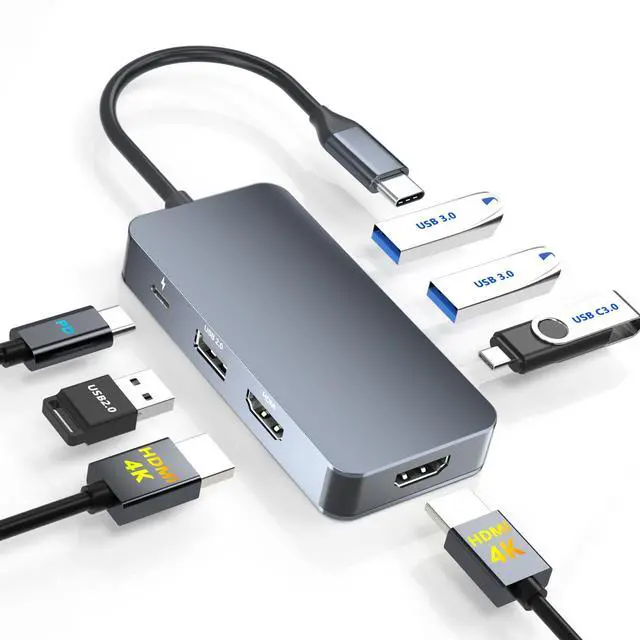
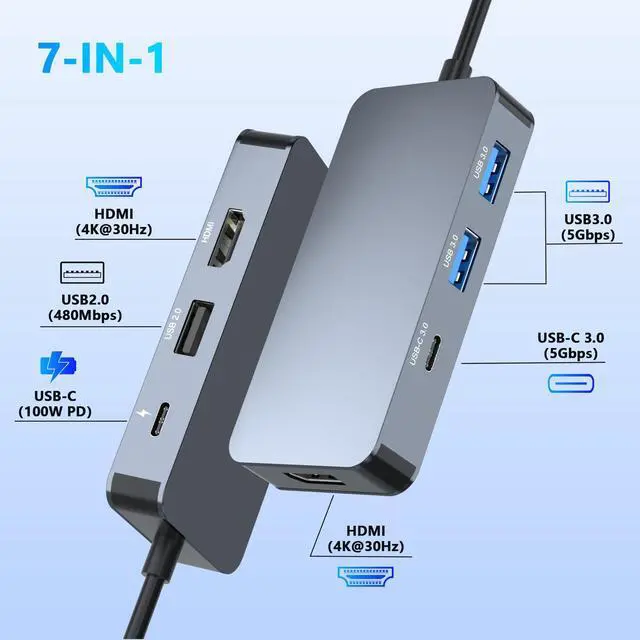
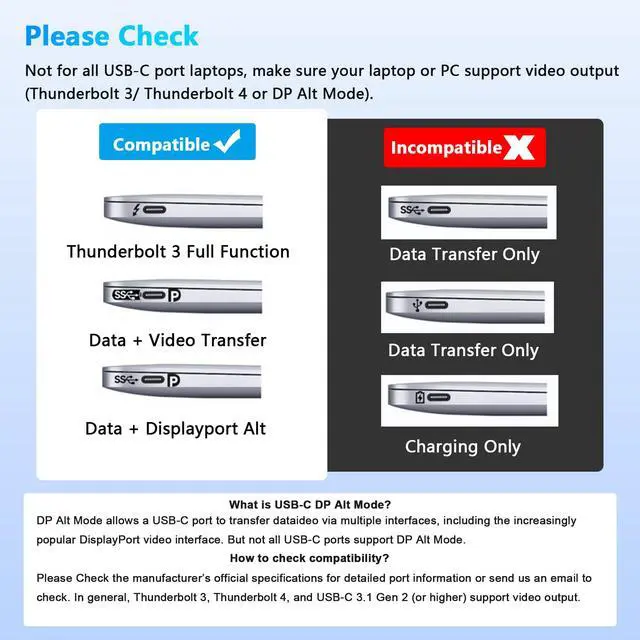
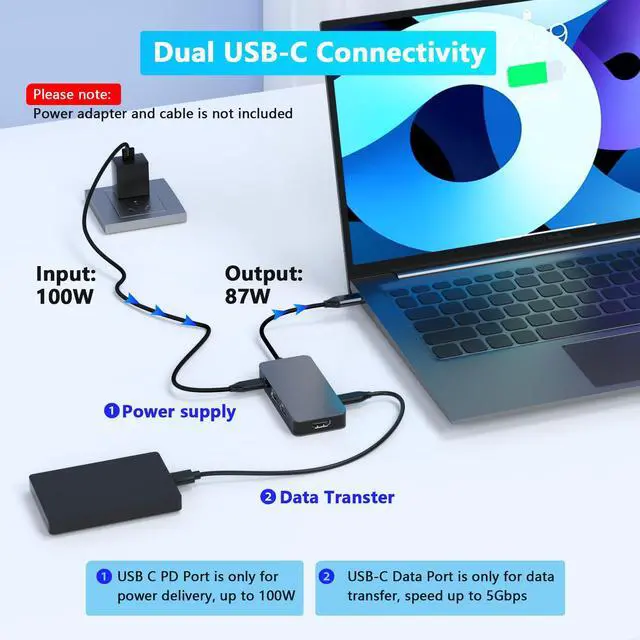
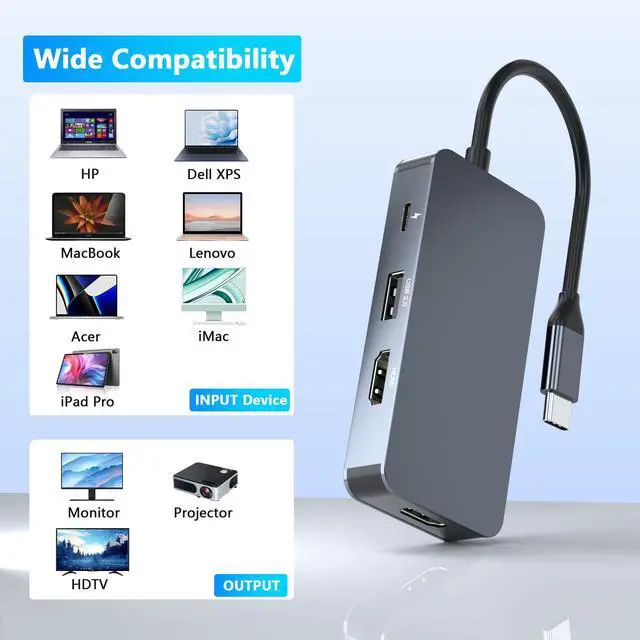
  • 7-in-1 Laptop Docking Station Dual MonitorThis USB C docking station allows you to easily expand your laptop's USB-C/Thunderbolt 3 port to 7 essential ports:2x4K@30Hz HDMI Ports, 2xUSB 3.0 Ports, 1xUSB 2.0 Port, 1xUSB-C Data Transfer Port, 1x100W PD (Power Delivery) Port. Please Note: This docking stations is not compatible with all USB-C ports. Make sure your laptop or PC supports video output via Thunderbolt 3/Thunderbolt 4 or DP Alt Mode, as this will determine whether the HDMI ports function properly.
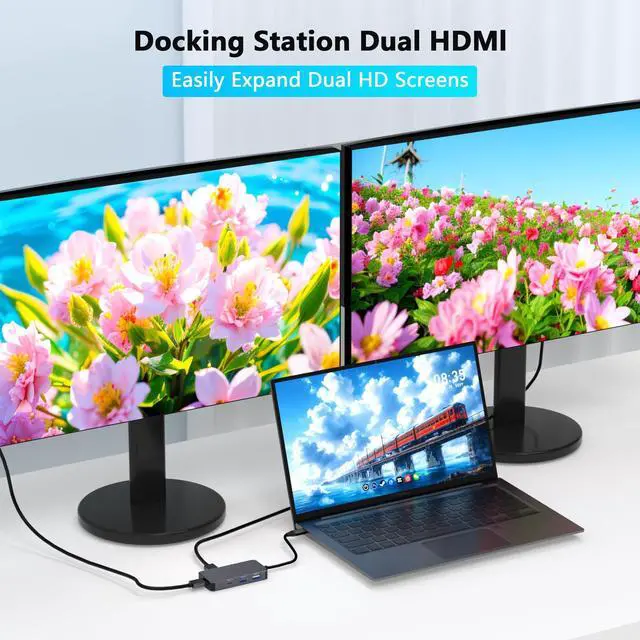
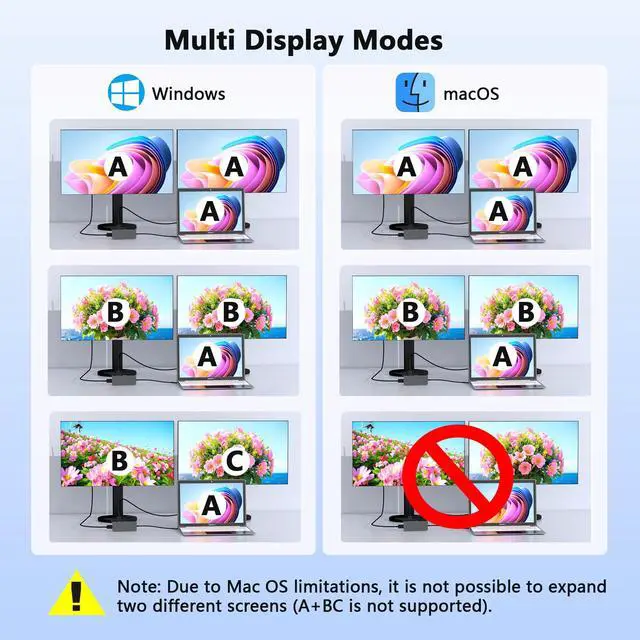
  • Docking Station with 2 HDMI Ports: The HDMI splitter for dual monitors with 2 HDMI ports, allow your USB C laptops to extend 2 different monitors, no need any drivers or software, just plug and play. 2 HDMI ports can be used simultaneously. Windows laptops support both MST and SST for dual-screen setups. macOS only supports SST (AAA/ABB) it does not support extending to two different screens due to system limitations.
  • USB 3.0 Multiport Adapter with 5Gbps Super-SpeedThis USB C laptop dock features two USB-A 3.0 ports and one USB-C 3.0 data transmission port, with speeds up to 5Gbps, allowing you to transfer files in seconds from your USB flash drive or USB/USB-C hard drives. Additionally, it includes a USB 2.0 port, which we recommend using for your mouse or keyboard to ensure lag-free performance. Note: The USB-C data port is for data transfer only; it does not support power delivery or monitor extension.
+
+
Overview
Specs
Reviews
docking station dual monitor
usb c docking station

7-in-1 USB-C Docking Station for Dual Monitors

7-in-1 USB-C Docking Station features 2×HDMI ports, 3×USB-A ports and 2×USB-C ports for a flexible workspace.

It Supports 4K@30Hz display output, up to 5Gbps data transfer and USB-C PD fast charging.

docking station for laptop

For Windows: this HDMI splitter for dual monitors support mirror mode(AAA) and extended mode(ABB mode and ABC mode).

How to connect Extend Mode for Windows OS?

Right-click desktop?select Intel display Settings ?pop-up Settings screen select display?select multi-screen display?expand the desktop

usb c docking station dual monitor

For macOS system, only support mirror mode(AAA) and extend mode(ABB), not support extend 2 different screens.

How to connect Extend Mode for MacOS?

"Setting" ?"Display" ?check "mirror display" box to switch to Extend mode ?drag a window to the right edge of the screen until it appears on the monitor

Choose From Three Types of Docking Station Dual Monitor

https://m.media-amazon.com/images/S/aplus-media-library-service-media/077a166f-fb2a-42d0-be43-b9e29ba364cb.__CR0,0,300,225_PT0_SX300_V1___.png

Dual HDMI Docking Station

https://m.media-amazon.com/images/S/aplus-media-library-service-media/1a8414db-3132-4e23-bc86-eefa9e63bd5a.__CR0,0,300,225_PT0_SX300_V1___.png

HDMI DP Docking Station

https://m.media-amazon.com/images/S/aplus-media-library-service-media/61dce040-ce94-40d3-87c1-da8f0b02419c.__CR0,0,300,225_PT0_SX300_V1___.png

Dual DP Docking Station

Number of ports

7 IN 1

Number of ports

7 IN 1

Number of ports

7 IN 1

Two Video Output Port

2*HDMI Port(4K@30Hz)

Two Video Output Port

1*HDMI Port (4K@60Hz), 1*DisplayPort(4K@60Hz)

Two Video Output Port

2*DisplayPort (4K@60Hz)

Two USB-C Port

1*USB-C Charging Port, 1*USB-C Data Transfer Port

Two USB-C Port

1*USB-C Charging Port, 1*USB-C Data Transfer Port

Two USB-C Port

1*USB-C Charging Port, 1*USB-C Data Transfer Port

Three USB-A Port

2*USB3.0 Port,1*USB2.0 Port

Three USB-A Port

2*USB3.0 Port,1*USB2.0 Port

Three USB-A Port

2*USB3.0 Port,1*USB2.0 Port

docking station
laptop docking station dual monitor

7-in-1 USB-C Docking Station for Dual Monitors

7-in-1 USB-C Docking Station features 2×HDMI ports, 3×USB-A ports and 2×USB-C ports for a flexible workspace.

It Supports 4K@30Hz display output, up to 5Gbps data transfer and USB-C PD fast charging.

laptop dock

For Windows: this HDMI splitter for dual monitors support mirror mode(AAA) and extended mode(ABB mode and ABC mode).

How to connect Extend Mode for Windows OS?

Right-click desktop?select Intel display Settings ?pop-up Settings screen select display?select multi-screen display?expand the desktop

usb c hub

For macOS system, only support mirror mode(AAA) and extend mode(ABB), not support extend 2 different screens.

How to connect Extend Mode for MacOS?

"Setting" ?"Display" ?check "mirror display" box to switch to Extend mode ?drag a window to the right edge of the screen until it appears on the monitor

Choose From Three Types of Docking Station Dual Monitor

https://m.media-amazon.com/images/S/aplus-media-library-service-media/077a166f-fb2a-42d0-be43-b9e29ba364cb.__CR0,0,300,225_PT0_SX300_V1___.png

Dual HDMI Docking Station

https://m.media-amazon.com/images/S/aplus-media-library-service-media/1a8414db-3132-4e23-bc86-eefa9e63bd5a.__CR0,0,300,225_PT0_SX300_V1___.png

HDMI DP Docking Station

https://m.media-amazon.com/images/S/aplus-media-library-service-media/61dce040-ce94-40d3-87c1-da8f0b02419c.__CR0,0,300,225_PT0_SX300_V1___.png

Dual DP Docking Station

Docking Station Dual Monitor for Dell/HP/Mac Laptops, 7 IN 1 USB C to Dual HDMI Adapter Multiport Hub with 2*4K HD, 3*USB-A/USB-C Data Port, 100W PD, HDTV Splitter for Dual Monitors Extended Display

Warranty & Returns

Warranty, Returns, And Additional Information

Warranty

  • Please contact the Seller directly for warranty information. Warranty information may also be found on the Manufacturer's website.
  • CONTACT

Return Policies

Manufacturer Contact Info

LOADING...