


- Free 82-day Returns
$249.99
Add to PC build list
Sold by Newegg
Shipped by Newegg
Add to Wish List(Found on 503 wish lists)
Best Sellers
- $279.74
- + FREE SHIPPING
 Hot Seller
- $265.44
- + $18.99 Shipping
Hot Seller- $301.37
- + FREE SHIPPING



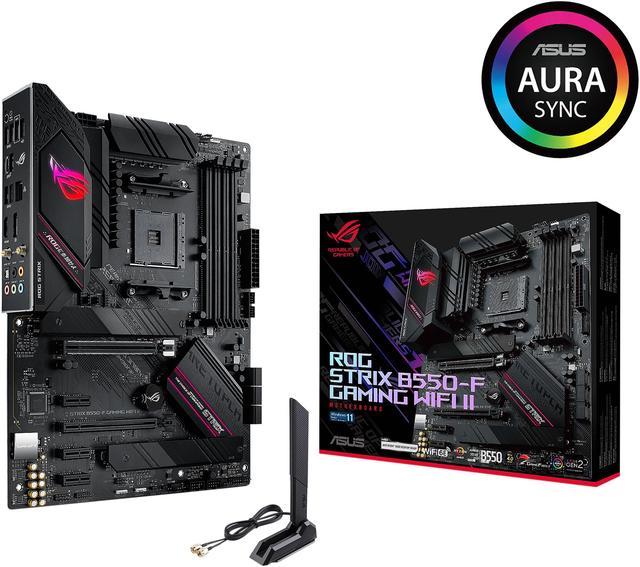


Asus ROG STRIX B550-F GAMING WIFI II AMD AM4 (3rd Gen Ryzen) ATX Gaming Motherboard (PCIe 4.0,WiFi 6E, 2.5Gb LAN, BIOS FlashBack, HDMI 2.1, Addressable Gen 2 RGB Header and AURA Sync)
ASUS ROG STRIX B550-F GAMING WIFI II AM4
$249.99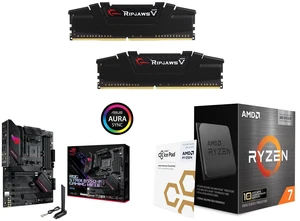
G.SKILL Ripjaws V Series DDR4 3200 32GB
ASUS ROG STRIX B550-F GAMING WIFI II AM4
AMD Ryzen 7 5800X3D 10th Anniversary Edition Desktop CPU Processor
$969.97Combo Savings $130.00
- AMD B550
- AM4 socket: Ready for AMD Ryzen 3000 and 5000 series, plus 5000 and 4000 G-series desktop processors.Bluetooth v5.2
- Best gaming connectivity: PCIe 4.0-ready, dual M.2 slots, USB 3.2 Gen 2 Type-C, plus HDMI 2.1 and DisplayPort 1.2 output
- Smooth networking: On-board WiFi 6E (802.11ax) and Intel 2.5 Gb Ethernet with ASUS LANGuard
- Robust power solution: 12+2 teamed power stages with ProCool power connector, high-quality alloy chokes and durable capacitors
- Renowned software: Bundled 60 days AIDA64 Extreme subscription and intuitive UEFI BIOS dashboard
+
+
Overview
Specs
Reviews (206)
Warranty & Returns
Warranty, Returns, And Additional Information
Warranty
- Limited Warranty period (parts): 3 years
- Limited Warranty period (labor): 3 years
- Read full details
Return Policies
- Return for refund until: January 31, 2027
- Return for replacement until: January 31, 2027
- This item is covered by Newegg.ca's Extended Holiday Return Policy.
- Read full return policy for details.
We want to ensure your holiday shopping this year is hassle-free. That’s why we’re automatically extending our return policies on almost every product! For purchases placed between November 1st, 2026 and December 31, 2026 you will have until January 31, 2027 to return your product.
Manufacturer Contact Info
- Manufacturer Product Page
- Manufacturer Website
- Support Phone: 1-510-739-3777
- Support Website
- View other products from ASUS
LOADING...
LOADING...
The ASUS ROG Strix B550-F Gaming WiFi II is an ATX AMD B550 motherboard for AM4 Ryzen 3000, 4000 G-Series, and 5000 builds, best suited for gamers and upgraders who want PCIe 4.0, Wi‑Fi 6E, 2.5Gb Ethernet, dual M.2 storage, and BIOS FlashBack in a full-size desktop platform.
Recommended For
- AM4 upgraders keeping a Ryzen 3000, 5000, or 5800X3D-era gaming build alive and wanting modern essentials like PCIe 4.0 for the GPU/primary NVMe slot, onboard Wi‑Fi, 2.5Gb Ethernet, and BIOS FlashBack without moving to AM5.
- Builders using a mid-to-high-end Ryzen gaming CPU who want a feature-rich ATX board with stable power delivery, straightforward troubleshooting LEDs, and enough rear I/O and fan headers for a clean first or second custom build.
- PC gamers or mixed-use home users who need reliable wired and wireless networking built in, especially for setups where Ethernet is preferred but Wi‑Fi 6E and Bluetooth are useful for backup connectivity or peripherals.
- Users building around a Ryzen APU who want display outputs on the motherboard plus gaming-board extras such as better onboard audio, RGB control, and two M.2 slots for a compact all-in-one desk setup.
Real-World Use Scenarios
- Building a Ryzen 5000 gaming PC with a modern GPU and NVMe SSD: the board fits a typical AM4 gaming build well, and reviews show it runs at stock settings without unusual behavior while supporting PCIe 4.0 for the main GPU slot and primary M.2 slot.
- Upgrading an older AM4 system to a Ryzen 5000 CPU without keeping an older compatible chip on hand: BIOS FlashBack makes this a practical swap path because the BIOS can be updated from USB even without CPU or memory installed.
- Using the PC on Wi‑Fi in a room where Ethernet is inconvenient: onboard Wi‑Fi 6E is meant for this kind of setup, but community reports show first-time setup often depends on installing the correct ASUS Wi‑Fi II driver and attaching the bundled antenna for normal signal quality.
- Setting up a mixed-use gaming and content library with two SSDs: the two M.2 slots make it practical to keep a fast boot/game drive plus a second storage drive, though populating the lower M.2 slot disables SATA ports 5 and 6, so drive planning matters.
- Running large game downloads, local file transfers, or high-bitrate streaming over a wired network: the 2.5GbE port is suited to faster home networking, so users with compatible routers or switches can expect better-than-gigabit transfer potential compared with standard 1GbE boards.
- Pairing the board with a higher-core-count Ryzen for gaming plus background tasks or light tuning: published testing found normal stock behavior and trouble-free overclocking on a 12-core Ryzen 9, so the board is a reasonable fit for mainstream to upper-end AM4 builds rather than just entry-level CPUs.
Spec Summary
| Attribute | Value |
|---|---|
| Best For | ATX AMD AM4 gaming and enthusiast desktop builds using AMD Ryzen 3000/5000 CPUs or 5000/4000 G‑series APUs; configured for PCIe 4.0 NVMe storage and multiple expansion cards |
| Model Identifiers | ASUS ROG Strix B550‑F Gaming WiFi II (ROG STRIX B550-F GAMING WIFI II), ROG series, AMD B550 chipset, AM4 socket |
| CPU And Socket | Socket AM4 supporting AMD Ryzen 5000 and 3000 series processors and AMD Ryzen 5000 and 4000 G‑Series desktop processors (see manufacturer CPU support list) |
| Memory Configuration | 4 x DDR4 DIMM slots, dual‑channel, unbuffered, up to 128GB total; Intel XMP 2.0 support and wide JEDEC/OC speed support lists (varies by CPU); ECC mode support varies by CPU |
| Expansion And PCIe | Expansion: 1 x PCIe 4.0 x16, 1 x PCIe 3.0 x16 (operates at x4/shared lanes), plus 3 x PCIe 3.0 x1 for a total of five PCIe slots for GPUs and add‑in cards |
| Storage And M.2 | 6 x SATA 6Gb/s ports and two M.2 (M.2_1 Key M 2242/2260/2280/22110 supports PCIe 4.0 x4 & SATA; M.2_2 Key M 2242/2260/2280/22110 supports PCIe 3.0 x4 & SATA; populating M.2_2 may disable SATA6G_5/6); supports SATA RAID 0/1/10 |
| Onboard Video And Display | Integrated display output depends on CPU/APU with integrated graphics; rear I/O exposes 1 x DisplayPort and 1 x HDMI |
| Networking | Intel I225‑V 2.5Gb Ethernet (1 port) plus onboard Wi‑Fi 6E (802.11a/b/g/n/ac/ax) and Bluetooth 5.2 for wireless connectivity |
| USB, Front Headers And Rear I/O | Rear I/O: 2 x USB 3.2 Gen 2 (1 Type‑A + 1 Type‑C), 4 x USB 3.2 Gen 1 Type‑A, 2 x USB 2.0, optical S/PDIF out, BIOS FlashBack button and Wi‑Fi module; onboard headers: 1 x USB 3.2 Gen1 header (adds 2 ports) and 2 x USB 2.0 headers (adds 4 ports) |
| Audio | ROG SupremeFX S1220A high‑definition codec with 7.1‑channel analog output and optical S/PDIF out |
| Power And Cooling | 12+2 teamed power stages with ProCool power connector, high‑quality alloy chokes and durable capacitors; connectors include 1 x 24‑pin EATX, 1 x 8‑pin ATX 12V and 1 x 4‑pin ATX 12V; multiple 4‑pin CPU/CPU_OPT/AIO_PUMP and chassis fan headers plus a thermal sensor header |
| Form Factor And Dimensions | ATX form factor, PCB dimensions approximately 12.0 x 9.6 inches |
| BIOS And Manageability | UEFI AMI BIOS (256 Mb Flash ROM) with BIOS FlashBack, Clear CMOS header, CrashFree BIOS 3 and EZ Flash 3; manageability includes WOL by PME and PXE |
| Features And Expansion Headers | Addressable Gen2 RGB header plus 2 x AURA RGB headers, SafeSlot reinforced PCIe, pre‑mounted I/O shield, M.2 heatsink and ASUS Q‑Design convenience features |
| Software And Utilities | Bundled ASUS/ROG utilities and trials including Armoury Crate (Aura Sync/Creator), RAMCache III, ROG CPU‑Z, GameFirst VI, Sonic Studio III, Sonic Radar III, DTS Sound Unbound, Two‑Way AI Noise Cancelation and a 60‑day AIDA64 Extreme trial |
| Package Contents And Weight | Includes addressable RGB extension cable, four SATA 6Gb/s cables, Wi‑Fi antennas, cable ties, M.2 rubber package and screws, ROG key chain and stickers, support DVD and user manual; sold as single unit with package weight ~1.601 kg and item weight ~1000 g |
| Operating System And Compatibility | Supports Windows 10 64‑bit and Windows 11 64‑bit; intended for use in personal computer builds |
Reference Q&A
Q: Should I buy the ASUS ROG Strix B550-F Gaming WiFi II or move to an AM5 B650 motherboard?
A: Choose the ROG Strix B550-F Gaming WiFi II if you are staying on AM4 with a Ryzen 3000 or 5000 CPU and want a feature-rich board without replacing CPU and DDR4 memory. It already covers the needs of most AM4 gaming builds with one PCIe 4.0 x16 slot, one PCIe 4.0 M.2 slot, Wi‑Fi 6E, 2.5Gb Ethernet, BIOS FlashBack, and strong onboard audio. Move to B650 if you are building from scratch and want the newer AM5 platform, DDR5 support, and a longer CPU upgrade path. In short: B550-F Gaming WiFi II is the practical choice for maximizing an AM4 build, while B650 makes more sense for a fresh platform investment.
Q: Is the ASUS ROG Strix B550-F Gaming WiFi II worth it over a cheaper B550 board like the ASUS TUF Gaming B550-Plus WiFi II?
A: Buy the ROG Strix B550-F Gaming WiFi II if you want a more premium AM4 feature set rather than just basic B550 functionality. Compared with the TUF Gaming B550-Plus WiFi II, the Strix model is positioned higher in ASUS' lineup and adds stronger onboard audio, more enthusiast-oriented design touches, BIOS FlashBack, and a more premium I/O and software package. The TUF alternative is the better fit when the goal is simply to run a Ryzen 5000 system reliably at lower cost. The decision usually comes down to whether you value the extra connectivity, audio, and build-focused features enough to pay more.
Q: How does the ASUS ROG Strix B550-F Gaming WiFi II compare with the older B450 option for Ryzen 5000?
A: The ROG Strix B550-F Gaming WiFi II is the better choice if you want a cleaner Ryzen 5000 experience and more modern I/O. Compared with typical B450 boards, it gives you native-era support for Ryzen 5000-class AM4 builds, PCIe 4.0 support for the main GPU slot and one M.2 slot, 2.5Gb Ethernet, Wi‑Fi 6E, and a more current rear I/O feature set. A B450 board still works when budget is the main priority and the exact board has the right BIOS support, but B550-F Gaming WiFi II is the more straightforward option for users who want newer connectivity and fewer platform compromises.
Q: Is this a good motherboard for a Ryzen 5000 gaming build, or is it mainly for older AM4 CPUs?
A: Yes. It is a strong fit for AM4 buyers using Ryzen 3000 or Ryzen 5000 processors, especially for mid-range to high-end gaming builds that still want modern features like PCIe 4.0, dual M.2, 2.5Gb Ethernet, and onboard Wi-Fi 6E. It is not for newer AM5 CPUs such as Ryzen 7000 or 8000 series, so it makes the most sense for users intentionally building around the older AM4 platform rather than starting a new AM5 system.
Q: Do I need a BIOS update for Ryzen 5000, or can I build with this board out of the box?
A: Usually it should work with Ryzen 5000, but buyers should not assume every box has the same factory BIOS. This board includes BIOS FlashBack, which is valuable because it lets you update the BIOS even if the CPU is not recognized yet. That makes it a safer AM4 choice for first-time builders or anyone pairing it with a Ryzen 5000 chip and wanting a recovery path.
Q: Is the built-in Wi-Fi and Bluetooth good enough, or should I plan on adding separate networking cards?
A: For most users, the onboard networking is already enough. The board includes Wi-Fi 6E, Bluetooth 5.2, and Intel 2.5Gb Ethernet, so it suits gaming, general home use, and fast local networking without extra add-in cards. The main limitation is that Wi-Fi 6E benefits depend on router support and operating system support, and wired Ethernet is still the better choice for lowest-latency gaming.
Q: Can I use the display outputs on this board without a graphics card?
A: Only if your Ryzen processor has integrated graphics. The board has HDMI 2.1 and DisplayPort 1.2 outputs, but those ports work only with AMD APUs or other supported CPUs that include integrated graphics. If you use a standard Ryzen CPU without integrated graphics, such as many Ryzen 5, 7, or 9 non-G models, you will still need a discrete GPU for video output.
Q: What is the main trade-off of using both M.2 slots on this motherboard?
A: The main trade-off is storage lane sharing. You get two M.2 slots, but when the second M.2 slot is populated, SATA ports 5 and 6 are disabled. This is fine for many gaming builds that mainly use NVMe SSDs, but it matters if you plan to connect many SATA SSDs or hard drives alongside two M.2 drives.
Q: Is the Asus ROG Strix B550-F Gaming WiFi II still worth buying for a new AM4 build?
A: Yes, if you are intentionally building on AM4 with Ryzen 3000 or 5000 and want a feature-rich ATX board. It fits buyers who want PCIe 4.0 for the main GPU slot, two M.2 slots, Wi-Fi 6E, 2.5Gb Ethernet, BIOS FlashBack, and solid I/O without moving to AM5. The main trade-off is platform age: it is a mature AM4 board, so it makes more sense for value-focused AM4 builds or upgrades than for buyers who want the newest CPU platform.
Q: Who is this motherboard a good fit for?
A: It is a good fit for builders using Ryzen 3000 or 5000 who want a full-size ATX board with built-in wireless networking, strong everyday connectivity, and room for storage and expansion. It is especially suitable for gaming PCs, general desktop use, and AM4 upgrades where features like Wi-Fi 6E, 2.5Gb LAN, dual M.2, and BIOS FlashBack matter. It is less suitable for buyers who need a newer AM5 upgrade path or more than one PCIe 4.0 M.2 slot.
Q: What are the main trade-offs of the B550-F Gaming WiFi II?
A: The main trade-offs are platform age and lane limitations typical of B550. You get one PCIe 4.0 x16 slot and one PCIe 4.0 M.2 slot from the CPU, while the second M.2 slot runs at PCIe 3.0 x4 from the chipset. Also, using the second M.2 slot disables SATA ports 5 and 6. This makes the board strong for a typical single-GPU build, but less ideal if you want newer-platform longevity or more flexible high-speed storage expansion.
Q: Is the WiFi II version easy to set up, or are there driver issues to know about?
A: Setup is generally straightforward, but a repeated issue in community discussions is using the wrong networking drivers. The WiFi II version uses different wireless driver support than the earlier WiFi version, so buyers should download drivers specifically for the 'B550-F Gaming WiFi II' model. This is mainly a setup caveat rather than a reason to avoid the board, but it matters if you expect Wi-Fi or LAN to work immediately during a fresh Windows install.