


Best Sellers
 Hot Seller
- $1,239.00
- + FREE SHIPPING

Sponsored Products
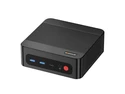



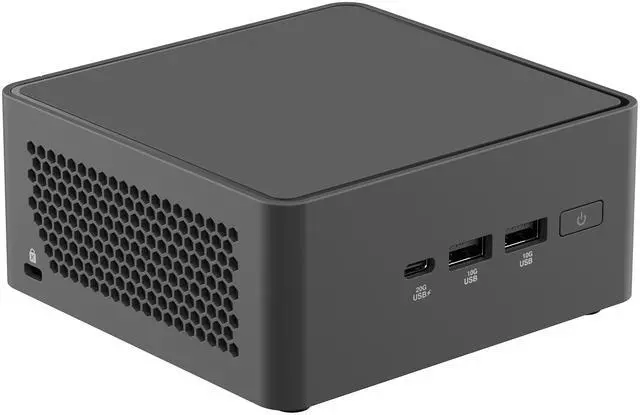


ASUS NUC 15 Pro RNUC15CRHU70000U Black Barebone System w/ Intel Ultra 7 255H CPU, Integrated - Intel Arc 140T Graphics ,US cord, Single Unit - Memory and Storage Sold Separately
- Dimensions : Net product 4.61" x 4.41" x 2.13" inches
- Weight: Net product 0.80 lbs
- Volume : 0.7 L
- Intel Core Ultra 7 255H
- 2 x 262Pin SO-DIMM SO-DIMM DDR5-5600 MHz / CSO-DIMM DDR5-6400 MHz
- M.2 2280 PCIe 5.0 | M.2 2242 PCIe 4.0
- 2.5G Ethernet Port
- Wi-Fi 7 (802.11be) | Bluetooth 5.4
- Thunderbolt 4 | USB 3.2 Gen 2 & 2.2
- HDMI 2.1 | USB 2.0
- Includes US Power Cord & VESA Bracket
+
+
Overview
Specs
Reviews (3)
Best Compact Choice for the AI-Driven Future. Experience the future of computing with ASUS NUC 15 Pro - a sleek mini PC that's perfect for office and edge computing. Powered by the latest Intel Core Ultra 7 255H processor with DDR5 6400MHz memory and Intel graphics, ASUS NUC 15 Pro delivers unmatched speed and efficiency in a scratch-resistance matte texture chassis. Wider Range, Faster ConnectionDDR5ASUS NUC 15 Pro's dual-channel DDR5 memory (up to 96GB) offers up to 50% more bandwidth over DDR4 memory, ensuring quicker load times and smoother performance-even during heavy multitasking.
Intel Wi-Fi 7Intel Wi-Fi 7 offers massive bandwidth to simultaneously support up to 16 streaming devices at speeds of up to 46Gbps-ideal for open office spaces or home studios. Wi-Fi SensingIntegrated proximity-sensing technology detects the user's presence, conveniently locking or waking the CPU to ensure data security. Bluetooth 5.4W ith enhanced data rate (EDR) transfer speeds of up to 50Mbps and connection range of up to 240 meters, Bluetooth 5.4 provides unparalleled streaming experiences. Robust SecuritySecurity Enhanced, Management SimplifiedIn an era of hybrid work environments, security becomes more important than ever. With Intel Platform Trust Technology (PTT), managing the security of business operations has never been easier.
Intel Platform Trust TechnologyStrengthens platform security with hardware-level key management and prevents unauthorized BIOS modificationsVersatilityFlexible ConfigurationASUS NUC 15 Pro packs powerful performance in a compact design. The sleek chassis ensures easy deployment across various retail, indoor industrial, and IoT settings. Exceptional Display PotentialHeadless Display SupportWorks without a physical monitor-perfect for servers, digital signages, and remote management. Virtual Display CapabilitiesFacilitates seamless management of multiple virtual displays for development and testing, enhancing operational flexibility. Expanded VersatilityMechanical compatibility is at the core of ASUS NUCs. We've developed more user-friendly upgrades and versatile NUCs/kits with various expansion options, including: PCIe FPC Header 1x
RS232 Serial HeaderTall Kits Only: 2nd M. 2 222x80 SSD Expansion Accessory 2nd 2.5G bE LAN Expansion Accessory 2nd 2.5G bE LAN Expansion w/ RS232 Serial Port AccessorySmart On and OffASUS Power SyncASUS power sync is an advanced power management and connectivity solution. It eliminates cable clutter, enhances power delivery efficiency, and provides superior device connectivity for an improved user experience. Integrated And ExpandableMinimize downtime with ASUS NUC 15 Pro, featuring an innovative hinged lever-action design that enables quick and convenient RAM or storage upgrades. Its additional internal headers and expansion accessories let users customize their mini PC for every business needs. Reliable Cooling SolutionBoasting an advanced thermal design with dual heat pipes, intelligent thermal management, and strategically-placed vents, ASUS NUC 15 Pro ensures effective and silent heat dissipation. Support & ReliabilityNUC Pro Software SuiteThe NUC Pro Software Suite (NPSS) ensures NUC 15 Pro remains operational even during unexpected disconnections. Application MonitorReal-time monitoring of system performance. Player FailoverAutomatically activates a backup NUC to minimize system downtime in the event of primary-device failure. Advanced TabEasily configure system settings and perform HDMI hardware diagnostics. Remote Server MonitorConfigure and monitor a remote server's address and its connections.
ASUS Control CenterASUS Control Center is a centralized IT-management suite that enhances enterprise productivity with comprehensive control through a very friendly user interface.
Intel Wi-Fi 7Intel Wi-Fi 7 offers massive bandwidth to simultaneously support up to 16 streaming devices at speeds of up to 46Gbps-ideal for open office spaces or home studios. Wi-Fi SensingIntegrated proximity-sensing technology detects the user's presence, conveniently locking or waking the CPU to ensure data security. Bluetooth 5.4W ith enhanced data rate (EDR) transfer speeds of up to 50Mbps and connection range of up to 240 meters, Bluetooth 5.4 provides unparalleled streaming experiences. Robust SecuritySecurity Enhanced, Management SimplifiedIn an era of hybrid work environments, security becomes more important than ever. With Intel Platform Trust Technology (PTT), managing the security of business operations has never been easier.
Intel Platform Trust TechnologyStrengthens platform security with hardware-level key management and prevents unauthorized BIOS modificationsVersatilityFlexible ConfigurationASUS NUC 15 Pro packs powerful performance in a compact design. The sleek chassis ensures easy deployment across various retail, indoor industrial, and IoT settings. Exceptional Display PotentialHeadless Display SupportWorks without a physical monitor-perfect for servers, digital signages, and remote management. Virtual Display CapabilitiesFacilitates seamless management of multiple virtual displays for development and testing, enhancing operational flexibility. Expanded VersatilityMechanical compatibility is at the core of ASUS NUCs. We've developed more user-friendly upgrades and versatile NUCs/kits with various expansion options, including: PCIe FPC Header 1x
RS232 Serial HeaderTall Kits Only: 2nd M. 2 222x80 SSD Expansion Accessory 2nd 2.5G bE LAN Expansion Accessory 2nd 2.5G bE LAN Expansion w/ RS232 Serial Port AccessorySmart On and OffASUS Power SyncASUS power sync is an advanced power management and connectivity solution. It eliminates cable clutter, enhances power delivery efficiency, and provides superior device connectivity for an improved user experience. Integrated And ExpandableMinimize downtime with ASUS NUC 15 Pro, featuring an innovative hinged lever-action design that enables quick and convenient RAM or storage upgrades. Its additional internal headers and expansion accessories let users customize their mini PC for every business needs. Reliable Cooling SolutionBoasting an advanced thermal design with dual heat pipes, intelligent thermal management, and strategically-placed vents, ASUS NUC 15 Pro ensures effective and silent heat dissipation. Support & ReliabilityNUC Pro Software SuiteThe NUC Pro Software Suite (NPSS) ensures NUC 15 Pro remains operational even during unexpected disconnections. Application MonitorReal-time monitoring of system performance. Player FailoverAutomatically activates a backup NUC to minimize system downtime in the event of primary-device failure. Advanced TabEasily configure system settings and perform HDMI hardware diagnostics. Remote Server MonitorConfigure and monitor a remote server's address and its connections.
ASUS Control CenterASUS Control Center is a centralized IT-management suite that enhances enterprise productivity with comprehensive control through a very friendly user interface.
Warranty & Returns
Warranty, Returns, And Additional Information
Warranty
- Limited Warranty period (parts): 3 years
- Limited Warranty period (labor): 3 years
- Read full details
Return Policies
- Return for refund until: January 31, 2027
- Return for replacement until: January 31, 2027
- This item is covered by Newegg.ca's Extended Holiday Return Policy.
- Read full return policy for details.
We want to ensure your holiday shopping this year is hassle-free. That’s why we’re automatically extending our return policies on almost every product! For purchases placed between November 1st, 2026 and December 31, 2026 you will have until January 31, 2027 to return your product.
Manufacturer Contact Info
- Manufacturer Product Page
- Manufacturer Website
- Support Phone: 1-510-739-3777
- Support Website
- View other products from ASUS
LOADING...
LOADING...
The ASUS NUC 15 Pro RNUC15CRHU70000U is a barebone mini PC for users who want strong everyday and light AI-ready performance in a very small footprint, with an Intel Core Ultra 7 255H, Intel Arc 140T graphics, Wi-Fi 7, 2.5GbE, and support for up to four 4K displays; best for office setups, edge deployments, and compact workstations that need user-added RAM and SSDs.
Recommended For
- Desk users who want a very small PC for heavy office multitasking, web apps, video calls, and multiple monitors without giving up wired networking or Thunderbolt expansion.
- IT buyers and business users who prefer a branded mini PC with tool-less serviceability, VESA mounting, long connectivity lists, and stronger warranty/support coverage than many no-name mini PCs.
- Developers, home-office power users, and compact workstation shoppers who want barebone flexibility to choose their own RAM and SSD while keeping a small footprint on a desk or behind a monitor.
- Users doing light photo work, short-form video edits, media encode/decode, or AI-assisted desktop tasks who benefit from Intel Arc graphics and Quick Sync, but do not need a discrete GPU.
Real-World Use Scenarios
- Mounted behind a monitor in a front desk, office, or classroom, it works well as a space-saving everyday desktop for web apps, Office work, video calls, and several browser tabs at once; the typical experience is quick startup, quiet operation under light loads, and enough headroom for heavier multitasking than entry-level mini PCs.
- For a home lab or small server, users can add plenty of RAM and run Proxmox, VMware, Docker, or multiple utility services in one compact box; the likely outcome is a tidy low-footprint system that handles light-to-moderate virtualization and always-on services comfortably, though serious multi-VM workloads still benefit from larger systems.
- As a living-room media PC or compact Plex/Jellyfin host, it fits real-world use cases where users want smooth 4K playback and hardware video handling in a small box; the expected experience is reliable media streaming and efficient transcoding support, especially on Intel-friendly software stacks.
- For light content creation and creator workflows, it suits photo editing, office design work, and lighter video tasks such as short 4K edits, exports, or streaming setups; in practice, it feels fine for bursty creative work, but long renders and heavier editing projects are still better served by systems with stronger sustained cooling or discrete graphics.
- For casual gaming or emulator use on a desk or TV, it is best matched with esports titles, older AAA games, indie games, and lower-to-medium settings rather than demanding new releases; the usual outcome is playable 1080p performance in lighter games, while modern graphically heavy games often require clear settings compromises.
Spec Summary
| Attribute | Value |
|---|---|
| Best For | Compact, upgradeable mini‑PC barebone for users who need a high-performance Intel Core Ultra 7 255H platform with integrated Intel Arc 140T graphics, multiple modern I/O (Thunderbolt 4, HDMI 2.1), and high‑speed networking; memory and storage are sold separately |
| Processor And Core Count | Intel Core Ultra 7 255H — 16 total cores (6 performance + 8 efficient + 2 low‑power efficient), 16 threads, up to 5.1 GHz max turbo, 24 MB cache, processor base power 28 W and maximum turbo power 115 W |
| GPU And Graphics | Integrated Intel Arc 140T GPU (8 Xe‑cores) with up to 2.25 GHz graphics dynamic frequency, hardware codecs (H.264, H.265, AV1, VP9), DirectX 12.2 / OpenGL 4.6 / OpenCL 3.0 support, ray tracing, and a reported GPU peak TOPS (Int8) of 74 |
| AI And Machine Learning | Platform-level AI support across CPU, GPU and NPU: CPU overall peak TOPS (Int8) 96, GPU peak TOPS 74, NPU (Intel AI Boost) peak TOPS 13 with sparsity support; common frameworks listed include OpenVINO, WindowsML, ONNX RT, DirectML, WebNN/WebGPU |
| Memory Configuration | Two SO‑DIMM slots (2 x 262‑pin) supporting DDR5 SO‑DIMM DDR5‑5600 and CSO‑DIMM DDR5‑6400, no memory preinstalled, maximum supported memory 96 GB |
| Storage And Expansion | Two M.2 NVMe slots: one M.2 2280 and one M.2 2242, both PCIe x4 NVMe (internal lists as Gen4x4) — storage not included |
| Ports And Connectivity | Front: 1× USB 3.2 Gen 2x2 Type‑C, 2× USB 3.2 Gen 2 Type‑A; Rear: 1× USB 3.2 Gen 2 Type‑A (10 Gbps), 1× USB 2.0 Type‑A; plus 2× Thunderbolt 4 (with DisplayPort 2.1) and 2× HDMI 2.1; total of five USB ports reported |
| Networking | Intel i226V 2.5 GbE wired LAN and Wi‑Fi 7 (802.11be) with Bluetooth 5.4 for wireless connectivity |
| Display Support | Supports up to 4 displays; HDMI 2.1 ports capable of up to 4K (external lists 3840×2160) and Thunderbolt 4 provides DisplayPort 2.1 outputs for external monitors |
| Power And Thermal | Includes 120 W AC power adapter; CPU baseline/limits shown as 28 W processor base power and up to 115 W maximum turbo power |
| Dimensions And Weight | Small tall chassis measuring 4.61 × 4.41 × 2.13 inches and weighing approximately 0.8 lb (0.8 Pounds reported externally) |
| Chassis And Physical | Tall, black mini‑PC barebone chassis with VESA mount support; no keyboard included |
| Package Contents | Ship package includes the barebone unit plus VESA mount and screws, AC power adapter and power cord |
| Security & Virtualization | Supports Intel virtualization technologies including VT‑x, VT‑d and VT‑x with Extended Page Tables (EPT) |
| Model Identifiers | ASUS NUC 15 Pro — Model RNUC15CRHU70000U (Part Number 90AR00Q2-M001U0), Manufacturer ASUS, Series NUC 15 Pro |
| Miscellaneous | Barebone item (memory and storage not installed), listed with Windows as the operating system family in external attributes and includes FCC identification info |
Reference Q&A
Q: Should I choose the ASUS NUC 15 Pro with Core Ultra 7 255H or a Core Ultra 5 225H mini PC?
A: Choose the ASUS NUC 15 Pro with Core Ultra 7 255H if you want more graphics headroom, heavier multitasking capacity, and a stronger fit for creator or light gaming workloads. External comparisons consistently show the Ultra 7 255H pairing a faster Arc 140T iGPU with higher CPU performance than the Ultra 5 225H and Arc 130T combination. A Core Ultra 5 mini PC is the more practical choice when your priority is office work, web use, signage, or general productivity and you do not need the extra iGPU performance.
Q: Is the ASUS NUC 15 Pro a worthwhile upgrade over the ASUS NUC 14 Pro?
A: The ASUS NUC 15 Pro is the better upgrade if you want newer platform features, stronger integrated graphics options, and better long-term fit for Wi-Fi 7, AI-assisted workloads, and newer display or storage setups. The NUC 14 Pro remains a sensible choice for business productivity and compact deployment, especially if your workloads are CPU-focused and you do not specifically need the newer Series 2 platform. In short, move to NUC 15 Pro for broader capability; stay with NUC 14 Pro if your needs are mainly office, browser, and standard enterprise tasks.
Q: Should I buy this ASUS NUC 15 Pro barebone or move up to a higher-tier Core Ultra 9 mini PC?
A: Buy this ASUS NUC 15 Pro barebone if you want a compact system with modern connectivity and enough CPU and iGPU performance for demanding everyday work, media, edge deployment, and light creator use. Move up to a Core Ultra 9 mini PC if your workloads are consistently heavier, such as larger compile jobs, more sustained rendering, or when you want the most headroom from the same platform class. The higher-tier option usually improves peak compute margins, but this Ultra 7 configuration is the more balanced choice for users who want strong capability without paying for top-bin performance they may not fully use.
Q: Is the ASUS NUC 15 Pro better for portability and clean desk setups, or should I choose a larger performance-first mini PC?
A: Choose the ASUS NUC 15 Pro if your priority is a very small footprint, VESA-mount flexibility, quiet deployment, and strong I/O in a compact chassis. It fits especially well for home office, conference room, digital signage, and space-limited workstation setups. Choose a larger performance-first mini PC when sustained cooling and maximum integrated or discrete graphics performance matter more than size. The trade-off is simple: the NUC 15 Pro favors compactness and deployment flexibility, while larger mini PCs favor thermal headroom and higher sustained performance.
Q: Do I need to buy RAM, storage, and an operating system separately for this ASUS NUC 15 Pro barebone?
A: Yes. This is a barebone mini PC, so it includes the processor and chassis but not memory or SSDs. You should plan to add your own DDR5 SO-DIMM RAM, NVMe storage, and an operating system before it is usable as a full PC.
Q: Is this a good mini PC for office work, meetings, web apps, and a clean desk setup?
A: Yes, if you are comfortable finishing the build yourself. The Core Ultra 7 255H is more than enough for office work, video calls, browsing, note-taking, and multitasking. Its strengths are very small size, VESA mounting, Wi‑Fi 7, 2.5GbE, and multiple modern display outputs. The trade-off is that it is a barebone unit, so it is better for users who want a compact workstation and do not mind adding RAM, SSD, and OS.
Q: Who is this ASUS NUC 15 Pro barebone best suited for?
A: It is best for buyers who want a compact desktop they can configure themselves: home-office users, developers, IT teams, digital signage setups, and users who want a VESA-mountable mini PC with fast networking and modern ports. It is less suitable for shoppers who want a ready-to-use computer out of the box, because memory, storage, and software are not included.
Q: What are the main trade-offs versus buying a prebuilt mini PC instead?
A: The main advantage of this barebone NUC is flexibility: you choose the RAM, SSDs, and software, and you still get strong connectivity in a very small chassis. The trade-offs are extra setup time, extra parts cost, and no out-of-box convenience. A prebuilt mini PC is the better choice if you want something that works immediately; this barebone model is the better choice if you want control over the build and upgrades.
Q: Is this a good choice if I want gaming upgrades later?
A: Not really. It is fine for everyday graphics work, media, and light GPU use from the integrated Intel Arc 140T, but it is not designed like a tower PC with graphics-card upgrade headroom. If future GPU upgrades are a priority, a larger desktop is usually the better fit.
Q: Is the ASUS NUC 15 Pro a good fit for office work, development, and general daily use?
A: Yes. It is better suited to office work, programming, browser-heavy use, media playback, and a compact desktop setup than to gaming-first use. The Core Ultra 7 255H, support for up to 96GB DDR5, dual NVMe slots, 2.5Gb Ethernet, Wi-Fi 7, and Thunderbolt 4 make it a strong small-form-factor work machine. The main trade-off is that it is a barebone system, so you must add your own memory and storage.
Q: Is the ASUS NUC 15 Pro worth buying if I want a very small PC with upgrade flexibility?
A: It can be worth buying if your priority is a premium mini PC with modern connectivity and some upgrade room. Compared with many sealed compact PCs, it gives you two SO-DIMM slots, two M.2 slots, VESA mounting, 2.5Gb Ethernet, Wi-Fi 7, and Thunderbolt 4 in a 0.7L chassis. The trade-off is value: because it is sold as a barebone, total cost rises once RAM and SSDs are added.
Q: Is the ASUS NUC 15 Pro a good choice for gaming or GPU-heavy workloads?
A: Only if gaming is secondary. Its integrated Intel Arc 140T graphics are fine for light 3D, media, and casual use, but community discussion has raised concerns about iGPU power limits on some NUC 15 Pro systems. If your main goal is consistent gaming performance or heavier GPU work, a mini PC with stronger graphics or a larger system is a safer choice.
Q: Who is the ASUS NUC 15 Pro most suitable for?
A: It is most suitable for buyers who want a compact desktop for workstations, home office, labs, digital signage, or a clean VESA-mounted setup. It is less suitable for buyers who want an all-in-one out-of-box PC, because this model does not include RAM or storage, and less suitable for gaming-first buyers because graphics performance is integrated-only.
Q: Are there any storage or configuration trade-offs to know before buying the ASUS NUC 15 Pro?
A: Yes. The biggest practical trade-off is that storage and memory are not included, so setup cost depends on the parts you add. Community discussion also shows buyers paying close attention to storage layout and chassis details, especially around the secondary M.2 slot and tall-chassis expansion expectations. If you need maximum internal expandability, check the exact chassis and slot configuration before buying.
Q: How many memory slots does this system have and what type of memory does it support?
A: This system has 2 memory slots and supports SO-DIMM DDR5-5600 MHz and CSO-DIMM DDR5-6400 MHz memory types.
Q: Can this system support multiple displays and at what resolution?
A: Yes, this system supports multiple displays, up to 4. The HDMI ports support resolutions up to 4K at 60Hz.
Q: Does the system come with pre-installed memory and storage?
A: No, the system does not come with pre-installed memory and storage.
Q: What are the connectivity options available on this system?
A: The connectivity options available on this system include Wi-Fi 7 (802.11be), Bluetooth 5.4, Ethernet with a maximum speed of 2.5Gbps, Thunderbolt 4 ports, USB 3.2 Gen 2x2 Type-C, USB 3.2 Gen 2 Type-A, and HDMI 2.1.
Q: What is the maximum frequency of the integrated GPU?
A: The maximum frequency of the integrated GPU is 2.25 GHz.
Q: Can this device handle 4K HDR to 1080p transcodes?
A: Yes, the device supports 4K HDR with HDMI 2.1 output, which is capable of handling high-resolution video formats.
Q: Should I choose the ASUS NUC 15 Pro with Core Ultra 7 255H or a Core Ultra 5 225H mini PC?
A: Choose the ASUS NUC 15 Pro with Core Ultra 7 255H if you want more graphics headroom, heavier multitasking capacity, and a stronger fit for creator or light gaming workloads. External comparisons consistently show the Ultra 7 255H pairing a faster Arc 140T iGPU with higher CPU performance than the Ultra 5 225H and Arc 130T combination. A Core Ultra 5 mini PC is the more practical choice when your priority is office work, web use, signage, or general productivity and you do not need the extra iGPU performance.
Q: Is the ASUS NUC 15 Pro better for portability and clean desk setups, or should I choose a larger performance-first mini PC?
A: Choose the ASUS NUC 15 Pro if your priority is a very small footprint, VESA-mount flexibility, quiet deployment, and strong I/O in a compact chassis. It fits especially well for home office, conference room, digital signage, and space-limited workstation setups. Choose a larger performance-first mini PC when sustained cooling and maximum integrated or discrete graphics performance matter more than size. The trade-off is simple: the NUC 15 Pro favors compactness and deployment flexibility, while larger mini PCs favor thermal headroom and higher sustained performance.
Q: Should I buy this ASUS NUC 15 Pro barebone or move up to a higher-tier Core Ultra 9 mini PC?
A: Buy this ASUS NUC 15 Pro barebone if you want a compact system with modern connectivity and enough CPU and iGPU performance for demanding everyday work, media, edge deployment, and light creator use. Move up to a Core Ultra 9 mini PC if your workloads are consistently heavier, such as larger compile jobs, more sustained rendering, or when you want the most headroom from the same platform class. The higher-tier option usually improves peak compute margins, but this Ultra 7 configuration is the more balanced choice for users who want strong capability without paying for top-bin performance they may not fully use.
Q: Is the ASUS NUC 15 Pro a worthwhile upgrade over the ASUS NUC 14 Pro?
A: The ASUS NUC 15 Pro is the better upgrade if you want newer platform features, stronger integrated graphics options, and better long-term fit for Wi-Fi 7, AI-assisted workloads, and newer display or storage setups. The NUC 14 Pro remains a sensible choice for business productivity and compact deployment, especially if your workloads are CPU-focused and you do not specifically need the newer Series 2 platform. In short, move to NUC 15 Pro for broader capability; stay with NUC 14 Pro if your needs are mainly office, browser, and standard enterprise tasks.
Q: Who is this ASUS NUC 15 Pro barebone best suited for?
A: It is best for buyers who want a compact desktop they can configure themselves: home-office users, developers, IT teams, digital signage setups, and users who want a VESA-mountable mini PC with fast networking and modern ports. It is less suitable for shoppers who want a ready-to-use computer out of the box, because memory, storage, and software are not included.
Q: What are the main trade-offs versus buying a prebuilt mini PC instead?
A: The main advantage of this barebone NUC is flexibility: you choose the RAM, SSDs, and software, and you still get strong connectivity in a very small chassis. The trade-offs are extra setup time, extra parts cost, and no out-of-box convenience. A prebuilt mini PC is the better choice if you want something that works immediately; this barebone model is the better choice if you want control over the build and upgrades.
Q: Is this a good choice if I want gaming upgrades later?
A: Not really. It is fine for everyday graphics work, media, and light GPU use from the integrated Intel Arc 140T, but it is not designed like a tower PC with graphics-card upgrade headroom. If future GPU upgrades are a priority, a larger desktop is usually the better fit.
Q: Do I need to buy RAM, storage, and an operating system separately for this ASUS NUC 15 Pro barebone?
A: Yes. This is a barebone mini PC, so it includes the processor and chassis but not memory or SSDs. You should plan to add your own DDR5 SO-DIMM RAM, NVMe storage, and an operating system before it is usable as a full PC.
Q: Is this a good mini PC for office work, meetings, web apps, and a clean desk setup?
A: Yes, if you are comfortable finishing the build yourself. The Core Ultra 7 255H is more than enough for office work, video calls, browsing, note-taking, and multitasking. Its strengths are very small size, VESA mounting, Wi‑Fi 7, 2.5GbE, and multiple modern display outputs. The trade-off is that it is a barebone unit, so it is better for users who want a compact workstation and do not mind adding RAM, SSD, and OS.
Q: Who is the ASUS NUC 15 Pro most suitable for?
A: It is most suitable for buyers who want a compact desktop for workstations, home office, labs, digital signage, or a clean VESA-mounted setup. It is less suitable for buyers who want an all-in-one out-of-box PC, because this model does not include RAM or storage, and less suitable for gaming-first buyers because graphics performance is integrated-only.