
Your Browsing History


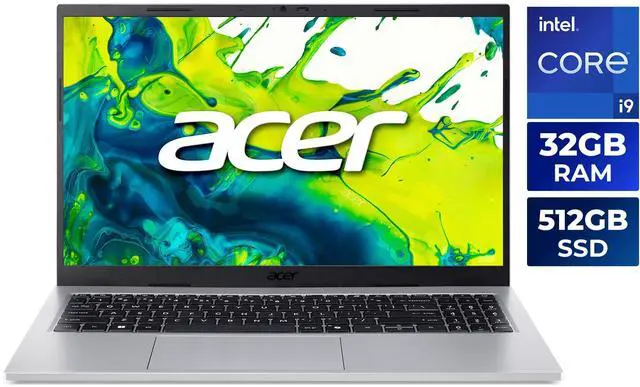
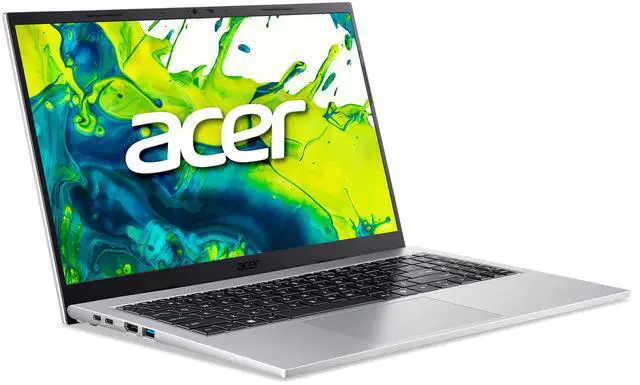
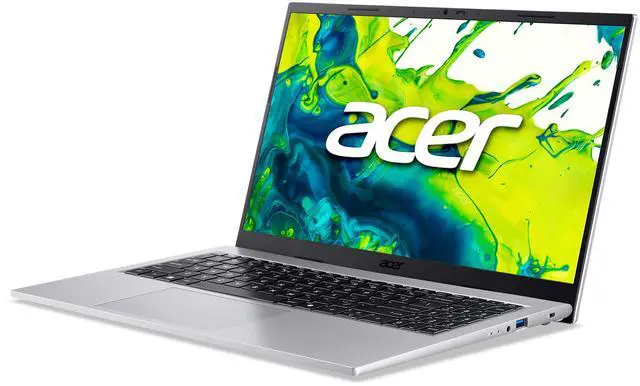
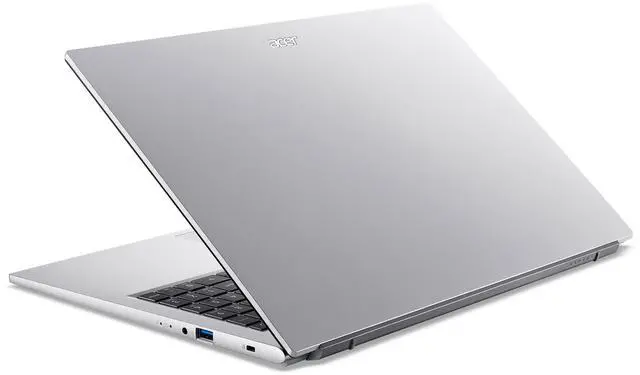


Acer Aspire Go 15 15.6" - Intel Core i9-13900H - 32GB RAM - 512GB SSD - Windows 11 Home (AG15-72P-97RC)
- Intel Core i9-13900H
- 32GB Memory / 512GB PCIe SSD
- Intel Iris Xe Graphics
- Non-Touch Screen
- 1920 x 1080
- Windows 11 Home
+
+
Overview
Specs
Reviews
Warranty & Returns
Warranty, Returns, And Additional Information
Warranty
- Limited Warranty period (parts): 1 year
- Limited Warranty period (labor): 1 year
- Read full details
Return Policies
- Return for refund within: 15 days
- Return for replacement within: 15 days
- This item is covered by Newegg.ca's 15-Day Return Policy.
- Read full return policy for details.
Manufacturer Contact Info
- Manufacturer Product Page
- Manufacturer Website
- Support Phone: 1-800-816-2237
- Support Website
- View other products from Acer America
LOADING...
Learn about this product
The Acer Aspire Go 15 (AG15-72P-97RC) is a 15.6-inch Windows 11 laptop with a Core i9-13900H, 32GB RAM, and 512GB PCIe SSD, suited for students, home users, and professionals who want strong everyday multitasking and office productivity in a thin, lightweight design.
Recommended For
- People who want a large-screen Windows laptop for everyday work at home or school—browser tabs, Office apps, email, video calls, and light multitasking—without needing dedicated graphics.
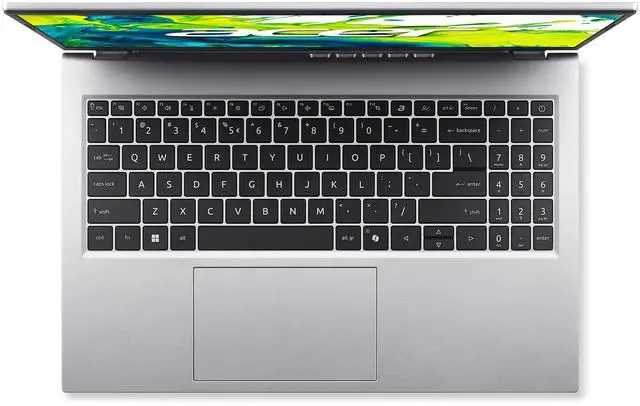
- Students or remote workers who spend long stretches typing and joining calls, and value a full-size 15.6-inch layout, numpad-class workspace, 1080p webcam, and easy day-to-day portability over premium materials.
- Buyers who care more about CPU and memory headroom for spreadsheets, many open tabs, light coding, or running several productivity apps at once than they do about gaming or creator features.
- Users who want a straightforward personal laptop with modern ports and wireless connectivity for home use, light media, cloud apps, and occasional travel, rather than a specialized gaming or studio machine.
Real-World Use Scenarios
- Working with many browser tabs, Office apps, Zoom, and background tools at the same time should feel smooth, with 32GB RAM helping reduce slowdowns during typical school or office multitasking.
- For video calls, online classes, and remote meetings, the FHD webcam, dual microphones, and AI noise reduction should deliver a clear enough experience for everyday communication, especially in home or office settings.
- Using it as a general home laptop for web browsing, email, streaming, documents, and light photo handling should be comfortable, but the integrated graphics and basic display make it less ideal for demanding creative work or visually critical editing.
- For students or mobile workers carrying a 15.6-inch laptop between home, class, and coffee shops, it should be manageable in a backpack thanks to its relatively light weight, though battery life is better suited to partial-day use than a full unplugged workday.
- Connecting an external monitor, charger, mouse, headset, and other accessories should be straightforward for a desk setup, since Aspire Go 15 variants in this series commonly include HDMI plus multiple USB-A and USB-C ports.
- It can handle light casual gaming and media playback, but users expecting modern AAA gaming, heavy 3D work, or fast export times in GPU-accelerated apps will likely run into the limits of Intel integrated graphics.
Spec Summary
| Attribute | Value |
|---|---|
| Best For | Users who want a high-performance 15.6" thin-and-light Windows laptop for heavy multitasking, content creation and general-purpose/gaming on an FHD IPS display |
| Processor And Core Count | Intel Core i9-13900H (Raptor Lake) 14-core (6P+8E) processor with 24 MB L3 cache; listed processor speed 2.6 GHz and single physical processor |
| GPU And VRAM | Intel Iris Xe integrated graphics using shared system memory |
| Display Spec | 15.6" FHD (1920 x 1080) IPS non-touch display, 16:9 aspect ratio, 300 nits |
| Memory Configuration | 32GB DDR4 3200 (16GB installed + 1x16GB V-COLOR SO-DIMM), 2 SO-DIMM slots; external data lists 32GB as installed and maximum |
| Storage And Expansion | 512GB PCIe SSD |
| High Speed I O | 2 x USB-A 3.2 Gen 1 and 2 x USB-C 3.2 Gen 2, HDMI 2.1, 1 x headphone/microphone combo jack |
| Wired And Wireless Networking | Wi‑Fi 6 (802.11ax) wireless LAN and Bluetooth 5.3 |
| Webcam And Privacy | FHD 1920 x 1080 webcam with Blue Glass to reduce lens flares and Acer TNR (Temporal Noise Reduction) for improved low-light imagery; supports 1080p video |
| Audio Setup | Two built-in stereo speakers, dual built-in microphones and Acer PurifiedVoice technology with AI noise reduction |
| Keyboard And Control | Precision Touchpad supporting Windows Modern Touchpad gestures |
| Battery And Power | 51.6 Wh lithium-ion battery (1 battery/cell listed externally), up to 6.5-hour battery life; batteries included |
| Portability | Thin-and-light design; dimensions 14.08 x 9.23 x 0.48–0.7 inches and weight 3.37 lbs |
| External Display And Docking Fit | HDMI 2.1 for external displays plus two USB-C 3.2 Gen2 ports available for docking and peripherals |
| Model Identifiers | Acer Aspire Go 15 AG15-72P-97RC (Part NX.JSDAA.001), 2026 model year; manufacturer listed as NEWEGG |
Reference Q&A
Q: Should I choose the Acer Aspire Go 15 i9/32GB or a budget gaming laptop with RTX 4050?
A: Choose the Aspire Go 15 if your priority is CPU-heavy work in a lighter everyday laptop, such as large spreadsheets, multitasking, coding, browser-heavy workflows, and office use. Its Core i9-13900H and 32GB RAM give it much more headroom than many entry gaming models for productivity. Choose an RTX 4050 laptop if your workload depends on graphics performance, including modern gaming, GPU-accelerated creative apps, 3D work, or local AI tools. The main trade-off is that this Acer pairs a high-end H-series CPU with Intel Iris Xe integrated graphics, so it is better positioned as a mobile productivity system than as a graphics-first machine.
Q: Is the Acer Aspire Go 15 i9/32GB worth it over an i5 or i7 Aspire Go 15?
A: The i9/32GB version makes more sense if you keep many apps open, work with heavier office files, run development tools, or want longer upgrade runway without adding RAM later. A lower-tier i5 or i7 Aspire Go 15 is usually the better fit for web, schoolwork, streaming, and general home use, because those tasks rarely benefit enough from the extra CPU headroom to justify moving all the way up to an i9. The practical trade-off is that this configuration improves multitasking and sustained CPU capacity more than it improves graphics capability, because the laptop still uses Intel Iris Xe integrated graphics.
Q: Should I buy this Aspire Go 15 or step up to a laptop with newer Intel Arc integrated graphics?
A: Choose this Aspire Go 15 if you want stronger traditional CPU performance and 32GB memory in a straightforward home or work laptop, and your graphics needs are light. Step up to a newer Core Ultra model with Intel Arc integrated graphics if you care more about better iGPU gaming, newer media features, and improved graphics efficiency. The key trade-off is simple: this Aspire Go 15 offers a powerful 13th Gen H-series processor, but its Iris Xe graphics are from an older integrated graphics tier than current Intel Arc-based laptop chips.
Q: Is the Acer Aspire Go 15 a better choice than a thin-and-light ultrabook for travel?
A: Choose the Aspire Go 15 if you want more raw CPU performance and more memory for the price, especially for multitasking and desk-based use. Choose a portability-focused ultrabook if longer unplugged use, quieter operation, and easier travel matter more. This Acer is relatively light for a 15.6-inch laptop, but its H-series Core i9 and Acer's listed battery target make it more performance-leaning than a typical efficiency-first ultrabook.
Q: Is this a good laptop for office work, meetings, and heavy multitasking?
A: Yes for productivity. This configuration is strong for office work because it combines an Intel Core i9-13900H with 32GB RAM, which is well above what buyers typically ask for in everyday work laptops. It is a good fit for large spreadsheets, many browser tabs, video calls, documents, and general business apps. The main limit is graphics: Intel Iris Xe is integrated, so this model is not the right choice if your work depends on GPU-heavy 3D, CAD, or advanced video effects.
Q: Is it worth buying as a travel work laptop?
A: It can work well for travel if you want a larger 15.6-inch screen without carrying a very heavy system. At 3.37 lbs, it is relatively portable for its size and it has useful travel ports, including HDMI 2.1, USB-A, and two USB-C ports. The trade-off is battery life: Acer rates it up to 6.5 hours, which is adequate for shorter work sessions but not especially strong for all-day unplugged travel.
Q: Who is this laptop best suited for?
A: This model is best for users who want a fast general-purpose Windows laptop rather than a gaming or creator machine. It suits home office users, students with demanding multitasking needs, remote workers, and buyers who keep many apps open at once. It is less suitable for buyers who specifically want touchscreen note-taking, stylus use, high-end gaming, or professional GPU workloads.
Q: Can it handle light creative work or casual gaming?
A: It can handle light creative tasks and older or less demanding games, but it is not a gaming laptop. The processor and 32GB RAM are strong, but Intel Iris Xe graphics are integrated and share system memory. That makes this laptop fine for photo edits, office media work, and light games, but a weak choice for modern AAA gaming, serious 3D work, or heavier CAD and rendering.
Q: What are the main trade-offs versus a similar 15-inch competitor laptop?
A: The main advantage here is unusually high CPU and memory headroom for a mainstream 15.6-inch laptop: Core i9 plus 32GB RAM is stronger than many competing office-focused models. The main trade-offs are typical of this class: integrated graphics instead of a dedicated GPU, a standard 1080p non-touch display, and battery life that looks moderate rather than class-leading. Choose it if you value multitasking performance more than gaming, pen input, or premium display features.
Q: Is the Acer Aspire Go 15 AG15-72P-97RC worth buying if I want strong everyday performance without a dedicated GPU?
A: Yes, if your priority is CPU performance, memory capacity, and general productivity value. This configuration pairs a Core i9-13900H with 32GB RAM, which is unusually strong for office work, multitasking, coding, and large spreadsheets. The trade-off is graphics: Intel Iris Xe is fine for basic visual work and older or lighter games, but it is not the right choice for GPU-heavy gaming, 3D work, or AI workloads.
Q: Is this Acer Aspire Go 15 good for school, work, and travel?
A: It is a good fit for school and work if you mainly need web apps, documents, video calls, note-taking, and multitasking. At 3.37 lbs, it is reasonably portable for a 15.6-inch laptop, and the 1080p webcam, Wi-Fi 6, and 32GB RAM support remote work well. The main limitation for travel or long campus days is battery life: Acer rates it at up to 6.5 hours, so it is better for partial-day use than all-day unplugged use.
Q: Can the Acer Aspire Go 15 AG15-72P-97RC handle gaming?
A: It can handle light gaming and older or less demanding titles, but it is not a gaming laptop. The Core i9 processor is powerful, but the integrated Intel Iris Xe graphics are the limiting factor. If gaming performance is an important buying reason, a laptop with a dedicated GPU will be a better fit even if the CPU looks less impressive on paper.
Q: Who is this Aspire Go 15 best suited for?
A: It is best suited for buyers who want a large-screen Windows laptop for productivity first: office work, school, research, coding, video calls, and heavy multitasking. It makes less sense for buyers who prioritize long battery life, color-critical creative work, touch input, or modern AAA gaming. In short, it is a performance-leaning mainstream laptop, not a creator or gaming machine.
Q: What are the main trade-offs of choosing this configuration?
A: The main advantages are a fast H-series processor, 32GB RAM, a 15.6-inch IPS display, and useful everyday connectivity including USB-C, HDMI 2.1, Wi‑Fi 6, and a 1080p webcam. The main trade-offs are integrated graphics, a standard 1080p non-touch screen, and battery life that is modest rather than class-leading. It is a better choice for productivity and multitasking than for GPU-intensive or all-day mobile use.