Skip to: |

Newegg.ca - A great place to buy computers, computer parts, electronics, software, accessories, and DVDs online. With great prices, fast shipping, and top-rated customer service - once you know, you Newegg.

If you are reading this message, Please click this link to reload this page.(Do not use your browser's "Refresh" button). Please email us if you're running the latest version of your browser and you still see this message.

Newegg.ca - Computer Parts, Laptops, Electronics, HDTVs, Digital Cameras and More!

  • | Wish List
  • Help

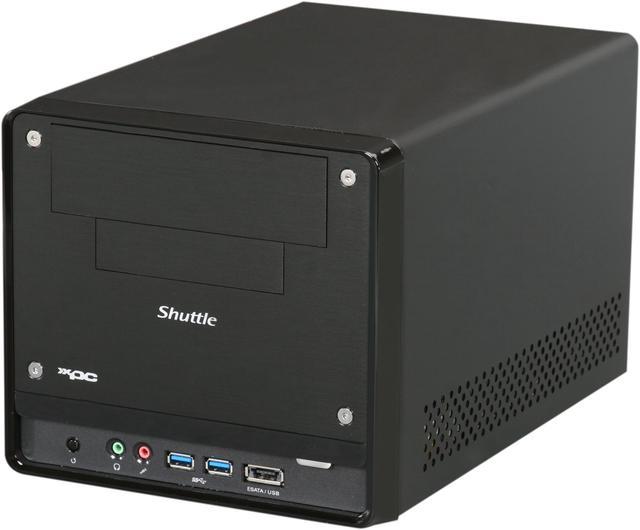
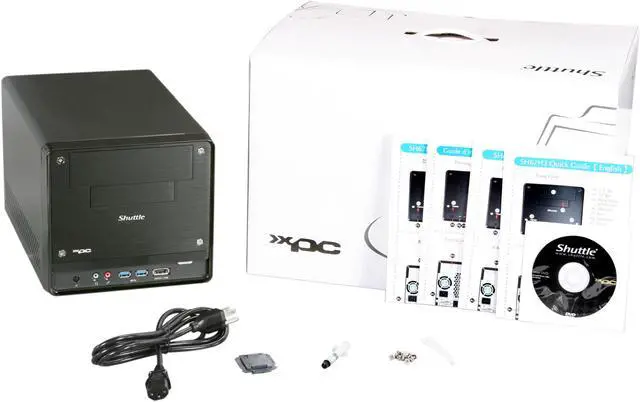
Shuttle SH67H3 Intel Core i7 / i5 / i3 (LGA1155) Intel Socket H2(LGA1155) Intel H67 Intel HD Graphics 2000/3000 integrated in the processor 1 x HDMI XPC Barebone

In stock. Limit 5 per customer.

  • Intel Socket H2(LGA1155)
  • Intel H67
  • 4 x 240Pin
  • Pin It
  • Email this page
ICON Loading...

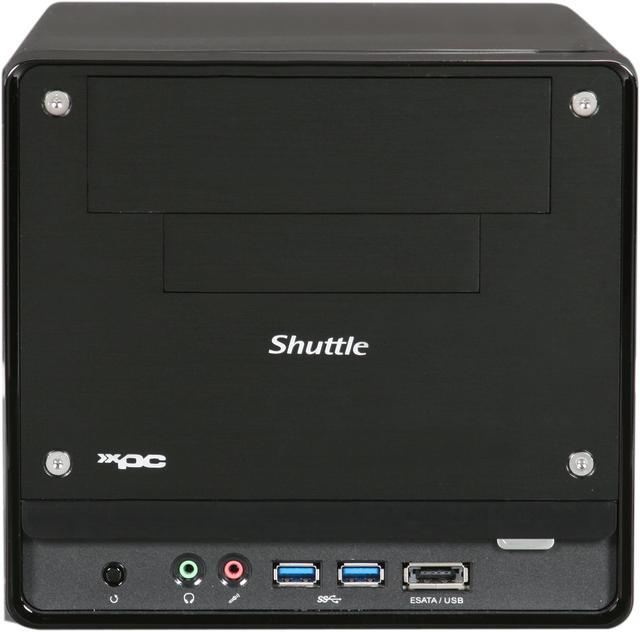
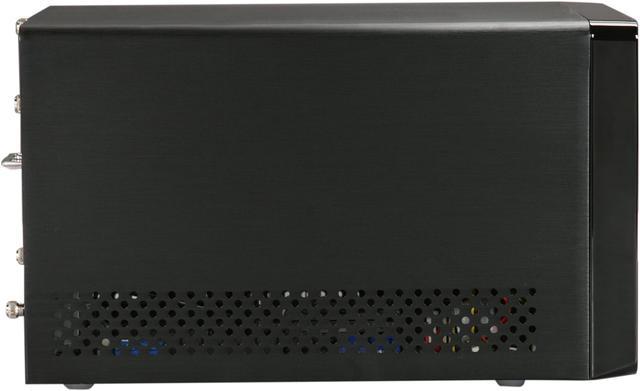
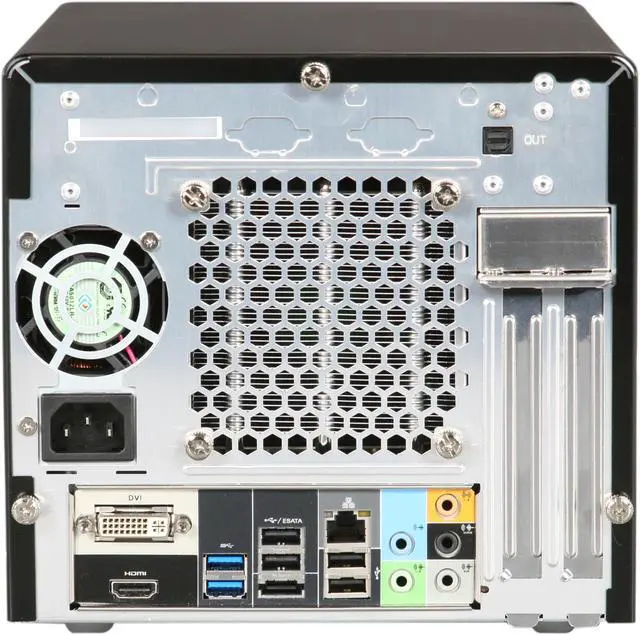
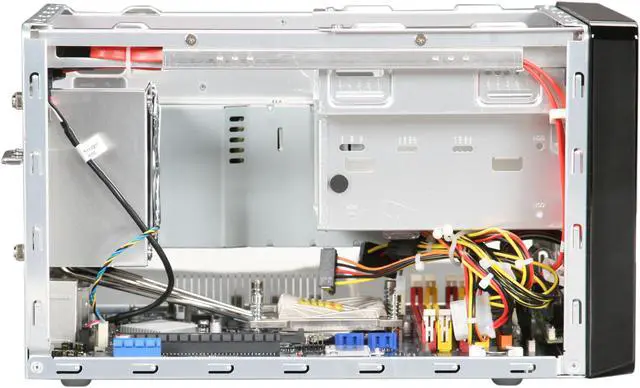
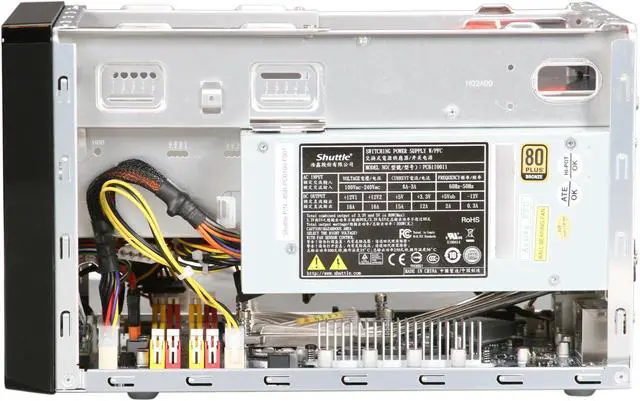
The Shuttle XPC Barebones SH67H3 was designed for Intel's latest "Sandy Bridge" platform to handle more intensive tasks than before. It is based on the Intel H67 chipset and ready for LGA1155 processors of the Intel Core i7 / i5 / i3 series with integrated graphics (up to 95 W TDP). Despite its compact dimensions, the SH67H3 still provides room for an additional PCI-Express dual-slot graphics card, four DDR3 memory slots and two 3.5" HDDs. Multi-display is also possible thanks to the HDMI and DVI connections. The SH67H3 also comes with an array of cutting-edge ports including 2x SATA 6Gb/s, 4x USB 3.0, 2x eSATA, along with Gigabit LAN and 8-channel audio with S/PDIF out. With a high efficiency 300W power supply and effective Heatpipe cooling system, the SH67H3 stays well-cooled even under the toughest conditions. This Mini-PC is sleek, stylish, compact and high performing - a status symbol to sit on your desk!


  • newegg Supports Intel 32nm Sandy Bridge Processors The Intel microarchitecture codename Sandy Bridge is an incredible leap in processor integration and manufacturing introduced in the 2nd generation Intel Core processor family. Manufactured entirely on Intel 32nm process technology, Sandy Bridge unifies processor cores, memory controller, last-level cache (LLC), and graphics and media processing. Such tight integration enables a host of performance and efficiency improvements, including fast access by cores and graphics to shared data in the last-level cache to accelerate graphics processing, fewer buses over which data and signaling must travel for faster processing, and more memory bandwidth for the cores to boost system performance.
  • newegg 4x USB 3.0 & 2x SATA 6Gb/s The USB 3.0 connectors of the SH67H3 allow for data transfer of up to 5 Gbit/s. This enables external devices such as USB hard disks to be connected and run at nearly the same speed as their internal siblings. USB 3.0 is downward compatible so that also devices of previous USB generations can be hooked up. With SATA 6Gb/s ports, internal high performance drives such as SSDs can use their full potential and thus run significantly faster.
  • newegg 8-channel HD Audio plus S/PDIF Output The superior high-definition sound not only gives that perfect cinema feeling at home, it also offers optimal sound quality for your Skype VOIP telephone conferencing. Conveniently located ports ensure ultimate user friendliness. SPDIF allows the transmission of audio signals in digital quality. The sound of films, music and games is sent to the terminal via fibre-optic or coax cable without any data loss.
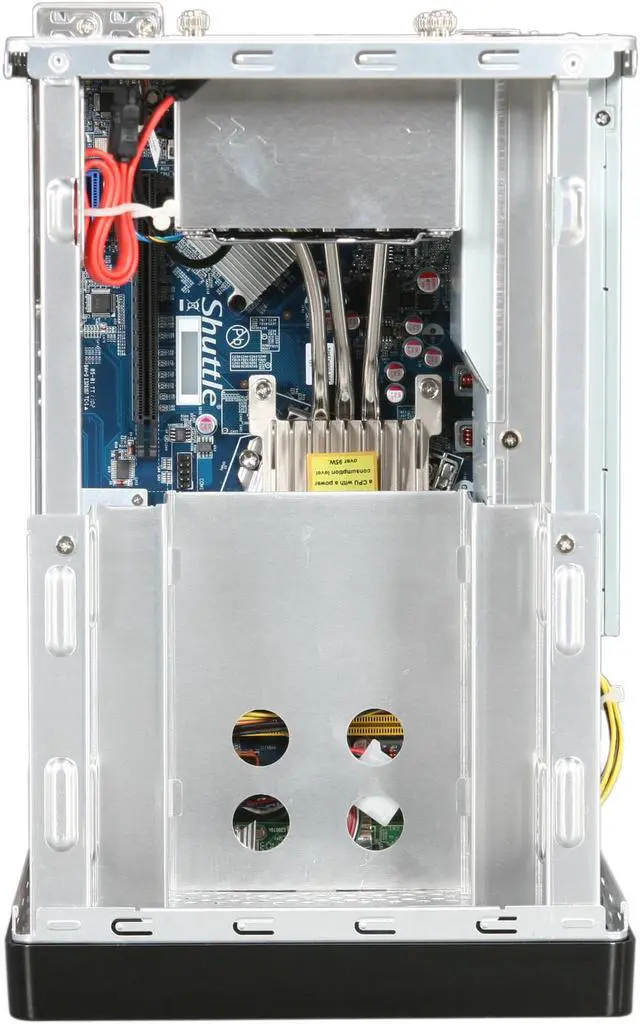
  • newegg Supports Dual-Slot Graphics Cards and Two Hard Disks Despite the small housing, the SH67H3 is capable of running dual-slot (double-height) PCI Express graphics cards. Furthermore, you can install one optical drive and up to two hard disks into the SH67H3.
  • newegg Small, but Easy to Install Shuttle XPCs offer the performance of a desktop PC at a third of the size while using standard desktop components. Shuttle keeps the concept of being "futureproof" in mind when designing the H3 chassis. The meticulously designed internal layout features pre-routed cables to reduce clutter, increase airflow and make the installation of components easy.
  • newegg Optimal Cooling Shuttle's industry-leading I.C.E. heatpipe technology delivers efficient cooling and is exceptionally quiet. Warm air is transported out of the chassis by means of cleverly arranged components, which enables a large number of parts to be cooled simultaneously in the air flow. At no time can heat build up and adversely affect the stability of the system.

Learn more about the Shuttle Computer SH67H3

General

Brand
Shuttle
Model
SH67H3
Color
Black

CPU Supported

CPU Type
Intel Core i7 / i5 / i3 (LGA1155)
CPU Socket
Intel Socket H2(LGA1155)

Chipset

North Bridge
Intel H67

Memory Supported

Memory slot
4 x 240Pin
Memory Type Supported
DDR3-1066/1333 SDRAM memory (PC3-8500/10600)
Max Memory Supported
32GB

Expansion Slots

PCI Express 2.0 x16
1 x PCI Express 2.0 x16 (PEG, for graphics cards only)
PCI Express
1 x PCI Express x1
Other
1 x Mini PCI Express 2.0 x1 (for the optional WLAN module)

Storage

Serial ATA
2 x SATA 3.0Gb/s + 2 x SATA 6.0Gb/s
SATA RAID
RAID 0/1/5/10/JBOD

Graphics

Onboard Video
Intel HD Graphics 2000/3000 integrated in the processor

Audio

Channel
8-CH

Communications

First LAN
Realtek 8111E(10/100/1000Mbps)
Max LAN Speed
10/100/1000Mbps

Extension Bays

3.5" Internal bays
1
3.5" External bays
1
5.25" External bays
1

Front Panel Ports

Front USB
2 x USB 3.0
Front e-SATA Ports
eSATA 3Gb/s + USB 2.0 Combo
Front Audio Ports
2 jacks

Back Panel Ports

HDMI
1 x HDMI
VGA
1 x DVI
Rear USB
6 (4 x USB 2.0 + 2 x USB 3.0)
Rear e-SATA Ports
1
RJ45
1
Rear Audio Ports
5 jacks

Power Supply

Power Supply
300 Watt power supply (80 PLUS Bronze)

Physical SPEC

Dimensions
12.72" x 8.19" x 7.72"
Weight
7.94 lbs.
Material
Aluminum

Features

Features
The H3 chassis design: a clean and modern look

Small, but easy to install

Supports Intel 32nm Sandy Bridge Processors


Single-Chip Chipset: Intel H67 Express

Integrated Cooling Engine (I.C.E.)


Solid Capacitor

SATA 3.0 with up to 6 Gbit/s speed


4 x USB 3.0

Supports Dual-Slot Graphics Card

Supports one optical drive and two hard disks


Built-in Intel HD Graphics Engine

Dual View Technology with HDMI and DVI (or VGA)

HD Audio capabilities

80 PLUS BRONZE certified Power Supply

Supports power-on after power-loss. (Bios versions 1.05 and 1.06)

Manufacturer Warranty

Parts
3 years limited
Labor
3 years limited

Quick Info

Warranty

  • Limited Warranty period (parts): 3 years
  • Limited Warranty period (labor): 3 years


Customer Reviews of the Shuttle Computer SH67H3

Do you own this product? Write a Review

Filter Results

Go
  • Frustrated Peter
  • 3/28/2013 12:33:17 PM
  • Tech Level: Average
  • Ownership: more than 1 year
  • Verified Owner

1 out of 5 eggsBSOD and Freezing.

Pros: Small compact and can fit a full size GPU. Sleek design and feels very sturdy. It's the smallest gaming rig I could find at the time.

Cons: That BSOD, freezing, and sudden reboot. Use to only happen with full screen videos or games and only ever so often. But how after a year, I get it from zero to about half a dozen times when gaming. It definitely very very frustrating since I play online games with multiple players and it's giving me a very bad taste with Shuttle.

Other Thoughts: I've contacted Shuttle and I've search online for solution but came up empty. Shuttle Tech support suggest that I either remove the GPU and drop down the memory. As unhelpful as that might sound I did it and still doesn't solve my issue. I'd reply back to Shuttle but no respond yet...it's been a week. So I've submited my issue again with the emails. Let's see what they say next.

Here's my build:
Intel core i5 2500 w/ turbo
OCz Vertex 3 120
3 tb Seagate HDD (secondary)
G.Skills Ripjaws X 16GB 1333Mhz
EVGA Classified Ultra GTX560Ti 448 Cores
Shuttle 500w PSU (upgrade from the 300w)

0 out of 3 people found this review helpful. Did you? Yes No

  • N/A
  • 3/24/2013 5:17:33 AM
  • Tech Level: Average
  • Ownership: 1 month to 1 year
  • Verified Owner

5 out of 5 eggs

Pros: Easy to build, fast, and stable.
I7
16 GB Ram
120 GB SSD
1 TB HD
Blu Ray Burner
Win 8
Thinking about adding a video card but haven't decided yet.

Cons: None

1 out of 1 people found this review helpful. Did you? Yes No

  • Mr Slinky
  • 3/19/2013 12:08:00 AM
  • Tech Level: Somewhat High
  • Ownership: 1 day to 1 week
  • Verified Owner

3 out of 5 eggsYou'll Need a PCIE Graphics Card... The onboard controller is MEH.

Pros: Compact and well thought out design, little box but not too cramped to easily build in. Shuttle's "Heatpipe cooling system" works surprisingly well.

Cons: Well... The graphic controller is junk... I would go as far to say it's Broken. Display flickers and lags. I'm knocking a full two eggs of for this.

Other Thoughts: I've built this for tethered shooting (photography) and basically just needed a small system to capture and display still image files on a large monitor. built this using an Intel Core i3-2100, 8gb of RAM an Intel 330 SSD running Windows 7 64bit and some proprietary imaging software. Other than the terrible graphics this system is great... I would actually have RMA'd it but I'm in this far so I'll cough up another $50 for a PCIE card.

1 out of 2 people found this review helpful. Did you? Yes No

  • DuctSoup
  • 3/17/2013 3:20:17 PM
  • Tech Level: High
  • Ownership: 1 week to 1 month
  • Verified Owner

5 out of 5 eggsZippy

Pros: The i7 and built-in graphics are quite impressive. This build is fast, compact and quiet as a (sleeping) moose. The case is laid out thoughtfully and while there's not a lot of room, there's all the room you really need. Hyperthreaded so it runs smooth pretty much regardless of what you throw at it.

Cons: Assembly was easy and OS loading was completely flawless. Not really a con, don't plan on loading ESXi on this one.

Other Thoughts: I added a 512GB Samsung SSD for the boot drive and use it as a AutoDesk and Adobe CS workstation.

Win7x64 says: Processor 7.7, RAM 7.7, Graphics 6.5, Gaming 6.5 HDD 7.9

Did you find this review helpful? Yes No

  • ChrisM
  • 3/13/2013 10:01:08 AM
  • Tech Level: High
  • Ownership: 1 day to 1 week
  • Verified Owner

5 out of 5 eggsWorks, but prefer the AMD Shuttles

Pros: As with any Shuttle, it assembles easily. Looks Sharp !! Runs Nicely.
This one comes with a 300W PS and 4 memory slots, instead of the typical 250W and 2 memory slots. Also, Nice.
If you have SATA3 drive(s), this MoBo supports them as well.
Overall very easy build. Fan runs very quietly (BIOS setting to Auto). Checked several times to make sure it was actually running.
The one internal SATA cable provided, was long enough for my application (to DVD burner). Installed another cable for my SSD.

Cons: No Heatsink Grease supplied, as with other shuttles .....
Intel provides a "HUGE" heatsink/fan assembly with their chips (has heat transfer tape pre-installed), but also doesn't provide a tube of grease to apply if not using supplied heatsink assembly. Had to make a run to Radio Shack for a $2 item that will now last me for the rest of my life's builds.

Other Thoughts: For the added cost of this "Intel" Shuttle, vs. an "AMD" Shuttle, and the additional Intel Chip cost (includes on board Video processor), I could have purchased one heck of an add-on "Video Card of Choice" ......

NewEgg, you're missing out by not selling the AMD Shuttles (and with a larger PS, too).

Is "BLACK" the only color available ?

SSD prices are coming down, as capacities (and speed) are going up. SATA3 SSD really compliments this build.

Did you find this review helpful? Yes No

  • 303Mike
  • 3/10/2013 2:05:00 PM
  • Tech Level: Somewhat High
  • Ownership: 1 month to 1 year
  • Verified Owner

1 out of 5 eggsIt Just Gets Worse

Pros: First the onboard HDMI wouldn't work. I covered that in an earlier review, but at least the system was stable. Now...

Cons: The USB took a dump. I was getting a BSOD on boot, and traced it down to the USB webcam. The cam works fine on all my other systems, so that narrows it down to the motherboard. Within 24 hours, the USB issue was quickly followed by a complete bios lockup. No luck resetting the CMOS.

I have never had such trouble from a system, and I've build quite a few. So now I'm off to order another board and case, as from what I read, Shuttles use proprietary cases. Sigh.

Other Thoughts: I really wish I never bought this system. At least the other components are salvageable.

1 out of 1 people found this review helpful. Did you? Yes No

  • Max
  • 3/8/2013 8:07:34 AM
  • Tech Level: Somewhat High
  • Ownership: 1 day to 1 week
  • Verified Owner

4 out of 5 eggsFirst DIY Build

Pros: Documentation was great for first barebone build from Shuttle. Heat sink and fan appear top notch and are quiet. Also, cables are long enough to attach to devices in drive bays

Cons: Shuttle should throw in some extra SATA cables, no PCI express mini slot, drive cage housing not optimized for tiny SSD devices

Other Thoughts: NA

1 out of 1 people found this review helpful. Did you? Yes No

  • N/A
  • 3/6/2013 1:46:40 PM
  • Tech Level: Somewhat High
  • Ownership: 1 week to 1 month
  • Verified Owner

1 out of 5 eggsCorrupt BIOS

Pros: Good system.

Cons: Newegg corrupted my BIOS during testing. What a freaking hassle.

0 out of 4 people found this review helpful. Did you? Yes No

  • Nate
  • 2/27/2013 6:33:50 AM
  • Tech Level: Somewhat High
  • Ownership: 1 month to 1 year
  • Verified Owner

5 out of 5 eggsStill truckin'...

Pros: I had written a review earlier in the year. However, I've made some significant changes that I thought people might be interested in:

Uses very little power and runs at a low temperature. I had been running:

Intel i3 2105 Sandybridge H67
WD SATA 3.0g/s HD
ASUS CD/DVD RW Drive
Using the integrated Graphics

One issue I and many others seemed to be concerned about was the Power Supply being only 300W. I was wanting to add a video card to it at some point, but wasn't sure about how well it would work. However, I don't think it's an issue at all. Judging from several PS estimation calculators and comments from other users, the system with the parts I listed above will probably run ~170 Watt load with moderate usage. So I brokedown and added a video card:

Galaxy Geforce GT 430

It's not a workhorse card. It's cheap (about $78), small, lower power (max 49W usage), and runs cool; but it does what I need. I just wanted to play a few games and do some Boinc crunching. So far, it hasn't disappointed. I play Guild Wars 2 on medium setting with ~45 fps. During the day, I run Einstein@home on my gpu. So far, no ill-effects. No game/program crashes or no booting problems. If you want to get a video card, I wouldn't worry too much about getting one. You probably wouldn't want to get a new, high-end card or anything. But a moderatly powered card would do just fine.

As far as temperature, no problems here. Looking at the case size, I'm not sure how the parts breath. However, when crunching, the GPU would peak at about 57C and the CPU would peak at about 51C. I was running the 'smart fan' speed setting; but I ended up turning the fan speed up to 'low' (increased 600 rpms). Einstien@home GPU crunching runs all day, and the temperature never gets above 51C (the max is 98C). My processor never really gets above 47C (although, i3s run at a lower temp, max 69C). It's a little louder, but not unbearable.

Cons: One issue for me. I'm not a huge fan of the BIOS. The settings are lacking. There are no overclocking options (not that I planned on it). When i was using the onboard video, it wouldn't let me allocate more than 512MB to the RAM; and I know HD 3000 graphics can use more than that.

Also, I'm not sure if it's just me, but the Smart fan doesn't seem to work very well. My CPU will go from 32C to 52C with barely a change in the speed. Maybe it's going off the system temperature? I'm not sure. I've yet to find a good way to change it. I tried using speedfan, but couldn't get that to work either.

Other Thoughts: I mentioned I turned the Smart Fan option off and set it to 'low'. However, I'm not entirely sure that's required to keep it cool. With the small case and the addition of the card, my own paranoia got the best of me. I'll probably try and bring it back down to the smart fan eventually if the noise starts to bug me; although, it's not that loud.

0 out of 1 people found this review helpful. Did you? Yes No

  • Steve511
  • 2/23/2013 9:43:56 PM
  • Tech Level: Somewhat High
  • Ownership: 1 day to 1 week
  • Verified Owner

5 out of 5 eggsSupports Ivy Bridge V2Mbo

Pros: Well designed, Quiet, compact, Perfect for a media server

Cons: Only room for 2 hdd

Other Thoughts: Built a HTPC from this unit. Shuttle website confirmed Ivy Bridge support with V2 of the motherboard so It got a Corei5-3770K, 2 8Gig Ripjaws DDR3 Ram, a SSD drive to boot up and 2tB Caviar Green. Plenty of room for 4 Ceton InfiniTV cards so this makes for 1 awesome Home theater PC.

1 out of 1 people found this review helpful. Did you? Yes No

ICON Loading...
  • $295.99
  • $274.99
  • Save: $21.00 (7%)
  • $16.99 Shipping
 
Are you an E-Blast Insider? Subscribe Newegg e-Blast

Buzz

Back in business! - Great new start.

5 out of 5 eggs
Finally a top of the line shuttle, at a reasonable prices that works right out of the box. Everything worked from the start. ...
— 5/13/2011

Powerful little box

5 out of 5 eggs
Does everything a Shuttle should: take up little space, run near silently, and look good while being a rugged and capable ...
— 6/13/2011


LOADING... LOADING...
Shop by Region: United States | Canada | China
Follow us:   RSS Feeds Youtube
VeriSign Reliability Seal1 PaypalVerify GoldenSeal InteracThis site protected by Trustwave's Trusted Commerce program Inc500

Policy & Agreement | Privacy Policy

 © 2000-2013 Newegg Inc.  As used herein, “Newegg.ca” means Newegg Canada Inc. unless the context specifically refers to the www.newegg.ca web address.
If the Adobe Reader does not appear when you click on a link for a PDF file, you can download Adobe Reader from the Adobe web site. nassau