Skip to: |

Newegg.ca - A great place to buy computers, computer parts, electronics, software, accessories, and DVDs online. With great prices, fast shipping, and top-rated customer service - once you know, you Newegg.

If you are reading this message, Please click this link to reload this page.(Do not use your browser's "Refresh" button). Please email us if you're running the latest version of your browser and you still see this message.

Newegg.ca - Computer Parts, Laptops, Electronics, HDTVs, Digital Cameras and More!

  • | Wish List
  • Help
Home
Home > 
Networking > 
Wireless Networking > 
Wireless AP > 
Cisco Small Business > 
Item#: N82E16833124337

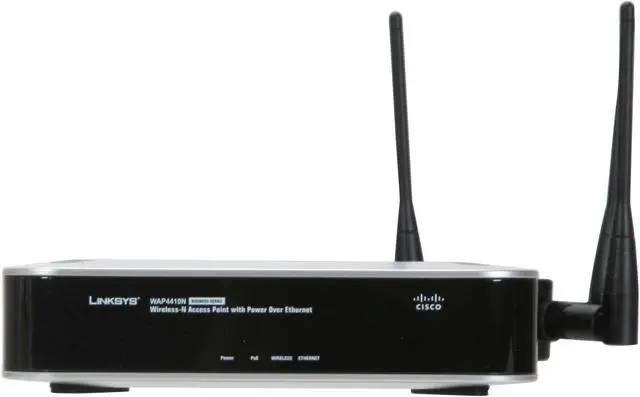
Cisco Small Business WAP4410N Wireless Access Point 802.11b/g/n up to 300Mbps/ PoE/Advanced Security

neweggOUT OF STOCK.

  • IEEE 802.11n/g/b, IEEE 802.3, IEEE 802.3u, IEEE 802.3af (PoE), 802.1x, 802.11i security WPA/WPA2, WMM 300Mbps
  • 10/100/1000 Mbps x1
  • PoE/Advanced Security
ICON Loading...

Combined with the access point's draft-802.11n technology (backwards compatible with wireless-b and wireless-g standards), you can theoretically connect at data rates up to 300Mbps—nearly six times the speed of the 802.11g standard.

Don't let the need for power limit where you place your access point. The WAP4410N can use a single Ethernet connection for both power and data, so there's no need to use the included power adapter if there are no nearby outlets. Also, VoIP and video applications won't suffer from other network data demands thanks to the integrated QoS (quality of service) features that give signal priority to voice and video quality.


  • newegg 802.11n Support Compliant with draft 802.11n, the Cisco WAP4410N delivers real-world performance up to 300Mbps and remains compatible with 802.11g and 802.11b devices.
  • newegg MIMO Technology MIMO (Multiple In, Multiple Out) technology multiplies the effective data rate and uses signal reflections to increase the range and reduce "dead spots" in the wireless coverage area.
  • newegg PoE Support With PoE (Power over Ethernet) support, the Cisco WAP4410N can receive data and power over a single Ethernet network cable eliminating the need for a dedicated power outlet.
  • newegg Wireless QoS Capabilities The integrated Quality of Service (QoS) features prioritize wireless voice and video traffic for crisp voice and video communications.
  • newegg High Wireless Security To protect your data and privacy, the Cisco WAP4410N supports WEP (Wired Equivalent Privacy) and the industrial-strength wireless security of WPA (Wi-Fi Protected Access) to encode all your wireless transmissions with powerful encryption. With the MAC Address filter, decide exactly who access to your wireless network, while advanced logging keeps you appraised.

Learn more about the Cisco Small Business WAP4410N

Model

Brand
Cisco Small Business
Model
WAP4410N

Spec

Standards
IEEE 802.11n/g/b, IEEE 802.3, IEEE 802.3u, IEEE 802.3af (PoE), 802.1x, 802.11i security WPA/WPA2, WMM
Device Management
Built-in web user interface for easy browser-based configuration (HTTP/HTTPS)
Wireless Data Rates
Up to 300Mbps
Security
WEP/WPA/WPA2, WPS, Access control, SSID broadcast, Client isolation, 802.1X, 802.1X supplicant, RADIUS server, Rogue access point detection.
WPA/WPA2
WPA2
Frequency Band
2.4GHz
Channels
Operating channels: 11 North America, 13 most of Europe (ETSI and Japan)
Antenna
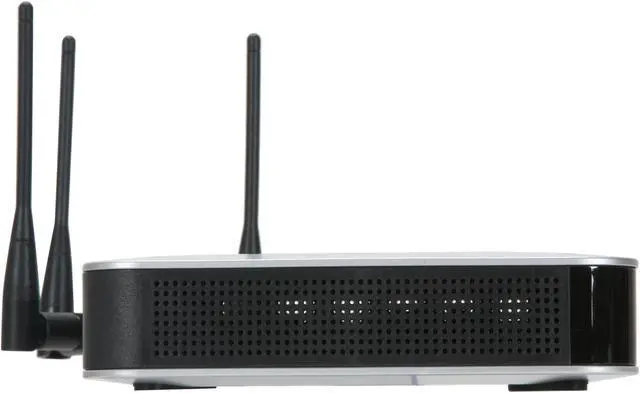
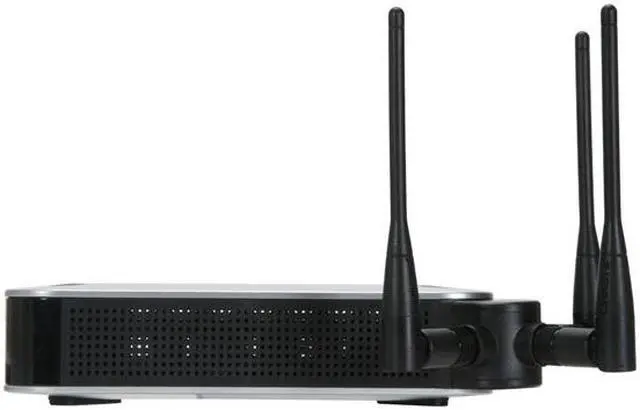
3 x omnidirectional, 2 dBi
Transmitted Power
Transmit power @ normal temp range for FCC:
802.11b: 16 dBm @ 1TX, 19 dBm @ 2TX, 20.5 dBm @ 3TX
802.11g: 13 dBm @ 1TX, 16 dBm @ 2TX, 17.5 dBm @ 3TX
802.11n: 17 dBm @ 1TX @ MCS0~5/8~13, 13 dBm @ 1TX @ MCS6/14,
11 dBm @ 1TX @ MCS7/15, 20 dBm @ 2TX@MCS0~5/8~13,
16 dBm @ 2TX @ MCS6/14, 14 dBm @ 2TX @ MCS7/15,
21.5 dBm @ 3TX@MCS0~5/8~13, 17.5 dBm @ 3TX @ MCS6/14,
15.5 dBm @ 3TX @ MCS7/15

Transmit power @ normal temp range for ETSI:
11b/g/n: 13 dBm @ 1TX, 16 dBm @ 2TX, 17.5 dBm @ 3TX
Receiver Sensitivity
802.11.n: 300 Mbps at -69dBm
802.11.g: 54 Mbps at -73dBm
802.11.b: 11 Mbps at -88dBm
Modulation
802.11b/DSSS, 802.11g/OFDM, 802.11n/OFDM
System Requirements
Minimum Requirements:
802.11b, 802.11g, 802.11n wireless adapter with TCP/IP protocol installed per PC.
Switch/router with PoE support or PoE injector when used with PoE.
Web-based configuration: Java-enabled web browser.
Interface
Ethernet Port
LEDs
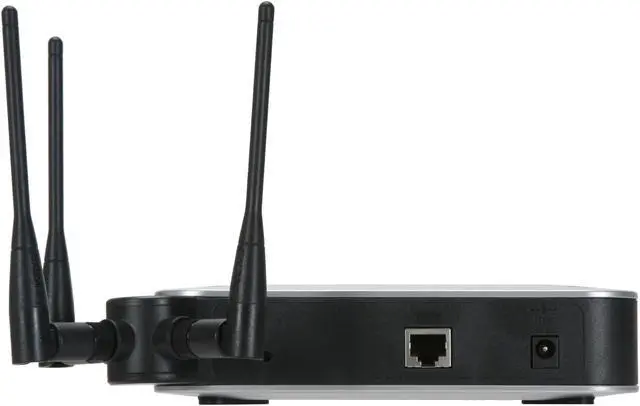
Power, Ethernet, Wireless, PoE
Buttons
Reset Button
Ports
1 x 10/100/1000M
Power Adapter
12V 1A DC input, and IEEE 802.3af compliant PoE
Max power draw: 10.1W
Dimensions
6.69" x 6.69" x 1.60"
Weight
0.86 lbs.
Temperature
0°C - 40°C (32°F - 104°F)
Humidity
10% - 85%, Non-Condensing

Features

Features
Simple Network Management Protocol (SNMP) version

Web firmware upgrade

Diagnostics: Flash, RAM, LAN, WLAN

Dynamic Host Configuration Protocol (DHCP): DHCP client

HTTP Redirect: Redirects initial user access to an external web server to display company logo or network usage policy

IPv6 host:
Support for management and control of access point over IPv6.
Supports RFC2460 (IPv6 protocol) and RFC4294 (IPv6 node requirements).

Quality of Service(QoS)

Certification: FCC, CE, IC

Packaging

Package Contents
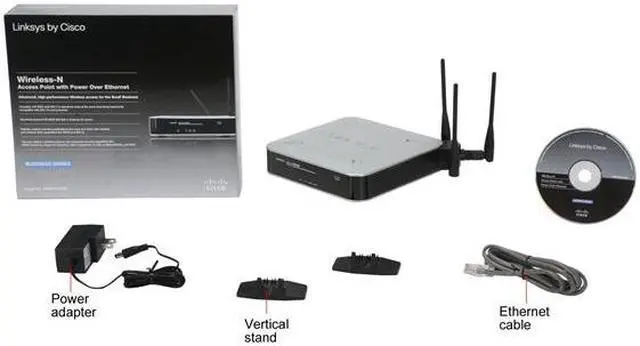
Cisco WAP4410N Wireless-N Access Point with PoE
User guide on CD-ROM
Ethernet network cable
Power adapter
Product stands
Registration card

Manufacturer Warranty

Parts
1 year limited
Labor
1 year limited

Quick Info

Warranty

  • Limited Warranty period (parts): 1 year
  • Limited Warranty period (labor): 1 year


Customer Reviews of the Cisco Small Business WAP4410N

Do you own this product? Write a Review

Filter Results

Go
  • MZ
  • 4/25/2013 2:12:08 PM
  • Tech Level: High
  • Ownership: more than 1 year

1 out of 5 eggsAbsolute garbage

Pros: Wireless N, POE, Good signal range

Cons: Simply doesn't work. Drops client connections after a few hours to a few days; requiring device reboot. Clients connect, but then connection drops once user does anything requiring actual usage/bandwidth. Some clients will successfully connect but then never get assigned an IP from the local LAN's DHCP server. Completely unreliable.

Other Thoughts: Purchase 7 WAP4410Ns for my workplace and experienced nothing but problems. Opened incident with Cisco and tried numerous recommended setting combinations, hotfix firmware updates issued by their support group, etc., but still no joy. I've tried every firmware update available, but the device just doesn't work. It's a failed product line and I don't understand why Cisco still sells this junk. Don't waste your time on this one...

Did you find this review helpful? Yes No

  • The IT Geek
  • 2/22/2013 2:56:59 PM
  • Tech Level: Somewhat High
  • Ownership: more than 1 year

5 out of 5 eggssolid so far

Pros: I have set multiple units at several clients with no problems. For those who are having to restart manually I hope you know that there is a "Keep Alive" setting on it. I have had to use it on one AP because I am not the one who manages the main switch in the building.

Cons: I have had not found one. If you are having problems with it may be the way the switch that it is connected to is configured.

Other Thoughts: I plan to use them with other clients.

Did you find this review helpful? Yes No

  • N/A
  • 1/27/2013 6:08:17 AM
  • Tech Level: High
  • Ownership: 1 day to 1 week
  • Verified Owner

5 out of 5 eggsWorks Great!!

Pros: Works great.. AP Only..

Cons: NOne that ive found yet!

Other Thoughts: Im not sure what others are talking about it stops working after a day, ive had it running for 3 days and its solid as a rock, running off my cisco gigabit switch it flys! newest firmware was released a few days ago.. will update review later, but so far, Very happy.. replaced an old cisco AP1200 of mine

Did you find this review helpful? Yes No

  • N/A
  • 1/18/2013 7:42:02 AM
  • Tech Level: High
  • Ownership: 1 month to 1 year
  • Verified Owner

1 out of 5 eggsDo NOT buy these

Pros: Good reception when they work, very easy to set up, multiple ssid support, POE

Cons: 4 out of 6 constantly drop out until you reset them.

Other Thoughts: I contacted Cisco, they recommended I installed logging software and point the device to the ip running the software. Doing this and sending in the log could result in Cisco giving you a beta version of the firmware. NOTE, Cisco recommends software that could contain viruses. Be careful where you get the logging software.
If you have issues, just RMA it right away.

Did you find this review helpful? Yes No

  • N/A
  • 1/11/2013 9:03:56 AM
  • Tech Level: Somewhat High
  • Ownership: more than 1 year

2 out of 5 eggsNeeds to be reset a lot

Pros: It worked great for me for a while, until I had more than one device using the wireless

Cons: If you have more than one device connecting to this AP, it will need to be reset at least once a day.

1 out of 1 people found this review helpful. Did you? Yes No

  • N/A
  • 12/31/2012 9:10:18 AM
  • Tech Level: Average
  • Ownership: 1 month to 1 year
  • Verified Owner

1 out of 5 eggsDo not buy!

Pros: Could be amazing.

Cons: Drops wireless and needs a reboot every day if not more.

Other Thoughts: Do your research in Cisco Support forums. There are post in there over a year old with the same issue.

Mine is going back.

2 out of 2 people found this review helpful. Did you? Yes No

  • netwatch
  • 12/4/2012 5:49:17 AM
  • Tech Level: High
  • Ownership: 1 month to 1 year
  • Verified Owner

1 out of 5 eggsDrops

Pros: None

Cons: Had used Cisco AP's before, but not this model. Took the leap and ordered out of brand loyalty. Lesson learned....Out of 10 deployed at various locations, 6 had the same issues as other reviewers reported - primarily dropped connections requiring a reboot of the unit repeatedly.

Other Thoughts: Stay Away!!!

2 out of 2 people found this review helpful. Did you? Yes No

  • ChrisSm
  • 8/28/2012 11:38:31 AM
  • Tech Level: High
  • Ownership: 1 month to 1 year

1 out of 5 eggsWorst AP I've ever dealt with

Pros: Great feature set... Multiple SSID, VLAN support, PoE.

Cons: Disconnects users every 1-2 days, and won't allow reconnect. Manual power cycle required to get unit back online. Do a quick search on this model. Cisco offers no fix! Avoid this like the plague!

2 out of 2 people found this review helpful. Did you? Yes No

  • Selcomed
  • 8/22/2012 9:26:08 AM
  • Tech Level: Somewhat High
  • Ownership: more than 1 year

2 out of 5 eggsLooks like a great AP to have

Pros: Directional antennas, superb coverage in a business environment, tons of features.

Cons: I have six of these APs, four setup and working currently. I havent had an issue with only one of these APs and I dont plan on messing with it anytime soon either.

The other five have given me nothing but fits and stress. Constantly having to reboot to get the APs to fire up the wireless signal or get packets flowing again. Some start to sputter and slow down in a very major way - dropped packets and kicks random clients on the floor off the network.

Other Thoughts: I have tinkered with them enough to find my own stable solution which has gotten three APs back online without having to powercycle daily. A vast majority of the features have to be messed with/disabled and its basically a huge waste of time to fiddle with all the settings, trial and error JUST to get the darn things operational.

Cisco has no solution to these APs and all the troubles it has. I have seen and read many threads from others with the exact same problems. Two of mine are now unusable as they just flat out drop off and never come back. This is while on BBU power as well, all APs on different channels, and then switches/fiber/BBU, all other equipment has been tested - I know its the AP.

I have slowly begun to swap these out as I cant trust them. I come in to work two hours later then those on the plant floor, I need a product I can trust to be reliable so people can get their work done. I refuse to be blamed when these APs are down, just a plain waste.

1 out of 1 people found this review helpful. Did you? Yes No

  • useradmn
  • 8/2/2012 3:40:08 PM
  • Tech Level: High
  • Ownership: more than 1 year

5 out of 5 eggsGreat for Business

Pros: POE. Very small foot print. High Throughput.

Cons: Kept having to reset the AP. Called into Cisco to find that we had to turn off gigabit and turn the wired port to 100Mbps. After this, we had NO PROBLEMS at all. Works great now! We installed 16 of these in our building.

Other Thoughts: Installed in high wireless traffic area. Serves over 200 machines great!

1 out of 1 people found this review helpful. Did you? Yes No

ICON Loading...
Discontinued
  • This item is currently out of stock and it may or may not be restocked.
  • $11.49 Shipping
Discontinued
Are you an E-Blast Insider? Subscribe Newegg e-Blast

Buzz

Cannot recommend

1 out of 5 eggs
Does not deliver.
Bought one of these (not from Newegg) for our office and returned it after weeks of frustration. ...
— Chris 11/19/2010

Finally fixed!

4 out of 5 eggs
Price point is acceptable for level of product. Wireless N works great!

Firmware is finally starting to resemble ...
— milkboy31 3/26/2010


Home
Home > 
Networking > 
Wireless Networking > 
Wireless AP > 
Cisco Small Business > 
Item#: N82E16833124337
LOADING... LOADING...
Shop by Region: United States | Canada | China
Follow us:   RSS Feeds Youtube
VeriSign Reliability Seal1 PaypalVerify GoldenSeal InteracThis site protected by Trustwave's Trusted Commerce program Inc500

Policy & Agreement | Privacy Policy

 © 2000-2013 Newegg Inc.  As used herein, “Newegg.ca” means Newegg Canada Inc. unless the context specifically refers to the www.newegg.ca web address.
If the Adobe Reader does not appear when you click on a link for a PDF file, you can download Adobe Reader from the Adobe web site. nassau