Newegg.ca - A great place to buy computers, computer parts, electronics, software, accessories, and DVDs online. With great prices, fast shipping, and top-rated customer service - once you know, you Newegg.

If you are reading this message, Please click this link to reload this page.(Do not use your browser's "Refresh" button). Please email us if you're running the latest version of your browser and you still see this message.

Newegg.ca - Computers, Computer Parts and Electronics

My Account
All prices shown in Canadian dollars unless otherwise specified. 

About UsBrowse Entire SiteShop All BrandsHelp & Info
topNavRowBottom  
Home
Home. > 
Networking0_. > 
Modems1_. > 
D-Link2_. > 
Item#: N82E16825112003CVF

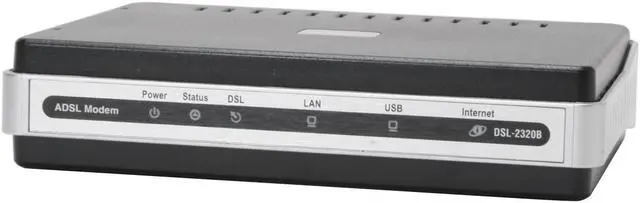
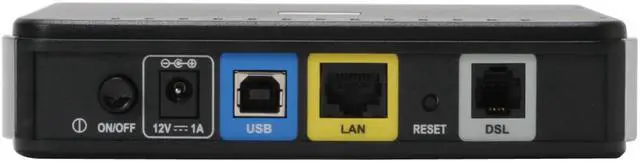
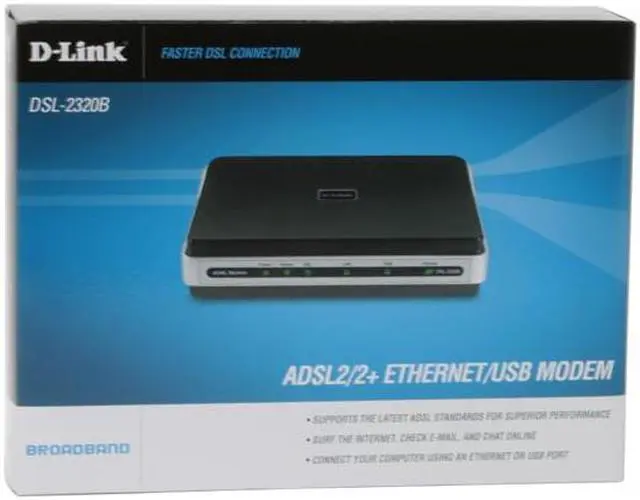
D-Link DSL-2320B 24Mbps Downstream, 3.5Mbps Upstream ADSL Port (RJ-11) 10/100 Ethernet Port (RJ-45) USB 1.1 Port ADSL2/2+ Ethernet/USB Modem

Average Rating

4 out of 5 eggs(54 reviews)

In stock.

Now: $75.99
 Add to Cart
  • Add to WishlistAdd to Wishlist
  • Log In RequiredPrice Alert
  • PrintPrint This Page
  • Email This Page Facebook Twitter Sharethis Share...
Free Shipping
Buzz
Works Great
5 out of 5 eggs
Works much bettter than the westell modem bellsouthgave me to use. Able to handle more traffic and bandwidth than the generic ...
— marcusj3000 6/25/2007
Speed to burn
5 out of 5 eggs
This item replaced a modem I've had since signing up with my internet service provider over 5 years ago, my interent ...
— Agent0008 6/6/2007


Quick Info
Manufacturer Warranty
  • Manufacturer Limited Warranty period (parts): 3 years
  • Manufacturer Limited Warranty period (labor): 3 years


Return Policies

This item is covered by Newegg.ca's Standard Return Policy.

  • Return for refund within: 30 days
  • Return for replacement within: 30 days
  • Restocking Fee: Yes

Learn more about the D-Link DSL-2320B

Model
Brand
D-Link
Model
DSL-2320B
Spec
Interface
ADSL Port (RJ-11)
10/100 Ethernet Port (RJ-45)
USB 1.1 Port
Standards
ADSL Standards:
Multi-mode
Full-rate ANSI T1.413 Issue 2
ITU-T G.992.1 (G.dmt) Annex A/C/I
ITU-T G.992.2 (G.lite) Annex A/C
ITU-T G.994.1 (G.hs)

ADSL2 Standards:
ITU-T G.992.3 (G.dmt.bis) Annex A/J/K/L/M
ITU-T G.992.4 (G.lite.bis) Annex A

ADSL2+ Standards:
ITU-T G.992.5 Annex A/L/M

Compliance:
TR-067 Interop Performance
Max Transmission Rate
24Mbps Downstream, 3.5Mbps Upstream
Features
Features
Supports The Latest ADSL Standards for Superior Performance
Surf The Internet, Check E-mail, and Chat Online
Connect Your Computer Using Ethernet or USB
Packaging
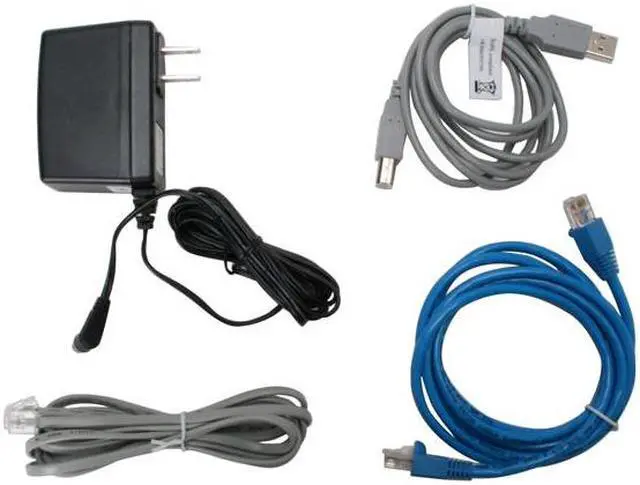
Package Contents
DSL-2320B
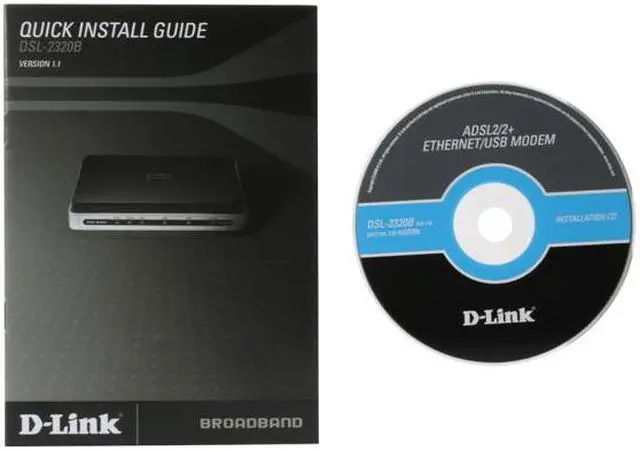
Quick Start Guide
Power Cord
Power Adapter
RJ45 Cable
RJ11 Cable
USB Cable
Manufacturer Warranty
Parts
3 years limited
Labor
3 years limited

Customer Reviews of the D-Link DSL-2320B

Do you own this product? Write a Review
Filter Results
Go
  • Blacksheep427
  • 8/19/2010 12:09:45 PM
  • Tech Level: above average
  • Ownership: less than 1 day
  • Verified Owner
4 out of 5 eggsDSL 2320 modem

Pros: good connection speed and nice look.

Cons: hard to setup, ISP settings wouldn't auto configure, internet light already stopped working, even though we have connection.

Other Thoughts: nice, useable product, but lights are short-lived. setup ought to be as easy as the DGL 4500 router I purchased with the modem, that was plug n play easy.

Did you find this review helpful? Yes No

  • N/A
  • 8/3/2010 3:47:44 PM
  • Tech Level: above average
  • Ownership: 1 day to 1 week
1 out of 5 eggsTerrible Product

Pros: Bad product bad connection i have never experienced this type of modem. It was just plain bad

Cons: Horrible Product

0 out of 1 people found this review helpful. Did you? Yes No

  • DIY GUY
  • 7/26/2010 7:25:54 PM
  • Tech Level: above average
  • Ownership: 1 day to 1 week
  • Verified Owner
1 out of 5 eggsworked for only a few days

Pros: When it worked it worked well

Cons: Only worked for 2 days before it died. Lights were still lighting up but I could not reach the internet using it and I could not enter the IP address.

Other Thoughts: Picked a different DSL router one up from from a brick and mortar for the same price. I set it up and it has been running solid ever since. I like d-link but I think I will stick to there products that only use cat 6 or wireless networking and buy the DSL modems from companies that make phones.

Did you find this review helpful? Yes No

  • Technosquid
  • 7/4/2010 5:48:23 PM
  • Tech Level: above average
  • Ownership: 1 month to 1 year
5 out of 5 eggsExtremely reliable in bridge mode.

Pros: I've been using this modem for one month now in bridge mode with my WNDR3700 router. I haven't had to reboot the modem yet in the entire month. It's been a welcome change from my old 2wire 1800HG which had to be rebooted at least once a week.

Cons: Factory settings do not work for my Qwest DSL. Standard VPI/VCI is 0/35 (like most modems.) Qwest requires you to add a setting for 0/32.

Other Thoughts: If you don't want to buy or rent a DSL modem from your ISP, this is a strong candidate. I recommend only buying this for bridge mode use with a wireless router.

2 out of 2 people found this review helpful. Did you? Yes No

  • N/A
  • 7/2/2010 5:52:36 AM
  • Tech Level: above average
  • Ownership: 1 month to 1 year
  • Verified Owner
1 out of 5 eggsworks good - for the first week

Pros: Fast speed, easy setup

Cons: Well where to start had one die after about a week constantly kept rebooting wouldn't hold a connection ATT repair guy traced it to the modem. I RMA'd with D-Link and the second one lasted about three days with out dropping a connection then started doing same as the first one.

Other Thoughts: At least my old Speedstream 4100 still works great.

Did you find this review helpful? Yes No

  • Tommyboy
  • 6/23/2010 10:02:04 AM
  • Tech Level: above average
  • Ownership: 1 week to 1 month
  • Verified Owner
4 out of 5 eggsLow End Modem

Pros: Connects and auto detects the DSL connection with few problems.
Auto-Detect feature is nice.
It works on AT&T DSL internet service (see cons and other thoughts)

Cons: I have AT&T DSL. AT&T is a company that works on non-industry standards. They have their internet setup requiring the MTU setting to be at 1492. This Modem doesn't allow you to change this setting (defaulted to 1500). I overcame this problem by setting the MTU on my router (D-Link DIR-655).
There aren't many custom settings for this modem, but I guess the neat tinker-toy-settings come with higher end products.

Other Thoughts: When I had the MTU setting set to 1500 the internet worked for most websites. Key word 'most'. Google worked just fine, but msn.com didn't come up. The browser acted like it was going to eventually timeout, but nothing ever happened, no error message, nothing. After I got the MTU setting to 1492, everything worked flawlessly. So if you have AT&T DSL, be sure your router has the ability to change the MTU setting, because you can't change it on this modem.

1 out of 2 people found this review helpful. Did you? Yes No

  • edward
  • 6/22/2010 4:58:50 AM
  • Tech Level: above average
  • Ownership: 1 day to 1 week
  • Verified Owner
2 out of 5 eggsissues with AT&T (old SBC)

Pros: found certain settings to be able to connect to AT&T on initial setup

Cons: other settings aren't documented or supported, and modem (without any router) had initial connection issues to every site or gaming IP. Noticeable delay when first loading a site, then would work fine. Pings did the same thing, first ping was always > 90 ms to first hop (not so on Actiontek and 2wire modem)

Other Thoughts: runs extremely hot, makes me question the reliability, certainly would not place it on a laminate desk or another electronic device

Problems might have been workable if I hadn't had an Actiontek modem/router from a retailer that worked within 30 seconds of turning it on, RMA'd this for lack of energy to deal with products that won't work with a top DSL provider

Did you find this review helpful? Yes No

  • commander_cook
  • 6/16/2010 12:35:52 AM
  • Tech Level: above average
  • Ownership: more than 1 year
  • Verified Owner
1 out of 5 eggsThis modem is an abomination

Pros: It worked, sort of.

Cons: I have a 1.5 Mbit connection, which I was getting with my old modem, but when I installed this one, I only saw about 1/3 of that. As if the reduced speed wasn't enough, It constantly dopped the connection. I gave up on it and put it back in its box where it has been for about 10 months.

Other Thoughts: Yes, I know about the locked MTU, but it's locked on the correct setting for my ISP.

Did you find this review helpful? Yes No

  • Hard Knocks
  • 6/11/2010 7:08:14 PM
  • Tech Level: above average
  • Ownership: 1 week to 1 month
  • Verified Owner
2 out of 5 eggsLocked MTU setting. What's up with that?

Pros: It has decent reviews (?)
It worked fine when it wasn't dropping the connection.
It may be ok if you have a short or medium loop length and don't mind bridging through your router.

Cons: Mine would constantly drop the DSL connection for a minute or two several times per hour. That can be very frustrating if using VOIP, gaming, watching streaming video, or doing just about anything else you use the net for.

The user can't adjust MTU setting - It's hard-set at 1500. Which means you either have to bridge the modem through a router and use router controls, or manually change the registry to 1492 on your PC (if you use AT&T DSL).

Come on D-Link - is there really a good reason to lock the MTU setting? I mean - really? One has to wonder about your sense of judgment.

Other Thoughts: I'm about 16,000 feet from the phone office so I bought this model because I read somewhere else that this modem is good for long loop lengths (which I have). Well, It's not!!! I ended up ditching this modem and going back to my 6-yr old Speedstream 5100, which never drops the connection. I think another reviewer also said that you would be better off with a used Speedstream. Well, it's true.

It's a shame when 6-yr old technology works better than the new stuff.

Did you find this review helpful? Yes No

  • not happy
  • 2/10/2010 4:17:24 AM
  • Tech Level: above average
  • Ownership: 1 month to 1 year
  • Verified Owner
2 out of 5 eggsDidn't work for what I needed it to

Pros: It worked sometimes.

Cons: Spotty internet, couldn't broadcast over my wireless router, cost, etc.

I live in FL and was tired of Comcast so I wanted to try AT&T DSL. After reading numerous posts on the interweb & dslreports.com I was sure I had the right settings to be able to make a non-AT&T approved modem work. Modem menu seemed to have conflicts with my netgear router (it also hand conflicts w/out being connected to my netgear router) and after trying a host of different things I finally canceled the service & went back to comcast.

Other Thoughts: In hindsight, I think it was only an extra $5-$10 to get the AT&T approved modem. However by canceling my Comcast service their customer service does call you back w/in a week to give you a better deal than what you had for less money.

1 out of 4 people found this review helpful. Did you? Yes No

Home
Home. > 
Networking0_. > 
Modems1_. > 
D-Link2_. > 
Item#: N82E16825112003CVF
Shop by Region: United States | Canada | China
Affiliated Sites:
EggXpert.com
Newegg Community
VeriSignReliability Seal1PaypalVerify GoldenSealThis site protected by Trustwave's Trusted Commerce program

Policy & Agreement | Privacy Policy

 © 2000-2010 Newegg Inc.  As used herein, “Newegg.ca” means Newegg Canada Inc. unless the context specifically refers to the www.newegg.ca web address.
If the Adobe Reader does not appear when you click on a link for a PDF file, you can download Adobe Reader from the Adobe web site. nassau