Skip to: |

Newegg.ca - A great place to buy computers, computer parts, electronics, software, accessories, and DVDs online. With great prices, fast shipping, and top-rated customer service - once you know, you Newegg.

If you are reading this message, Please click this link to reload this page.(Do not use your browser's "Refresh" button). Please email us if you're running the latest version of your browser and you still see this message.

Newegg.ca - Computer Parts, Laptops, Electronics, HDTVs, Digital Cameras and More!

  • | Wish List
  • Help
Home
Home > 
Computer Hardware > 
Hard Drives > 
External Hard Drives > 
Seagate > 
Item#: N82E16822178105

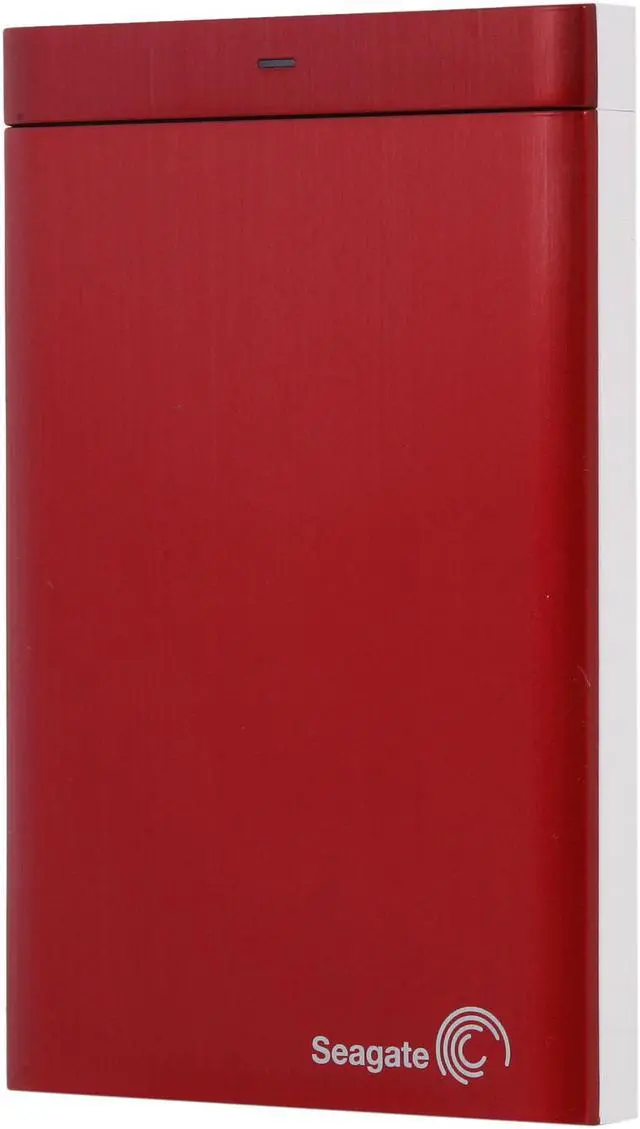
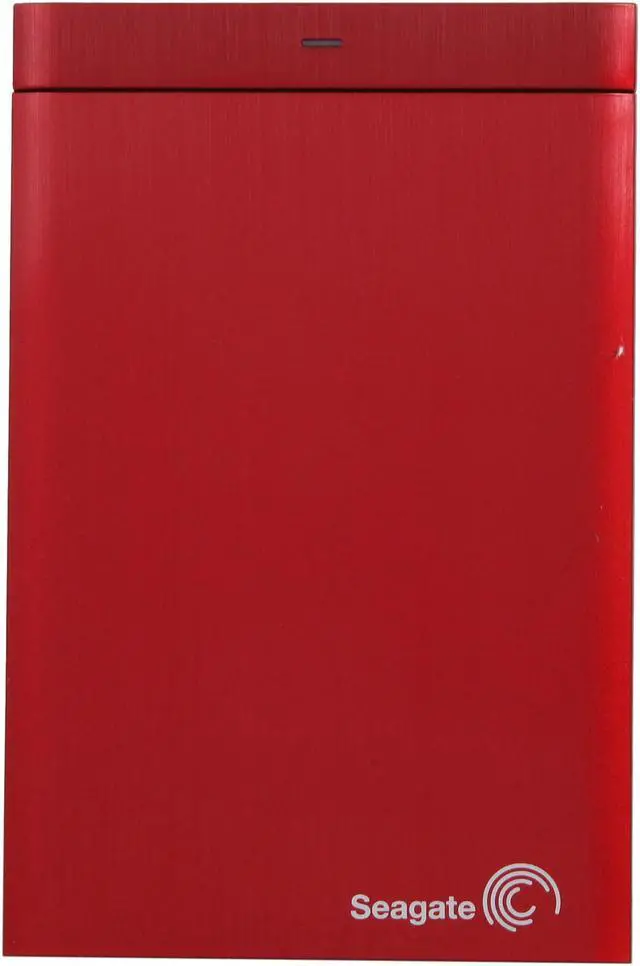
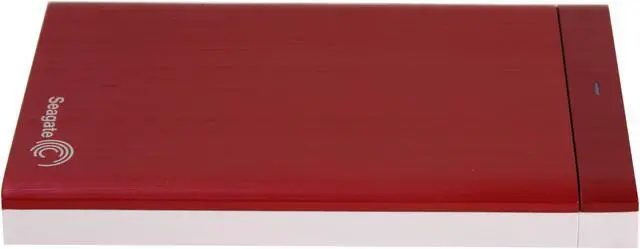
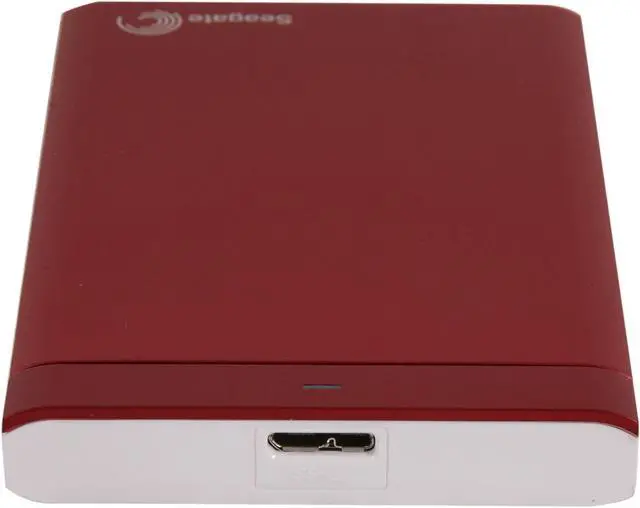
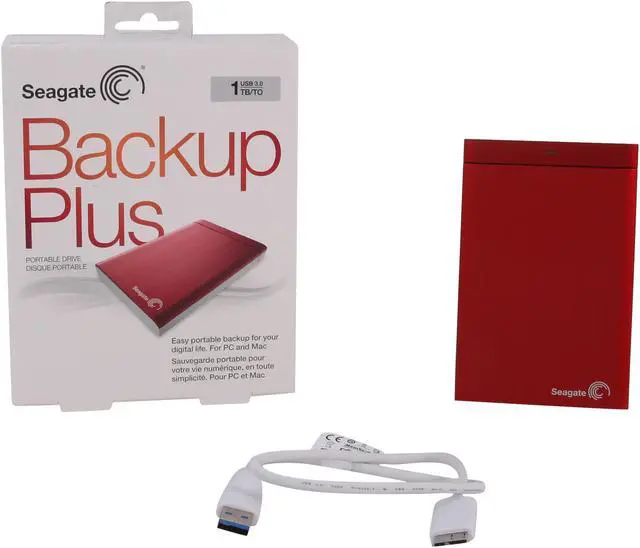
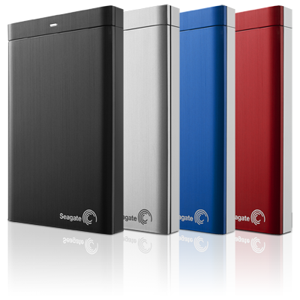
Seagate Backup Plus 1TB USB 3.0 Silver Portable Hard Drive STBU1000101

In stock. Limit 10 per customer.

  • STBU1000101
  • USB 3.0
  • 2.5"
  • Pin It
  • Email this page
ICON Loading...


Learn more about the Seagate STBU1000101

Model

Brand
Seagate
Series
Backup Plus
Model
STBU1000101

Performance

Color
Silver
Interface
USB 3.0
Capacity
1TB

Physical Spec

Form Factor
2.5"
Dimensions
4.86" x 3.19" x 0.57"
Weight
0.44 lbs.

Features

Features
Protect your stuff with easy, flexible backups

Automatically save photos from your social networks

Share photos and videos to social networks with a click

USB 3.0 plug-and-play. You can also easily upgrade to Thunderbolt technology or FireWire 800 with add-on adapters (sold separately). USB 3.0 is also backward compatible with USB 2.0.

Packaging

Package Contents
Seagate Backup Plus drive
18-inch USB 3.0 cable
USB 3.0 interface adapter
Quick start guide
Seagate Dashboard pre-loaded on drive
NTFS driver for Mac pre-loaded on drive

Quick Info

Warranty

  • Limited Warranty period (parts): 2 years
  • Limited Warranty period (labor): 2 years


Customer Reviews of the Seagate STBU1000101

Do you own this product? Write a Review

Filter Results

Go
  • N/A
  • 2/19/2013 8:38:34 AM
  • Tech Level: Average
  • Ownership: 1 day to 1 week
  • Verified Owner

3 out of 5 eggsNot a fan

Pros: Nice look
Slightly faster than my 500GB WD USB 2.0 drive
Good Price

Cons: PROPRIETARY USB CABLE
Didn't get true USB 3.0 speeds
If you misplace the USB cable, good luck accessing your files quickly
Have to have yet another type of backup USB cable

Other Thoughts: The cable is a big one for me, I hate the "Apple" feeling of having to buy a separate cable that will only work with one device. I already have 20+ cables. Why couldn't it just be a USB micro cable?

Just another company trying to make you spend more money with them.

The other thing, I've only tested it once so far. But I transfered a 3.??GB file and received speeds in the 40Mbps range and it transfered in 1:23

I then tested it with my WD 500GB USB 2.0 that I've had for @ least 4 years now. And I attained 32Mbps transferred in 1:41.

These tests were both using the USB 3.0 port on my laptop OBV.

1 out of 7 people found this review helpful. Did you? Yes No

  • Diggles
  • 2/13/2013 8:12:09 AM
  • Tech Level: Somewhat High
  • Ownership: 1 week to 1 month
  • Verified Owner

5 out of 5 eggsFast and tiny

Pros: Very fast, very small. Also, as another reviewer pointed out, it seems fairly easy to use this enclosure on a different 2.5" drive.

Cons: None

Other Thoughts: It took about 20 minutes to copy all 120GB of my music.

Did you find this review helpful? Yes No

  • Young
  • 11/2/2012 12:27:34 AM
  • Tech Level: Somewhat High
  • Ownership: 1 week to 1 month

4 out of 5 eggsGood Backup drive

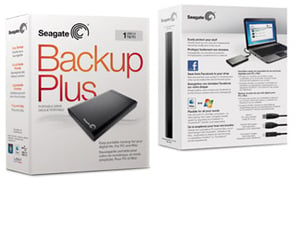
Pros: From the well-designed package I can feel the quality of this product. The drive itself is very slim and the USB3.0 connection is fast. I use this drive to backup my mac. No need to reformat. Very easy to setup time machine. Fast transfer speed compare to other brands that I had before. Overall I am very satisfied with this product. Will highly recommend this hard drive. Well done Seagate!

Cons: If the cable is longer that will be perfect.

Other Thoughts: This is my first Seagate product and the product is amazing with this beautiful price. I will definitely buy from them again.

Did you find this review helpful? Yes No

  • KD7LRI
  • 11/1/2012 3:37:21 AM
  • Tech Level: High
  • Ownership: 1 week to 1 month
  • Verified Owner

5 out of 5 eggsSpiffy.

Pros: Pretty fast for a 5400. Not as fast as a 7200 obviously but more than fast enough for data storage and backups.

Awesome interchangeable interface; not because you can buy others but because you can pop this one off and use it to connect any other laptop HDD at USB3 speeds. This is great for a techie who regularly helps save data from other users and means one less piece of equipment to carry around (obviously cant save that data back to this drive at the same time but that's not the point!)

Runs cool. I expected it to get significantly hotter considering its a plastic case but it doesn't come close to other drives I have used. This is from copying data to it as fast as it would let me for about an hour (perhaps not the hottest it could get).

2 year warranty is better than some but not all, wish they still had longer warranties but at least its not 1 year like some others.

Cons: Short and thick cable. The cable it comes with is far to short for my liking and is also not very flexible. I just use another cable that I happen to have but for some this might be an issue as finding a place to put it in certain situations might be a pain.

Other Thoughts: Got this on sale rather than build my own with an aluminum enclosure. Proved to be a good choice and I got a 2 for one with its use as an adapter for other drives without having to take it apart.

Did you find this review helpful? Yes No

  • The-Real-Link
  • 10/27/2012 5:13:17 PM
  • Tech Level: High
  • Ownership: 1 week to 1 month

4 out of 5 eggsSeagate Backup Plus 1TB USB3 HDD For Mac

Pros: The Seagate Backup Plus arrived in excellent condition like everything from Newegg. For the silver 1TB USB3 model, setting the drive up took little effort and the included Seagate Dashboard and manuals are all pre-loaded on the drive itself. The Dashboard software is particularly helpful for grabbing full resolution photos from Facebook / Flickr if they are deleted from the local machine’s HDD. Dashboard also lets you automate in real-time or schedule a particular file type, a folder, or all of a user’s non-system files to backup to the Backup Plus Drive whenever it is convenient, however Dashboard is not a drive cloning tool. You can also use the software to share photos to social networks but I did not try this option since I’m not a heavy Facebook or Flickr uploader.

Testing this drive, I had to utilize a mid-2010 Macbook running OSX 10.8 Lion to test USB2 speeds, and used Windows 7 for testing both USB2 and USB3 speeds.

Performance was very good, though not quite as fast as expected.

Under Mac OSX utilizing copy/paste and Black Magic Design’s speedtester, I could achieve roughly 40MB/sec read and 15-40MB/sec write, depending size and amount of files.

Under Windows and HDTune, I could again achieve a solid saturation of USB2 speeds of 30MB/sec Read and 33MB/sec write.

For USB3, this drive performed very well overall, with a 110MB/sec Read dropping to ~50MB/sec by the end of the disk and a 100MB/sec Write dropping to again, 50MB/sec at the end of the disk. Not SSD speeds but far faster than USB2.0.

Durable plastic and aluminum casing is solid and slick. It’s certainly not something I’d expect to survive a hard drop onto concrete, but the casing looks clean and nice and is not flimsy. USM module allows for connecting USB3, Firewire, and Thunderbolt via separate adapters purchased through Seagate.

After copying the Dashboard installer from the drive for future use, I just reformatted the whole thing and using it as a backup clone of my C:\ along with other files. Stays under 40C nearly all times and remains very cool to the touch.

While I’m not a fan of installing tons of extra programs I won’t need, I did again do tests on them for ease of use and review. The Dashboard software for Mac allows a de-selection of all social networks should that be a user’s choice. Aesthetically, the program is slightly different than the Windows version but functionally, remains the same.

Cons: While I do feel that Seagate did plenty right with the drive, there are a couple big caveats preventing me from giving the drive 5 eggs.

--The USM Module itself is a neat idea to swap different connectors to the front plate of the drive but if you want to use Firewire or Thunderbolt, you need to purchase a separate adapter directly from Seagate. There’s $30 or so extra…

--The USM front plate is a very tight connection and fits snugly to the rest of the hard drive. The downside is that even though the SATA data and power connectors are standard like internal ones, good luck trying to make any internal plug fit – it won’t. This pretty much rules out using the drive as an internal drive for any desired reason short of maybe destroying the entire casing which I did not want to do. External use only!

--The SS (interface) cable for my drive had USB3 on one end and a special rectangular plug on the other. This precludes it from being swapped with other products or devices since the end appears proprietary. If you travel a lot, be sure to keep the cable plugged into the drive or always with it since a regular USB cable will not fit the USM module if the original is lost! Thus, one could feasibly be stranded with their data on the drive with a delay in accessing it if the cable goes missing.

Other Thoughts: Overall, I’m very happy with this drive and while there are a few small negative points, it shouldn’t really affect the daily usage or enjoyment of the drive. Since I have USB3 ports, that’s how I’ll use the drive via Windows, but for any Mac user, there should be no reason as to why this wouldn’t saturate USB2.0. Only the latest Macbooks have USB3 so I could not test that at this time.

The included Dashboard software may not clone your drive but it does serve as a great way for an average user who might have one HDD to allow the software to automate a backup routine – presuming they even have one for their data.

The fact that Dashboard allows to grab full resolution photos from Flickr and Facebook is a wonderful option for someone who might not have their local photos any more. It noticed it did download the original full size photo if it was originally uploaded in high quality so that’s a great thing to see.

If instead you’d just rather have a nice portable backup drive for data, simply forego the software (or keep it installed and turn off the services) and enjoy. Registration is done from within the software’s installation screen and took a minute at most.

Also included is a free 1TB worth of Seagate Cloud backup (accessible via email).

3 out of 3 people found this review helpful. Did you? Yes No

  • Scootiep
  • 10/24/2012 5:29:10 PM
  • Tech Level: High
  • Ownership: 1 week to 1 month
  • Eggxpert Review

4 out of 5 eggsGood backup drive but not true USB 3.0 performance.

Pros: I decided to wait to write my review until I had put this little drive through the wringer for about 3 weeks. Overall, I'm fairly impressed. The drive is pretty easy on the eyes. The simulated brushed aluminum looks good but it's only on the top panel. The rest is white plastic. Not that this is bad, it just rubs me a little the wrong way. It's almost like an attempted Apple knockoff. I'm a PC guy, but one thing I can't fault Apple for design so I can see why Seagate (and everyone else under the sun) would want to capitalize on this.

Next, the interface. Seagate uses a standard USB 3.0 A male to Micro B cable. Nothing like the proprietary BS you'll find from Apple. Easy to get a longer one if you want. Additionally, you can remove the bottom adapter block to get to actual SATA 6Gb/s and SATA power ports should you have the inkling to use them. Also, there's no additional power cord. Just the USB 3.0 interface. You can thank the increased power handling capacity of the USB 3.0 standard for that one.

Now for the real meat, speed. For a 5900 RPM external drive, it's pretty zippy. I used HD Tune Pro to do all testing. I tested on two pretty simple systems to give me a more generic result. I did not bother testing USB 2.0:

System 1
AMD FX-4100
ASRock 970 Extreme3 AM3+
8 gigs DDR3 1600 RAM
Sapphire Raedon 5770
120 OCZ agility 3 SSD drive
320Gb 7200RPM Seagate Barracuda

System 2
AMD Phenom II X4 830
MSI 970A-G45 AM3+ SATA 6Gb/s USB3.0
6 gigs DDR3 1600 RAM
Powercolor Raedon 6790
90Gb Corsair Force Series 3 SSD
1Tb Samsung Spinpoint F1 HD

I obtained the following test results:
System 1
Read Benchmark - Min 47 MB/s, Max 110.5 MB/s, Avg 84 MB/s Access time 17.2 ms, Burst rate 143.9 MB/s
File Benchmark - Sequential Read 105,881 KB/s, Write 87,795 KB/s
4KB random single Read 118 IOPS, Write 380 IOPS
4KB random multi Read 137 IOPS, Write 252 IOPS

System 2
Read Benchmark - Min 45.2 MB/s, Max 112.1 MB/s, Avg 81 MB/s Access time 18.1 ms, Burst rate 141.4 MB/s
File Benchmark - Sequential Read 106,647 KB/s, Write 86,242 KB/s
4KB random single Read 108 IOPS, Write 353 IOPS
4KB random multi Read 127 IOPS, Write 286 IOPS

I ran some other benchmarks but it would probably bore most people so I'll stop there. Needless to say, the speed is pretty good, especially considering this is a 5900 RPM mechanical external drive. However, I need to note that these values were obtained from a synthetic program. When actually transferring files from my SSD, performance dipped a bit. And when transferring files from my SATA 3Gb/s mechanical internal backup, performance obviously suffered much more. Still, like I said, really good speed for a backup drive of this type.

One quick note, if you find yourself getting USB 2.0 speeds after plugging this drive into your computer and you have verified that the cable is in fact plugged into one of the 3.0 ports, download and re-install your USB 3.0 drivers. This would've saved me a ton of time initially.

Cons: While the design of the drive from an aesthetic standpoint is very nice, I'm a bit concerned with the lack of any form of rubberized coating. This is supposed to be a portable drive and as such, Seagate's engineers should have anticipated this drive taking a few jarring drops every now and then in my opinion. I'm pretty sure if this thing took a decent hit or fall, it wouldn't stand up to the durability test.

Additionally, while this drive is definitely fast for a mechanical drive, I still feel like the USB 3.0 label is a bit of a misnomer. I ran multiple tests using HD Tune Pro and the results were a mixed batch. The drive's benchmark tests look good on paper (Burst 143.9, Max read 110.5, min read 47.1, avg. read 84, all in mb/s) But in my real world tests it's a bit different. My sustained reads were around 68 mb/s and my sustained writes were around 61 mb/s. A bit lower than my benchmarks. This was done with a 2.8 Gb folder copied, read and copied multiple times including multiple small files and Adobe Illustrator CS6. In addition, I did a dump of 80+ Gbs of photos, and a 400+ Gb dump of my internal backup drive. My real point here is that labeling a drive like this with "USB 3.0" performance moniker doesn't really mean much. A lot of people look at USB 3.0 and instantly think they're going to get SSD speeds. I personally think it would be a lot fairer to the average consumer if these were advertised with their average transfer speeds. I know plenty of less tech savvy people who are getting preyed upon with advertising gimmicks like this. It's akin to the bloated contrast ratios on TV's. To be clear, the speeds I was getting were easily twice as fast as USB 2.0 or greater but most people know that USB 3.0 is theoretically capable of speeds 10 times faster and realistically 6 times faster with current available products. The claim of "future proofing" in the product overview is misleading. A drive like this will never be able to future proof in the speed department. Yes, I've been spoiled by the current gen SSD's, but I believe my point still stands.

Finally, while not a major issue, the cable is only 18 inches long. This is ridiculous. When dealing with desktops, a lot of your available 3.0 ports are going to be on the back of the computer. So chalk up a minimum $4 plus shipping to make this drive really usable in most desktop settings. Again, more of an annoyance than a real issue.

Other Thoughts: At the time of my writing this, the drive was $99.99 (The current $10 promo which makes the price a bit more palatable). There are some cheaper drives out there but that's being somewhat picky of me. This really is a good little drive and the con's I've listed are minor in the grand scheme of things. I really do think that this drive is a good buy and would recommend it. I've also done multiple error checks throughout my review period and come up with nothing. My guess is that most people aren't going to put it through the kind of abuse I did and it's served me fine so far.

I didn't add or deduct any points for the additional software that Seagate provides because I did not test this. I am not at all a fan of what I consider to be "bloatware". I do not see the need to pay for software services that I have found perfectly acceptable free solutions for. As Seagate does not force any of these on you and the advertisements for them are optional to view, I have no problem with them being on the drive. I will say that the promotions for their products weren't bad. A bit over simplified and self pandering, but that's to be expected. But the video quality, GOOD LORD SEAGATE! Record in HD!

Regarding what I've read in some other reviews, I had no issues with the drive showing up in Win Explorer or ejecting it. I also did not test Seagate's included backup and media website software. I'm not a fan of bloatware and I much prefer my own, truly free solutions.

On a final note, I want to revisit the USB 3.0 speed issue. When buying a backup drive for speed, you need to take into account a few key variables beyond the stated speed of the drive. The first is, will your system be able to make use of it. The only way you are going to hit the max speeds of 100+ mb/s, burst speeds of 140+ mb/s are if your system is capable of allowing these kinds of data transfers. If you have an SSD and fully capable SATA III system, but all of your files are stored on a SATA II drive, you're going to find your transfer speeds very limited by your internal drive.

6 out of 6 people found this review helpful. Did you? Yes No

  • Tikrjee
  • 10/11/2012 6:05:19 PM
  • Tech Level: High
  • Ownership: 1 week to 1 month
  • Eggxpert Review

5 out of 5 eggsSeagate Backup Plus 1TB

Pros: USB 3.0, cable included; Not too bulky; recognized on several computers, a PS3, a couple media players, and a Dish Network DVR; Transfer speeds are as expected for a platter-based drive (130-180MB/s via USB3.0 on large video files, 20-30MB/s via USB2.0); No extra power needed

Cons: Personal preferences, but not a big fan of the “Mac-“esque look of it. At least it’s not super-glossy like previous Seagate externals.

Other Thoughts: Was rather impressed that it works my DVR. By the on-screen estimation, it’ll hold a little over 450 hours of HD content. Sure beats the 30-40 hours stock. One of the better external hard drives I’ve had yet.

2 out of 2 people found this review helpful. Did you? Yes No

  • Steve from Ohio
  • 10/8/2012 11:02:56 AM
  • Tech Level: Somewhat High
  • Ownership: 1 day to 1 week
  • Eggxpert Review

5 out of 5 eggsAmazing drive and so small

Pros: First thing I noticed was that the packaging was really nice.
Very professional looking. The drive itself looks very Apple-esque as it looks like a drive that would be used on an Apple computer which it can be by the way. This drive is pretty small for being 1 TB in size....actually 971 gb after Seagate sets it up with factory formatting and all the backup software they installed like Dashboard and other files.

The USB3 connection is awesome. It is the future. Very fast almost like an SSD when hooked up to a USB3 port. The outside drive case looks high tech looking with a small white LED to indicate that the drive is on.

This drive is very quiet. Like SSD quiet. I mean you cannot hear it quiet. One of the quietest hard drives I've ever used and I have had tons of them. And with the USB3 connection, it seems to be a lot faster than most other hard drives I've owned in the past.

I love this hard drive. It is so easy to use. The supplied software which is on the drive is called Seagate Dashboard. You can set this drive up to automatically back up and files from your computer but also backs up online places like Facebook and other social media sites. It is not mandatory to use it. Windows 7 also has a program to back up automatically files from your computer only and that is what I use. It works perfectly.

While the USB3 connection is fast, this drive is not meant to be used as a main drive. It is a BACKUP drive and so it begs to be used as such. It is fast enough to be used as a main drive or a backup if you want though. I use it as backup and an extra drive and so far it works without a problem. I've only had it for a short time so time will tell about long term reliability. I downloaded all 65 gb of my music and video library off my main SSD to this drive and it went very fast and smooth. I lo9aded a few programs to this drive and they open faster than even my 2tb WD Caviar Black.

Cons: There is one con. The supplied USB3 cable is only 18 inches long.
For some it may be too short. Possibly another con is that the white LED light may be too bright for some. That is a minor thing as this drive overall is awesome.

Other Thoughts: I never thought I would need a backup drive as I never had a problem with lost data before with the newer drives. Recently I have had to fix a few friends computers which have had recent drives die on them. Lots of photos and memories gone forever. My church I am a member of has had much of its records and recordings lost due to failed drives. After seeing those problems, I decided that this type of drive set up is not a luxury but a necessity because it is not IF your drive will die, but WHEN your drive dies. Backing up is a great strategy to make sure that you don't lose your files and mind. After all, if you ever had a crashed or dead drive, you know how mind messing it can be. I have a a three drive backup system now as I have been put in charge of my church's data. I have this drive, a flash drive and a Blue Ray 50gb re-recordable disk drive.

No need to format as this drive is plug and play. I just plugged it into the USB3 port and it was immediately recognized.

This drive is a great way to back up your files. The SSD folks like to say The hard drive is dead. I say Long live the hard drive.

I highly recommend the Seagate 1TB Backup Plus.

3 out of 3 people found this review helpful. Did you? Yes No

  • BugHunter
  • 10/4/2012 4:02:02 PM
  • Tech Level: Somewhat High
  • Ownership: 1 day to 1 week
  • Eggxpert Review

5 out of 5 eggsMany systems don’t keep up with this drive!

Pros: VERY fast. Great choice for capacity. Small footprint. Quiet, well, silent actually. No flashing lights (does dim a little). Powered from data cable, no need for a wall power supply! Woohoo! Priced very competitively. Comes with a 2 year warranty, which is unusual on external drives. It’s backward compatible with usb2 systems, just slower when used with them. Still faster even on usb2 than plain usb2 drives. Choice of 3 interfaces using optional cables (not incl). It includes simple software to help you keep your data safe. Has a default setting which saves virtually everything a person could want to save, or you can do custom jobs of your own liking. Also has the capability to do constant on the fly backup of your data while you work. The software tracks changes to your files and writes all changed files to the external drive.

I tried this for its very first use on an older WinXP system (Quad Phenom 9950) to see how it would work. As expected, it would saturate the usb2 bus and easily maintains read and write speeds of about 32MB/sec (max for usb2). Slightly faster write than my usb2 external drive which is equal in read speed, but slightly slower at 28 to 29MB/sec write. When copying lots of small files via usb2 this drive shines even more due to fairly decent seek speeds. Where the old drive would slow even more, this drive maintains its speed. Of course, if you’re doing small files, speed probably isn’t an issue anyway.

I tried again moving movie iso files on a Quad Phenom 955 system. I got both read AND write speeds of just over 90MB/sec. The drive sustained 91.2MB/sec over 89.9GB of data (5 files). 16:26 for 89.9GB WRITE is as good as I’ve seen on any media. Via my home network which is all Cat6e and gig Ethernet, I’ve sustained a maximum transfer of 131MB/sec, but that is very dependant upon the hard drives in the systems. Faster Sata3 drives will sustain those sorts of speeds, but many drives such as low power ones (green drives for example) will not transfer much past 60MB/sec. Do not expect 90MB/sec transfer rates if your hard disk isn’t up to the task. “The weakest link is the strength of the chain.” For example, if your systems internal hard disk is only capable of 55m/s write and 75m/s read, it will limit the capabilities of this drive while transferring files. In that case, expect to actually see faster write speeds to this drive than read speeds from it. That is because it will keep up with your drives max read speed when writing, but your internal drive won’t keep up with this when writing. The majority of internal hard disks in typical consumer systems today are not as fast as this external. Unless you’ve got a Sata3 (sata 6gb) drive with considerable cache, or a Raptor drive or similar, it probably won’t keep up with this external. Also, the bus on your motherboard might not handle this amount of throughput. (Nice problem to have!)

Cons: The drive format as shipped does not support right-click-eject as with most removable media. You must use the tray icon and do a “safely remove mass storage device”. Unfortunately, depending on your system and OS, it may not identify what mass storage device you’re removing, so if you have more than one, you simply have to guess which one or remove them all and reconnect the others afterward. The included cable allows USB connectivity, but there is no standard usb port on the unit itself. Due to compatibility requirements of the other Firewire and Thunderbolt interfaces, the connector on the drive is not a standard usb connector. This requires a special cable to adapt from whatever interface to the drive. USB cable is included with the drive.

This drive does show up as a hard disk in Windows Explorer. Depending on your OS or system configuration, your drive may not show up in the safely remove hardware dialog. You may also not have a tray icon showing there is a device you can remove. You may have to reconfigure the drive properties to make it removable. If so, right click on “my computer” and select manage. Under storage, select disk management, then select this drive in the list. Right click it and go to properties. Select “Hardware”, then again find this drive in the list. Again select properties. Now select the Policies tab. Now configure the drive for quick removal, or the wording may be Turn off windows write-cache buffer flushing, or something to that effect, depending on your version of windows. Hit ok, and now the drive should show up in the safely remove dialogs. This still will not give an eject option on your context menus. This might also be worded “configure for quick removal or configure for performance”, depending on your OS, but this really isn’t a performance issue in practice because there is really no loss of performance. It just changes how it does background transfers of cached data. It doesn’t really write faster.

Other Thoughts: None of the cons for this product warrant taking an egg away. Everything I found was easily configured and fixed. The speed of this drive is amazing.

I mostly use the drive just like any other, just using Windows Explorer. But I have to admit, I’ll be using the software to do backup jobs just because of the ease of it. Also, the backed up data is stored on the drive in such a way you can still access it with or without this included software. Your directory structure is intact (under the Seagate folder), and the files are unencrypted. So for you old school purists (like me) this is the best of all situations.

I see lots of people say their external drives fail early in life. Remember, these drive are NOT solid state, there is a spinning disk in there. That spinning disk is a gyroscope just like any other spinning object, and moving it around is VERY hard on the bearings. If you’d like to get long life from your external drive, don’t move the drive around when it’s plugged in! I’ve used external drives for many years, and even used internals as externals before external drives were sold. I’ve never had one fail, and a big part of that is that I get the drive in position before plugging it in, then, I let my hands off of it till it is shut down. While yes, banging the drive into things is really bad too. It is just as bad to move it when the platter is spinning. Sliding it side to side isn’t a big deal, but rotating it around the axis pretty much is the kiss of death for a hard disk. This applies to your internal drives in a computer as well. Bottom line, if you want it to live long and give you good service, let it alone when it’s in use.

1 out of 1 people found this review helpful. Did you? Yes No

  • Lomzaman
  • 10/4/2012 4:02:02 PM
  • Tech Level: Somewhat High
  • Ownership: 1 week to 1 month
  • Eggxpert Review

4 out of 5 eggsGreat Little Back UP HDD

Pros: This external HDD pretty much operates as advertised. The back-up and web sharing software is preloaded onto a partition that Windows 7 64 bit had no trouble installing and integrating into the system. I backed up everything on my system onto this drive using the provided software and was able to restore the same files seamlessly and easy. I have over 300 Gigs of music and some work papers I do not want to lose, and no problems. The 18 inch USB3 cable is of high quality and built to last. (This cable is much longer than my last short cable from a WD source.) The Back-up Plus works equally well and fast without installing the software package, Windows recognized the drive without installing the software package and was able to use it as an external drive with no problems. I was getting 94 to 96 MB per second using the USB3 straight off my Asrock Extreme 4 MB with the Z77 chip. I tried to again using a USB3 Marvell add on card and got the same results. Testing with ATTO 32 gave the same 94 to 96 write speed and 94 MB per second read speed. Not bad for a 5400 rpm back up drive on a USB connection!

Cons: The software once installed slowed down my starting time considerably. After having gone through the trouble and expense of putting in an SSD with all the bells and whistles to get a fast starting time on my PC I thought the slower starting time due to the software package deserved a star deduction on the software package no matter how functional.

Other Thoughts: I like this drive. It is small fast and light. Though I did not get a chance to use the social software portion of the drive, (I do not engage the social portion of the ‘net.) I would not expect any less stellar performance than with any of the other software features.

Did you find this review helpful? Yes No

ICON Loading...
Free Shippingrestrictions apply
  • $119.99
  • $99.99
  • Save: $20.00 (17%)
 

Protect Your Investment!

    • (more options) read warranty details
Are you an E-Blast Insider? Subscribe Newegg e-Blast

Buzz

Beautiful, fast drive

5 out of 5 eggs
Brushed finish on the front, Compatible with old Goflex cable, fast copy speed through USB3.0/eSata, copied 400GB @ ...
— aodio 6/30/2012

Good backup drive but not true USB 3.0 performance.

4 out of 5 eggs
I decided to wait to write my review until I had put this little drive through the wringer for about 3 weeks. Overall, I'm ...
— Scootiep 10/24/2012


Home
Home > 
Computer Hardware > 
Hard Drives > 
External Hard Drives > 
Seagate > 
Item#: N82E16822178105
LOADING... LOADING...
Shop by Region: United States | Canada | China
Follow us:   RSS Feeds Youtube
VeriSign Reliability Seal1 PaypalVerify GoldenSeal InteracThis site protected by Trustwave's Trusted Commerce program Inc500

Policy & Agreement | Privacy Policy

 © 2000-2013 Newegg Inc.  As used herein, “Newegg.ca” means Newegg Canada Inc. unless the context specifically refers to the www.newegg.ca web address.
If the Adobe Reader does not appear when you click on a link for a PDF file, you can download Adobe Reader from the Adobe web site. nassau