Skip to: |

Newegg.ca - A great place to buy computers, computer parts, electronics, software, accessories, and DVDs online. With great prices, fast shipping, and top-rated customer service - once you know, you Newegg.

If you are reading this message, Please click this link to reload this page.(Do not use your browser's "Refresh" button). Please email us if you're running the latest version of your browser and you still see this message.

Newegg.ca - Computer Parts, Laptops, Electronics, HDTVs, Digital Cameras and More!

  • | Wish List
  • Help
Home
Home > 
Computer Hardware > 
Hard Drives > 
Controllers / RAID Cards > 
Syba > 
Item#: N82E16816124043

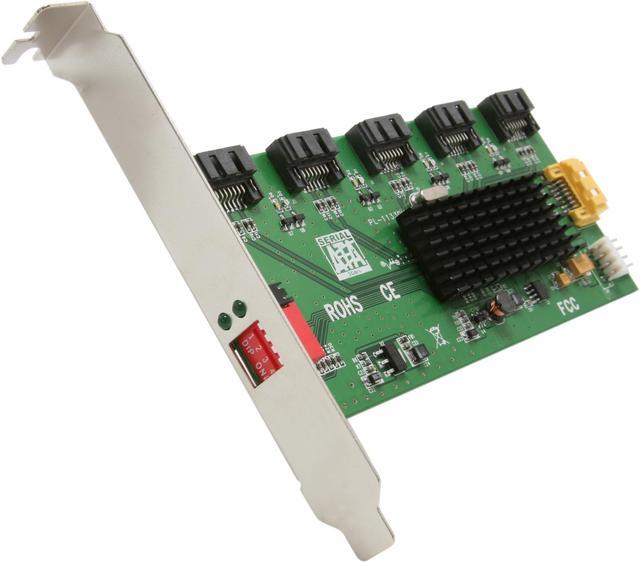
SYBA SY-PCI40037 SATA II (3.0Gb/s) 1:5 (5x1) Port Multiplier PCI Mounting Card

In stock.

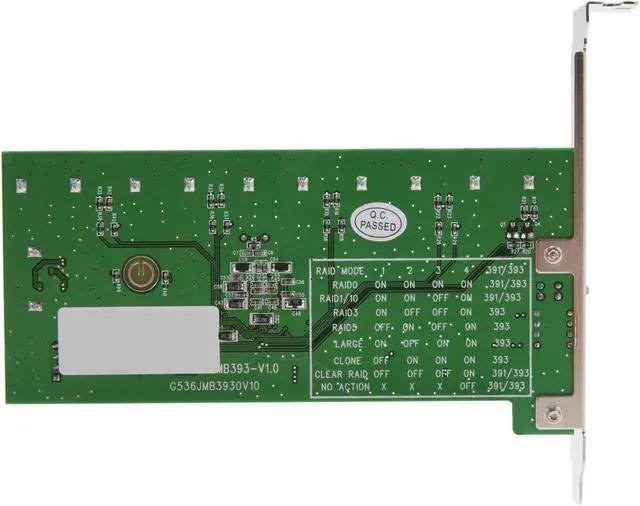
  • RAID 0/1/3/5/10/ JBOD/ CLONE
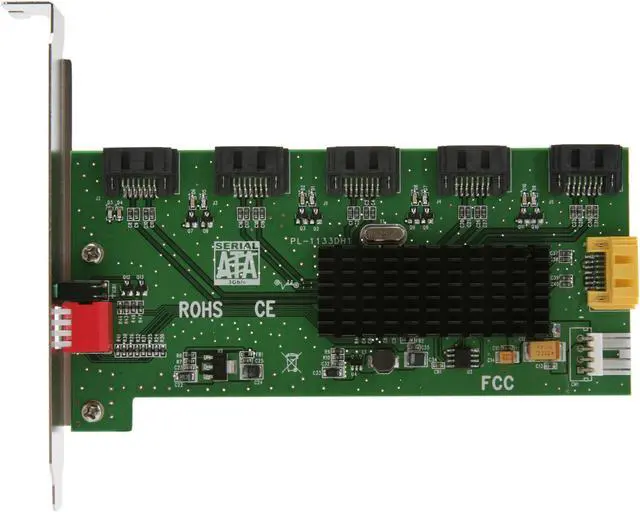
  • 5 x SATA II Internal Connectors
  • Up to 3Gb/s
  • Pin It
  • Email this page
ICON Loading...

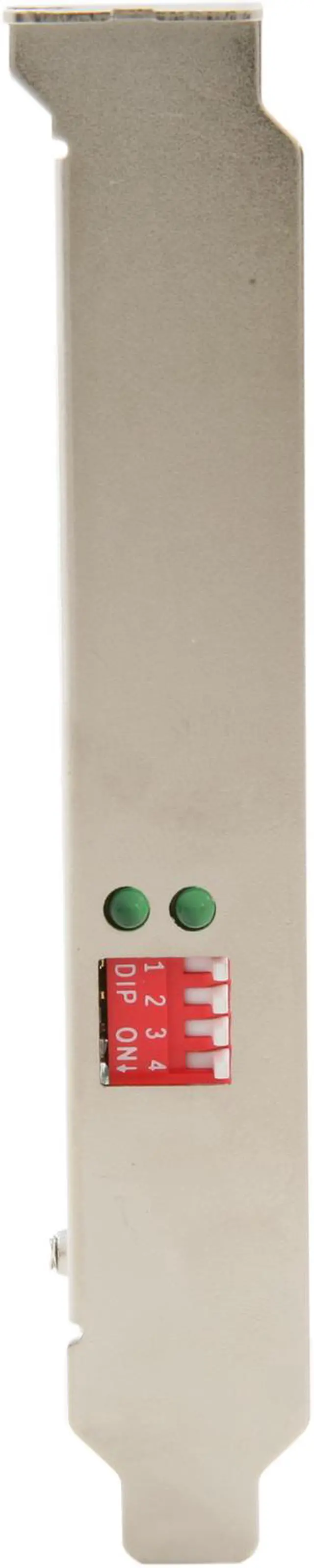
Add more data storage and configure RAID is now an easy-to-do, quick and easy task. External dip switch "Clear and Simple" design makes RAID possible for everyone. Suitable for wide range of storage applications.

  • newegg SATA Port Expansion, Data Protection and Performance The SYBA SY-PCI40037 boasts JMB393 chip. JMB393 uses JMicron's production-proven Multi-port Serial ATA PHY technology and JMicron-proprietary storage processor to provide very high efficient SATA RAID operation. With an easy configuration scheme, the SYBA SY-PCI40037 device can be a pure port multiplier which provides SATA port expansion just like a SATA Hub, or hard-drive performance booster which provides a high performance device seen by host controller or hard-drive data protector which automatically backup data to prevent data loss from hard-drive damage. JMB393 also has advance mode to provide both benefit of performance boost and data protection.
  • newegg More Benefits JMB393 is also a self-contained storage processor chip which completely frees up the main CPU loading and the SATA ports comply with eSATA specification, making it suitable for use in both internal system and external storage applications.

Learn more about the Syba SY-PCI40037

Model

Brand
SYBA
Model
SY-PCI40037

Specifications

Type
SATA II (3.0Gb/s)
Internal Connectors
5 x SATA II
Transfer Rate
Up to 3Gb/s
RAID
RAID 0/1/3/5/10/ JBOD/ CLONE
Operating Systems Supported
Windows 7 (32/64 bit)
Vista
Windows XP
Windows 2000
Windows 2003 (32/64 bit)
Windows 2008 64 bit

Features

Features
JMB393 is a self-contained storage processor chip which completely frees up the main CPU loading.

External Dip Switch for Easy RAID Configiration.

Provides SATA Port Expansion, Data Protection and Performance.

Supports SATA II Gen2i and Gen2m.

Supports Native Command Queue (NCQ).

Supports Hot-plug.

Supports PM Aware and Non-PM Aware Host.

RAID feature:
Fully hardware-accelerated RAID Engine.
No driver, BIOS or software required for RAID operation.
No external DRAM or processor required for RAID operation.
Independent of device SATA port connection sequence.
RAID 3 / 5 write-back cache to enhance performance.
SATA In-band application interface.
Supports more than 2Tera Bytes RAID drive.
Supports on-line command based bad sector recovery.
Supports on-line Auto-Rebuild.
Rebuild speed: 200GB/hour.
Rebuild proceed continuously between power cycling.
Supports Hot Spare on RAID.
Supports various RAID configuration and monitoring method.

Application:
RAID Subsystem
NAS Servers
Backup Systems
Disk Clone Systems
Serial ATA Enclosures
Large Capacity & High Performance Solid State Drive
Very Large Capacity Disk Systems
SATA Ports Expander.

Packaging

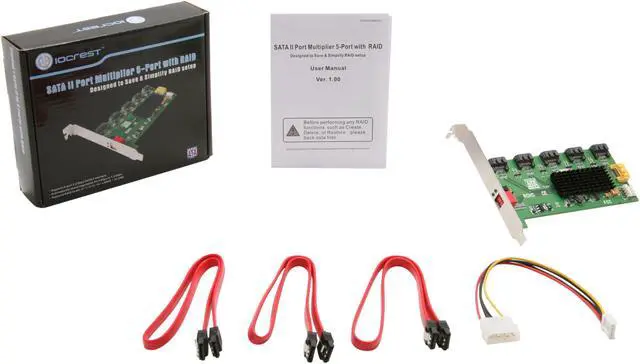
Package Contents
5x1 SATA II Port Multiplier PCI Mounting Card
4-Pin Molex Power Cord
SATA Cables 18" (2)
User Manual

Quick Info

Warranty

  • Limited Warranty period (parts): Lifetime
  • Limited Warranty period (labor): 1 year


Customer Reviews of the Syba SY-PCI40037

Do you own this product? Write a Review

Filter Results

Go
  • KermEd
  • 3/4/2013 12:39:56 PM
  • Tech Level: High
  • Ownership: 1 month to 1 year
  • Verified Owner

2 out of 5 eggsBought two of these 3 months ago

Pros: Cheap
Easy to install
Dippers are awesome

Cons: Instructions were terrible. I can google, so I don't mind. But the instructions look like they were created in English using Google Translate.

One card says my RAID failed, backup card confirms the RAID did not fail - the card failed.

A second card keeps saying I/O errors even though a replacement card does not.

My advice: Pass on these ones, go for something higher-end from a North American supplier. Its worth it.

Other Thoughts: Still in the process of recovering and repairing.

Manufacturer Response:

Dear Customer,

Our older manuals do lack information, but we updated some information on the product within our website including step by step instructions to use this product properly.

Thank you for purchasing one of our products, and for leaving us your valuable feedback. We value all positive and negative feedback.

We apologize for any issues that you are having. As you know we are more than happy to provide our customers with a hassle free exchange when a product is defective.

SYBA offers an online RMA form, the user can easily fill out the form and submit it for a quick RMA return and exchange. It is SYBA's policy to answer all customer inquiries within 24 hours (M-F)

Our technical support team is available to help 9am-5pm M-F. Feel free to contact us during those business hours at support@sybausa.com

Regards, SYBA CST 03192013

1 out of 1 people found this review helpful. Did you? Yes No

  • edtechbw
  • 1/4/2013 1:02:07 PM
  • Tech Level: High
  • Ownership: 1 month to 1 year
  • Verified Owner

4 out of 5 eggsCosts More With RMA's

Pros: When the cards do work, they are alright. Just remember to read the directions that can be downloaded at the Manufacturer's Product Page. The Manual is not really needed, but the step by step instructions are a great help.

Cons: Over the past couple months, I've ordered 6 or 7 of these cards, and I've had to RMA about half of them for a variety of different reasons. Generally, the card will signal one or more drives connected to it as failing or missing, but when checked with a known good card, all drives show up fine.

Other Thoughts: Some users have complained about the dip switches on these cards, but I find them the most useful aspect of this product. I own several raid cards, and this one is by far the easiest to set up (once you get a good one, that is, and if you bother to read the step by step instructions downloaded from the manufacturer's product page).

Did you find this review helpful? Yes No

  • bman
  • 10/19/2012 10:21:27 PM
  • Tech Level: Somewhat High
  • Ownership: less than 1 day

3 out of 5 eggszfs sil 3132

Pros: dont have the card, so cant comment in full

Cons: dont have the card, so cant comment in full

Other Thoughts: to the guy who had the corrupted zfs array. too bad, good thing it was a test. to the idiot who said the hardware is to blame, you are partially correct, but because you guessed correctly, you are an idiot. no reason why you cannot use port multipliers with zfs arrays, they SHOULD work fine. unfortunately zfs does not play nice with many silicon image controllers, the sil 3132 being one of the one with the most documented problems. causes errors when they are not there, and apparently corrupts arrays. to syba, weird that you are asking the customer to help you 'develop' solutions, but some what admirable. get away from silcon image. contract out to lsi and youll be fine.

0 out of 11 people found this review helpful. Did you? Yes No

  • Prozak
  • 9/15/2012 12:53:11 AM
  • Tech Level: Average
  • Ownership: 1 day to 1 week
  • Verified Owner

1 out of 5 eggsRound Two

Pros: None.

Cons: Device will not allow my system to boot up. System continues to hang during boot up. Swapped out sata ports as recommended by Tech support. No change, also disable on board controllers, no luck. Previous card (RMA) would at least work on occasions, would also be recognized by the OS. With this card no such luck. Looks like I'll be out 19 bucks.... Bummer

Manufacturer Response:

Dear Prozak,

This is one of our most popular cards, and it is truly a good product. It is highly unlikely for the second card to be bad. There are a number of things that might be causing what you are experiencing. Since you have already gotten two cards, yet you are still unable to get them working, we suggest you give us a call this time. Our knowledgeable tech team can provide you with better over the phone assistance.

Thank you for purchasing one of our products, and for leaving us your feedback. We value all positive and negative feedback.

Feel free to contact us anytime @ support@sybausa.com

Regards, SYBA CST 09202012

2 out of 2 people found this review helpful. Did you? Yes No

  • Prozak
  • 9/2/2012 5:30:54 PM
  • Tech Level: Somewhat Low
  • Ownership: 1 day to 1 week
  • Verified Owner

1 out of 5 eggsNo Luck

Pros: None at this time. RMA device.. Hoping Ill have better luck with its replacement

Cons: The device works at times. At time it will port and other times it wont allow the system to finish a reboot. Remove the card, reset RAID values, re-install the card and it your lucky the system reboots

Other Thoughts: RAID Configuration instructions do not come with the device. You will have to down load them from SYBA USA web site.

Manufacturer Response:

Dear Prozak,

we are sorry to hear that you had to RMA this card. When you get your next card, please make sure you connect power to it, and try a different SATA port on your motherboard. sometimes ports on motherboards can go bad which leads to such events as the ones you described. If you still encounter problems, dont hesitate to contact us.

Thank you for purchasing one of our products, and for leaving us your feedback. We value all positive and negative feedback.

Feel free to contact us anytime @ support@sybausa.com

Regards, SYBA CST 09132012

2 out of 2 people found this review helpful. Did you? Yes No

  • Eggspert
  • 8/2/2012 8:03:26 PM
  • Tech Level: Somewhat High
  • Ownership: 1 day to 1 week
  • Verified Owner

4 out of 5 eggsImpressive!!

Pros: Cheap
Easy to use
Very Fast for RAID5

Cons: Mediocre documentation, does not work at all with SIL3132 card and Silicon Image RAID management software

Other Thoughts: Easy to setup RAID5, reads & writes at ~185MBytes/sec between a Seagate 3TB 6Gb/s drive and five Samsung 2TB drives in a RAID5 configuration using ECS A75F-M FM1 motherboard.

Deliberately replaced a 2TB drive in the RAID5 with an empty 2TB to test the auto rebuild function, the entire set is invisible to win7 until its completely rebuilt. My hunch was correct that auto rebuild process can be done offline with a standalone power supply, and it took 6 hours to rebuild the RAID5 with 420GB of stored data. Total RAID5 capacity seen by WIN7 is 8TB, and the SY-PCI40037 spec said it rebuilds at 200GB/Hour, so 6 hours is for rebuilding the entire 8TB capacity, or just the 420GB stored data? Either way, math didn't compute.

System has a SIL3132 card with Silicon Image RAID management software installed. RAID5 works with SATA III connector on the motherboard, but not the SIL3132 card, not seen at all by WIN7 nor RAID management software. So much for "Supports PM Aware and Non-PM Aware Host

2 out of 2 people found this review helpful. Did you? Yes No

  • A_Enigma
  • 7/5/2012 2:46:23 PM
  • Tech Level: High
  • Ownership: 1 week to 1 month
  • Verified Owner

5 out of 5 eggsIt just works

Pros: No driver needed, easy configuration, NO PCI SLOT NEEDED.

Cons: None!!!!

Other Thoughts: I installed this in my WHS2011 server to take 4x640GB drives into a single RAID 5 stripe. It has worked like a champ and speed tests exceed those of the SIIG SATA RAID card that originally connected these drives. No special drivers needed and just one of the best RAID products for the price I have purchased in years.

1 out of 1 people found this review helpful. Did you? Yes No

  • N/A
  • 4/19/2012 7:28:55 AM
  • Tech Level: High
  • Ownership: 1 week to 1 month
  • Verified Owner

5 out of 5 eggsWorks well

Pros: I picked up three of these cards and put into my media server. Each of these cards has 5 1TB drives tied to it, and tied back into the motherboards onboard controller. Using the motherboards on board controller, I created a raid 0 using 3 ports. I was surprised at how well it works for setting up a 12TB usable, where I can lose one drive on any array and still have full access to my data.

Cons: It is a sata II port multiplier, so using this I'm limited to 3Gb/s (384 megaBYTES max, but I'm only observing ~340) on my controller which is somewhat unfortunate, but I knew that when I purchased it and accepted that for the price, I was going to get plenty of performance.

4 out of 4 people found this review helpful. Did you? Yes No

  • LD
  • 4/13/2012 7:18:40 AM
  • Tech Level: Average
  • Ownership: more than 1 year
  • Verified Owner

5 out of 5 eggsCheap and easy raid 5.

Pros: It's cheap, simple and so far it just works. Throuput is good enough for my home use, and setup was dead simple. Set the dip switches, plug in the harddrives and boot up. Instant raid 5.

Cons: It takes an expansion slot, but does not plug in to the motherboard. With 7 cables plugged into it (5 sata in, 1 sata out and a power cable) it can move around a lot, and feels like it could break. It would be nice if there was a better way to secure it.

Dip switches on the outside of the case make it pretty easy to accidentally or maliciously wipe all data connected to the card.

Other Thoughts: I've run a raid 5 with 5 Samsung 2 tb hdd for about 8 months now with this card. It was the only cheap raid solution I could find that would take 5 drives. I've never had an issue.

Did you find this review helpful? Yes No

  • Erasmix
  • 4/8/2012 2:04:00 PM
  • Tech Level: High
  • Ownership: 1 month to 1 year

3 out of 5 eggsMixed feelinga

Pros: Dirt Cheap

Cons: I have 5 WD Caviar 2TB drives plugged in but POST shows only one HD. I've gone into the utility many times but can't get the other 4 drives to show up. However when I boot into Linux it does sees the other drives, so I was able to setup and manage a RAID 5 using mdamd.

I never got an answer when I submitted an email asking for help on from the SYSBA website. I did get a copy of my request, so they must have gotten it too.

Other Thoughts: I'm running Fedora 16 x86_64 with the 3.3 Kernel and I continue to experience freezes when running the VMWare Player (not otherwise) and the VM is on the the RAID attached to this card. I've been able to get around this problem running the VM on a single drive plugged directly onto the motherboard (not ideal). I do suspect this to be related to the Linux 64-bit driver and not the card itself.

Did you find this review helpful? Yes No

ICON Loading...
  • $59.99
  • $9.99 Shipping
 
Are you an E-Blast Insider? Subscribe Newegg e-Blast

Buzz

SWEET - FINALLY

4 out of 5 eggs
Card does work as port mult with onboard Sil 3132 (not sure about add-in cards, but it should work)
— ronm 9/14/2011

Works well

5 out of 5 eggs
I picked up three of these cards and put into my media server. Each of these cards has 5 1TB drives tied to it, and tied ...
— 4/19/2012


Home
Home > 
Computer Hardware > 
Hard Drives > 
Controllers / RAID Cards > 
Syba > 
Item#: N82E16816124043
LOADING... LOADING...
Shop by Region: United States | Canada | China
Follow us:   RSS Feeds Youtube
VeriSign Reliability Seal1 PaypalVerify GoldenSeal InteracThis site protected by Trustwave's Trusted Commerce program Inc500

Policy & Agreement | Privacy Policy

 © 2000-2013 Newegg Inc.  As used herein, “Newegg.ca” means Newegg Canada Inc. unless the context specifically refers to the www.newegg.ca web address.
If the Adobe Reader does not appear when you click on a link for a PDF file, you can download Adobe Reader from the Adobe web site. nassau